|
VOOZH | about |
|
VOOZH | about |
The COUNTIF function in Google Sheets counts the number of cells within a given range that meet a specific condition. It’s useful for conditional counting, such as determining how many times a particular value or criterion appears, like counting sales exceeding a certain number or how often a word appears in a list.
Here is the syntax of COUNTIF in Google Sheets:
COUNTIF(range, criterion)The COUNTIF function in Google Sheets counts cells based on specific criteria, such as numbers, text, or dates. It’s perfect for quickly counting cells that meet certain conditions, like counting cells with values above a threshold or containing certain words. Learn how to use the COUNTIF function for efficient data analysis in Google Sheets.
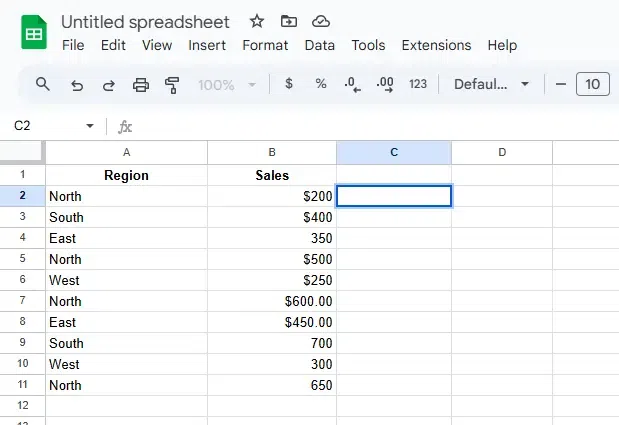
Choose the cell where you want the count result to appear, e.g., C2.
Determine the range of cells you want to evaluate (e.g., A2:A10 for regions).
Set the criteria for the cells to be counted, such as:
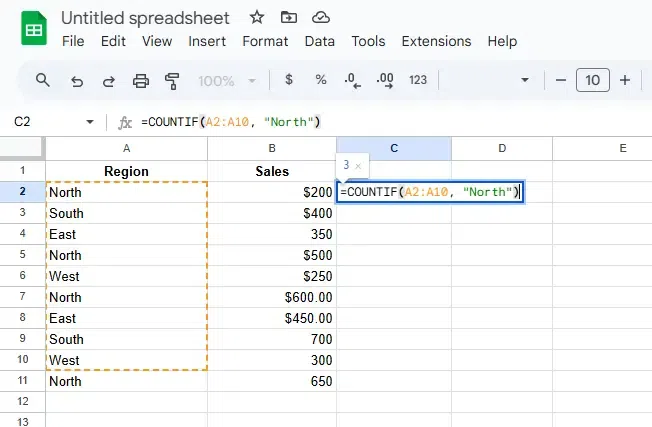
In the selected cell, type the formula:
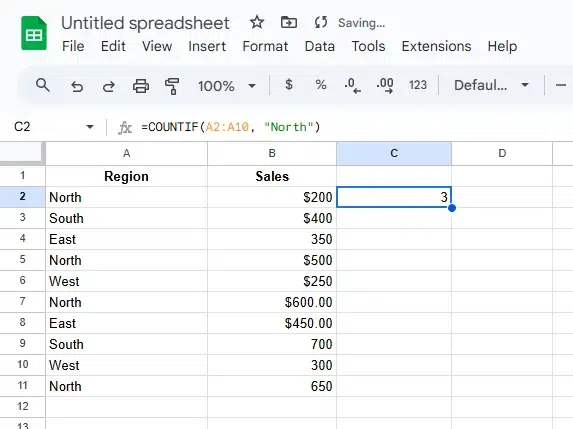
=COUNTIF(A2:A10, "North")Press Enter to apply the formula. The cell will display the count of cells that match the specified condition.
Also Read: