We use cookies to improve your experience on our site. By clicking “Accept”, you are agreeing to the collection and use of data as described in our Privacy Policy.
We use cookies to improve your experience on our site. By using our site, you are agreeing to the collection and use of data as described in our Privacy Policy.
As you look to build internal or customer-facing integrations, you’ll likely run into dozens of vendors with similar websites and marketing messages.
To help you sift through the noise, we’ll provide a shortlist of the most powerful, reliable, and innovative SaaS integration solutions in the market.
But before we do, let’s align on the definition of a SaaS integration platform.
SaaS integration platform overview
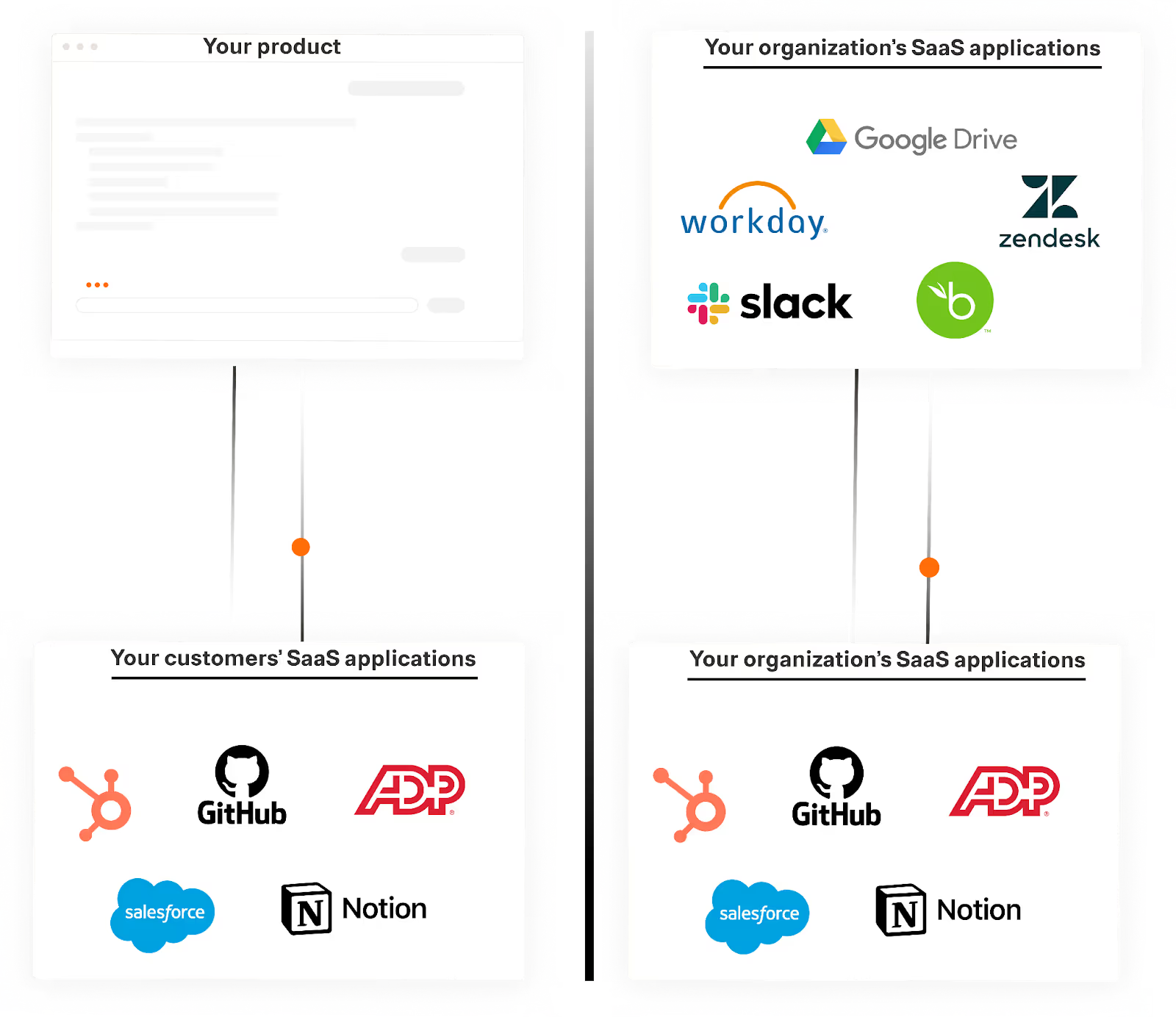
A SaaS integration platform is a 3rd-party tool that lets you connect SaaS applications either within your organization’s tech stack or between your customers’ tech stacks and your product.
The overarching goal of any SaaS integration platform is to accelerate the process of building integrations and save your developers significant time.
SaaS integration platforms can support two use cases: product integrations (left) and internal integrations (right)
Types of SaaS integration platforms
There are a few different types of SaaS integration platforms to choose from:
Integration platform as a service (iPaaS): This platform lets you build API-based integrations and workflow automations that work across applications, data, and teams within an organization
Common iPaaS solutions include Zapier, Workato, Tray.ai, Mulesoft, Jitterbit, and Celigo.
Robotic process automation (RPA): This platform uses software scripts (referred to as bots) to perform specific tasks at the user interface level, such as copying and pasting data between applications. Like iPaaS solutions, RPA tools are often used for automating internal business processes
Popular RPA software providers include UiPath, Automation Anywhere, Blue Prism, and Appian.
Embedded iPaaS: Like its name implies, an embedded iPaaS is simply an iPaaS solution that’s integrated into your product. More specifically, your customers can use an embedded iPaaS solution’s connectors and workflow builder within your product’s UI to implement integrations between your product and their applications
The top solutions in this category include Paragon, Workato Embedded, and Prismatic.
Unified API: A unified API platform lets you build to a single API to access a whole category of integrations, whether that’s HRIS, CRM, file storage, and so on
Merge Unified is the leading solution in this space.
AI tool-calling platform: While this category is still new and evolving, there are now solutions like Merge Agent Handler that let you connect your AI agents to MCP servers’ tools as well as observe and manage any tool calls
Before we break down the specific SaaS integration platforms worth prioritizing during your evaluation process, let’s walk through the benefits they provide.
Benefits of internal SaaS integrations
Internal SaaS integrations improve the employee experience, raise productivity, prevent human errors, and more.
Improves the employee experience: Employees can avoid manual and unpleasant tasks, like re-entering data across systems or reminding employees to perform an activity
Reduces human errors: Enabling employees to avoid manually-intensive tasks can also prevent human errors with potentially detrimental consequences, such as pasting an employee’s social security number into another’s profile
Elevates employee productivity: Employees can focus more of their time and effort on strategic, critical work
Saves engineers’ significant time: The platform allows them to spend less time on building and maintaining the integrations
Increases integration velocity: Companies can use pre-built connectors to more easily launch integrations at scale—versus relying on engineers to build native integrations incrementally
We also compared the top benefits to last year’s results, giving us a clear picture of how the value product integrations is evolving
Increased close rate: By offering as many, if not more, product integrations as competitors, you’ll be more competitive in sales cycles and win more deals
Higher customer retention rate: Integrated customers can automate key workflows in your product, such as automating user provisioning. This will likely translate to higher customer retention
Market expansion: By integrating with the applications your target prospects use in specific markets, you’ll be more likely to win their business
Offering reliable and personalized AI features: Integrated data can enable your AI agents to generate more accurate, helpful, and actionable outputs
Time savings for engineers: Using a SaaS integration platform, your engineers can focus less time on developing and maintaining each product integration
Scalability: By using a SaaS integration platform—and a unified API platform in particular—you can integrate with dozens, if not hundreds, of your customers' applications in a matter of weeks
Best SaaS integration platforms for internal business processes
Here are some of the best SaaS integration platforms for supporting your internal workflows.
Zapier
Zapier is a task automation platform that lets you build “Zaps” to automate just about any task imaginable.
Pros:
Ease of use: Non-technicalteams within marketing, sales, and support, for example, can use Zapier’s no-code tool themselves to build automations across their apps
Comprehensive connectivity: Zapier now supports more than 8,000 connectors across more than a dozen categories, ensuring that it can support all of your organization’s integration needs
Zapier promotes their vast pre-built connector library and ease of adoption
Fast time to value: Zapier’s template library lets you search for and use pre-built Zaps across their top use cases. You can use their Zap templates as is or build on top of them
Cons:
Lacks several advanced workflow features: You may need to use advanced features like nested logic (e.g., using conditional statements inside of conditional statements) to build more complex workflows. Zapier, in many cases, doesn’t support these features natively
Lacks HIPAA compliance: If you plan on supporting workflow automations that use protected health information under HIPAA, you can’t use Zapier
Recent data leak: Zapier recently had a security incident related to a two-factor authentication misconfiguration that led to customer data leaking to an unauthorized user. And while this likely won’t happen again, the fact that it happened to begin with is a sign that their security protocols and infrastructure aren’t bullet proof
Workato
Workato is an iPaaS that’s geared towards enterprise companies.
Pros:
Enterprise-grade security: Workato complies with HIPAA, GDPR, and other key data privacy and protection regulations; they provide extremely fine-grained roles for users (e.g., a user can edit workflows but can’t deploy them); they offer comprehensive version control history, and more
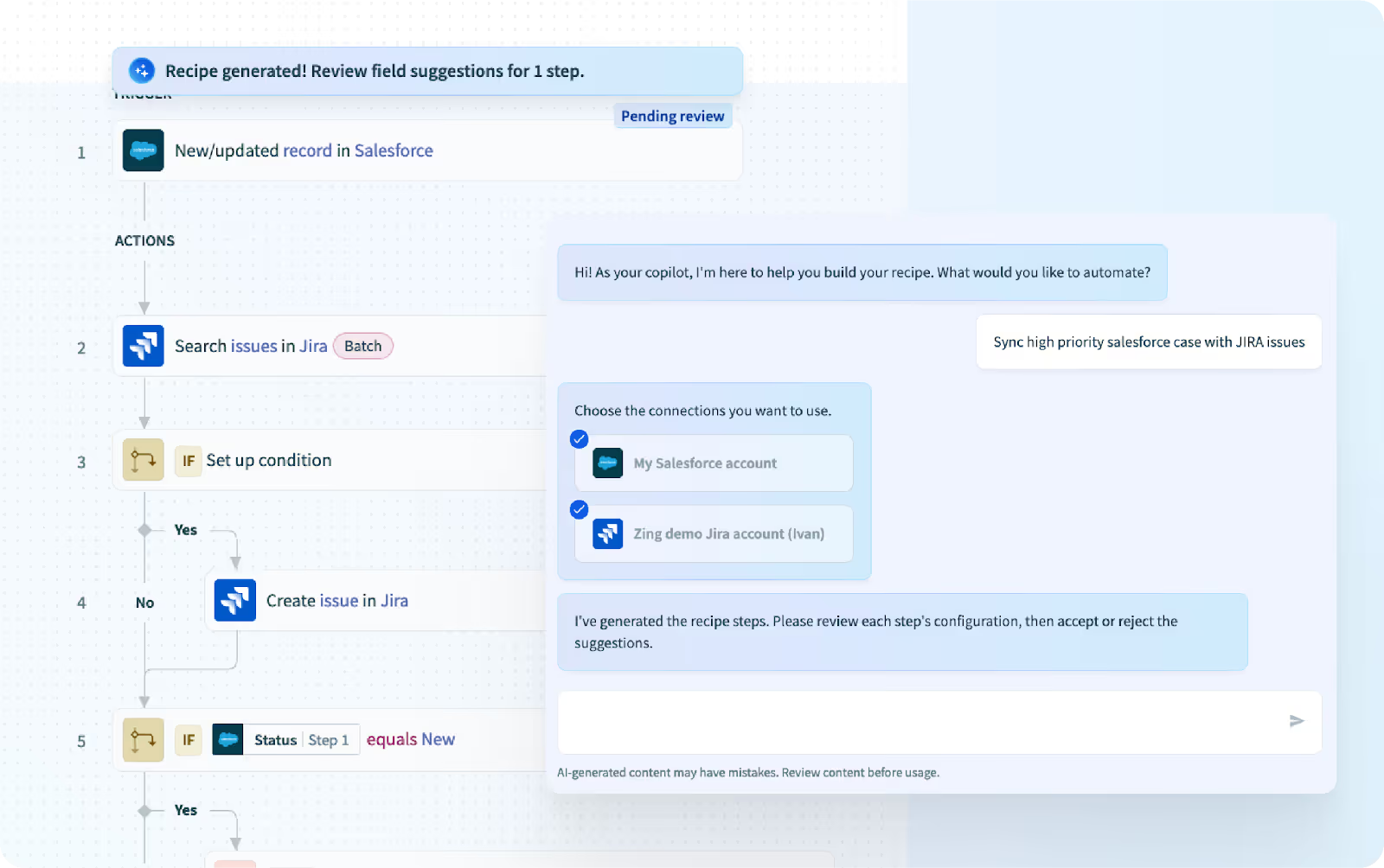
AI-powered enablement: Workato offers AI copilots that can help you build or modify automations (i.e., which they refer to as “recipes”) through plain text, document your automations, provide feedback on improving them, and more
Diverse offerings: Workato also lets you develop and manage API endpoints, AI agents, customer-facing workflow automations, and more
Cons:
Lacks support for SMBs: Workato typically charges tens of thousands, if not hundreds of thousands—of dollars per year. As a result, small and medium-sized businesses (SMBs) are excluded from it
Technically complex to use: While Workato brands itself as a low-code tool, understanding the nuances of their recipe builder (or workflow automation builder) requires technical expertise. And while their copilots support integration development to an extent, you ultimately need someone who can review and validate your recipes
Resources are spread thin: By building and supporting a plethora of solutions, Workato can’t improve the individual features and functionality for their core integration offering as fast as you might expect and want
Mulesoft offers an iPaaS (i.e., their “Anypoint Platform”) along with other solutions to support AI agents, manage API endpoints, and more.
Pros:
Ample resources: Since Mulesoft is part of Salesforce, they have access to world-class infrastructure, product expertise, enterprise customer support teams, and more
Supports on-prem and hybrid use cases: Mulesoft was founded before the proliferation of SaaS apps (2006), so the platform was built to integrate modern cloud applications with legacy, on-prem systems
Broad solution offerings: Like Workato, Mulesoft supports an increasing number of products, with an increased focus on managing AI agents for internal processes
Cons:
Overkill for simple use cases: MuleSoft isn’t designed for simple, point-to-point integrations (e.g., connecting two SaaS apps). It’s built for orchestrating complex, multi-system integrations and automating mission-critical processes (e.g., order-to-cash). As a result, many SMBs likely shouldn’t use it
Difficult to transition away: The learning curve for the Anypoint platform is resource and time intensive. This makes it all the more difficult to move away from the platform
Bias toward Salesforce products and services: Since MuleSoft is owned by Salesforce, its integrations with Salesforce products are likely prioritized. In other words, Mulesoft’s integrations with apps outside the Salesforce ecosystem may receive less native depth or ongoing optimization
Best SaaS integration platforms for customer-facing use cases
If you’re looking for a tool to build product integrations, here are some of your best options.
Merge
Merge offers a Unified API that lets you add hundreds of integrations to your product.
Pros:
Best-in-class support: Merge’s post-sales team is not only responsive—they’re also true integration experts that help customers navigate all of the complexities of taking integrations to market. This can be anything from helping customers decide how to price the integrations to brainstorming the best marketing tactics for promoting them to providing guidance on the best ways to support them
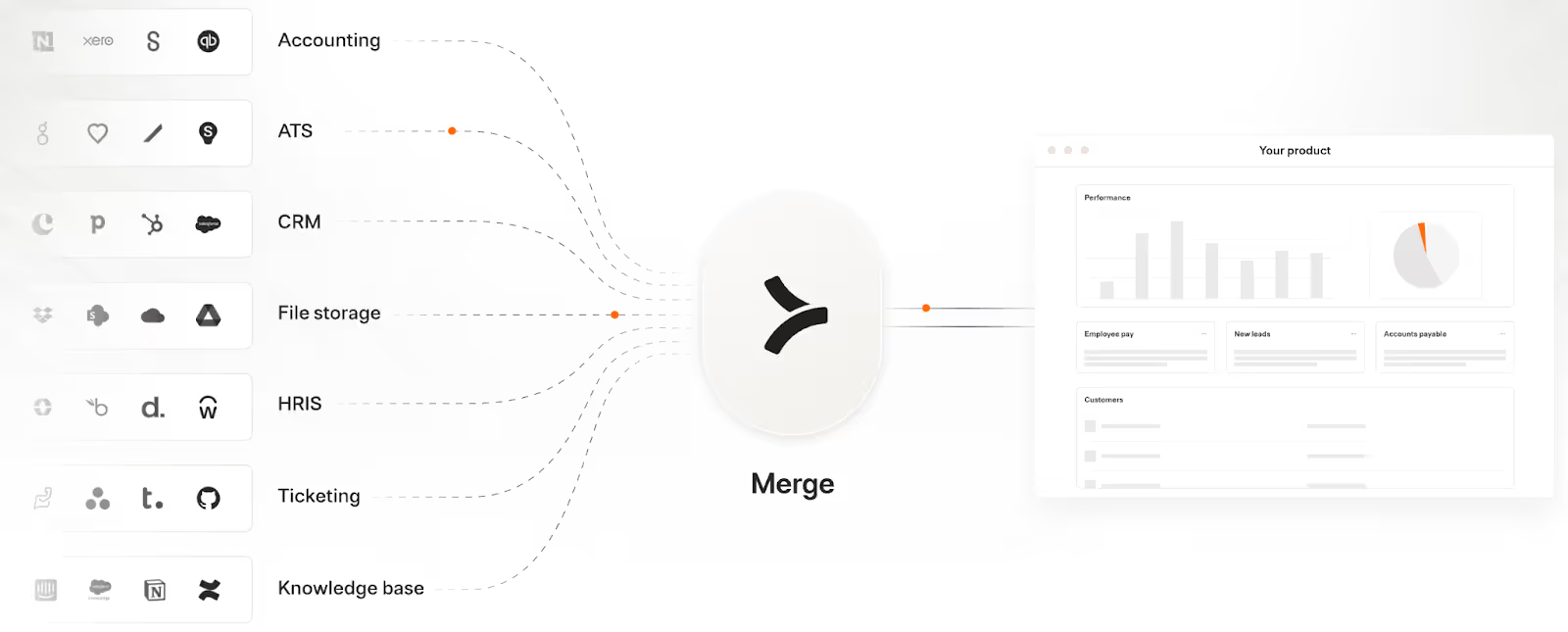
Multi-category support: Unlike most unified API solutions, Merge supports integrations across a wide range of software categories—and this list is quickly growing
A snapshot of Merge’s supported integration categories
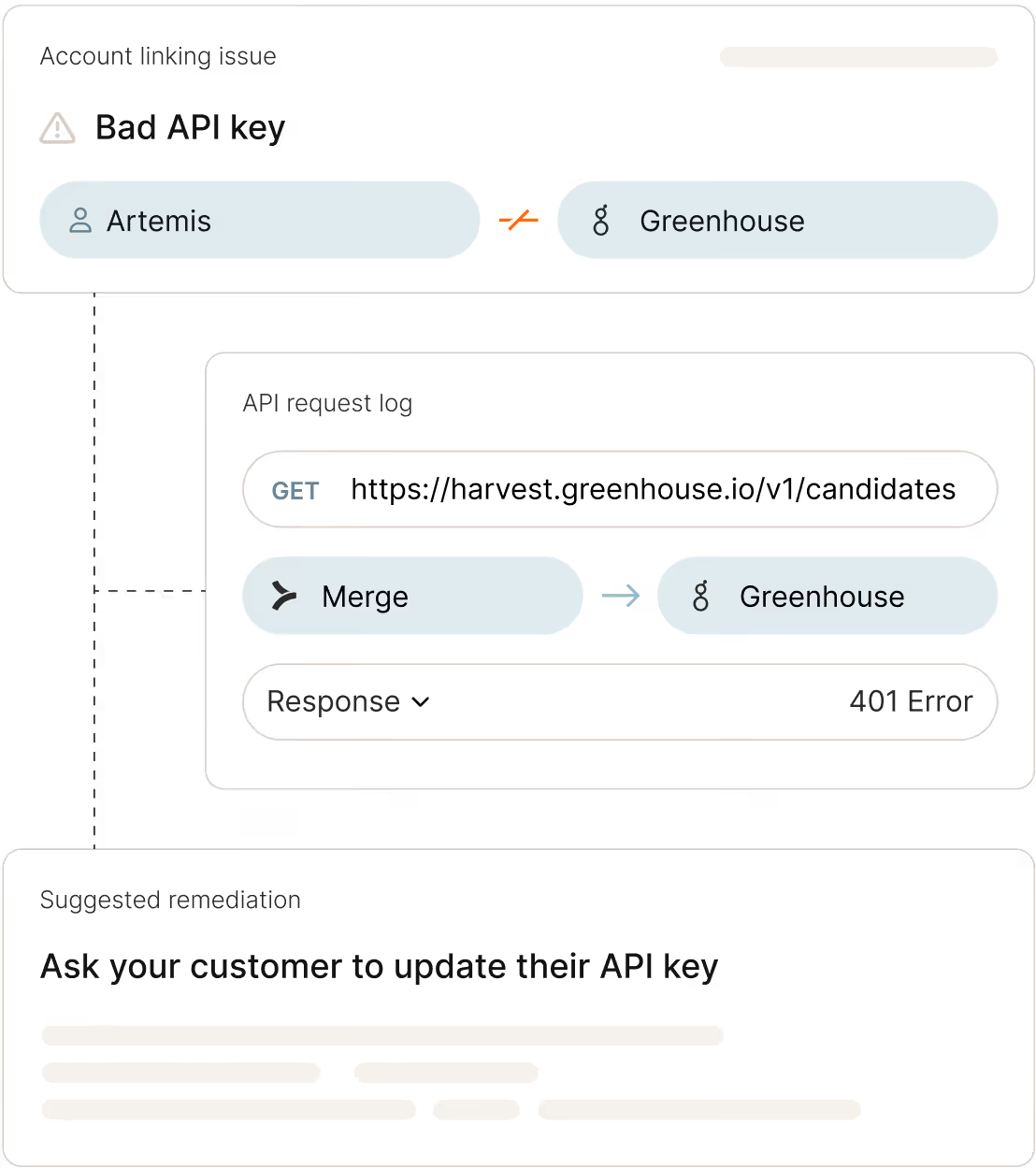
Integration observability: Merge offers intuitive and comprehensive tools to help customer-facing teams manage their customers’ integrations. This includes fully-searchable logs, automated issue detection functionality, and a dashboard that provides holistic integration insights
Merge flags integration issues and provides steps to address them
Success with the enterprise: Merge works with the leading LLM providers, banks, and other prominent SaaS companies, which validates the platform’s enterprise-grade security, scalability, and support
In FinServ alone, Merge works with many leading brands
{{this-blog-only-cta}}
Paragon
Paragon offers an embedded iPaaS, which lets you build integrations and workflows automations through their workflow builder.
Pros:
AI support: Like Merge, Paragon offers an MCP server that can help your AI agents access customers’ 3rd-party applications via tools
Pre-built connectors: Paragon provides 130+ pre-configured integrations across more than a dozen software categories to help you build integrations and automations faster
Enterprise-grade security:Paragon’s enterprise price plan lets you access security features and capabilities like SSO, role based access control, and the ability to deploy and run their integrations on your own servers
Cons:
Difficult to scale: Paragon forces you to build one integration at a time. If you need to build several integrations, quickly, this approach can be problematic
Requires technical expertise: Paragon is built for developers, but your dev team will likely need weeks to become familiar with the platform’s UX, which delays your integration timelines even further
Shallow observability features: Paragon doesn’t offer key capabilities for managing integrations. For example, Paragon doesn’t support issue detection functionality, putting the onus on your team to build and maintain it
Finch offers a unified API platform that focuses exclusively on HR and payroll integrations.
Pro:
Broad coverage: Finch offers more than 250 HR and payroll integrations, which will likely cover all of your customers’ integration needs for these categories
Scalable approach: By enabling you to access hundreds of integrations through their unified API, you can quickly and easily scale your HR and payroll integration offerings
Established business: Similar to Merge, Finch has been around for several years, has tens of millions of dollars in funding, and has hundreds of customers (Merge has tens of thousands of customers). In other words, you don’t need to worry about Finch going out of business any time soon
Cons:
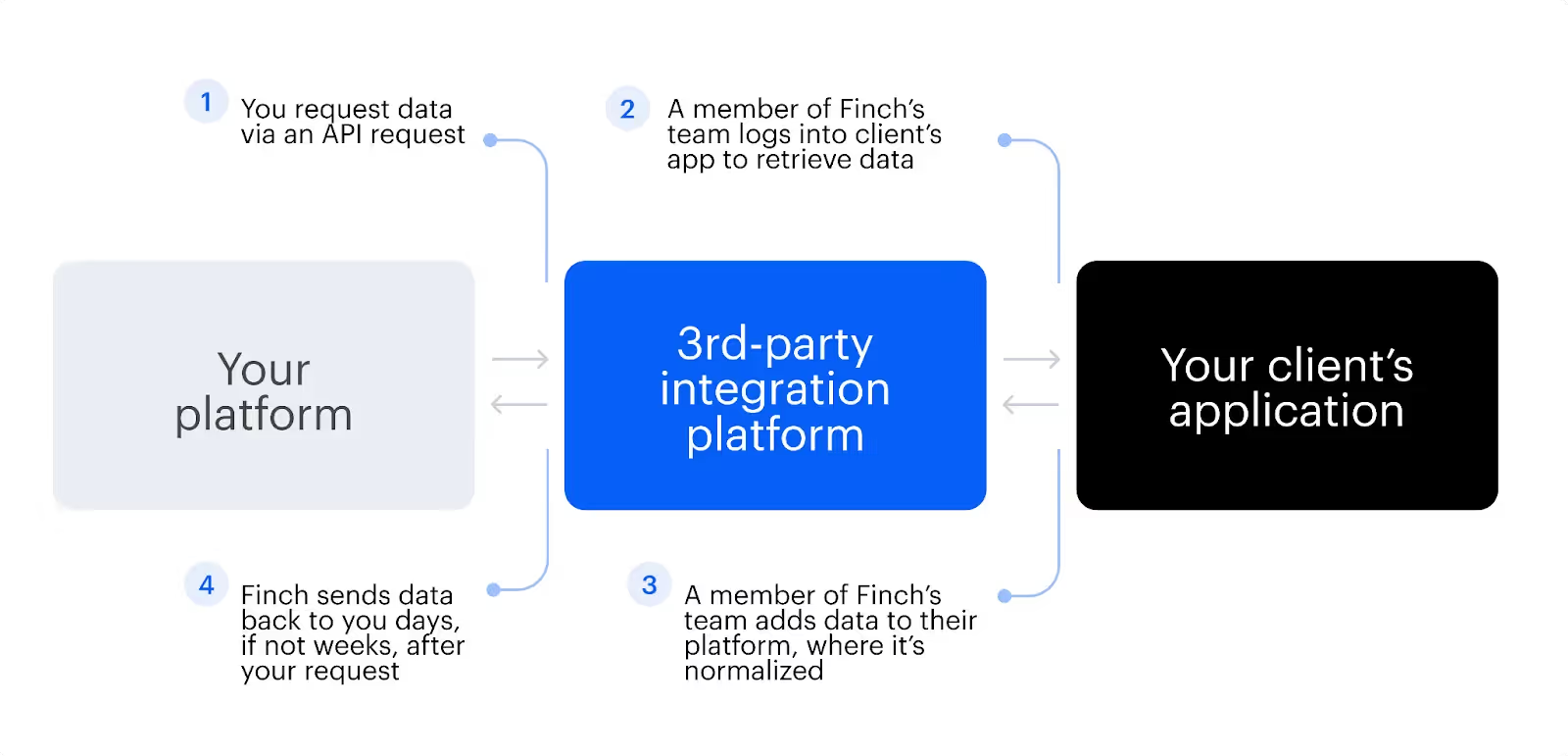
Insecure integrations: Many of Finch’s integrations are “assisted”, which essentially means that a member of their team needs to manually log into your customers’ apps to retrieve data. This approach introduces a variety of security and compliance risks and likely won’t be comfortable for your customers
Shallow category coverage: As your business grows, your integration needs will likely extend beyond HRIS and payroll. Since Finch doesn’t support additional categories, you’d be forced to search for another integration platform
Infrequent data syncs: Finch’s integrations can take weeks to sync data (especially in the case of assisted integrations). If your integrations need to support at least somewhat time-sensitive workflows, this likely won’t work for your business
Whether you’re looking at internal or customer-facing integration platforms, you should follow these steps before deciding on any.
Review the vendors’ reputations on 3rd-party review sites
Sites like G2 have a rich set of customer reviews that can help you analyze vendors across the areas you care about most, whether that’s security, support, integration performance, etc.
Many vendors even use the reviews, along with other factors, to create simple grids for easy comparison. For example, the G2 Grid® for Unified APIs lets you compare Merge with Finch, Codat, Kombo, and the rest of the market with ease.
Go on proof of concepts to better assess the platforms and the teams
Any integration vendor can make attractive, lofty claims. To see which vendors are being honest and to determine the one that best supports your use case(s), you can test a few vendors via a proof of concept (PoC).
This adds additional time and resources for your team, but the long-term benefits of picking the best integration solution for your business makes this step well worth taking.
Review the vendors’ long-term business viability
The integration market is increasingly crowded with new vendors, many of which either shut down or get acquired—often leading to product sunsets or undesirable changes. Within the past few years alone, we’ve seen this happen to Kloudless (acquired by Netskope), Automate.io (acquired by Notion), and Cloud Elements (acquired by UiPath).
Since you likely want to use a single integration platform for several years, it’s worth doing your due diligence on their business’ health and roadmap, whether that’s by reviewing their recent funding rounds, reading their recent press, or talking directly to their leadership teams about their forward-looking plans.
Jon Gitlin is the Managing Editor of Merge's blog. He has several years of experience in the integration and automation space; before Merge, he worked at Workato, an integration platform as a service (iPaaS) solution, where he also managed the company's blog. In his free time he loves to watch soccer matches, go on long runs in parks, and explore local restaurants.

.avif)
.avif)
.avif)





.png)



