 |
VOOZH | about |
|
VOOZH | about |
We use cookies to improve your experience on our site. By using our site, you are agreeing to the collection and use of data as described in our Privacy Policy.
Cookie Settings×Table of contents
In many cases, an integration’s performance hinges on its ability to sync data in real-time. Whenever this applies to an integration you’re looking to build, you can use webhooks.
We’ll help you determine when, exactly, it makes sense to use webhooks in your integrations by covering how they work and several use cases they’re well suited to support.
{{this-blog-only-cta}}
It’s a specific, event-driven method of sharing information between applications in real-time.
Here’s how it generally works: Once a predefined event occurs in an application (the “source application”), it makes a POST request to a URL endpoint that was registered by another application (the “destination application").
The destination application then processes the information provided in the request and takes the appropriate set of follow-up actions within their system.
As a side note, webhooks shouldn’t be used interchangeably with polling. API polling refers to the process of making repeated requests to an API endpoint, so this method doesn’t allow you to retrieve data in real-time.
Related: What is a webhook? Here’s what you need to know
We’ll cover 5 examples, where the first 2 are internal use cases (i.e., integrations built between applications used inside an organization) and the last 3 are customer-facing (i.e., integrations built between your product and the applications your clients and prospects use).
To help your reps reach out to sales qualified leads (SQLs) quickly and successfully, you should alert them whenever a lead becomes an SQL via the application they already work in.
To facilitate this, you can register a webhook in your marketing automation platform that listens for leads becoming SQLs.
Whenever this happens, the application (e.g., Marketo) makes a POST request to the webhook endpoint registered by your business communications platform (e.g., Slack), allowing this app to then message the assigned rep key details on the lead.
Once a rep closes a deal, finance needs to create an invoice quickly in order to deliver it as soon as possible.
With this in mind, you can register a webhook in your CRM (e.g., Salesforce) and listen for opportunities that get marked as “closed-won”.
Once this happens for a given opportunity, the CRM makes a POST request to the webhook endpoint registered by the ERP system. The ERP system can then automatically create an account for the client that just closed and create their first invoice, using the information provided by the payload.
Related: API polling examples
Certain product issues require an immediate response from your engineering team. Otherwise, the issue can cause meaningful harm to your business and, potentially, your customers.
To enable engineering to become aware of these issues and resolve them quickly, you can register a webhook in the platform you use to listen to potentially harmful events (e.g., Splunk).
Once a harmful event occurs, the application makes a POST request to the webhook endpoint with details on the issue. Your engineering team’s ticketing tool (e.g., GitHub) can then receive this issue and create a ticket that includes the details from the response body.
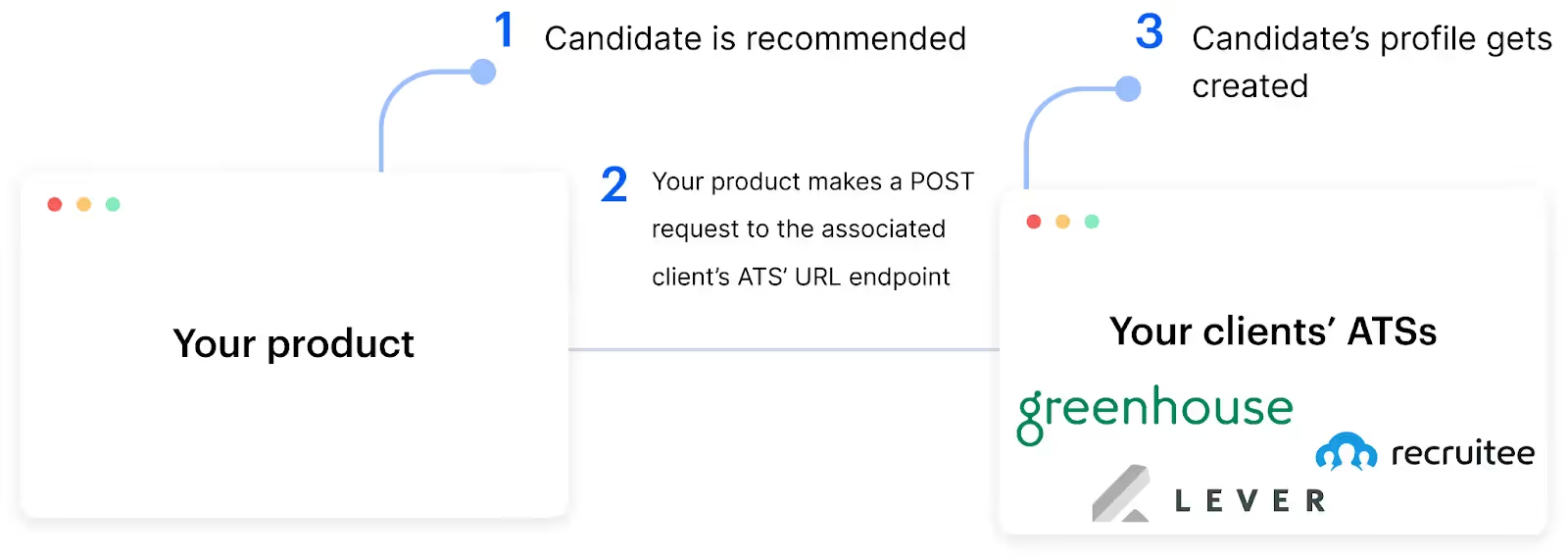
Imagine you offer a product that uses AI and machine learning to help clients identify target candidates for specific roles.
To help clients add the candidates you recommend to their ATSs seamlessly and quickly—so that their recruiters can become aware and follow up with these candidates on time—clients can register a webhook in your product and listen for any candidates that are recommended. Once this happens, your product would make a POST request to the webhook endpoint with a variety of information on the client, leading the new candidate’s account to get created and fully-populated.
To help clients provision users quickly, easily, and accurately so that new hires can get onboarded to your product effectively, you can use webhooks as follows: A client registers a webhook endpoint from your product in their HRIS solution that listens for new employees. When this event occurs, the HRIS makes a POST request to the webhook endpoint with critical information on that employee—allowing the employee to get added to your product with all the information that’s needed to provision them successfully.
Say you provide an e-signature platform, like DocuSign. To help your clients automatically add their fully-executed contracts from your platform to their file storage system—where they can be securely stored and easily accessed—in real-time, your clients can use a webhook as follows:
They register a webhook in your product that listens for newly-signed contracts. Once a contract is fully executed, the webhook makes a POST request to the client’s file storage system’s URL endpoint, allowing their system to retrieve the file and store it in the appropriate location.
Related: Examples of API integrations
Imagine that you offer a compliance automation platform that helps customers identify the specific tasks they need to complete in order to comply with specific frameworks, such as SOC 2 Type II, GDPR, ISO 27001, etc.
To help customers work on these tasks quickly, they can register a webhook in your product that listens for newly-created tasks.
Once a task is identified, your product makes a POST request to the associated customer’s ticketing tool’s URL endpoint, allowing this tool to create a ticket for the task with relevant context.
Merge, a single API that lets you add hundreds of integrations to your product, supports 3rd-party webhooks to help your product receive data payloads in real-time. And, in the event that a 3rd-party platform doesn’t support webhooks, you can use Merge’s.
You can learn more about using webhooks with Merge by scheduling a demo with one of our integration experts.
In case you have any more questions on webhooks, we’ve addressed several frequently-asked ones below.
While a webhook is often referred to as a “reverse API," it offers a fundamentally different method of communication between applications.
A webhook provides “push-based communication," as a predefined event pushes information from one application to another; while an API provides “pull-based communication," as one application pulls, or polls for, specific information from another application.
They are both communication protocols that work between servers and clients but they function differently. More specifically, a webhook is used for one-way communication while a socket allows for bidirectional communication.
Webhooks offer a variety of benefits. Here are just a few to keep in mind:
The answer largely depends on your integration requirements and the applications involved.
Generally speaking, if you need data to move between applications in, or near, real-time, you can register a webhook in the source application, and the source application offers the appropriate security measures (e.g., using HTTPS), you should go ahead and use a webhook.
If on the other hand, any of the criteria mentioned above isn’t true (you don’t need to sync data in, or near, real-time; the source application doesn’t provide adequate security measures; or the source application doesn’t allow you to register a webhook), you likely can't and/or shouldn't use a webhook.
You can use a wide range of tools to help you test and manage webhooks.
Here are just a few options:
There are generally a few best practices worth following:
Learn how you can use Merge's Webhooks across file storage, ticketing, HRIS, ATS, accounting, and CRM integrations.






.avif)


.avif)
.png)



