|
VOOZH | about |
|
VOOZH | about |
dotnet add package ASSISTENTE --version 1.0.0
NuGet\Install-Package ASSISTENTE -Version 1.0.0
<PackageReference Include="ASSISTENTE" Version="1.0.0" />
<PackageVersion Include="ASSISTENTE" Version="1.0.0" />Directory.Packages.props
<PackageReference Include="ASSISTENTE" />Project file
paket add ASSISTENTE --version 1.0.0
#r "nuget: ASSISTENTE, 1.0.0"
#:package ASSISTENTE@1.0.0
#addin nuget:?package=ASSISTENTE&version=1.0.0Install as a Cake Addin
#tool nuget:?package=ASSISTENTE&version=1.0.0Install as a Cake Tool
🔗 QUICK LINKS: APP Demo 🆕 | Website | Nuget
🐳 DOCKER IMAGES: UI | API | WORKER | DB UPGRADER | PLAYGROUND
👁 GitHub
👁 GitHub Workflow Status
👁 Nuget
👁 Nuget
👁 GitHub issues
👁 GitHub pull requests
Struggling to keep track of all your dev notes, bookmarks, and useful code snippets scattered across different platforms? Frustrated by the time wasted searching for that crucial information or starting from scratch? 🤔
Introducing assistente.dev – your ultimate assistant for developers. It's your personal memory bank, effortlessly storing and retrieving everything you need, precisely when you need it. Whether it's code snippets, course notes, or example solutions, Assistende has you covered. 🦾
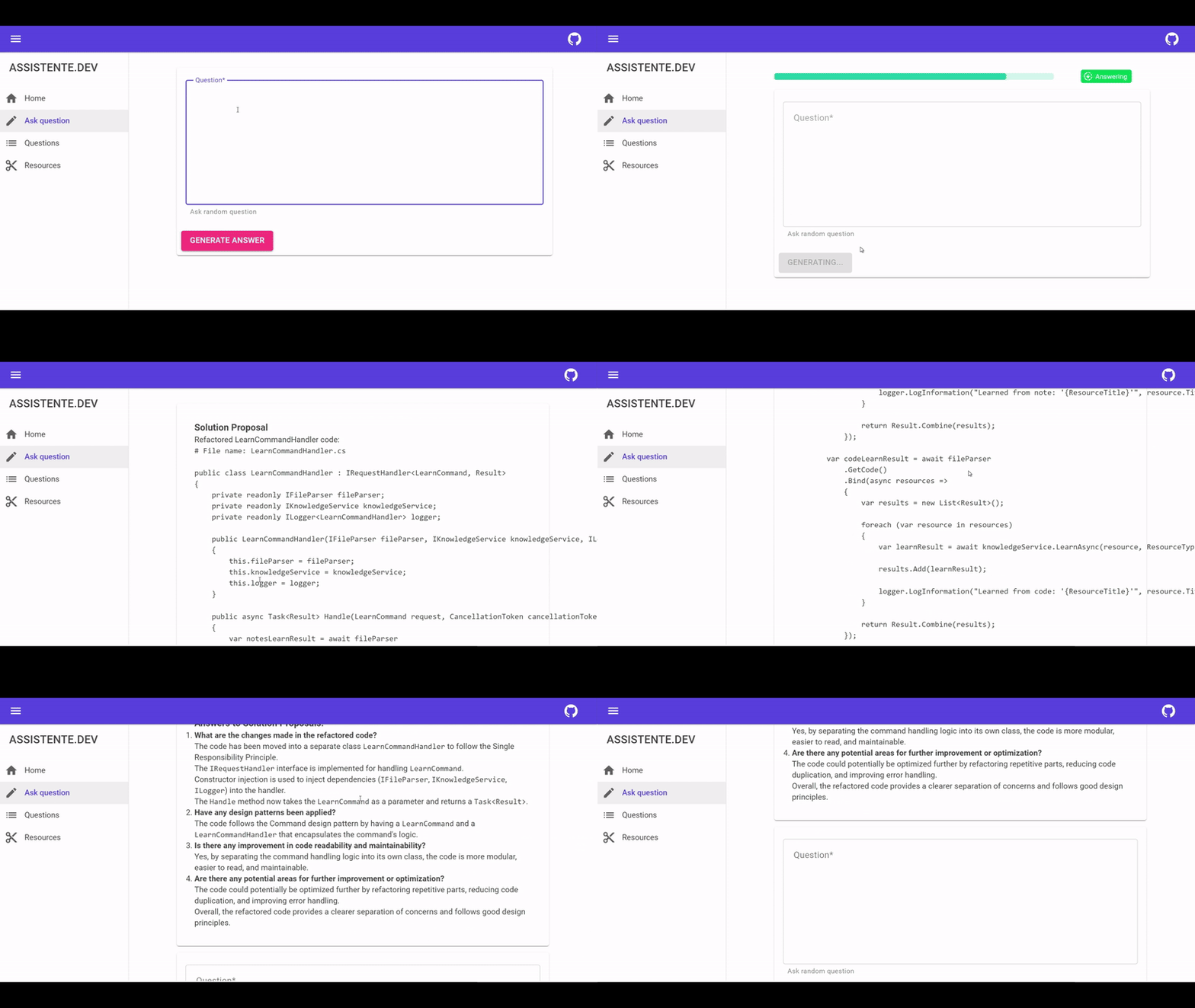
Simply paste your query and watch as assistente.dev draws from your notes, bookmarks, and code bases to provide the perfect solution. With assistente.dev, say goodbye to wasted time and hello to seamless development. Get started and unlock your productivity potential! 🚀
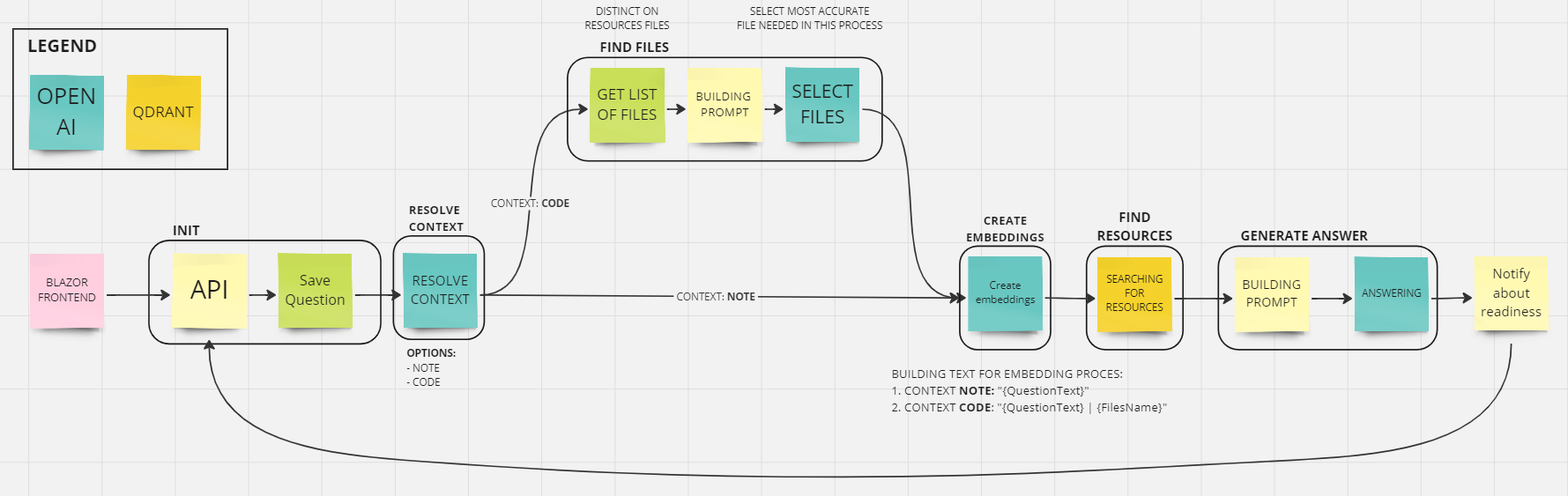
Phases:
Playground: QUICK LINKTODO:
*.md files - knowledge base*.cs files - code baseDEV_ASSISTENTE repository for demo purposeCODE generation
QuestionFiles to save information about select files based on questionconfiguration section in Readmequick start section in ReadmeMetrics integration with Prometheus and Graphana - TUTORIALTraces integration with SEQ (Jaeger shoud be replaces with SEQ)Tool which can search in Google (will be use as OpenAi function) + whitelisted resource domainsFill out the settings file appsettings.json - QUICK LINK
Llm_ApiKey - <API_KEY>
Llm_OrganizationId - <ORG_ID>
Llm_ProjectId - <PROJ_ID>
Embeddings_ApiKey - <API_KEY>
Embeddings_OrganizationId - <ORG_ID>
Embeddings_ProjectId - <PROJ_ID>
Fill out the .env file - QUICK LINK
OpenAi_ApiKey - <API_KEY>OpenAi_OrganizationId - <ORG_ID>OpenAi_ProjectId - <PROJ_ID>Prerequisites: Docker
Fill out the settings file (appsettings.json) and (.env) from CONFIGURATION section
Run start-enviroment.ps1 script with parameters:
-s - to start required services-d - to upgrade and migrate database-a - to start assistente application-p - to learn assistenteVoila! Currently you can go to https://localhost:1008
| Service | Port | Information | Metrics URL | Access |
|---|---|---|---|---|
| PostreSQL | 1000 | Database | - | - |
| PgAdmin | 1001 | Database UI | - | L: admin@assistente.dev, P: admin |
| Qdrant | 1002 | API & UI (dashboard) | /metrics |
- |
| Qdrant | 1003 | Search Engine | - | - |
| RabbitMq | 1004 | AMPQ Connection | - | - |
| RabbitMq | 1005 | RabbitMq UI | - | - |
| RabbitMq | 1013 | RabbitMq Metrics | /metrics |
- |
| Seq | 1006 | UI | - | - |
| Seq | 1007 | Logs API | - | - |
| Blazor UI | 1008 | Assistente UI | - | - |
| Internal API | 1009 | Assistente API | /metrics |
- |
| Worker | 1010 | Assistente worker | /metrics |
- |
| Jaeger | 1011 | OpenTelemetry Collector | - | - |
| Jaeger | 1012 | UI | - | - |
| Jaeger | 1014 | API | /metrics |
- |
| Product | Versions Compatible and additional computed target framework versions. |
|---|---|
| .NET | net9.0 net9.0 is compatible. net9.0-android net9.0-android was computed. net9.0-browser net9.0-browser was computed. net9.0-ios net9.0-ios was computed. net9.0-maccatalyst net9.0-maccatalyst was computed. net9.0-macos net9.0-macos was computed. net9.0-tvos net9.0-tvos was computed. net9.0-windows net9.0-windows was computed. net10.0 net10.0 was computed. net10.0-android net10.0-android was computed. net10.0-browser net10.0-browser was computed. net10.0-ios net10.0-ios was computed. net10.0-maccatalyst net10.0-maccatalyst was computed. net10.0-macos net10.0-macos was computed. net10.0-tvos net10.0-tvos was computed. net10.0-windows net10.0-windows was computed. |
This package is not used by any NuGet packages.
This package is not used by any popular GitHub repositories.
| Version | Downloads | Last Updated |
|---|---|---|
| 1.0.0 | 237 | 11/26/2024 |
| 0.6.0 | 211 | 6/8/2024 |
| 0.5.5 | 192 | 6/1/2024 |
| 0.5.4 | 234 | 5/25/2024 |
| 0.5.3 | 203 | 5/25/2024 |
| 0.5.2 | 196 | 5/23/2024 |
| 0.5.1 | 197 | 5/23/2024 |
| 0.5.0 | 210 | 5/21/2024 |
| 0.4.4 | 197 | 5/16/2024 |
| 0.4.3 | 187 | 5/15/2024 |
| 0.4.2 | 189 | 5/15/2024 |
| 0.4.1 | 199 | 5/15/2024 |
| 0.4.0 | 264 | 5/15/2024 |
| 0.3.4 | 201 | 5/14/2024 |
| 0.3.3 | 191 | 5/14/2024 |
| 0.3.2 | 195 | 5/14/2024 |
| 0.3.1 | 214 | 5/14/2024 |
| 0.3.0 | 187 | 5/13/2024 |
| 0.2.0 | 208 | 5/9/2024 |
| 0.1.2 | 212 | 5/6/2024 |
See https://github.com/jarmatys/DEV_ASSISTENTE/blob/master/CHANGELOG.md for release notes.