|
VOOZH | about |
|
VOOZH | about |
dotnet add package CrispyCode.BlazorSankey --version 1.0.3
NuGet\Install-Package CrispyCode.BlazorSankey -Version 1.0.3
<PackageReference Include="CrispyCode.BlazorSankey" Version="1.0.3" />
<PackageVersion Include="CrispyCode.BlazorSankey" Version="1.0.3" />Directory.Packages.props
<PackageReference Include="CrispyCode.BlazorSankey" />Project file
paket add CrispyCode.BlazorSankey --version 1.0.3
#r "nuget: CrispyCode.BlazorSankey, 1.0.3"
#:package CrispyCode.BlazorSankey@1.0.3
#addin nuget:?package=CrispyCode.BlazorSankey&version=1.0.3Install as a Cake Addin
#tool nuget:?package=CrispyCode.BlazorSankey&version=1.0.3Install as a Cake Tool
👁 Nuget version
👁 Nuget downloads
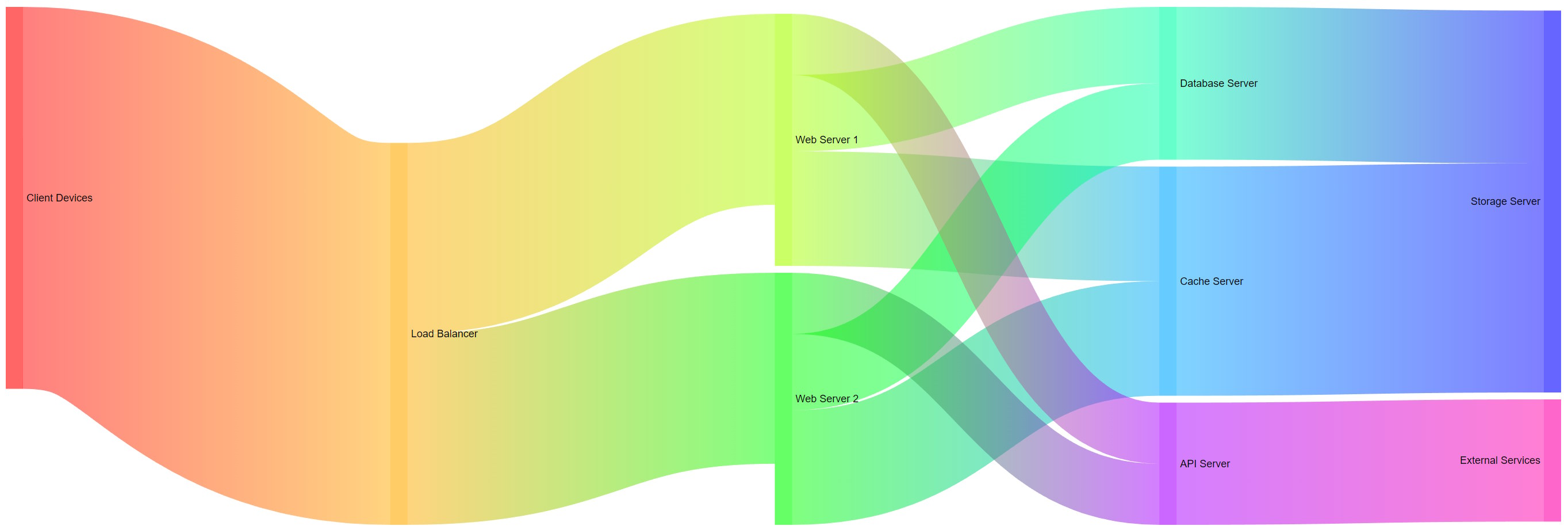
A sankey diagram component that can be used in Blazor applications. At the moment the implementation is very basic but should already be useful for some cases.
The BlazorServerTest and BlazorWasmTest projecs include a sample - the usage should be straight forward:
Optionally
@page "/"

@using CrispyCode.BlazorSankey
@using CrispyCode.BlazorSankey.Model;

<SankeyDiagram
 Width="100%"
 Height="402px"
 Nodes="@nodes"
 Links="@links"
 OnNodeClicked="NodeClicked"
 OnLinkClicked="LinkClicked" />

@code {
 private List<Node> nodes = new List<Node> {
 new Node(1, "Client Devices", fixedValue: 8000),
 new Node(2, "Load Balancer"),
 new Node(3, "Web Server 1"),
 new Node(4, "Web Server 2"),
 new Node(5, "Database Server"),
 new Node(6, "Cache Server"),
 new Node(7, "Storage Server"),
 new Node(8, "API Server"),
 new Node(9, "External Services")
 };

 private List<Link> links = new List<Link> {
 new Link(1, 2, 5000),
 new Link(2, 3, 2500),
 new Link(2, 4, 2500),
 new Link(3, 5, 1000),
 new Link(3, 6, 1500),
 new Link(4, 5, 1000),
 new Link(4, 6, 1500),
 new Link(5, 7, 2000),
 new Link(6, 7, 3000),
 new Link(3, 8, 800),
 new Link(4, 8, 800),
 new Link(8, 9, 1600)
 };

 private void NodeClicked(Node node)
 {
 Console.WriteLine($"Node {node.Name} clicked");
 }

 private void LinkClicked(Link link)
 {
 Console.WriteLine($"Link {link.pId} clicked");
 }
}
| Product | Versions Compatible and additional computed target framework versions. |
|---|---|
| .NET | net7.0 net7.0 is compatible. net7.0-android net7.0-android was computed. net7.0-ios net7.0-ios was computed. net7.0-maccatalyst net7.0-maccatalyst was computed. net7.0-macos net7.0-macos was computed. net7.0-tvos net7.0-tvos was computed. net7.0-windows net7.0-windows was computed. net8.0 net8.0 was computed. net8.0-android net8.0-android was computed. net8.0-browser net8.0-browser was computed. net8.0-ios net8.0-ios was computed. net8.0-maccatalyst net8.0-maccatalyst was computed. net8.0-macos net8.0-macos was computed. net8.0-tvos net8.0-tvos was computed. net8.0-windows net8.0-windows was computed. net9.0 net9.0 was computed. net9.0-android net9.0-android was computed. net9.0-browser net9.0-browser was computed. net9.0-ios net9.0-ios was computed. net9.0-maccatalyst net9.0-maccatalyst was computed. net9.0-macos net9.0-macos was computed. net9.0-tvos net9.0-tvos was computed. net9.0-windows net9.0-windows was computed. net10.0 net10.0 was computed. net10.0-android net10.0-android was computed. net10.0-browser net10.0-browser was computed. net10.0-ios net10.0-ios was computed. net10.0-maccatalyst net10.0-maccatalyst was computed. net10.0-macos net10.0-macos was computed. net10.0-tvos net10.0-tvos was computed. net10.0-windows net10.0-windows was computed. |
This package is not used by any NuGet packages.
This package is not used by any popular GitHub repositories.