|
VOOZH | about |
|
VOOZH | about |
dotnet add package Gapotchenko.FX.Console --version 2026.7.2
NuGet\Install-Package Gapotchenko.FX.Console -Version 2026.7.2
<PackageReference Include="Gapotchenko.FX.Console" Version="2026.7.2" />
<PackageVersion Include="Gapotchenko.FX.Console" Version="2026.7.2" />Directory.Packages.props
<PackageReference Include="Gapotchenko.FX.Console" />Project file
paket add Gapotchenko.FX.Console --version 2026.7.2
#r "nuget: Gapotchenko.FX.Console, 2026.7.2"
#:package Gapotchenko.FX.Console@2026.7.2
#addin nuget:?package=Gapotchenko.FX.Console&version=2026.7.2Install as a Cake Addin
#tool nuget:?package=Gapotchenko.FX.Console&version=2026.7.2Install as a Cake Tool
The module provides virtual terminal functionality, console traits, and other useful primitives for .NET console apps.
From the very beginning, computers used to employ teletypes as primary input and output devices. A teletype usually consisted of a keyboard and a printer, both placed inside a single case.
At later stages of development, teletypes were swapped with specialized computer terminals such as VT100. Those electronic devices provided not only the basic input/output capabilities, but also colors, pseudographics, and a custom control language based around a then-emerging ANSI X3.64 standard.
Unix operating systems have a built-in support for ANSI escape sequences that constitute the control language defined by the standard. Windows ignored that practice for a long time, up until Windows 10 version 1511.
Indeed, .NET base class library already provides
System.Console class with
ForegroundColor,
BackroundColor
and other properties for controlling the console.
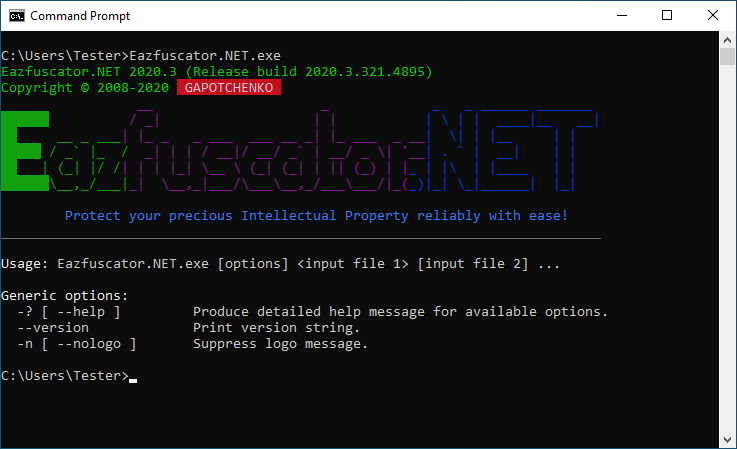
ANSI escape sequences become handy when the complexity of console output reaches a certain level. Just take a look at the example below:
👁 Advanced console visualization
It would be a very involved code to render such output with a set of imperative calls.
But we can do better with ANSI escape sequences:
using Gapotchenko.FX.Console;
using System;

VirtualTerminal.EnableProcessing();

Console.WriteLine(
 " \x1b[35m__ _ \x1b[34m_ _ ______ _______ \n" +
 "\x1b[42;32m██████\x1b[49m \x1b[35m / _| | | \x1b[34m| \\ | | ____|__ __|\n" +
 "\x1b[42;32m██\x1b[49m __ _ ___\x1b[35m| |_ _ _ ___ ___ __ _| |_ ___ _ __\x1b[34m| \\| | |__ | | \n" +
 "\x1b[42;32m█████\x1b[49m / _` |_ /\x1b[35m _| | | / __|/ __/ _` | __/ _ \\| '__\x1b[34m| . ` | __| | | \n" +
 "\x1b[42;32m██\x1b[49m | (_| |/ /\x1b[35m| | | |_| \\__ \\ (_| (_| | || (_) | |\x1b[34m_ | |\\ | |____ | | \n" +
 "\x1b[42;32m██████\x1b[49m\\__,_/___|\x1b[35m_| \\__,_|___/\\___\\__,_/___\\___/|_(\x1b[34m_)|_| \\_|______| |_|\x1b[0m");
Please note that the implementation starts with a call to VirtualTerminal.EnableProcessing method.
It is provided by Gapotchenko.FX.Console module and ensures that support of ANSI escape sequences is activated for the console.
In case when the host OS does not provide a native support for them, the method switches to a virtual terminal emulation.
In this way, ANSI X3.64 control language is guaranteed to work on the widest range of host operating systems and terminals.
Gapotchenko.FX.Console module provides ConsoleTraits class that allows you to programmatically retrieve the current console capabilities.
ConsoleTraits.IsColorAvailable boolean property indicates whether console color output is available.
Console color is usually always available unless program standard output streams are redirected.
ConsoleTraits.IsColorInhibited boolean property indicates whether console color output is inhibited.
Console color may be inhibited by the host system or a user preference.
For example, a NO_COLOR environment variable can be used to inhibit console colors as described by the corresponding specification.
ConsoleTraits.IsColorEnabled boolean property indicates whether console color output is enabled.
The console color is enabled when it is available and not inhibited.
The value of the property can be used by a program to automatically tune the output according to the usage context and user preference. Like so:
if (ConsoleTraits.IsColorEnabled)
{
 Console.WriteLine(
 " \x1b[35m__ _ \x1b[34m_ _ ______ _______ \n" +
 "\x1b[42;32m██████\x1b[49m \x1b[35m / _| | | \x1b[34m| \\ | | ____|__ __|\n" +
 "\x1b[42;32m██\x1b[49m __ _ ___\x1b[35m| |_ _ _ ___ ___ __ _| |_ ___ _ __\x1b[34m| \\| | |__ | | \n" +
 "\x1b[42;32m█████\x1b[49m / _` |_ /\x1b[35m _| | | / __|/ __/ _` | __/ _ \\| '__\x1b[34m| . ` | __| | | \n" +
 "\x1b[42;32m██\x1b[49m | (_| |/ /\x1b[35m| | | |_| \\__ \\ (_| (_| | || (_) | |\x1b[34m_ | |\\ | |____ | | \n" +
 "\x1b[42;32m██████\x1b[49m\\__,_/___|\x1b[35m_| \\__,_|___/\\___\\__,_/___\\___/|_(\x1b[34m_)|_| \\_|______| |_|\x1b[0m");
}
else
{
 Console.WriteLine(
@" ______ __ _ _ _ ______ _______
| ____| / _| | | | \ | | ____|__ __|
| |__ __ _ ___| |_ _ _ ___ ___ __ _| |_ ___ _ __| \| | |__ | |
| __| / _` |_ / _| | | / __|/ __/ _` | __/ _ \| '__| . ` | __| | |
| |___| (_| |/ /| | | |_| \__ \ (_| (_| | || (_) | |_ | |\ | |____ | |
|______\__,_/___|_| \__,_|___/\___\__,_/___\___/|_(_)|_| \_|______| |_|");
}
This is important in situations when the color output is not available. For example, console output redirection inhibits color by default. So the code above will produce slightly different outputs depending on whether the console output is written to the color screen or redirected to a file which has no notion of a color at all.
ConsoleTraits.WillDisappearOnExit boolean property indicates whether a console window will immediately disappear on a program exit.
Such a situation can occur when a console app is directly launched from a graphical shell.
In Windows, you can achieve that by creating a desktop shortcut to a console app and then running it.
A program can use the value of WillDisappearOnExit property to hold the console window in a visible state so that the user could read the output.
Like so:
if (ConsoleTraits.WillDisappearOnExit)
{
 Console.WriteLine();
 Console.WriteLine("Press any key to exit . . .");
 Console.ReadKey(true);
}
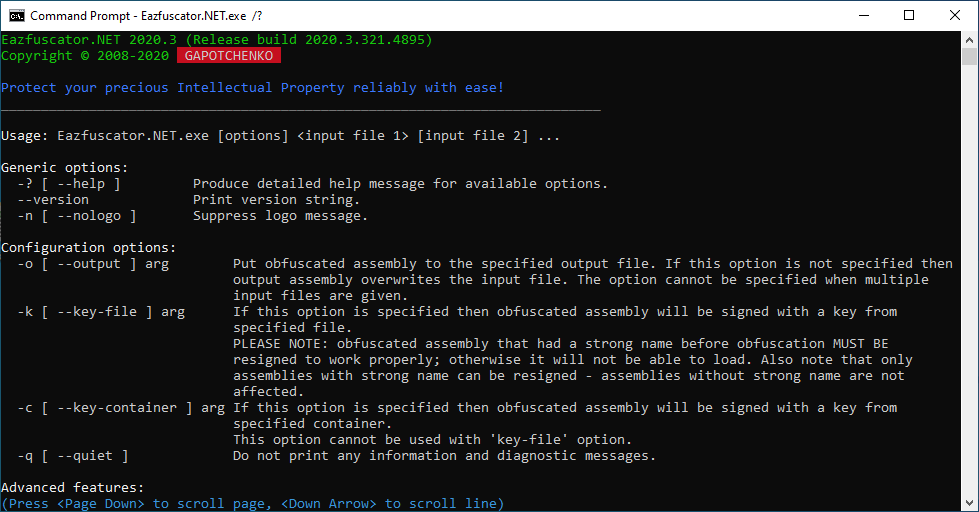
MoreTextWriter for Paginated OutputMoreTextWriter class from Gapotchenko.FX.Console module automatically manages pagination when written text exceeds the height of a console area visible to the user.
The functionality is similar to more command-line utility but can be used right within a program.
This allows you to provide an additional convenience for end users.
Let's take a look on example:
By pressing Page Down and Down Arrow keys it is possible to scroll the console output.
The standard Space and Enter are supported as well.
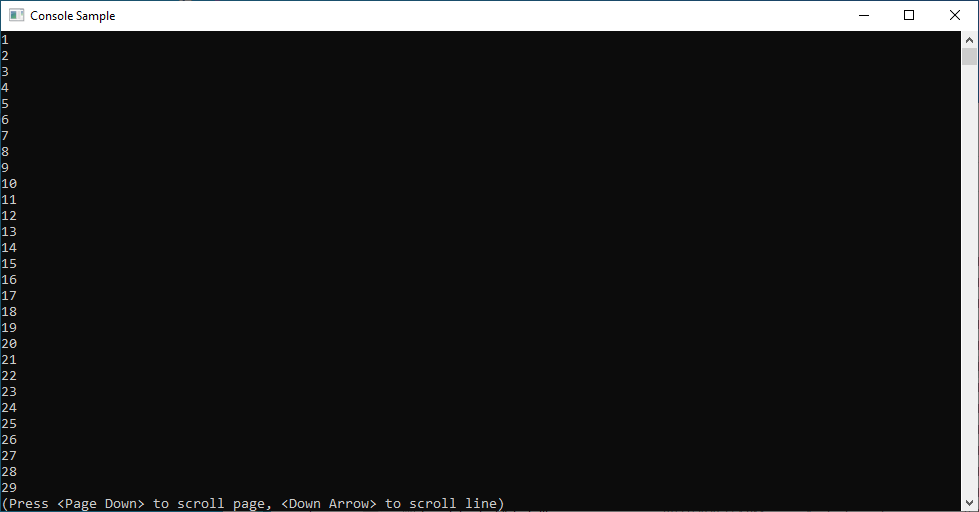
Below is a simple program that demonstrates the use of MoreTextWriter:
using Gapotchenko.FX.Console;
using System;

var more = new MoreTextWriter(Console.Out);

for (int i = 1; i < 100; ++i)
 more.WriteLine(i);
It produces the following output:
The keys, colors, and styling are fully customizable by deriving a class from the MoreTextWriter.
Gapotchenko.FX.Console.ConsoleTraitsGapotchenko.FX.Console.VirtualTerminalLet's continue with a look at some other modules provided by Gapotchenko.FX:
Or look at the full list of modules.
| Product | Versions Compatible and additional computed target framework versions. |
|---|---|
| .NET | net5.0 net5.0 was computed. net5.0-windows net5.0-windows was computed. net6.0 net6.0 was computed. net6.0-android net6.0-android was computed. net6.0-ios net6.0-ios was computed. net6.0-maccatalyst net6.0-maccatalyst was computed. net6.0-macos net6.0-macos was computed. net6.0-tvos net6.0-tvos was computed. net6.0-windows net6.0-windows was computed. net7.0 net7.0 was computed. net7.0-android net7.0-android was computed. net7.0-ios net7.0-ios was computed. net7.0-maccatalyst net7.0-maccatalyst was computed. net7.0-macos net7.0-macos was computed. net7.0-tvos net7.0-tvos was computed. net7.0-windows net7.0-windows was computed. net8.0 net8.0 is compatible. net8.0-android net8.0-android was computed. net8.0-browser net8.0-browser was computed. net8.0-ios net8.0-ios was computed. net8.0-maccatalyst net8.0-maccatalyst was computed. net8.0-macos net8.0-macos was computed. net8.0-tvos net8.0-tvos was computed. net8.0-windows net8.0-windows was computed. net9.0 net9.0 is compatible. net9.0-android net9.0-android was computed. net9.0-browser net9.0-browser was computed. net9.0-ios net9.0-ios was computed. net9.0-maccatalyst net9.0-maccatalyst was computed. net9.0-macos net9.0-macos was computed. net9.0-tvos net9.0-tvos was computed. net9.0-windows net9.0-windows was computed. net10.0 net10.0 is compatible. net10.0-android net10.0-android was computed. net10.0-browser net10.0-browser was computed. net10.0-ios net10.0-ios was computed. net10.0-maccatalyst net10.0-maccatalyst was computed. net10.0-macos net10.0-macos was computed. net10.0-tvos net10.0-tvos was computed. net10.0-windows net10.0-windows was computed. |
| .NET Core | netcoreapp2.0 netcoreapp2.0 was computed. netcoreapp2.1 netcoreapp2.1 was computed. netcoreapp2.2 netcoreapp2.2 was computed. netcoreapp3.0 netcoreapp3.0 was computed. netcoreapp3.1 netcoreapp3.1 was computed. |
| .NET Standard | netstandard2.0 netstandard2.0 is compatible. netstandard2.1 netstandard2.1 is compatible. |
| .NET Framework | net461 net461 was computed. net462 net462 was computed. net463 net463 was computed. net47 net47 was computed. net471 net471 was computed. net472 net472 is compatible. net48 net48 was computed. net481 net481 was computed. |
| MonoAndroid | monoandroid monoandroid was computed. |
| MonoMac | monomac monomac was computed. |
| MonoTouch | monotouch monotouch was computed. |
| Tizen | tizen40 tizen40 was computed. tizen60 tizen60 was computed. |
| Xamarin.iOS | xamarinios xamarinios was computed. |
| Xamarin.Mac | xamarinmac xamarinmac was computed. |
| Xamarin.TVOS | xamarintvos xamarintvos was computed. |
| Xamarin.WatchOS | xamarinwatchos xamarinwatchos was computed. |
This package is not used by any NuGet packages.
This package is not used by any popular GitHub repositories.
| Version | Downloads | Last Updated |
|---|---|---|
| 2026.7.2 | 133 | 5/16/2026 |
| 2026.6.2 | 133 | 3/29/2026 |
| 2026.5.3 | 127 | 2/24/2026 |
| 2026.4.2 | 147 | 2/4/2026 |
| 2026.3.5 | 124 | 1/29/2026 |
| 2026.2.2 | 125 | 1/25/2026 |
| 2026.1.5 | 126 | 1/13/2026 |
| 2025.1.45 | 216 | 12/25/2025 |
| 2025.1.27-beta | 221 | 10/8/2025 |
| 2025.1.26-beta | 264 | 8/30/2025 |
| 2025.1.25-beta | 927 | 7/22/2025 |
| 2025.1.24-beta | 430 | 7/16/2025 |
| 2025.1.23-beta | 304 | 7/12/2025 |
| 2024.2.5 | 275 | 12/31/2024 |
| 2024.1.3 | 234 | 11/10/2024 |
| 2022.2.7 | 703 | 5/1/2022 |
| 2022.2.5 | 602 | 5/1/2022 |
| 2022.1.4 | 629 | 4/6/2022 |
| 2021.2.21 | 662 | 1/21/2022 |