|
VOOZH | about |
|
VOOZH | about |
dotnet add package Mathema.Graph.MAUI.Visualization --version 1.1.9
NuGet\Install-Package Mathema.Graph.MAUI.Visualization -Version 1.1.9
<PackageReference Include="Mathema.Graph.MAUI.Visualization" Version="1.1.9" />
<PackageVersion Include="Mathema.Graph.MAUI.Visualization" Version="1.1.9" />Directory.Packages.props
<PackageReference Include="Mathema.Graph.MAUI.Visualization" />Project file
paket add Mathema.Graph.MAUI.Visualization --version 1.1.9
#r "nuget: Mathema.Graph.MAUI.Visualization, 1.1.9"
#:package Mathema.Graph.MAUI.Visualization@1.1.9
#addin nuget:?package=Mathema.Graph.MAUI.Visualization&version=1.1.9Install as a Cake Addin
#tool nuget:?package=Mathema.Graph.MAUI.Visualization&version=1.1.9Install as a Cake Tool
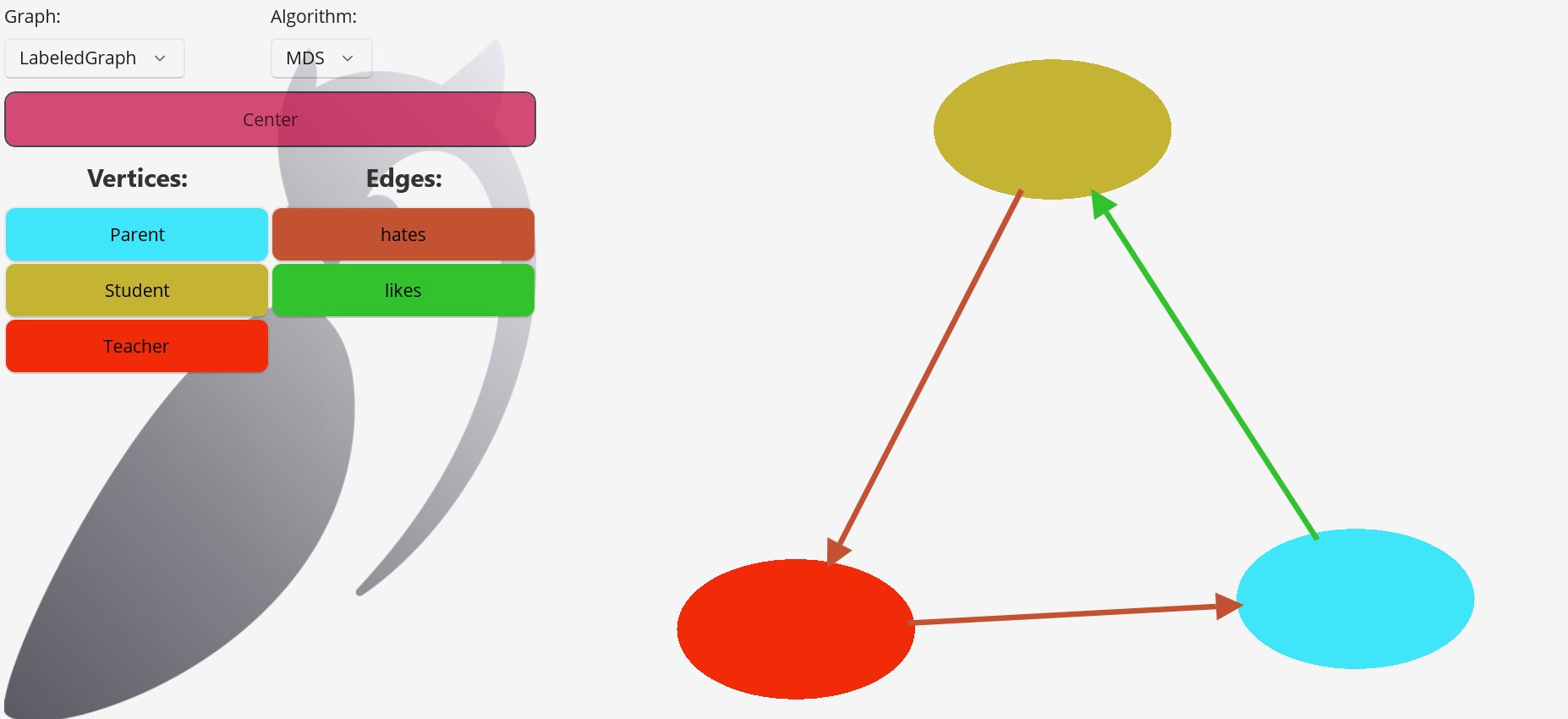
Welcome to the Mathema.Graph.MAUI.Visualization library for .NET MAUI! This library provides a powerful and flexible graph visualization control that allows you to display any graph with ease.
The control supports the visualization of any graph, offering flexibility in the representation of graph elements.
👁 Screenshot of Demo Application
Nodes and edges within the graph can hold arbitrary objects, granting users freedom in data representation. Just convert your graph like this:
var graph = new Graph();
var a = new DataNode() { DataItem = new YourObject() };
var b = new DataNode() { DataItem = new YourObject() };
graph.AddNode(a);
graph.AddNode(b);
// add more nodes

var c = new DataEdge(a, b) { DataItem = new YourObject() };
graph.AddEdge(c);
// add more edges...
Microsoft MSAGL is utilized for efficient graph layout calculations, ensuring a visually appealing presentation.
Easily insert the control into your XAML layouts, thanks to seamless integration with SkiaSharp.
Here's an example of how to use the control:
using SkiaSharp.Views.Maui.Controls.Hosting;

public static class MauiProgram
{
 public static MauiApp CreateMauiApp()
 {
 var builder = MauiApp.CreateBuilder();
 builder.UseMauiApp<App>().UseSkiaSharp();
	return builder.Build();
 }
}
// Add using statement
using Mathema.Graph.MAUI.Visualization.Models;

public partial class GraphsViewModel : BaseViewModel
{
 [ObservableProperty]
 Graph graphData;

 public GraphsViewModel()
 {
 var graph = new Graph();
	var a = new DataNode() { DataItem = new YourObject() };
	var b = new DataNode() { DataItem = new YourObject() };
 graph.AddNode(a);
 graph.AddNode(b);
	// add more nodes

	var c = new DataEdge(a, b) { DataItem = new YourObject() });
 graph.AddEdge(c);
	// add more edges...

 // set property
	GraphData = graph;
 }

 [RelayCommand]
 async Task NodeClicked(Node node)
 {
	// Handle individual node "clicked" event
 }

 [RelayCommand]
 async Task EdgeClicked(Edge edge)
 {
	// Handle individual edge "clicked" event
 }
}
controls:ContentPage xmlns="http://xamarin.com/schemas/2014/forms"
 xmlns:x="http://schemas.microsoft.com/winfx/2009/xaml"
 xmlns:controls="http://schemas.microsoft.com/dotnet/2021/maui"
 xmlns:graph="clr-namespace:Mathema.Graph.MAUI.Visualization.Controls;assembly=Mathema.Graph.MAUI.Visualization"
 x:Class="YourPage">
 <graph:VisualizationControlView
 BackgroundColor="Transparent"
 HorizontalOptions="FillAndExpand"
 VerticalOptions="FillAndExpand"
 LayoutSetting="SugiyamaScheme"
 Graph="{Binding GraphData}"
 OnEdgeClicked="{Binding EdgeClickedCommand}"
 OnVertexClicked="{Binding NodeClickedCommand}"
 EdgeThickness="2"
 VertexHeight="45.0"
 VertexWidth="80.0"
 VertexShape="Ellipse">
 </graph:VisualizationControlView>
</controls:ContentPage>
Feel free to explore the various properties and customize the control to suit your specific graph visualization needs. Thank you for choosing Mathema's GraphVisualizationControl library! If you have any questions or feedback, please don't hesitate to reach out.
If you have run out of energy or time for your project, put a note at the top of the README saying that development has slowed down or stopped completely. Someone may choose to fork your project or volunteer to step in as a maintainer or owner, allowing your project to keep going. You can also make an explicit request for maintainers.
| Product | Versions Compatible and additional computed target framework versions. |
|---|---|
| .NET | net7.0 net7.0 is compatible. net7.0-android net7.0-android was computed. net7.0-android33.0 net7.0-android33.0 is compatible. net7.0-ios net7.0-ios was computed. net7.0-ios16.1 net7.0-ios16.1 is compatible. net7.0-maccatalyst net7.0-maccatalyst was computed. net7.0-maccatalyst16.1 net7.0-maccatalyst16.1 is compatible. net7.0-macos net7.0-macos was computed. net7.0-tvos net7.0-tvos was computed. net7.0-windows net7.0-windows was computed. net7.0-windows10.0.19041 net7.0-windows10.0.19041 is compatible. net8.0 net8.0 was computed. net8.0-android net8.0-android was computed. net8.0-browser net8.0-browser was computed. net8.0-ios net8.0-ios was computed. net8.0-maccatalyst net8.0-maccatalyst was computed. net8.0-macos net8.0-macos was computed. net8.0-tvos net8.0-tvos was computed. net8.0-windows net8.0-windows was computed. net9.0 net9.0 was computed. net9.0-android net9.0-android was computed. net9.0-browser net9.0-browser was computed. net9.0-ios net9.0-ios was computed. net9.0-maccatalyst net9.0-maccatalyst was computed. net9.0-macos net9.0-macos was computed. net9.0-tvos net9.0-tvos was computed. net9.0-windows net9.0-windows was computed. net10.0 net10.0 was computed. net10.0-android net10.0-android was computed. net10.0-browser net10.0-browser was computed. net10.0-ios net10.0-ios was computed. net10.0-maccatalyst net10.0-maccatalyst was computed. net10.0-macos net10.0-macos was computed. net10.0-tvos net10.0-tvos was computed. net10.0-windows net10.0-windows was computed. |
This package is not used by any NuGet packages.
This package is not used by any popular GitHub repositories.