|
VOOZH | about |
|
VOOZH | about |
dotnet add package PlacePickerExt --version 1.0.0-beta.3
NuGet\Install-Package PlacePickerExt -Version 1.0.0-beta.3
<PackageReference Include="PlacePickerExt" Version="1.0.0-beta.3">
 <PrivateAssets>all</PrivateAssets>
 <IncludeAssets>runtime; build; native; contentfiles; analyzers</IncludeAssets>
</PackageReference>
<PackageVersion Include="PlacePickerExt" Version="1.0.0-beta.3" />Directory.Packages.props
<PackageReference Include="PlacePickerExt"> <PrivateAssets>all</PrivateAssets> <IncludeAssets>runtime; build; native; contentfiles; analyzers</IncludeAssets> </PackageReference>Project file
paket add PlacePickerExt --version 1.0.0-beta.3
#r "nuget: PlacePickerExt, 1.0.0-beta.3"
#:package PlacePickerExt@1.0.0-beta.3
#addin nuget:?package=PlacePickerExt&version=1.0.0-beta.3&prereleaseInstall as a Cake Addin
#tool nuget:?package=PlacePickerExt&version=1.0.0-beta.3&prereleaseInstall as a Cake Tool
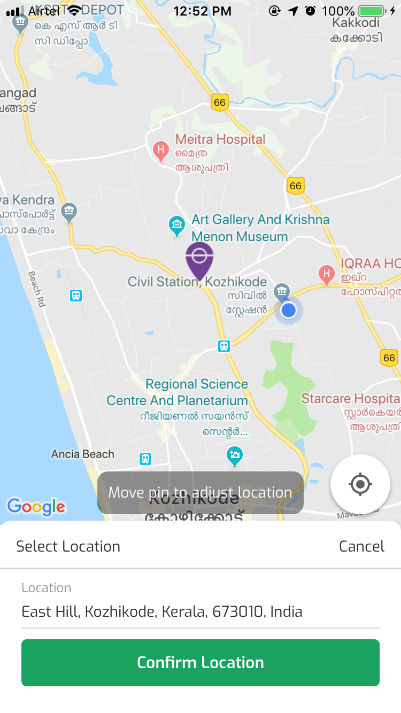
Place Picker is a simple cross-platform plugin which allows to pick a location and get location address from Google Maps with the help of Xamarin Essentials Geolocation & Geocoding.
Follow Minimum support versions required for Xamarin Essentials & Permissions Plugin.
These steps must be implemented for usage of Xamarin Forms Google Maps & Xamarin Essentials Geolocation.
[assembly: UsesPermission(Android.Manifest.Permission.AccessCoarseLocation)]
[assembly: UsesPermission(Android.Manifest.Permission.AccessFineLocation)]
[assembly: UsesFeature("android.hardware.location", Required = false)]
[assembly: UsesFeature("android.hardware.location.gps", Required = false)]
[assembly: UsesFeature("android.hardware.location.network", Required = false)]
 Plugin.CurrentActivity.CrossCurrentActivity.Current.Init(this, bundle);
 Xamarin.FormsGoogleMaps.Init(this, bundle);
 Xamarin.Essentials.Platform.Init(this, bundle);
To use the Google Maps on Android you must generate an API key and add it to your Android project.
Open AndroidManifest.xml file, and update the following in application tag
<application>
 <meta-data android:name="com.google.android.geo.API_KEY" android:value="YOUR-API-KEY-HERE" />
 <uses-library android:name="org.apache.http.legacy" android:required="false" />
</application>
NSLocationWhenInUseUsageDescription key in order to access the device’s location.Open the plist editor and add the Privacy - Location When In Use Usage Description property and fill in a value to display to the user.
Or manually edit the file and add the following :
<key>NSLocationAlwaysUsageDescription</key>
<string>Can we use your location at all times?</string>
<key>NSLocationWhenInUseUsageDescription</key>
<string>Can we use your location when your app is being used?</string>
<key>NSLocationAlwaysAndWhenInUseUsageDescription</key>
<string>Can we use your location at all times?</string>
Xamarin.FormsGoogleMaps.Init("YOUR-API-KEY-HERE");
Please do make sure to exclude/ignore PlacePicker assembly from iOS & Android Linker.
--linkskip=PlacePickerPlacePicker;LocationPicker.PinImage = "pin.png";
Make sure to add the required image resource file to corresponsing iOS & Android Projects.
var place = await LocationPicker.SelectPlace();
if (place?.Data != null)
{
 // Do the necessary code
}
The Result class :
public class BaseModel<Place>
{
 public Place Data { get; set; }

 public Status Status { get; set; }
}
Place model :
public class Place
{
 public Location Location { get; set; }
 public Placemark Placemark { get; set; }
 public string LocationAddress { get; set; }
}
Status model :
public enum Status
 {
 Success,
 Failed,
 Denied,
 Disabled,
 FeatureNotEnabled,
 NoInternet,
 Timeout,
 FeatureNotSupported,
 PermissionException,
 NSErrorException,
 Unknown
 }
Note : - The Response Status is based on location permissions & exceptions returned by the essentials plugin, you may do the action or show alerts as required.
The Response Status gives Success and returns the location data, only if locations permissions are enabled and can be accessed by the app.
This is a fork of https://github.com/fantacode/PlacePicker
| Product | Versions Compatible and additional computed target framework versions. |
|---|---|
| .NET | net5.0 net5.0 was computed. net5.0-windows net5.0-windows was computed. net6.0 net6.0 was computed. net6.0-android net6.0-android was computed. net6.0-ios net6.0-ios was computed. net6.0-maccatalyst net6.0-maccatalyst was computed. net6.0-macos net6.0-macos was computed. net6.0-tvos net6.0-tvos was computed. net6.0-windows net6.0-windows was computed. net7.0 net7.0 was computed. net7.0-android net7.0-android was computed. net7.0-ios net7.0-ios was computed. net7.0-maccatalyst net7.0-maccatalyst was computed. net7.0-macos net7.0-macos was computed. net7.0-tvos net7.0-tvos was computed. net7.0-windows net7.0-windows was computed. net8.0 net8.0 was computed. net8.0-android net8.0-android was computed. net8.0-browser net8.0-browser was computed. net8.0-ios net8.0-ios was computed. net8.0-maccatalyst net8.0-maccatalyst was computed. net8.0-macos net8.0-macos was computed. net8.0-tvos net8.0-tvos was computed. net8.0-windows net8.0-windows was computed. net9.0 net9.0 was computed. net9.0-android net9.0-android was computed. net9.0-browser net9.0-browser was computed. net9.0-ios net9.0-ios was computed. net9.0-maccatalyst net9.0-maccatalyst was computed. net9.0-macos net9.0-macos was computed. net9.0-tvos net9.0-tvos was computed. net9.0-windows net9.0-windows was computed. net10.0 net10.0 was computed. net10.0-android net10.0-android was computed. net10.0-browser net10.0-browser was computed. net10.0-ios net10.0-ios was computed. net10.0-maccatalyst net10.0-maccatalyst was computed. net10.0-macos net10.0-macos was computed. net10.0-tvos net10.0-tvos was computed. net10.0-windows net10.0-windows was computed. |
| .NET Core | netcoreapp2.0 netcoreapp2.0 was computed. netcoreapp2.1 netcoreapp2.1 was computed. netcoreapp2.2 netcoreapp2.2 was computed. netcoreapp3.0 netcoreapp3.0 was computed. netcoreapp3.1 netcoreapp3.1 was computed. |
| .NET Standard | netstandard2.0 netstandard2.0 is compatible. netstandard2.1 netstandard2.1 was computed. |
| .NET Framework | net461 net461 was computed. net462 net462 was computed. net463 net463 was computed. net47 net47 was computed. net471 net471 was computed. net472 net472 was computed. net48 net48 was computed. net481 net481 was computed. |
| MonoAndroid | monoandroid monoandroid was computed. |
| MonoMac | monomac monomac was computed. |
| MonoTouch | monotouch monotouch was computed. |
| Tizen | tizen40 tizen40 was computed. tizen60 tizen60 was computed. |
| Xamarin.iOS | xamarinios xamarinios was computed. |
| Xamarin.Mac | xamarinmac xamarinmac was computed. |
| Xamarin.TVOS | xamarintvos xamarintvos was computed. |
| Xamarin.WatchOS | xamarinwatchos xamarinwatchos was computed. |
This package is not used by any NuGet packages.
This package is not used by any popular GitHub repositories.
| Version | Downloads | Last Updated |
|---|---|---|
| 1.0.0-beta.3 | 379 | 8/25/2021 |
| 1.0.0-beta.2 | 302 | 8/25/2021 |
| 1.0.0-beta.1 | 304 | 8/25/2021 |
| 1.0.0-beta | 305 | 8/25/2021 |