|
VOOZH | about |
|
VOOZH | about |
dotnet add package Toolbelt.Blazor.LoadingBar --version 14.0.0
NuGet\Install-Package Toolbelt.Blazor.LoadingBar -Version 14.0.0
<PackageReference Include="Toolbelt.Blazor.LoadingBar" Version="14.0.0" />
<PackageVersion Include="Toolbelt.Blazor.LoadingBar" Version="14.0.0" />Directory.Packages.props
<PackageReference Include="Toolbelt.Blazor.LoadingBar" />Project file
paket add Toolbelt.Blazor.LoadingBar --version 14.0.0
#r "nuget: Toolbelt.Blazor.LoadingBar, 14.0.0"
#:package Toolbelt.Blazor.LoadingBar@14.0.0
#addin nuget:?package=Toolbelt.Blazor.LoadingBar&version=14.0.0Install as a Cake Addin
#tool nuget:?package=Toolbelt.Blazor.LoadingBar&version=14.0.0Install as a Cake Tool
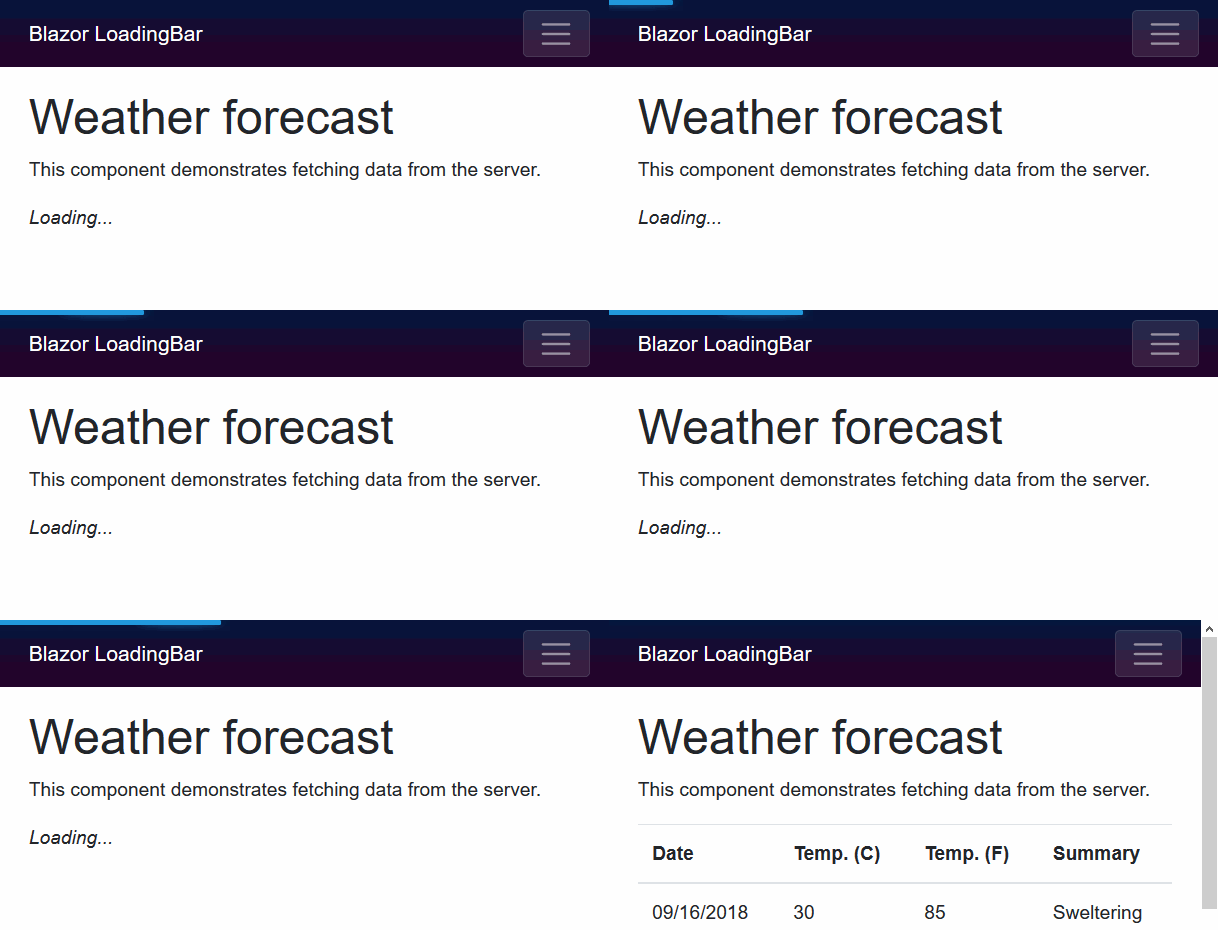
This is a class library that inserts loading bar UI automatically into a client side Blazor WebAssembly application.
This is a porting from angular-loading-bar (except spinner UI).
Any HTTP requests to servers from HttpClient will cause appearing loading bar effect if the request takes over 100 msec.
The live demo site is here:
"Blazor WebAssembly App (client-side) LoadingBar" ver.12.x or later supports Blazor WebAssembly App versions below.
Step.1 Install the library via NuGet package, like this.
> dotnet add package Toolbelt.Blazor.LoadingBar
Step.2 Register the "LoadingBar" service into the DI container, and declare the construct loading bar UI at the startup of your Blazor WebAssembly application (usually, you will need to do it in the "Program.cs").
using Toolbelt.Blazor.Extensions.DependencyInjection; // 👈 Open namespace, and...
...
var builder = WebAssemblyHostBuilder.CreateDefault(args);
builder.RootComponents.Add<App>("#app");
builder.Services.AddLoadingBarService(); // 👈 register the service, and...
...
builder.UseLoadingBar(); // 👈 declare construct loading bar UI.
...
await builder.Build().RunAsync();
...
Step.3 Add invoking EnableIntercept(IServiceProvider) extension method at the registration of HttpClient to DI container.
...
builder.Services.AddScoped(sp => new HttpClient {
 BaseAddress = new Uri(builder.HostEnvironment.BaseAddress)
}.EnableIntercept(sp)); // 👈 Add this!
...
That's all.
After doing those 3 steps, you can see a loading bar effect on your Blazor application UI, during an HttpClient request going on.
If you want to customize the color of the loading bar, please call AddLoadingBarService() with a configuration action like this:
builder.Services.AddLoadingBarService(options =>
{
 // Specify the color of the loading bar
 // by CSS color descriptor.
 options.LoadingBarColor = "yellow";
});
And also, the color of the loading bar is defined as a CSS variable, and the variable name is --toolbelt-loadingbar-color.
So you can change the color of the loading bar anytime by using JavaScript like this:
document.documentElement.style.setProperty('--toolbelt-loadingbar-color', '#ff00dc')
The threshold time to appearing the loading bar after sending an HTTP request is 100 msec by default. You can configure that threshold time by calling AddLoadingBarService() with a configuration action like this:
builder.Services.AddLoadingBarService(options =>
{
 // Specify the threshold time for the loading bar will appear by msec.
 options.LatencyThreshold = 200;
});
The calling of AddLoadingBarService() and UseLoadingBar() injects the references of JavaScript file (.js) and style sheet file (.css) - which are bundled with this package - into your page automatically.
If you don't want this behavior, you can disable these automatic injections, please call AddLoadingBarService() with a configuration action like this:
builder.Services.AddLoadingBarService(options =>
{
 // If you don't want automatic injection of js file, add below;
 options.DisableClientScriptAutoInjection = true;

 // If you don't want automatic injection of css file, add bllow;
 options.DisableStyleSheetAutoInjection = true;
});
You can inject those helper files manually. The URLs are below:
By default, the "Loading bar" injects its DOM contents to the inside of the body element.
If you want to specify the element where the "Loading Bar" 's contents are injected, you can do that by setting a query selector to the ContainerSelector option, like this.
builder.Services.AddLoadingBarService(options =>
{
 options.ContainerSelector = "#selector-of-container";
});
Credit goes to chieffancypants for his great works angular-loading-bar.
This library includes many codes, style sheet definition, and algorithms derived from angular-loading-bar.
Release notes is here.
| Product | Versions Compatible and additional computed target framework versions. |
|---|---|
| .NET | net5.0 net5.0 is compatible. net5.0-windows net5.0-windows was computed. net6.0 net6.0 is compatible. net6.0-android net6.0-android was computed. net6.0-ios net6.0-ios was computed. net6.0-maccatalyst net6.0-maccatalyst was computed. net6.0-macos net6.0-macos was computed. net6.0-tvos net6.0-tvos was computed. net6.0-windows net6.0-windows was computed. net7.0 net7.0 is compatible. net7.0-android net7.0-android was computed. net7.0-ios net7.0-ios was computed. net7.0-maccatalyst net7.0-maccatalyst was computed. net7.0-macos net7.0-macos was computed. net7.0-tvos net7.0-tvos was computed. net7.0-windows net7.0-windows was computed. net8.0 net8.0 was computed. net8.0-android net8.0-android was computed. net8.0-browser net8.0-browser was computed. net8.0-ios net8.0-ios was computed. net8.0-maccatalyst net8.0-maccatalyst was computed. net8.0-macos net8.0-macos was computed. net8.0-tvos net8.0-tvos was computed. net8.0-windows net8.0-windows was computed. net9.0 net9.0 was computed. net9.0-android net9.0-android was computed. net9.0-browser net9.0-browser was computed. net9.0-ios net9.0-ios was computed. net9.0-maccatalyst net9.0-maccatalyst was computed. net9.0-macos net9.0-macos was computed. net9.0-tvos net9.0-tvos was computed. net9.0-windows net9.0-windows was computed. net10.0 net10.0 was computed. net10.0-android net10.0-android was computed. net10.0-browser net10.0-browser was computed. net10.0-ios net10.0-ios was computed. net10.0-maccatalyst net10.0-maccatalyst was computed. net10.0-macos net10.0-macos was computed. net10.0-tvos net10.0-tvos was computed. net10.0-windows net10.0-windows was computed. |
| .NET Core | netcoreapp3.0 netcoreapp3.0 was computed. netcoreapp3.1 netcoreapp3.1 was computed. |
| .NET Standard | netstandard2.1 netstandard2.1 is compatible. |
| MonoAndroid | monoandroid monoandroid was computed. |
| MonoMac | monomac monomac was computed. |
| MonoTouch | monotouch monotouch was computed. |
| Tizen | tizen60 tizen60 was computed. |
| Xamarin.iOS | xamarinios xamarinios was computed. |
| Xamarin.Mac | xamarinmac xamarinmac was computed. |
| Xamarin.TVOS | xamarintvos xamarintvos was computed. |
| Xamarin.WatchOS | xamarinwatchos xamarinwatchos was computed. |
Showing the top 3 NuGet packages that depend on Toolbelt.Blazor.LoadingBar:
| Package | Downloads |
|---|---|
|
Corsinvest.AppHero.Core.MudBlazorUI
Package Description |
|
|
Z0.Blazor.ThemeTelerik
Theme for Blazor applications |
|
|
Z0.IdentityServer.UI
Package Description |
Showing the top 1 popular GitHub repositories that depend on Toolbelt.Blazor.LoadingBar:
| Repository | Stars |
|---|---|
|
jasontaylordev/ModernWebDevWithBlazorWasm
The sample code from my presentation Modern Web Dev with Blazor WebAsembly and ASP.NET Core 6.
|
| Version | Downloads | Last Updated |
|---|---|---|
| 14.0.0 | 59,127 | 8/26/2023 |
| 13.2.0 | 14,043 | 5/13/2023 |
| 13.1.2 | 132,902 | 11/19/2021 |
| 13.1.1 | 6,340 | 9/17/2021 |
| 13.1.0-preview.1.0 | 444 | 9/12/2021 |
| 13.0.0 | 2,086 | 9/8/2021 |
| 12.1.0 | 49,632 | 11/27/2020 |
| 12.0.1 | 12,143 | 7/22/2020 |
| 12.0.0 | 10,355 | 4/25/2020 |
| 11.0.0.1 | 4,125 | 3/12/2020 |
| 10.0.0 | 12,170 | 1/29/2020 |
| 9.0.0.3 | 2,184 | 1/12/2020 |
| 8.0.0 | 2,526 | 11/20/2019 |
| 7.0.0 | 3,215 | 9/5/2019 |
| 6.0.0 | 1,720 | 6/14/2019 |
| 5.0.0 | 1,516 | 4/26/2019 |
| 4.0.0 | 1,362 | 3/9/2019 |
| 3.0.0 | 1,392 | 2/8/2019 |
| 2.1.0 | 2,189 | 10/3/2018 |
| 2.0.0 | 1,522 | 9/21/2018 |
v.14.0.0
- Improve: The new AddLoadingBarService() extension method is released that doesn't break the service registration method chain since it returns IServiceCollection.
- Improve: Assembly trimming is enabled.
To see all the change logs, please visit the following URL.
- https://github.com/jsakamoto/Toolbelt.Blazor.LoadingBar//blob/master/RELEASE-NOTES.txt