|
VOOZH | about |
|
VOOZH | about |
dotnet add package Toolbelt.Web.CssClassInlineBuilder --version 3.1.0.1
NuGet\Install-Package Toolbelt.Web.CssClassInlineBuilder -Version 3.1.0.1
<PackageReference Include="Toolbelt.Web.CssClassInlineBuilder" Version="3.1.0.1" />
<PackageVersion Include="Toolbelt.Web.CssClassInlineBuilder" Version="3.1.0.1" />Directory.Packages.props
<PackageReference Include="Toolbelt.Web.CssClassInlineBuilder" />Project file
paket add Toolbelt.Web.CssClassInlineBuilder --version 3.1.0.1
#r "nuget: Toolbelt.Web.CssClassInlineBuilder, 3.1.0.1"
#:package Toolbelt.Web.CssClassInlineBuilder@3.1.0.1
#addin nuget:?package=Toolbelt.Web.CssClassInlineBuilder&version=3.1.0.1Install as a Cake Addin
#tool nuget:?package=Toolbelt.Web.CssClassInlineBuilder&version=3.1.0.1Install as a Cake Tool
Build CSS class string for a "class" attribute dynamically based on the boolean switch and enum values in Razor files in-line.
Package Manager Console:
PM> Install-Package Toolbelt.Web.CssClassInlineBuilder
dotnet CLI:
$ dotnet add package Toolbelt.Web.CssClassInlineBuilder
Add @using static Toolbelt.Web.CssClassInlineBuilder.V2 declaration in the head of each .razor file where you want to use the CSS class inline builder.
Or you can also add the declaration to _Imports.razor once instead.
@using static Toolbelt.Web.CssClassInlineBuilder.V2
You can use the CssClass(...) method anywhere you want to build a CSS class string.
Basically, you can pass CSS class name strings up to 4 to the arguments of CssClass() method.
The CssClass() method returns a string that is concatenated with all of those passed to argument strings with a space separator.
<div class="@CssClass("foo", "bar")">
bool propertiesNext, you can pass objects (including anonymous types) up to 4 that contain bool properties to the arguments of the CssClass() method.
The CssClass() method picks up the bool properties where its value is true from the argument objects, concatenates those property's name strings with a space separator, and returns them. (The names of properties are converted to lowercase.)
<div class="@CssClass(new {Foo=true, Bar=false}, new {Fizz=true})">
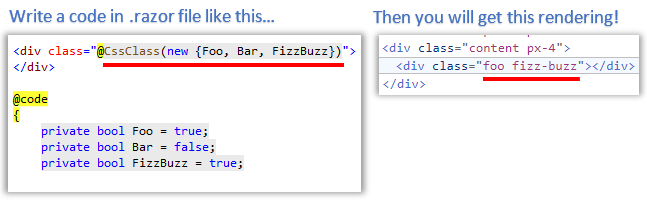
As you know, the anonymous type can omit explicit property names when the name is the same as a variable name.
<div class="@CssClass(new {Foo, Bar}, new {Fizz})">

@code {
 private bool Foo = false;
 private bool Bar = true;
 private bool Fizz = true;
 ...
The property name will be converted from a camel/snake case naming convention to a hyphenated lowercase.
<div class="@CssClass(new {FizzBuzz})">

@code {
 private bool FizzBuzz = true;
 ...
If you pass an object with non-boolean-type properties, a CSS class name will be built for each property.
That CSS class name will be concatenated with a hyphen of the property name and its value.
@code {
 private int Stars = 5;
 ...
}

<div class="@CssClass(new {NumberOfStars = this.Stars})">
You can also pass enum values up to 4 to the arguments of the CssClass() method.
The enum value will be converted to a string as a CSS class name.
The name of the enum value will be converted from camel case/snake case naming convention to hyphenated lower case.
@code {
 enum StateValues {
 NotReady,
 Complete,
 Error
 }

 private StateValues State = StateValues.NotReady;
 ...
}

<div class="@CssClass(this.State)">
You can pass mixing strings, objects, and enum values to the argument of the CssClass() method.
@code {
 enum StateValues {
 NotReady,
 Complete,
 Error
 }

 private bool Fizz = true;
 private bool Buzz = false;
 private int NumOfStars = 5;
 private StateValues State = StateValues.Complete;
 ...
}
...
<div class="@CssClass(new {Fizz, Buzz}, $"stars-{NumOfStars}", State)">
The CssClass() method uses the .NET CLR "Reflection" feature to parse the object's properties.
This means using the CssClass() method can degrade performance.
The CssClass() method includes a caching mechanism to avoid performance degradation, but it will be better to let you know this information anyway.
You can see the release notes here.
| Product | Versions Compatible and additional computed target framework versions. |
|---|---|
| .NET | net6.0 net6.0 is compatible. net6.0-android net6.0-android was computed. net6.0-ios net6.0-ios was computed. net6.0-maccatalyst net6.0-maccatalyst was computed. net6.0-macos net6.0-macos was computed. net6.0-tvos net6.0-tvos was computed. net6.0-windows net6.0-windows was computed. net7.0 net7.0 is compatible. net7.0-android net7.0-android was computed. net7.0-ios net7.0-ios was computed. net7.0-maccatalyst net7.0-maccatalyst was computed. net7.0-macos net7.0-macos was computed. net7.0-tvos net7.0-tvos was computed. net7.0-windows net7.0-windows was computed. net8.0 net8.0 is compatible. net8.0-android net8.0-android was computed. net8.0-browser net8.0-browser was computed. net8.0-ios net8.0-ios was computed. net8.0-maccatalyst net8.0-maccatalyst was computed. net8.0-macos net8.0-macos was computed. net8.0-tvos net8.0-tvos was computed. net8.0-windows net8.0-windows was computed. net9.0 net9.0 was computed. net9.0-android net9.0-android was computed. net9.0-browser net9.0-browser was computed. net9.0-ios net9.0-ios was computed. net9.0-maccatalyst net9.0-maccatalyst was computed. net9.0-macos net9.0-macos was computed. net9.0-tvos net9.0-tvos was computed. net9.0-windows net9.0-windows was computed. net10.0 net10.0 was computed. net10.0-android net10.0-android was computed. net10.0-browser net10.0-browser was computed. net10.0-ios net10.0-ios was computed. net10.0-maccatalyst net10.0-maccatalyst was computed. net10.0-macos net10.0-macos was computed. net10.0-tvos net10.0-tvos was computed. net10.0-windows net10.0-windows was computed. |
Showing the top 3 NuGet packages that depend on Toolbelt.Web.CssClassInlineBuilder:
| Package | Downloads |
|---|---|
|
BlazingStory
The clone of "Storybook" for Blazor, a frontend workshop for building UI components and pages in isolation. |
|
|
BlazingStory.Addons.BuiltIns
The clone of "Storybook" for Blazor, a frontend workshop for building UI components and pages in isolation. |
|
|
BlazingStory.ToolKit
The clone of "Storybook" for Blazor, a frontend workshop for building UI components and pages in isolation. |
Showing the top 1 popular GitHub repositories that depend on Toolbelt.Web.CssClassInlineBuilder:
| Repository | Stars |
|---|---|
|
jsakamoto/awesome-blazor-browser
A Blazor WebAssembly app for browsing the "Awesome Blazor" resources.
|
v.3.1.0
- Mark as trimmable.
To see all the change logs, please visit the following URL.
- https://github.com/jsakamoto/CssClassInlineBuilder/blob/master/RELEASE-NOTES.txt