|
VOOZH | about |
|
VOOZH | about |
dotnet add package Wacton.Unicolour --version 7.0.0
NuGet\Install-Package Wacton.Unicolour -Version 7.0.0
<PackageReference Include="Wacton.Unicolour" Version="7.0.0" />
<PackageVersion Include="Wacton.Unicolour" Version="7.0.0" />Directory.Packages.props
<PackageReference Include="Wacton.Unicolour" />Project file
paket add Wacton.Unicolour --version 7.0.0
#r "nuget: Wacton.Unicolour, 7.0.0"
#:package Wacton.Unicolour@7.0.0
#addin nuget:?package=Wacton.Unicolour&version=7.0.0Install as a Cake Addin
#tool nuget:?package=Wacton.Unicolour&version=7.0.0Install as a Cake Tool
👁 GitHub
👁 GitLab
👁 NuGet
👁 pipeline status
👁 tests passed
👁 coverage report
👁 AI generated
Unicolour is the most comprehensive .NET library for working with colour:
Written in C# with zero dependencies and fully cross-platform compatible.
Targets .NET Standard 2.0 for use in .NET 5.0+, .NET Core 2.0+ and .NET Framework 4.6.1+ applications.
See a live demo in the browser — a colour picker for any colour space, including print (CMYK · ICC profiles) and paint (RYB · pigments) — made with Unicolour.
Contents
A Unicolour encapsulates a single colour and its representation across 40 colour spaces.
It can be used to mix and compare colours, and offers many useful features for working with colour.
Supported colour spaces
RGB · Linear RGB · HSB / HSV · HSL · HWB · HSI · CIEXYZ · CIExyY · WXY · CIELAB · CIELChab · CIELUV · CIELChuv · HSLuv · HPLuv · YPbPr · YCbCr / YUV (digital) · YCgCo · YUV (PAL) · YIQ (NTSC) · YDbDr (SECAM) · TSL · XYB · LMS · IPT · ICTCP · Jzazbz · JzCzhz · Oklab · Oklch · Okhsv · Okhsl · Okhwb · Oklrab · Oklrch · CIECAM02 · CAM16 · HCT · Munsell HVC · CMYK ?
Unicolour pink = new("#FF1493");
Console.WriteLine(pink.Oklab); // 0.65 +0.26 -0.01
This library was initially written for personal projects since existing libraries had complex APIs, missing features, or inaccurate conversions. The goal of this library is to be accurate, intuitive, and easy to use. Although performance is not a priority, conversions are only calculated once; when first evaluated (either on access or as part of an intermediate conversion step) the result is stored for future use.
Unicolour is extensively tested, including verification of roundtrip conversions, validation using known colour values, and 100% line coverage and branch coverage.
dotnet add package Wacton.Unicolour
using Wacton.Unicolour;
Unicolour colour = new(ColourSpace.Rgb255, 192, 255, 238);
The simplest way to get started is to make a Unicolour and use it to see how the colour is represented in a different colour space.
var cyan = new Unicolour("#00FFFF");
Console.WriteLine(cyan.Hsl); // 180.0° 100.0% 50.0%

var yellow = new Unicolour(ColourSpace.Rgb255, 255, 255, 0);
Console.WriteLine(yellow.Hex); // #FFFF00
Colours can be mixed or interpolated using any colour space.
var red = new Unicolour(ColourSpace.Rgb, 1.0, 0.0, 0.0);
var blue = new Unicolour(ColourSpace.Hsb, 240, 1.0, 1.0);

/* RGB: [1, 0, 0] ⟶ [0, 0, 1] = [0.5, 0, 0.5] */
var purple = red.Mix(blue, ColourSpace.Rgb);
Console.WriteLine(purple.Rgb); // 0.50 0.00 0.50
Console.WriteLine(purple.Hex); // #800080

/* HSL: [0, 1, 0.5] ⟶ [240, 1, 0.5] = [300, 1, 0.5] */
var magenta = red.Mix(blue, ColourSpace.Hsl);
Console.WriteLine(magenta.Rgb); // 1.00 0.00 1.00
Console.WriteLine(magenta.Hex); // #FF00FF

// #FF0000, #FF0080, #FF00FF, #8000FF, #0000FF
var palette = red.Palette(blue, ColourSpace.Hsl, 5);
Console.WriteLine(palette.Select(colour => colour.Hex));
The difference or distance between colours can be calculated using any delta E metric.
var white = new Unicolour(ColourSpace.Oklab, 1.0, 0.0, 0.0);
var black = new Unicolour(ColourSpace.Oklab, 0.0, 0.0, 0.0);
var difference = white.Difference(black, DeltaE.Ciede2000);
Console.WriteLine(difference); // 100.0000
Other useful colour information is available, such as chromaticity coordinates, temperature, and dominant wavelength.
var equalEnergy = new Unicolour(ColourSpace.Xyz, 0.5, 0.5, 0.5);
Console.WriteLine(equalEnergy.RelativeLuminance); // 0.5
Console.WriteLine(equalEnergy.Chromaticity.Xy); // (0.3333, 0.3333)
Console.WriteLine(equalEnergy.Chromaticity.Uv); // (0.2105, 0.3158)
Console.WriteLine(equalEnergy.Temperature); // 5455.5 K (Δuv -0.00442)
Console.WriteLine(equalEnergy.DominantWavelength); // 596.1
Reference white points (e.g. D65) and the RGB model (e.g. sRGB) can be configured.
Unicolour calculates all transformations required to convert from one colour space to any other, so there is no need to manually chain multiple functions and removes the risk of rounding errors.
Unicolour colour = new(ColourSpace.Rgb255, 192, 255, 238);
var (l, c, h) = colour.Oklch;
RGB colours can also be constructed using their hex values:
Unicolour pink = new("ff1493");
var hex = pink.Hex; // #FF1493
Achromatic colours can be constructed with a single value:
Unicolour grey = new(ColourSpace.Rgb, 0.5);
var hex = grey.Hex; // #808080
| Colour space | Enum | Property |
|---|---|---|
| RGB (0–255) | ColourSpace.Rgb255 |
.Rgb.Byte255 |
| RGB | ColourSpace.Rgb |
.Rgb |
| Linear RGB | ColourSpace.RgbLinear |
.RgbLinear |
| HSB / HSV | ColourSpace.Hsb |
.Hsb |
| HSL | ColourSpace.Hsl |
.Hsl |
| HWB | ColourSpace.Hwb |
.Hwb |
| HSI | ColourSpace.Hsi |
.Hsi |
| CIEXYZ | ColourSpace.Xyz |
.Xyz |
| CIExyY | ColourSpace.Xyy |
.Xyy |
| WXY | ColourSpace.Wxy |
.Wxy |
| CIELAB | ColourSpace.Lab |
.Lab |
| CIELChab | ColourSpace.Lchab |
.Lchab |
| CIELUV | ColourSpace.Luv |
.Luv |
| CIELChuv | ColourSpace.Lchuv |
.Lchuv |
| HSLuv | ColourSpace.Hsluv |
.Hsluv |
| HPLuv | ColourSpace.Hpluv |
.Hpluv |
| YPbPr | ColourSpace.Ypbpr |
.Ypbpr |
| YCbCr / YUV (digital) | ColourSpace.Ycbcr |
.Ycbcr |
| YCgCo | ColourSpace.Ycgco |
.Ycgco |
| YUV (PAL) | ColourSpace.Yuv |
.Yuv |
| YIQ (NTSC) | ColourSpace.Yiq |
.Yiq |
| YDbDr (SECAM) | ColourSpace.Ydbdr |
.Ydbdr |
| TSL | ColourSpace.Tsl |
.Tsl |
| XYB | ColourSpace.Xyb |
.Xyb |
| LMS | ColourSpace.Lms |
.Lms |
| IPT | ColourSpace.Ipt |
.Ipt |
| ICTCP | ColourSpace.Ictcp |
.Ictcp |
| Jzazbz | ColourSpace.Jzazbz |
.Jzazbz |
| JzCzhz | ColourSpace.Jzczhz |
.Jzczhz |
| Oklab | ColourSpace.Oklab |
.Oklab |
| Oklch | ColourSpace.Oklch |
.Oklch |
| Okhsv | ColourSpace.Okhsv |
.Okhsv |
| Okhsl | ColourSpace.Okhsl |
.Okhsl |
| Okhwb | ColourSpace.Okhwb |
.Okhwb |
| Oklrab | ColourSpace.Oklrab |
.Oklrab |
| Oklrch | ColourSpace.Oklrch |
.Oklrch |
| CIECAM02 | ColourSpace.Cam02 |
.Cam02 |
| CAM16 | ColourSpace.Cam16 |
.Cam16 |
| HCT | ColourSpace.Hct |
.Hct |
| Munsell HVC | ColourSpace.Munsell |
.Munsell |
| CMYK ? | - | .Icc |
Munsell HVC colours are defined by 4 attributes, but are managed in Unicolour using 3. The Munsell hue notation is mapped to conventional degrees, with 5R at 0° and 360° and 5BG at 180°. This mapping is accessible via the
Hue.FromMunsell()helper function, e.g. for Munsell colour 6.1RP 5.5/19.5:Unicolour pink = new(ColourSpace.Munsell, Hue.FromMunsell(6.1, "RP"), 5.5, 19.5); Console.WriteLine(pink.Munsell); // 6.1RP 5.5/19.5
Two colours can be mixed by interpolating between them in any colour space, taking into account cyclic hue, interpolation distance, and alpha premultiplication. Palettes provide a range of evenly distributed mixes of two colours.
var red = new Unicolour(ColourSpace.Rgb, 1.0, 0.0, 0.0, alpha: 1.0);
var blue = new Unicolour(ColourSpace.Hsb, 240, 1.0, 1.0, alpha: 1.0);
var magenta = red.Mix(blue, ColourSpace.Hsl, 0.5, HueSpan.Decreasing);
var green = red.Mix(blue, ColourSpace.Hsl, 0.5, HueSpan.Increasing);
var palette = red.Palette(blue, ColourSpace.Hsl, 10, HueSpan.Longer);
The hue of colours created from a single achromatic value are ignored.
var yellow = new Unicolour(ColourSpace.Hsb, 60, 1, 1);

// hue moves 50% from 60° to 240° = 150°
var blackWithBlueHue = new Unicolour(ColourSpace.Hsb, 240, 0, 0);
var darkGreen = yellow.Mix(blackWithBlueHue, ColourSpace.Hsb);

// hue stays at 60°
var blackWithNoHue = new Unicolour(ColourSpace.Hsb, grey: 0);
var darkYellow = yellow.Mix(blackWithNoHue, ColourSpace.Hsb);
| Hue span | Enum |
|---|---|
| Shorter 👈 default | HueSpan.Shorter |
| Longer | HueSpan.Longer |
| Increasing | HueSpan.Increasing |
| Decreasing | HueSpan.Decreasing |
Two colours can be blended as though they are layered elements. Compositing is performed using the source-over operator.
var blue = new Unicolour(ColourSpace.Rgb, 240, 1.0, 1.0, alpha: 0.5);
var red = new Unicolour(ColourSpace.Rgb, 1.0, 0.0, 0.0);
var purple = blue.Blend(red, BlendMode.Normal);
var pink = blue.Blend(red, BlendMode.Screen);
| Blend mode | Enum |
|---|---|
| Normal | BlendMode.Normal |
| Multiply | BlendMode.Multiply |
| Screen | BlendMode.Screen |
| Overlay | BlendMode.Overlay |
| Darken | BlendMode.Darken |
| Lighten | BlendMode.Lighten |
| Colour Dodge | BlendMode.ColourDodge |
| Colour Burn | BlendMode.ColourBurn |
| Hard Light | BlendMode.HardLight |
| Soft Light | BlendMode.SoftLight |
| Difference | BlendMode.Difference |
| Exclusion | BlendMode.Exclusion |
| Hue | BlendMode.Hue |
| Saturation | BlendMode.Saturation |
| Colour | BlendMode.Colour |
| Luminosity | BlendMode.Luminosity |
Two methods of comparing colours are available: contrast and difference. Difference is calculated according to a specific delta E (ΔE) metric.
var red = new Unicolour(ColourSpace.Rgb, 1.0, 0.0, 0.0);
var blue = new Unicolour(ColourSpace.Hsb, 240, 1.0, 1.0);
var contrast = red.Contrast(blue);
var difference = red.Difference(blue, DeltaE.Cie76);
| Delta E | Enum |
|---|---|
| ΔE76 (CIE76) | DeltaE.Cie76 |
| ΔE94 (CIE94) graphic arts | DeltaE.Cie94 |
| ΔE94 (CIE94) textiles | DeltaE.Cie94Textiles |
| ΔE00 (CIEDE2000) | DeltaE.Ciede2000 |
| ΔECMC (CMC l:c) 2:1 acceptability | DeltaE.CmcAcceptability |
| ΔECMC (CMC l:c) 1:1 perceptibility | DeltaE.CmcPerceptibility |
| ΔEITP | DeltaE.Itp |
| ΔEz | DeltaE.Z |
| ΔEHyAB | DeltaE.Hyab |
| ΔEOK | DeltaE.Ok |
| ΔECAM02 | DeltaE.Cam02 |
| ΔECAM16 | DeltaE.Cam16 |
Colours that cannot be displayed with the configured RGB model can be mapped to the closest in-gamut RGB colour. Mapping to Pointer's gamut will return the closest empirically real surface colour of the same lightness and hue. Mapping to MacAdam limits will return the closest theoretically real surface colour of the same wavelength and luminance.
var veryRed = new Unicolour(ColourSpace.Rgb, 1.25, -0.39, -0.14);

var isDisplayable = veryRed.IsInRgbGamut;
var displayRed = veryRed.MapToRgbGamut();

var isEmpiricalSurface = veryRed.IsInPointerGamut;
var empiricalRed = veryRed.MapToPointerGamut();

var isTheoreticalSurface = veryRed.IsInMacAdamLimits;
var theoreticalRed = veryRed.MapToMacAdamLimits();
| RGB gamut mapping method | Enum |
|---|---|
| RGB clipping | GamutMap.RgbClipping |
| Oklch chroma reduction (CSS specification) 👈 default | GamutMap.OklchChromaReduction |
| WXY purity reduction | GamutMap.WxyPurityReduction |
Colour vision deficiency (CVD) or colour blindness can be simulated, conveying how a particular colour might be perceived. Anomalous trichromacy, where cones are defective instead of missing, can be adjusted using the severity parameter.
var colour = new Unicolour(ColourSpace.Rgb255, 192, 255, 238);
var missingRed = colour.Simulate(Cvd.Protanopia);
var defectiveRed = colour.Simulate(Cvd.Protanomaly, 0.5);
| Colour vision deficiency | Enum |
|---|---|
| Protanopia (missing red cones) | Cvd.Protanopia |
| Protanomaly (defective red cones) | Cvd.Protanomaly |
| Deuteranopia (missing green cones) | Cvd.Deuteranopia |
| Deuteranomaly (defective green cones) | Cvd.Deuteranomaly |
| Tritanopia (missing blue cones) | Cvd.Tritanopia |
| Tritanomaly (defective blue cones) | Cvd.Tritanomaly |
| Blue cone monochromacy (missing red & green cones) | Cvd.BlueConeMonochromacy |
| Achromatopsia (missing all cones) | Cvd.Achromatopsia |
Notable colourimetric components are conveniently accessible, and can be used to create a colour.
var grey = new Unicolour(ColourSpace.RgbLinear, 0.5, 0.5, 0.5);
var chromaticity = grey.Chromaticity;
var luminance = grey.RelativeLuminance;

var white = new Unicolour(chromaticity, luminance: 1.0);
Correlated colour temperature (CCT) and delta UV (∆uv) can be derived from a colour, and can be used to create a colour. CCT from 500 K to 1,000,000,000 K is supported but only CCT from 1,000 K to 20,000 K is guaranteed to have high accuracy.
var chromaticity = new Chromaticity(0.3457, 0.3585);
var d50 = new Unicolour(chromaticity);
var (cct, duv) = d50.Temperature;

var temperature = new Temperature(6504, 0.0032);
var d65 = new Unicolour(temperature);
var (x, y) = d65.Chromaticity;
The dominant wavelength and excitation purity of a colour can be ascertained using the spectral locus. They can be used to create a colour alongside the WXY colour space. Wavelengths from 360 nm to 700 nm are supported.
var chromaticity = new Chromaticity(0.1, 0.8);
var hyperGreen = new Unicolour(chromaticity);
var dominantWavelength = hyperGreen.DominantWavelength;
var excitationPurity = hyperGreen.ExcitationPurity;

var laserRed = new Unicolour(ColourSpace.Wxy, 670, 1.0, 0.5);
Colours that lie outside the spectral locus — the horseshoe-shaped curve of the CIE xy chromaticity diagram — cannot be produced by the eye. These imaginary colours are mathematically possible and can be detected.
var chromaticity = new Chromaticity(0.05, 0.05);
var impossibleBlue = new Unicolour(chromaticity);
var isImaginary = impossibleBlue.IsImaginary;
A colour can be created from a spectral power distribution (SPD). Wavelengths should be provided in either 1 nm or 5 nm intervals, and omitted wavelengths are assumed to have zero spectral power.
/* [575 nm] ⟶ 0.5 · [580 nm] ⟶ 1.0 · [585 nm] ⟶ 0.5 */
var spd = new Spd(start: 575, interval: 5, coefficients: [0.5, 1.0, 0.5]);
var intenseYellow = new Unicolour(spd);
Pigments can be combined using the Kubelka-Munk theory. The result is a colour that reflects natural paint mixing. Pigment measurements are required, either coefficients for absorption k and scattering s (two-constant) or a reflectance curve r (single-constant). Saunderson correction can be applied when using k and s and assumes measurements were taken in SPEX mode.
/* populate k and s with measurement data */
var phthaloBlue = new Pigment(startWavelength: 380, wavelengthInterval: 10, k: [], s: []);
var hansaYellow = new Pigment(startWavelength: 380, wavelengthInterval: 10, k: [], s: []);
var green = new Unicolour(pigments: [phthaloBlue, hansaYellow], weights: [0.5, 0.5]);
Device-dependent colour prints of 4 (e.g. FOGRA39 CMYK) or more (e.g. FOGRA55 CMYKOGV) are supported through ICC profiles. If no ICC profile is provided, or if the profile is incompatible, naive conversion for uncalibrated CMYK is used instead.
using Wacton.Unicolour.Icc;

var fogra39 = new IccConfiguration("./Fogra39.icc", Intent.RelativeColorimetric);
var config = new Configuration(iccConfig: fogra39);

var navyRgb = new Unicolour(config, ColourSpace.Rgb255, 0, 0, 128);
Console.WriteLine(navyRgb.Icc); // 1.0000 0.8977 0.0001 0.2867 CMYK

var navyCmyk = new Unicolour(config, new Channels(1.0, 1.0, 0.0, 0.5));
Console.WriteLine(navyCmyk.Rgb.Byte255); // 46 37 87
The following tables summarise which ICC profiles are compatible with Unicolour:
| Profile version | |
|---|---|
| ✅ | 2 |
| ✅ | 4 |
| ❌ | 5 / iccMAX |
| Profile/device class | |
|---|---|
| ✅ | Input scnr |
| ✅ | Display mntr |
| ✅ | Output prtr |
| ✅ | ColorSpace spac |
| ❌ | DeviceLink link |
| ❌ | Abstract abst |
| ❌ | NamedColor nmcl |
| Transform | |
|---|---|
| ✅ | AToB / BToA A2B0 A2B1 A2B2 B2A0 B2A1 B2A2 |
| ✅ | TRC matrix rTRC gTRC bTRC rXYZ gXYZ bXYZ |
| ✅ | TRC grey kTRC |
| ❌ | DToB / BToD D2B0 D2B1 D2B2 D2B3 B2D0 B2D1 B2D2 B2D3 |
A wider variety of ICC profiles will be supported in future releases. If a problem is encountered using an ICC profile that meets the above criteria, please raise an issue.
It is possible for invalid or unreasonable values to be used in calculations, either because conversion formulas have limitations or because a user passes them as arguments. Although these values don't make sense to use, they should propagate safely and avoid triggering exceptions.
var bad1 = new Unicolour(ColourSpace.Oklab, double.NegativeInfinity, double.NaN, double.Epsilon);
var bad2 = new Unicolour(ColourSpace.Cam16, double.NaN, double.MaxValue, double.MinValue);
var bad3 = bad1.Mix(bad2, ColourSpace.Hct, amount: double.PositiveInfinity);
Unicolour uses sRGB as the default RGB model and standard illuminant D65 (2° observer) as the default white point of all colour spaces,
ensuring consistency and a suitable starting point for simple applications.
These can be overridden using the Configuration parameter, and common configurations have been predefined.
var defaultConfig = new Configuration(RgbConfiguration.StandardRgb, XyzConfiguration.D65);
var colour = new Unicolour(defaultConfig, ColourSpace.Rgb255, 192, 255, 238);
Each line of artisan code is exquisitely handcrafted in small-batch programming sessions. No dependencies are used, so there is no risk of reliance on deprecated, obsolete, or unmaintained packages. Every line of code is tested, and any defect is Unicolour's responsibility.
The Configuration parameter can be used to define the context of the colour.
Example configuration with predefined
Configuration config = new(RgbConfiguration.Rec2020, XyzConfiguration.D50);
Unicolour colour = new(config, ColourSpace.Rgb255, 204, 64, 132);
Example configuration with manually defined
var rgbConfig = new RgbConfiguration(
 chromaticityR: new(0.7347, 0.2653),
 chromaticityG: new(0.1152, 0.8264),
 chromaticityB: new(0.1566, 0.0177),
 whitePoint: Illuminant.D50.GetWhitePoint(Observer.Degree2),
 fromLinear: value => Math.Pow(value, 1 / 2.19921875),
 toLinear: value => Math.Pow(value, 2.19921875)
);

var xyzConfig = new XyzConfiguration(Illuminant.C, Observer.Degree10, Adaptation.VonKries);

var config = new Configuration(rgbConfig, xyzConfig);
var colour = new Unicolour(config, ColourSpace.Rgb255, 202, 97, 143);
A Configuration is composed of sub-configurations.
Each sub-configuration is optional and will fall back to a sensible default if not provided.
RgbConfigurationDefines the RGB model, often used to specify a wider gamut than standard RGB (sRGB).
| Predefined | Property |
|---|---|
| sRGB 👈 default | .StandardRgb |
| Display P3 | .DisplayP3 |
| Rec. 2020 | .Rec2020 |
| Rec. 2100 PQ | .Rec2100Pq |
| Rec. 2100 HLG | .Rec2100Hlg |
| A98 | .A98 |
| ProPhoto | .ProPhoto |
| ACES 2065-1 | .Aces20651 |
| ACEScg | .Acescg |
| ACEScct | .Acescct |
| ACEScc | .Acescc |
| Rec. 601 (625-line) | .Rec601Line625 |
| Rec. 601 (525-line) | .Rec601Line525 |
| Rec. 709 | .Rec709 |
| xvYCC | .XvYcc |
| PAL (Rec. 470) | .Pal |
| PAL-M (Rec. 470) | .PalM |
| PAL 625 (Rec. 1700) | .Pal625 |
| PAL 525 (Rec. 1700) | .Pal525 |
| NTSC (Rec. 470) | .Ntsc |
| NTSC (SMPTE-C) | .NtscSmpteC |
| NTSC 525 (Rec. 1700) | .Ntsc525 |
| SECAM (Rec. 470) | .Secam |
| SECAM 625 (Rec. 1700) | .Secam625 |
XyzConfigurationDefines the XYZ white point (which is also inherited by colour spaces that do not need a specific configuration), the observer to use when colour matching functions (CMFs) are required, and the chromatic adaptation matrix to use for any white point adaptation (the Bradford method will be used if unspecified).
| Predefined | Property |
|---|---|
| D65 (2° observer) 👈 default | .D65 |
| D50 (2° observer) | .D50 |
YbrConfigurationDefines the constants, scaling, and offsets required to convert to YPbPr and YCbCr.
| Predefined | Property |
|---|---|
| Rec. 601 👈 default | .Rec601 |
| Rec. 709 | .Rec709 |
| Rec. 2020 | .Rec2020 |
| JPEG | .Jpeg |
CamConfigurationDefines the viewing conditions for CAM02 and CAM16, which take into account the surrounding environment to determine how a colour is perceived.
| Predefined | Property |
|---|---|
| sRGB 👈 default | .StandardRgb |
| HCT | .Hct |
The predefined sRGB configuration refers to an ambient illumination of 64 lux under a grey world assumption.
DynamicRangeDefines luminance values used when evaluating perceptual quantizer (PQ) transfer functions (ICTCP · Jzazbz · JzCzhz · Rec. 2100 PQ RGB) and hybrid log-gamma (HLG) transfer functions (Rec. 2100 HLG RGB).
| Predefined | Property |
|---|---|
| SDR | .Standard |
| HDR 👈 default | .High |
The predefined HDR configuration has a white luminance of 203 cd/m² at 75% HLG, and a minimum luminance of 0 cd/m² (no black lift).
IccConfigurationDefines the ICC profile and rendering intent, typically used for accurate CMYK conversion.
| Predefined | Property |
|---|---|
| None 👈 default | .None |
Unicolour does not embed or distribute ICC profiles. Some commonly used profiles can be found in the ICC profile registry.
.icc file)Most colour spaces are impacted by the reference white point. Unicolour applies different reference white points to different sets of colour spaces, as shown in the table below. When a conversion to or from XYZ space involves a change in white point, a chromatic adaptation transform (CAT) is performed. The default chromatic adaptation is the Bradford method but this can be customised.
| White point configuration | Affected colour spaces |
|---|---|
RgbConfiguration |
RGB · Linear RGB · HSB / HSV · HSL · HWB · HSI · YPbPr · YCbCr / YUV (digital) · YCgCo · YUV (PAL) · YIQ (NTSC) · YDbDr (SECAM) · TSL · XYB |
XyzConfiguration |
CIEXYZ · CIExyY · WXY · CIELAB · CIELChab · CIELUV · CIELChuv · HSLuv · HPLuv |
CamConfiguration |
CIECAM02 · CAM16 |
| None (always D65/2°) | IPT · ICTCP · Jzazbz · JzCzhz · Okhsv · Okhsl · Okhwb · Oklrab · Oklrch · HCT |
| None (always C/2°) | Munsell HVC |
A Unicolour can be converted to a different configuration,
in turn enabling conversions between different RGB models, XYZ white points, CAM viewing conditions, ICC profiles, etc.
/* pure sRGB green */
var srgbConfig = new Configuration(RgbConfiguration.StandardRgb);
var srgbColour = new Unicolour(srgbConfig, ColourSpace.Rgb, 0, 1, 0);
Console.WriteLine(srgbColour.Rgb); // 0.00 1.00 0.00

/* ⟶ Display P3 */
var displayP3Config = new Configuration(RgbConfiguration.DisplayP3);
var displayP3Colour = srgbColour.ConvertToConfiguration(displayP3Config);
Console.WriteLine(displayP3Colour.Rgb); // 0.46 0.99 0.30

/* ⟶ Rec. 2020 */
var rec2020Config = new Configuration(RgbConfiguration.Rec2020);
var rec2020Colour = displayP3Colour.ConvertToConfiguration(rec2020Config);
Console.WriteLine(rec2020Colour.Rgb); // 0.57 0.96 0.27
This repository contains projects showing how Unicolour can be used to create:
Example code to create gradient images using 📷 SixLabors.ImageSharp can be seen in the Example.Gradients project.
| 👁 Smooth gradient of deep pink to aquamarine gradient, created with Unicolour |
👁 Palette of deep pink to aquamarine gradient, created with Unicolour |
|---|---|
Gradient of deep pink to aquamarine through Oklch colour space using Mix() |
Gradient of deep pink to aquamarine through Oklch colour space using Palette() |
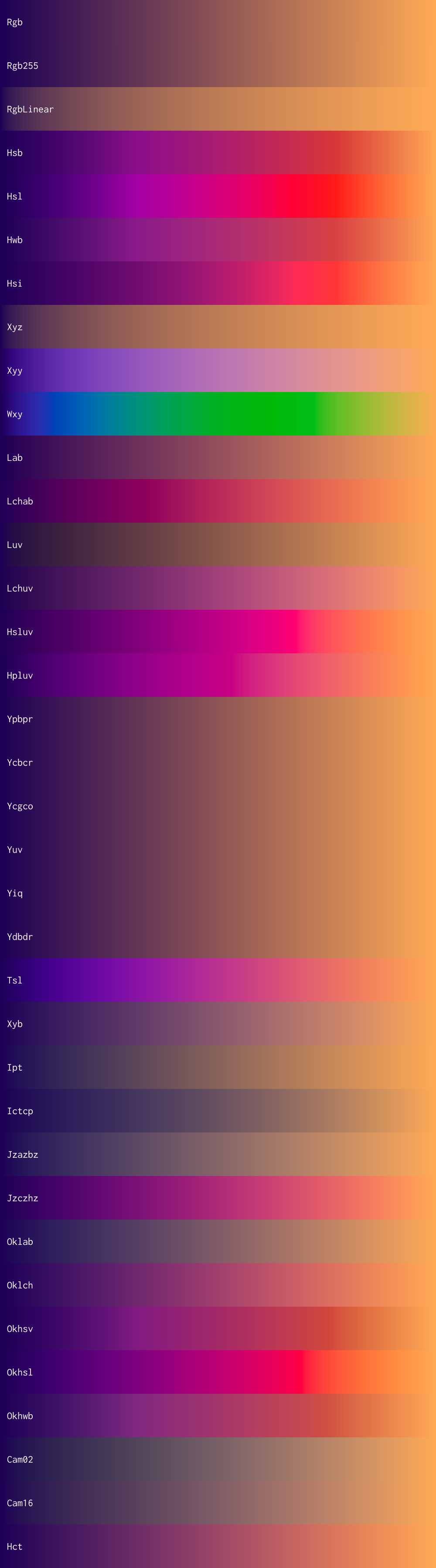
| 👁 Gradient of purple to orange through many colour spaces, created with Unicolour |
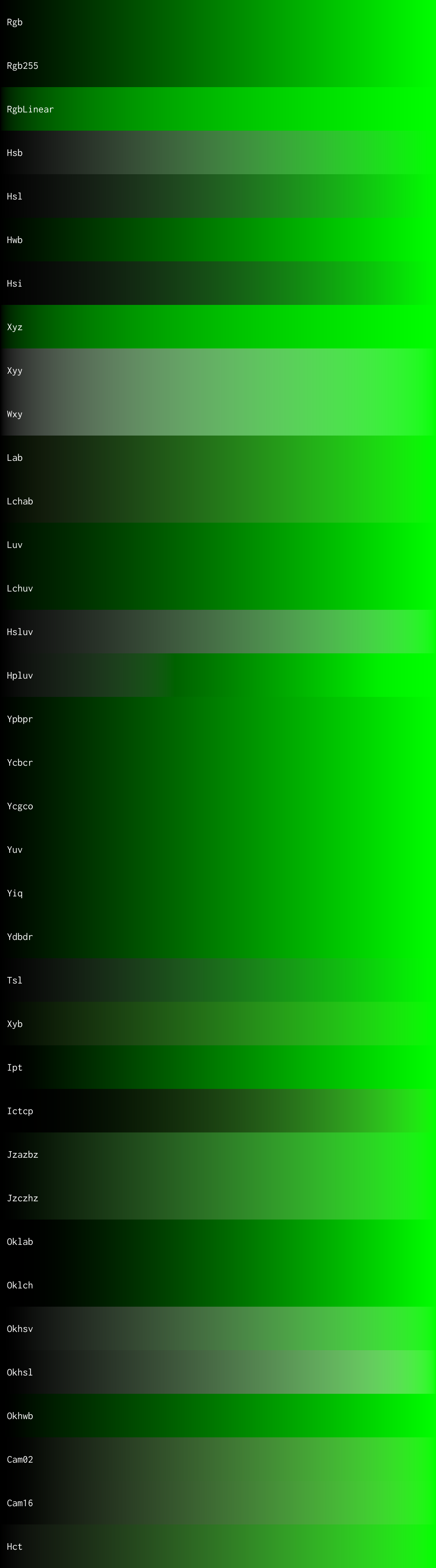
👁 Gradient of black to green through many colour spaces, created with Unicolour |
|---|---|
| Gradient of purple to orange generated in every colour space | Gradient of black to green generated in every colour space |
| 👁 Visualisation of temperature from 1,000 K to 13,000 K, created with Unicolour |
|---|
| Visualisation of temperature from 1,000 K to 13,000 K |
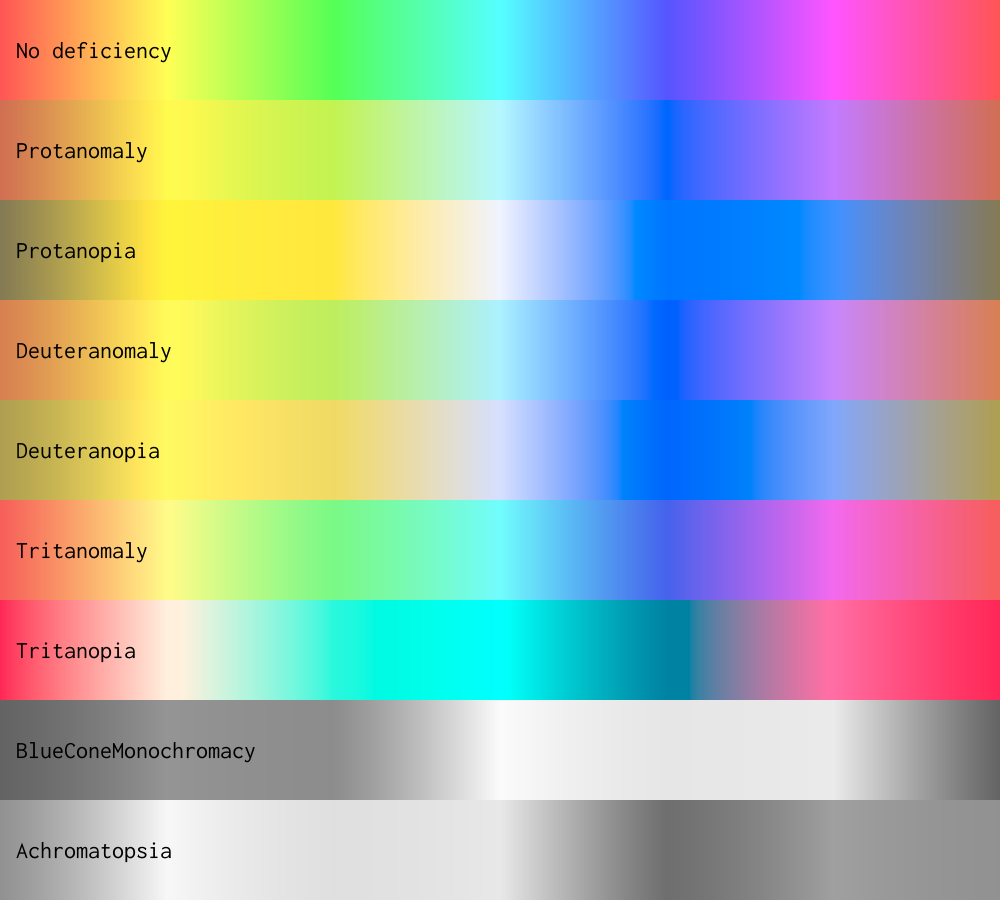
| 👁 Colour spectrum rendered with different colour vision deficiencies, created with Unicolour |
|---|
| Colour spectrum rendered with different colour vision deficiencies |
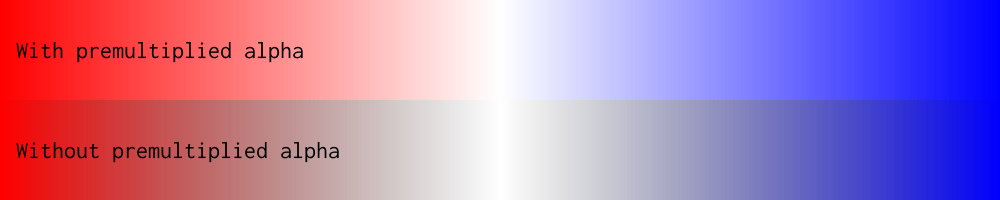
| 👁 Demonstration of interpolating from red to transparent to blue, with and without premultiplied alpha, created with Unicolour |
|---|
| Demonstration of interpolating from red to transparent to blue, with and without premultiplied alpha |
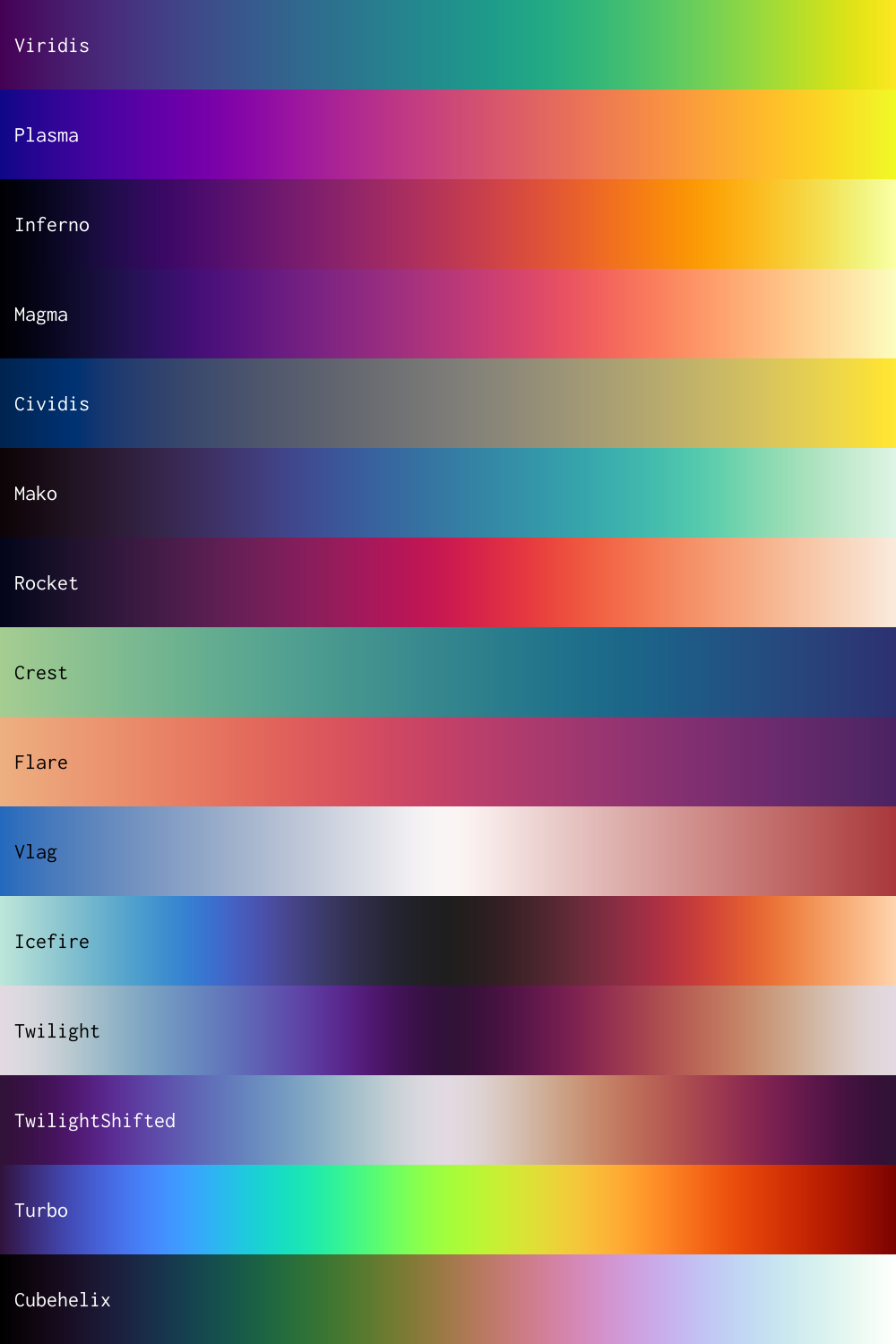
| 👁 Perceptually uniform colourmaps from Unicolour.Datasets, created with Unicolour |
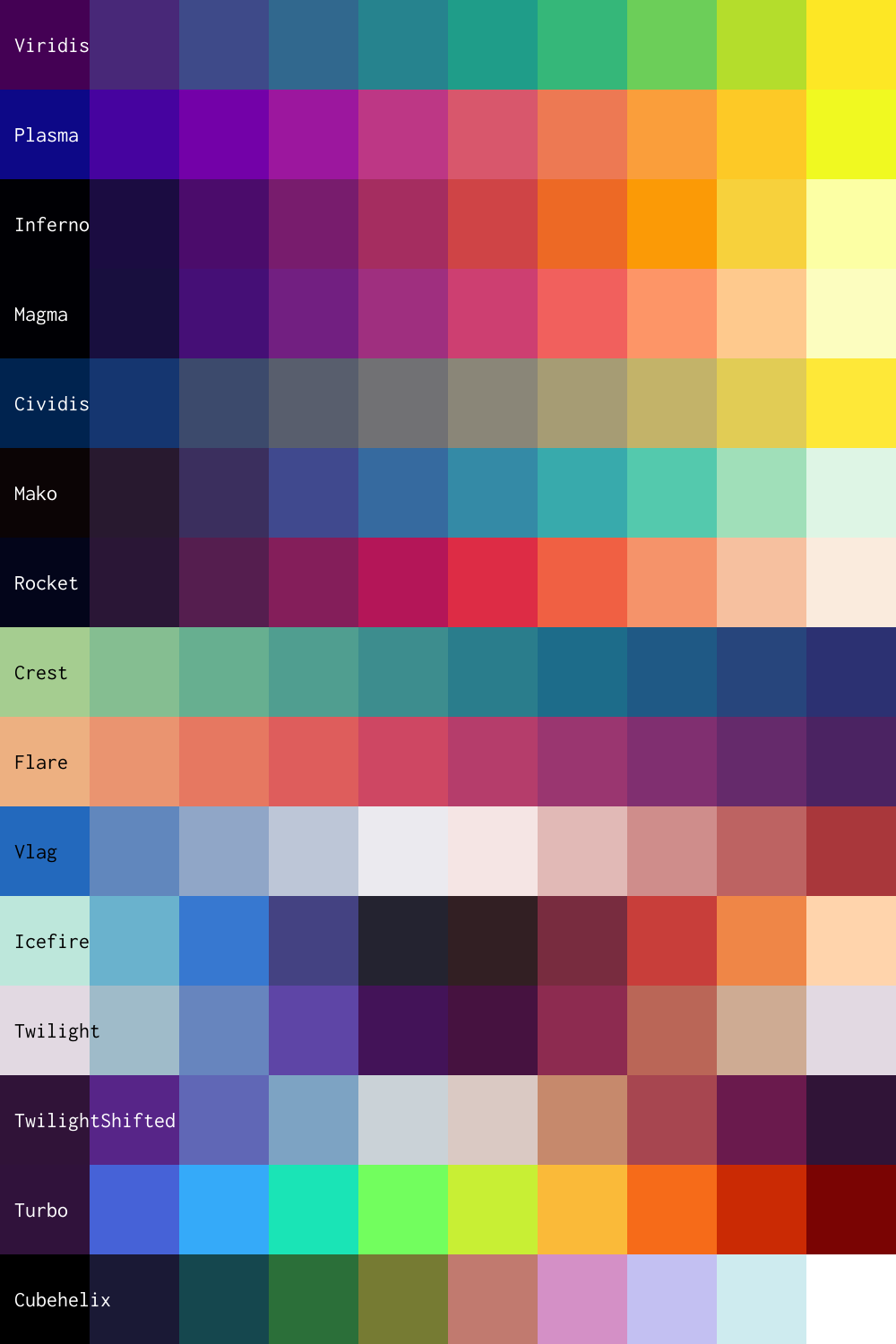
👁 Perceptually uniform colour palettes from Unicolour.Datasets, created with Unicolour |
|---|---|
| Perceptually uniform colourmaps from Unicolour.Datasets | Perceptually uniform colour palettes from Unicolour.Datasets |
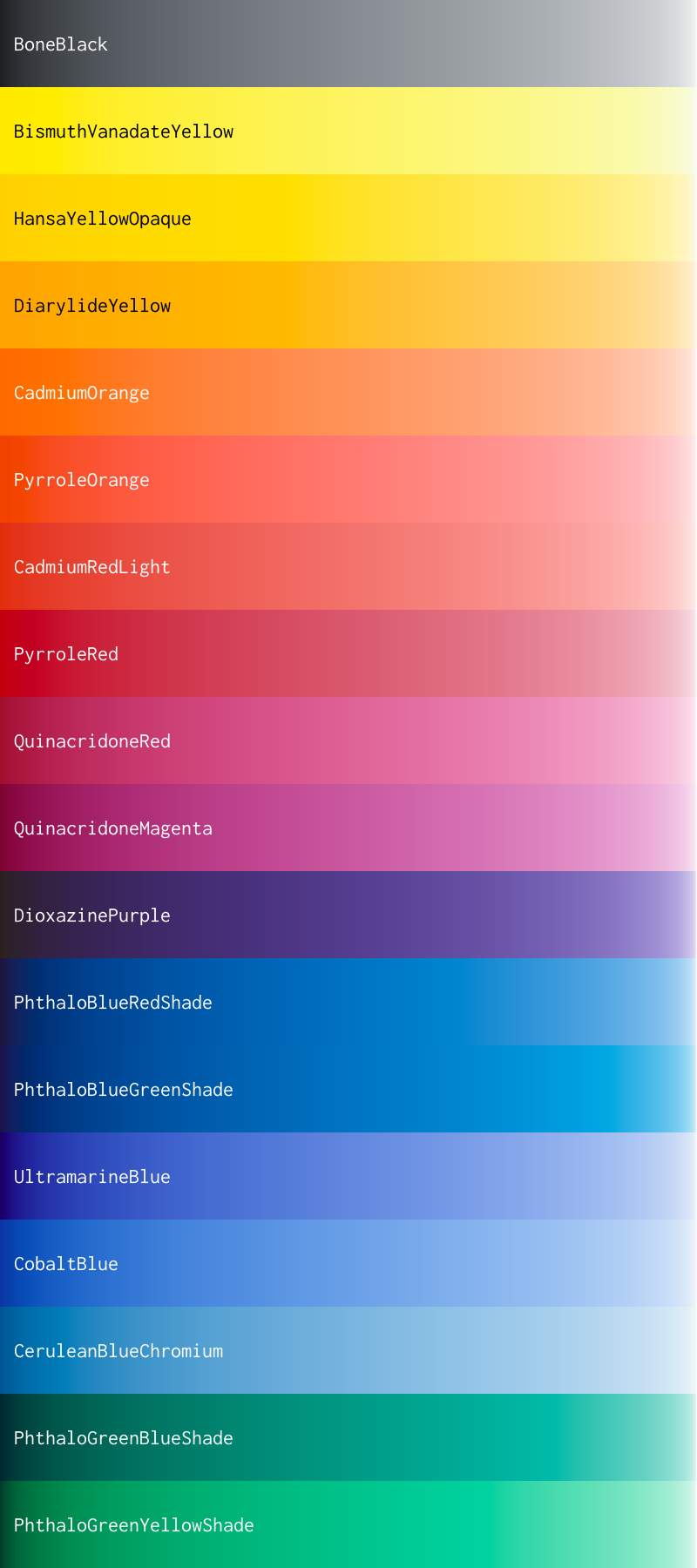
| 👁 Mixes of two-constant pigments to titanium white, created with Unicolour |
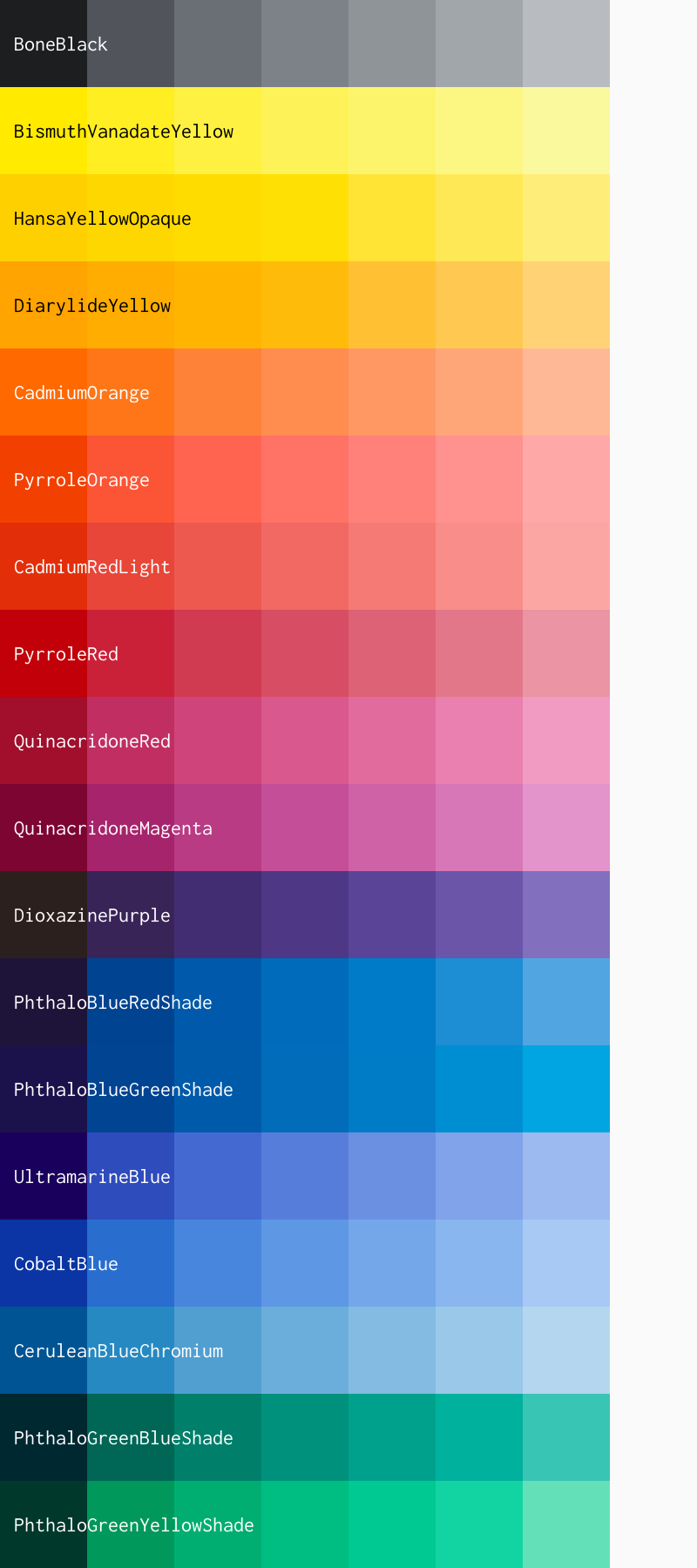
👁 Palettes of two-constant pigments to titanium white, created with Unicolour |
|---|---|
| Mixes of two-constant pigments to titanium white from Unicolour.Datasets | Palettes of two-constant pigments to titanium white from Unicolour.Datasets |
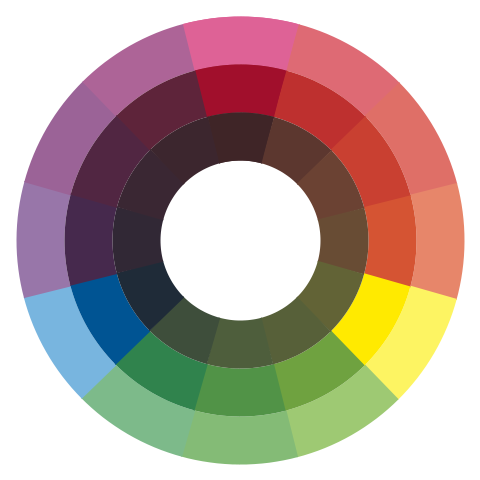
| 👁 Colour wheel based on RYB pigments, created with Unicolour |
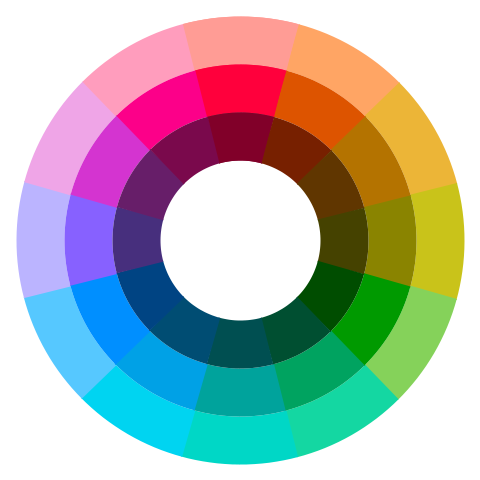
👁 Colour wheel based on hue, created with Unicolour |
|---|---|
| Colour wheel based on RYB pigments from Unicolour.Experimental (see also: my grandmother's patented Colour Joy kleurwiel) | Colour wheel based on hue from Unicolour.Experimental (see also: my grandmother's patented Colour Joy kleurwiel) |
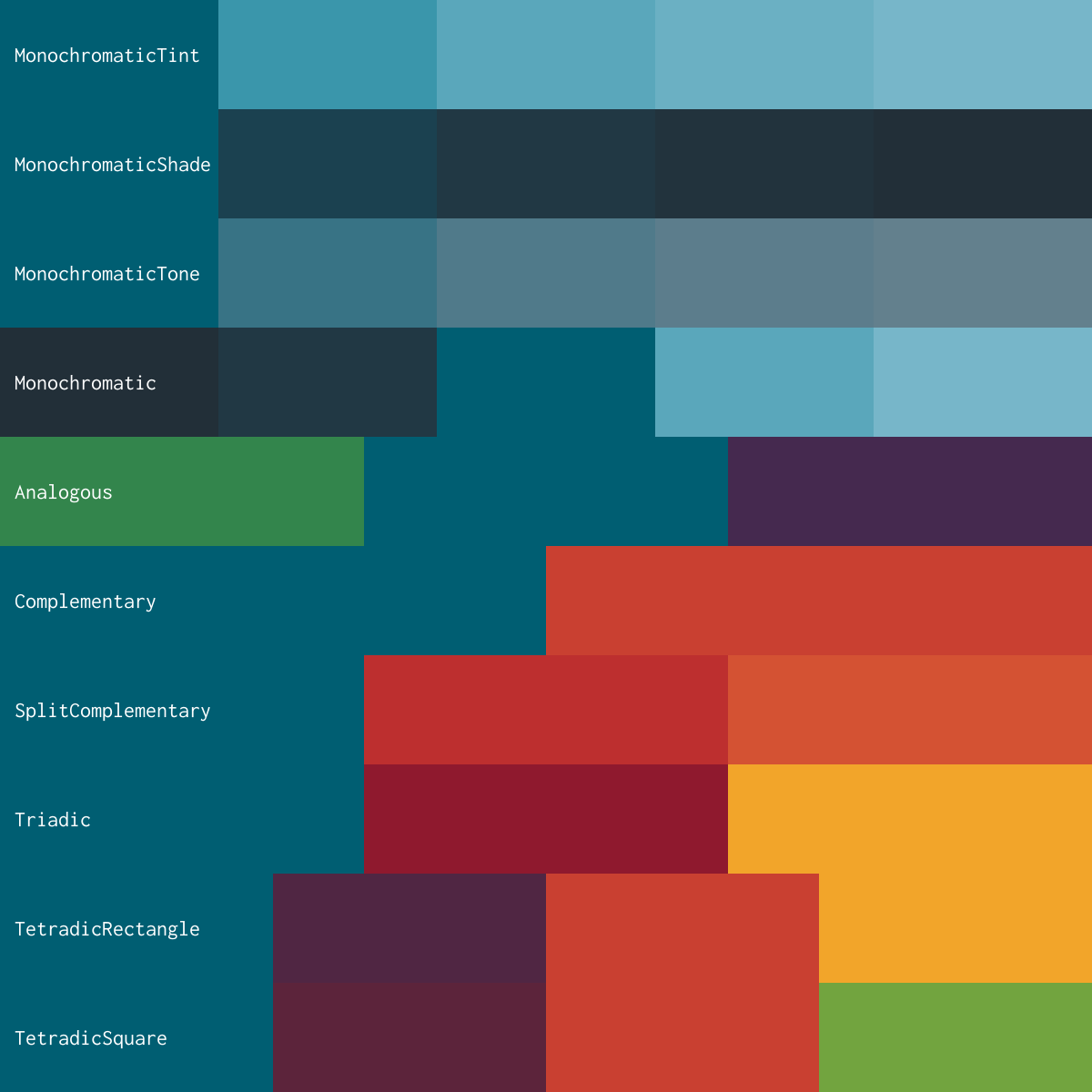
| 👁 Colour harmonies based on RYB pigments, created with Unicolour |
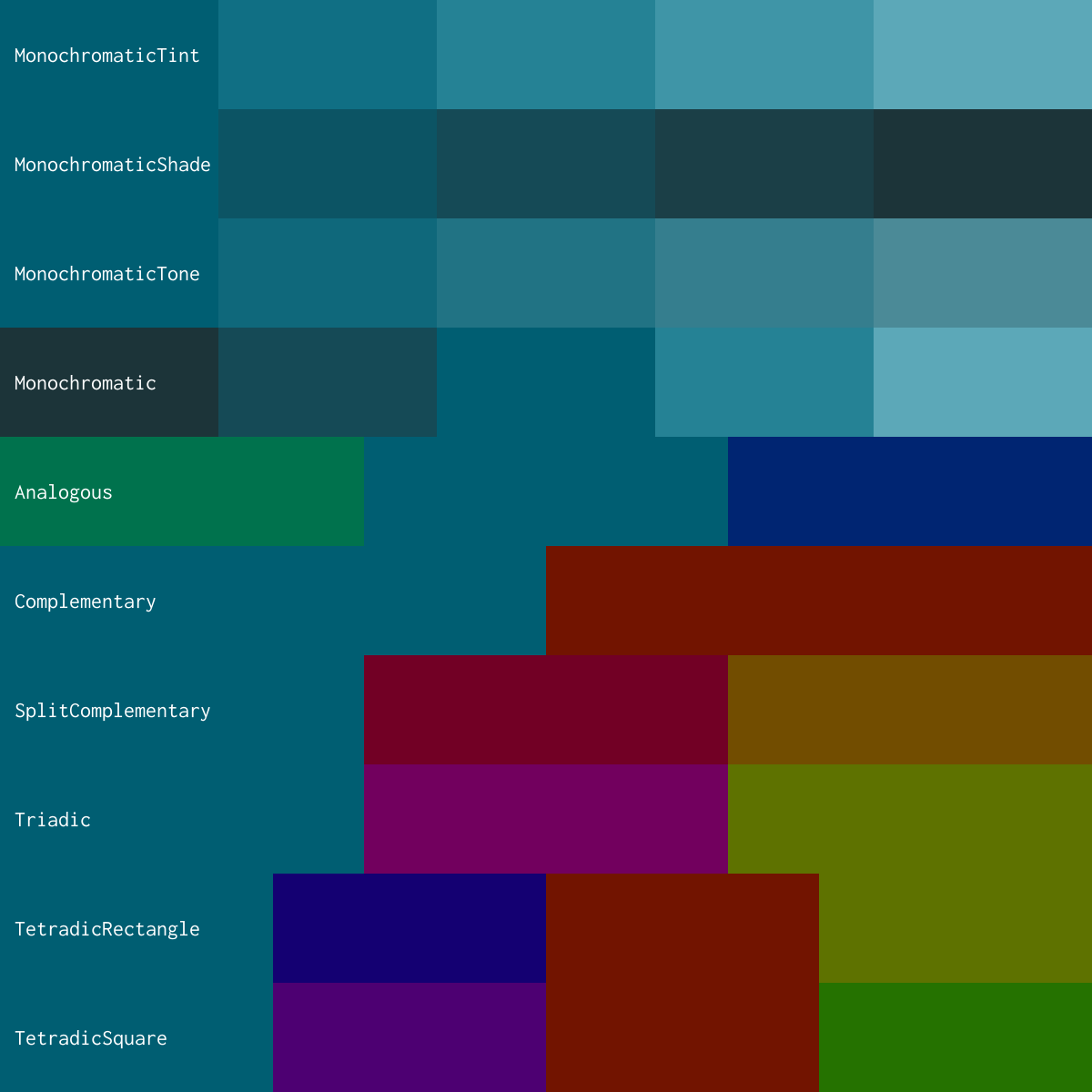
👁 Colour harmonies based on hue, created with Unicolour |
|---|---|
| Colour harmonies based on RYB pigments from Unicolour.Experimental | Colour harmonies based on hue from Unicolour.Experimental |
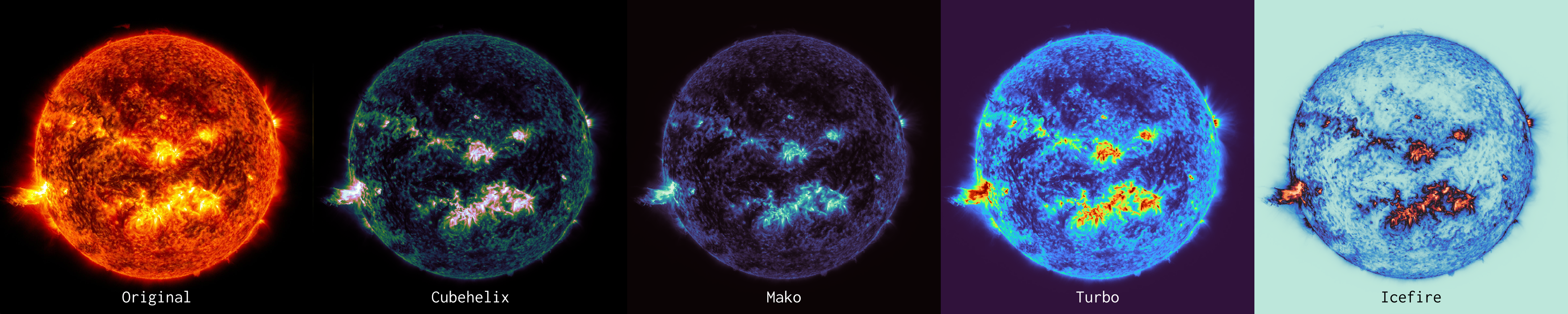
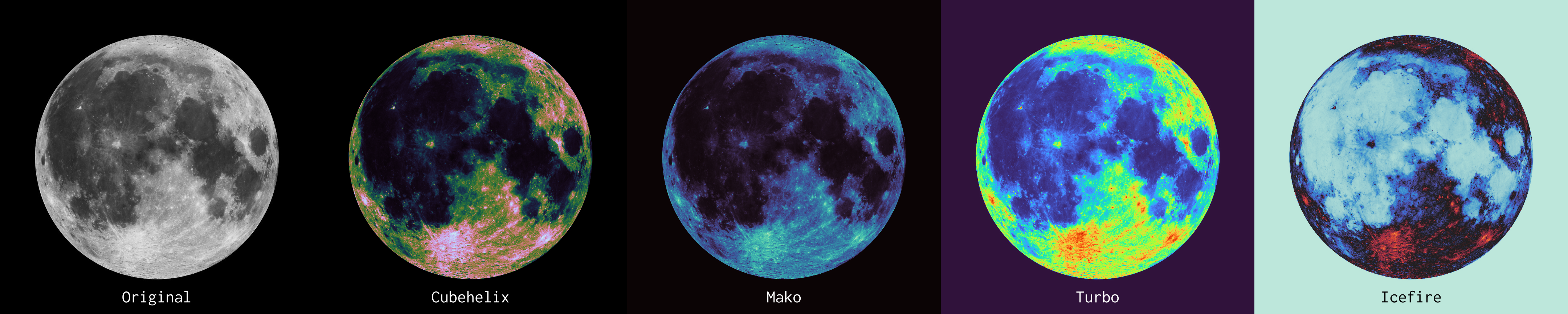
Example code to create heatmaps of luminance using 📷 SixLabors.ImageSharp with images from 🚀 NASA can be seen in the Example.Heatmaps project.
| 👁 Heatmap of the sun using perceptually uniform colourmaps from Unicolour.Datasets, created with Unicolour |
|---|
| Heatmap of the ☀️ sun using perceptually uniform colourmaps from Unicolour.Datasets |
| 👁 Heatmap of the moon using perceptually uniform colourmaps from Unicolour.Datasets, created with Unicolour |
|---|
| Heatmap of the 🌕 moon using perceptually uniform colourmaps from Unicolour.Datasets |
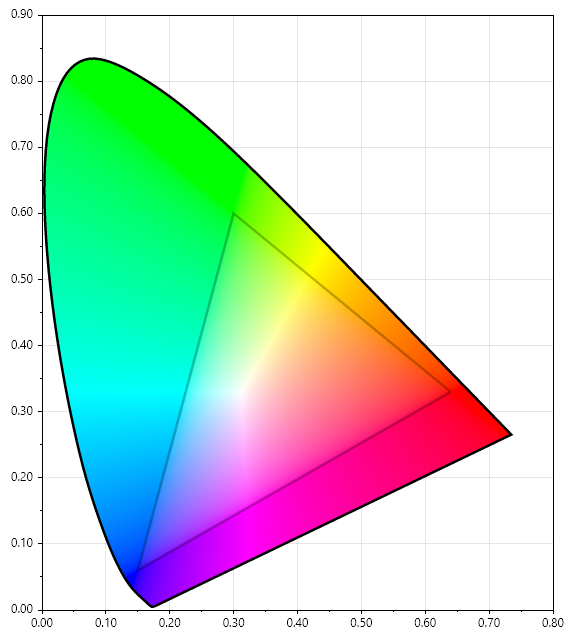
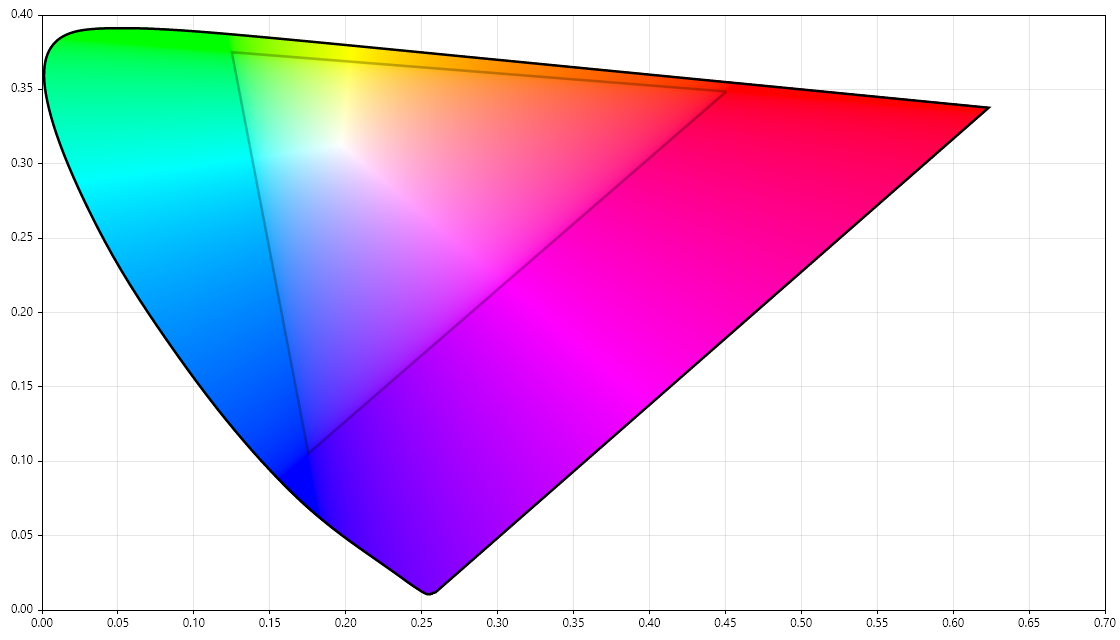
Example code to create diagrams of colour data using 📈 ScottPlot can be seen in the Example.Diagrams project.
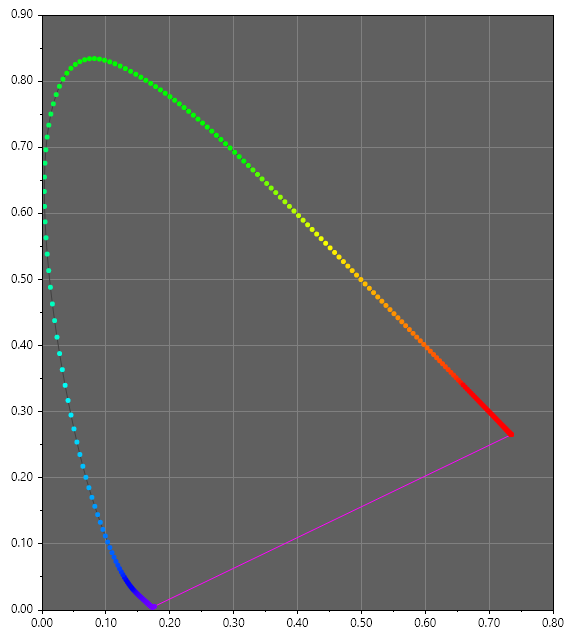
| 👁 CIE xy chromaticity diagram with sRGB gamut, created with Unicolour |
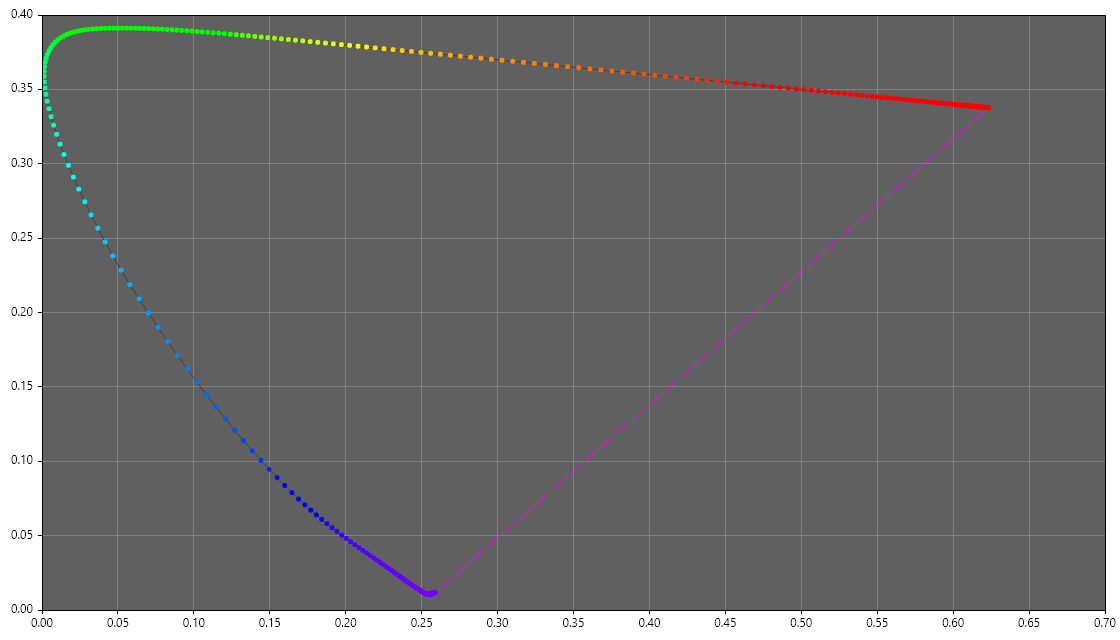
👁 CIE 1960 colour space with sRGB gamut, created with Unicolour |
|---|---|
| CIE xy chromaticity diagram with sRGB gamut | CIE 1960 colour space with sRGB gamut |
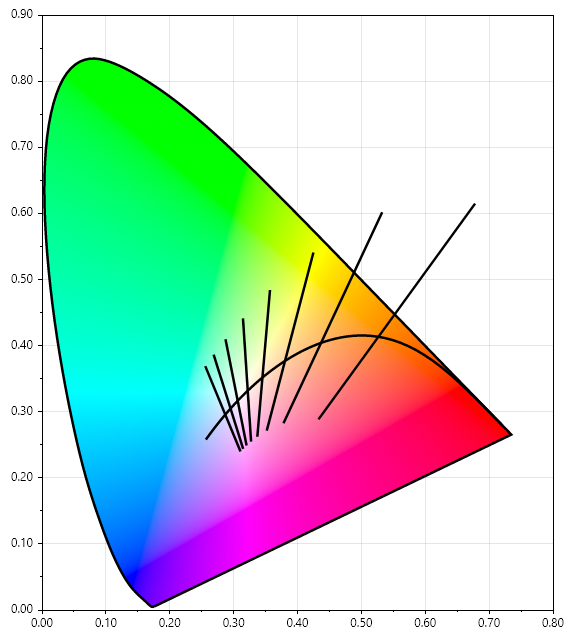
| 👁 CIE xy chromaticity diagram with Planckian or blackbody locus, created with Unicolour |
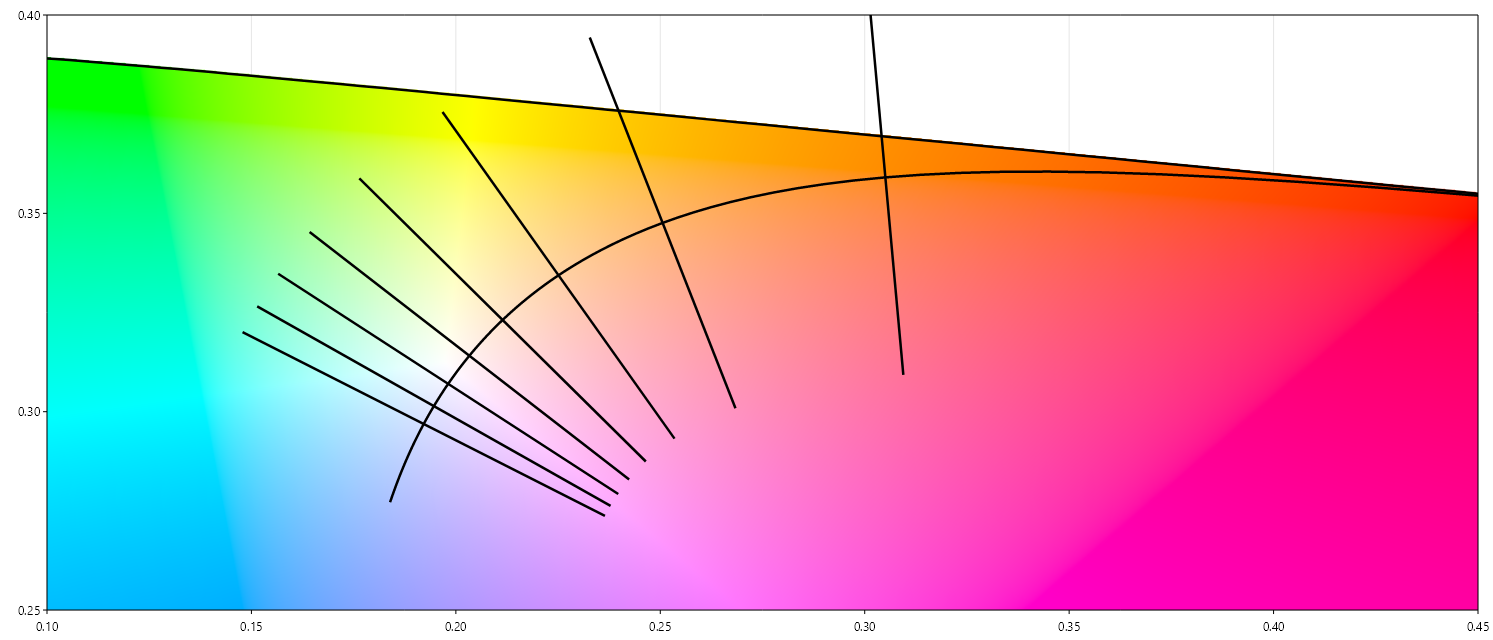
👁 CIE 1960 colour space with Planckian or blackbody locus, created with Unicolour |
|---|---|
| CIE xy chromaticity diagram with Planckian or blackbody locus | CIE 1960 colour space with Planckian or blackbody locus |
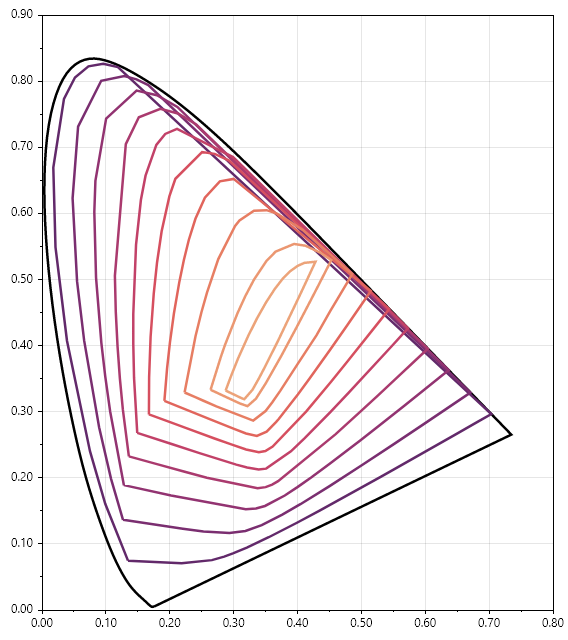
| 👁 CIE xy chromaticity diagram with MacAdam limits, created with Unicolour |
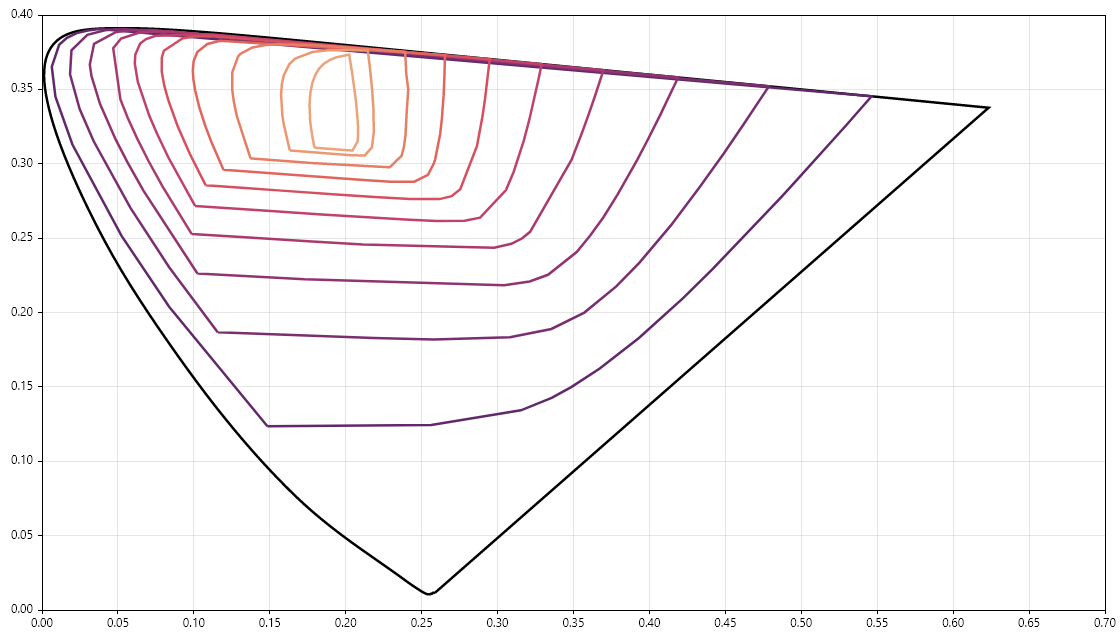
👁 CIE 1960 colour space with MacAdam limits, created with Unicolour |
|---|---|
| CIE xy chromaticity diagram with MacAdam limits | CIE 1960 colour space with MacAdam limits |
| 👁 CIE xy chromaticity diagram with spectral locus plotted at 1 nm intervals, created with Unicolour |
👁 CIE 1960 colour space with spectral locus plotted at 1 nm intervals, created with Unicolour |
|---|---|
| CIE xy chromaticity diagram with spectral locus plotted at 1 nm intervals | CIE 1960 colour space with spectral locus plotted at 1 nm intervals |
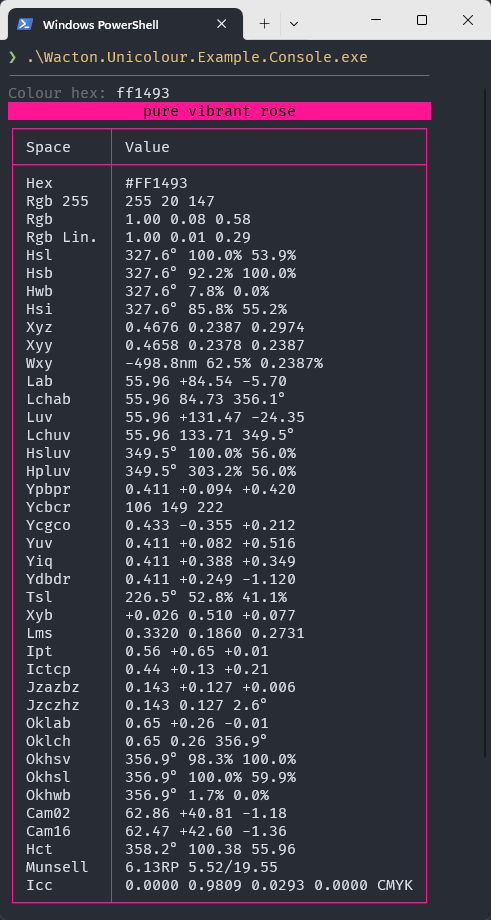
Example code to create a colourful console application using ⌨️ Spectre.Console can be seen in the Example.Console project.
| 👁 Console application displaying colour information from a hex value, created with Unicolour |
|---|
| Console application displaying colour information from a hex value |
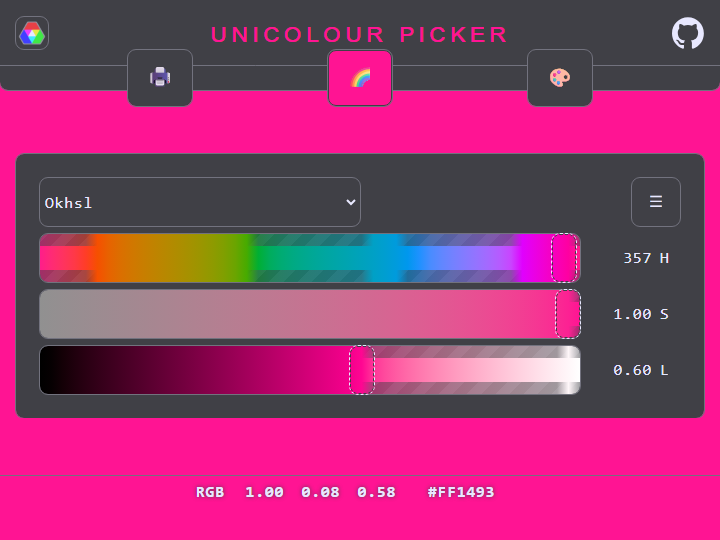
Example code to create a client-side colour picker web application using 🕸️ Blazor can be seen in the Example.Web project.
See the live demo!
| 👁 Web application for picking colours in any colour space, created with Unicolour |
|---|
| Web application for picking colours in any colour space |
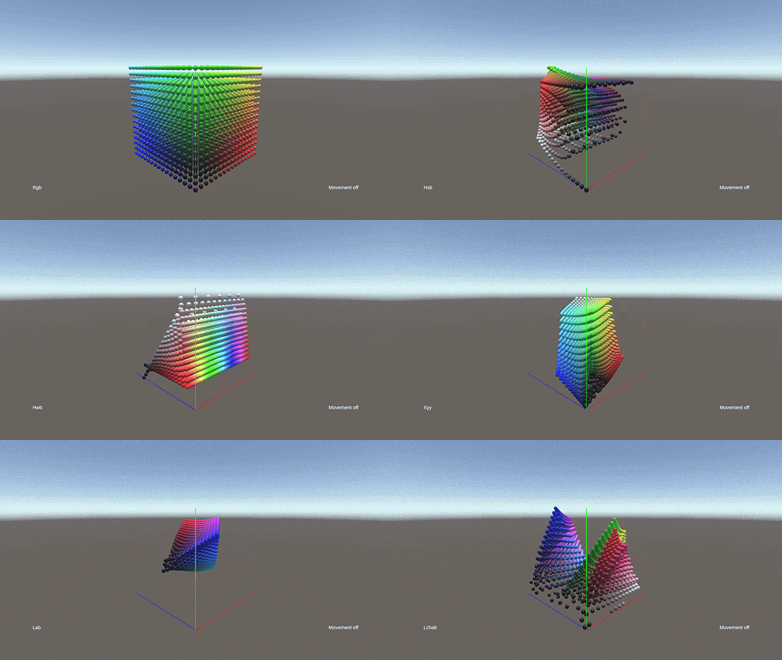
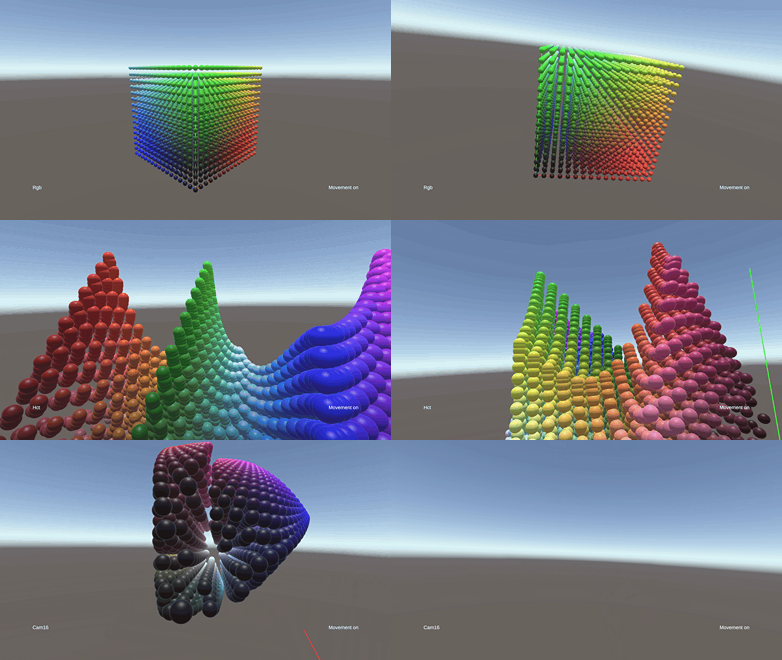
Example code to create 3D visualisations of colour spaces using 🎮 Unity can be seen in the Example.Unity project.
Try it out online in Unity Play!
| 👁 3D visualisation of colour spaces in Unity, created with Unicolour |
|---|
| 3D visualisation of colour spaces in Unity |
| 👁 3D movement through colour spaces in Unity, created with Unicolour |
|---|
| 3D movement through colour spaces in Unity |
Some colour datasets have been compiled for convenience in the Unicolour.Datasets project.
Commonly used sets of colours:
Perceptually uniform colourmaps / palettes:
Colour data used in academic literature:
Known pigments:
Example usage:
dotnet add package Wacton.Unicolour.Datasets
using Wacton.Unicolour.Datasets;
Unicolourvar pink = Css.DeepPink;
var green = Xkcd.NastyGreen;
var mapped = Colourmaps.Viridis.Map(0.5);
var palette = Colourmaps.Turbo.Palette(10);
There are additional useful features that are considered too ambiguous, indeterminate, or opinionated to be included as part of the core Unicolour library. These have been assembled in the Unicolour.Experimental project.
dotnet add package Wacton.Unicolour.Experimental
using Wacton.Unicolour.Experimental;
Traditionally, harmonious colour combinations are based on their relationship within a colour wheel. A colour wheel can be generated using pigments or a hued colour space.
/* populate pigment k and s with measurement data */
var quinaRed = new Pigment(380, 1, k: [], s: []);
var bismuthYellow = new Pigment(380, 1, k: [], s: []);
var ceruleanBlue = new Pigment(380, 1, k: [], s: []);
var titaniumWhite = new Pigment(380, 1, k: [], s: []);
var boneBlack = new Pigment(380, 1, k: [], s: []);

var colourWheel = usePigments
 ? ColourWheel.From(quinaRed, bismuthYellow, ceruleanBlue, titaniumWhite, boneBlack)
 : ColourWheel.From(ColourSpace.Oklch, reference: new Unicolour("ff0000"));

var orange = colourWheel.Pure(hue: 60);
var lightGreen = colourWheel.Tint(hue: 180, weight: 1);
var darkPurple = colourWheel.Shade(hue: 300, weight: 1);
var greyRed = colourWheel.Tone(hue: 0, weight: 1);

var orangePalette = colourWheel.Harmony(hue: 60, Harmony.Analogous);
| Colour harmony | Enum |
|---|---|
| Monochromatic (tint) | Harmony.MonochromaticTint |
| Monochromatic (shade) | Harmony.MonochromaticShade |
| Monochromatic (tone) | Harmony.MonochromaticTone |
| Monochromatic (tint and shade) | Harmony.Monochromatic |
| Analogous | Harmony.Analogous |
| Complementary | Harmony.Complementary |
| Split-complementary | Harmony.SplitComplementary |
| Triadic | Harmony.Triadic |
| Tetradic (rectangle) | Harmony.TetradicRectangle |
| Tetradic (square) | Harmony.TetradicSquare |
A reflectance curve can be generated for any colour, approximating a single-constant pigment. This enables Kubelka-Munk pigment mixing without taking reflectance measurements. Note that, similar to metamerism, there are infinitely many reflectance curves that can generate a single colour; this will find just one.
var redPigment = PigmentGenerator.From(new Unicolour("#FF0000"));
var bluePigment = PigmentGenerator.From(new Unicolour("#0000FF"));
var magenta = new Unicolour([redPigment, bluePigment], [0.5, 0.5]);
Spectral.js uses artificial reflectance curves to perform single-constant pigment mixing. However, input concentrations are adjusted according to luminance and a custom weighting curve that the author found to give aesthetically pleasing results. This behaviour has been replicated here except 1) reflectance curves are more accurately generated at a performance cost and 2) it has been extended to be able to mix more than two colours.
var blue = new Unicolour("#0000FF");
var yellow = new Unicolour("#FFFF00");
var green = SpectralJs.Mix([blue, yellow], [0.5, 0.5]);
var palette = SpectralJs.Palette(blue, yellow, 9);
Wacton.Unicolour is licensed under the MIT License, copyright © 2022-2026 William Acton.
| Product | Versions Compatible and additional computed target framework versions. |
|---|---|
| .NET | net5.0 net5.0 was computed. net5.0-windows net5.0-windows was computed. net6.0 net6.0 was computed. net6.0-android net6.0-android was computed. net6.0-ios net6.0-ios was computed. net6.0-maccatalyst net6.0-maccatalyst was computed. net6.0-macos net6.0-macos was computed. net6.0-tvos net6.0-tvos was computed. net6.0-windows net6.0-windows was computed. net7.0 net7.0 was computed. net7.0-android net7.0-android was computed. net7.0-ios net7.0-ios was computed. net7.0-maccatalyst net7.0-maccatalyst was computed. net7.0-macos net7.0-macos was computed. net7.0-tvos net7.0-tvos was computed. net7.0-windows net7.0-windows was computed. net8.0 net8.0 was computed. net8.0-android net8.0-android was computed. net8.0-browser net8.0-browser was computed. net8.0-ios net8.0-ios was computed. net8.0-maccatalyst net8.0-maccatalyst was computed. net8.0-macos net8.0-macos was computed. net8.0-tvos net8.0-tvos was computed. net8.0-windows net8.0-windows was computed. net9.0 net9.0 was computed. net9.0-android net9.0-android was computed. net9.0-browser net9.0-browser was computed. net9.0-ios net9.0-ios was computed. net9.0-maccatalyst net9.0-maccatalyst was computed. net9.0-macos net9.0-macos was computed. net9.0-tvos net9.0-tvos was computed. net9.0-windows net9.0-windows was computed. net10.0 net10.0 was computed. net10.0-android net10.0-android was computed. net10.0-browser net10.0-browser was computed. net10.0-ios net10.0-ios was computed. net10.0-maccatalyst net10.0-maccatalyst was computed. net10.0-macos net10.0-macos was computed. net10.0-tvos net10.0-tvos was computed. net10.0-windows net10.0-windows was computed. |
| .NET Core | netcoreapp2.0 netcoreapp2.0 was computed. netcoreapp2.1 netcoreapp2.1 was computed. netcoreapp2.2 netcoreapp2.2 was computed. netcoreapp3.0 netcoreapp3.0 was computed. netcoreapp3.1 netcoreapp3.1 was computed. |
| .NET Standard | netstandard2.0 netstandard2.0 is compatible. netstandard2.1 netstandard2.1 was computed. |
| .NET Framework | net461 net461 was computed. net462 net462 was computed. net463 net463 was computed. net47 net47 was computed. net471 net471 was computed. net472 net472 was computed. net48 net48 was computed. net481 net481 was computed. |
| MonoAndroid | monoandroid monoandroid was computed. |
| MonoMac | monomac monomac was computed. |
| MonoTouch | monotouch monotouch was computed. |
| Tizen | tizen40 tizen40 was computed. tizen60 tizen60 was computed. |
| Xamarin.iOS | xamarinios xamarinios was computed. |
| Xamarin.Mac | xamarinmac xamarinmac was computed. |
| Xamarin.TVOS | xamarintvos xamarintvos was computed. |
| Xamarin.WatchOS | xamarinwatchos xamarinwatchos was computed. |
Showing the top 5 NuGet packages that depend on Wacton.Unicolour:
| Package | Downloads |
|---|---|
|
VL.Interpolator
Powerfull binary search set of nodes for vl, to interpolate any kind of type. |
|
|
Wacton.Unicolour.Datasets
Datasets for use with 🌈 Wacton.Unicolour |
|
|
IdentitySuite
A ready-to-use OpenId Connect Server based on Openiddict with Microsoft Identity and a comprehensive management shell. |
|
|
VL.Unicolour
Unicolour for VL |
|
|
Lxman.PdfLibrary
A comprehensive .NET library for parsing, rendering, and creating PDF documents. Pure C# implementation with support for PDF 1.x and 2.0. |
Showing the top 3 popular GitHub repositories that depend on Wacton.Unicolour:
| Repository | Stars |
|---|---|
|
SixLabors/ImageSharp
:camera: A modern, cross-platform, 2D Graphics library for .NET
|
|
|
PCL-Community/PCL-CE
PCL 社区版 由社区开发者维护与管理
|
|
|
theron-wang/Tailwind-CSS-for-Visual-Studio
Unofficial Tailwind CSS extension for IntelliSense, linting, sorting, and more to enhance the development experience in Visual Studio 2026 and 2022.
|
| Version | Downloads | Last Updated |
|---|---|---|
| 7.0.0 | 11,677 | 4/19/2026 |
| 6.4.0 | 53,067 | 1/8/2026 |
| 6.3.0 | 21,396 | 10/6/2025 |
| 6.2.0 | 17,147 | 8/1/2025 |
| 6.1.0 | 4,280 | 6/9/2025 |
| 6.0.0 | 8,763 | 4/22/2025 |
| 5.0.0 | 3,055 | 2/8/2025 |
| 4.8.0 | 1,502 | 1/5/2025 |
| 4.7.0 | 3,335 | 11/1/2024 |
| 4.6.0 | 6,021 | 8/1/2024 |
| 4.5.0 | 1,378 | 6/21/2024 |
| 4.4.0 | 2,822 | 5/9/2024 |
| 4.3.0 | 8,140 | 4/17/2024 |
| 4.2.0 | 856 | 3/24/2024 |
| 4.1.0 | 932 | 2/13/2024 |
| 4.0.0 | 648 | 1/27/2024 |
| 3.0.0 | 1,343 | 11/5/2023 |
| 2.5.0 | 1,318 | 10/22/2023 |
| 2.4.0 | 454 | 10/7/2023 |
| 2.3.0 | 368 | 9/24/2023 |
Improve chromatic preservation and add achromatic constructors