|
VOOZH | about |
|
VOOZH | about |
dotnet add package Serilog.Sinks.Console --version 6.1.1
NuGet\Install-Package Serilog.Sinks.Console -Version 6.1.1
<PackageReference Include="Serilog.Sinks.Console" Version="6.1.1" />
<PackageVersion Include="Serilog.Sinks.Console" Version="6.1.1" />Directory.Packages.props
<PackageReference Include="Serilog.Sinks.Console" />Project file
paket add Serilog.Sinks.Console --version 6.1.1
#r "nuget: Serilog.Sinks.Console, 6.1.1"
#:package Serilog.Sinks.Console@6.1.1
#addin nuget:?package=Serilog.Sinks.Console&version=6.1.1Install as a Cake Addin
#tool nuget:?package=Serilog.Sinks.Console&version=6.1.1Install as a Cake Tool
A Serilog sink that writes log events to the Windows Console or an ANSI terminal via standard output. Coloring and custom themes are supported, including ANSI 256-color themes on macOS, Linux and Windows 10+. The default output is plain text; JSON formatting can be plugged in using Serilog.Formatting.Compact or the fully-customizable Serilog.Expressions.
To use the console sink, first install the NuGet package:
dotnet add package Serilog.Sinks.Console
Then enable the sink using WriteTo.Console():
Log.Logger = new LoggerConfiguration()
 .WriteTo.Console()
 .CreateLogger();

Log.Information("Hello, world!");
Log events will be printed to STDOUT:
[12:50:51 INF] Hello, world!
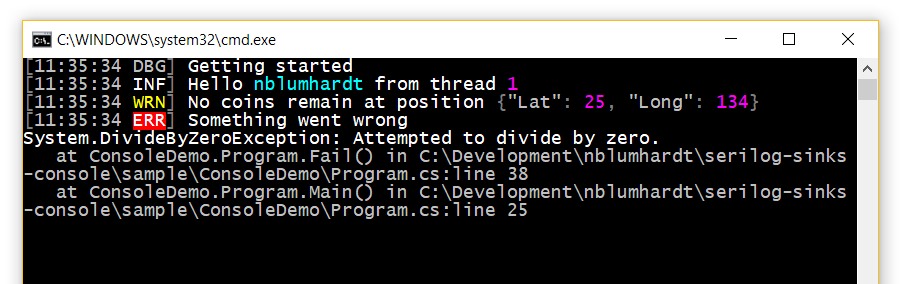
The sink will colorize output by default:
Themes can be specified when configuring the sink:
.WriteTo.Console(theme: AnsiConsoleTheme.Code)
The following built-in themes are available:
ConsoleTheme.None - no stylingSystemConsoleTheme.Literate - styled to replicate Serilog.Sinks.Literate, using the System.Console coloring modes supported on all Windows/.NET targets; this is the default when no theme is specifiedSystemConsoleTheme.Grayscale - a theme using only shades of gray, white, and blackAnsiConsoleTheme.Literate - an ANSI 256-color version of the "literate" themeAnsiConsoleTheme.Grayscale - an ANSI 256-color version of the "grayscale" themeAnsiConsoleTheme.Code - an ANSI 256-color Visual Studio Code-inspired themeAnsiConsoleTheme.Sixteen - an ANSI 16-color theme that works well with both light and dark backgroundsAdding a new theme is straightforward; examples can be found in the SystemConsoleThemes and AnsiConsoleThemes classes.
The format of events to the console can be modified using the outputTemplate configuration parameter:
 .WriteTo.Console(
 outputTemplate: "[{Timestamp:HH:mm:ss} {Level:u3}] {Message:lj}{NewLine}{Exception}")
The default template, shown in the example above, uses built-in properties like Timestamp and Level. Properties from events, including those attached using enrichers, can also appear in the output template.
The sink can write JSON output instead of plain text. CompactJsonFormatter or RenderedCompactJsonFormatter from Serilog.Formatting.Compact is recommended:
dotnet add package Serilog.Formatting.Compact
Pass a formatter to the Console() configuration method:
.WriteTo.Console(new RenderedCompactJsonFormatter())
Output theming is not available when custom formatters are used.
<appSettings> configurationTo use the console sink with the Serilog.Settings.AppSettings package, first install that package if you haven't already done so:
dotnet add package Serilog.Settings.AppSettings
Instead of configuring the logger in code, call ReadFrom.AppSettings():
var log = new LoggerConfiguration()
 .ReadFrom.AppSettings()
 .CreateLogger();
In your application's App.config or Web.config file, specify the console sink assembly under the <appSettings> node:
<configuration>
 <appSettings>
 <add key="serilog:using:Console" value="Serilog.Sinks.Console" />
 <add key="serilog:write-to:Console" />
To configure the console sink with a different theme and include the SourceContext in the output, change your App.config/Web.config to:
<configuration>
<appSettings>
<add key="serilog:using:Console" value="Serilog.Sinks.Console" />
<add key="serilog:write-to:Console.theme" value="Serilog.Sinks.SystemConsole.Themes.AnsiConsoleTheme::Code, Serilog.Sinks.Console" />
<add key="serilog:write-to:Console.outputTemplate" value="[{Timestamp:HH:mm:ss} {Level:u3}] {Message:lj} <s:{SourceContext}>{NewLine}{Exception}" />
appsettings.json configurationTo use the console sink with Microsoft.Extensions.Configuration, for example with ASP.NET Core or .NET Core, use the Serilog.Settings.Configuration package. First install that package if you have not already done so:
dotnet add package Serilog.Settings.Configuration
Instead of configuring the sink directly in code, call ReadFrom.Configuration():
var configuration = new ConfigurationBuilder()
 .AddJsonFile("appsettings.json")
 .Build();

var logger = new LoggerConfiguration()
 .ReadFrom.Configuration(configuration)
 .CreateLogger();
In your appsettings.json file, under the Serilog node, :
{
 "Serilog": {
 "WriteTo": [{"Name": "Console"}]
 }
}
To configure the console sink with a different theme and include the SourceContext in the output, change your appsettings.json to:
{
 "Serilog": {
 "WriteTo": [
 {
 "Name": "Console",
 "Args": {
 "theme": "Serilog.Sinks.SystemConsole.Themes.AnsiConsoleTheme::Code, Serilog.Sinks.Console",
 "outputTemplate": "[{Timestamp:HH:mm:ss} {Level:u3}] {Message:lj} <s:{SourceContext}>{NewLine}{Exception}"
 }
 }
 ]
 }
}
Console logging is synchronous and this can cause bottlenecks in some deployment scenarios. For high-volume console logging, consider using Serilog.Sinks.Async to move console writes to a background thread:
// dotnet add package serilog.sinks.async

Log.Logger = new LoggerConfiguration()
 .WriteTo.Async(wt => wt.Console())
 .CreateLogger();
Would you like to help make the Serilog console sink even better? We keep a list of issues that are approachable for newcomers under the up-for-grabs label. Before starting work on a pull request, we suggest commenting on, or raising, an issue on the issue tracker so that we can help and coordinate efforts. For more details check out our .
When contributing please keep in mind our .
Copyright © Serilog Contributors - Provided under the Apache License, Version 2.0.
| Product | Versions Compatible and additional computed target framework versions. |
|---|---|
| .NET | net5.0 net5.0 was computed. net5.0-windows net5.0-windows was computed. net6.0 net6.0 is compatible. net6.0-android net6.0-android was computed. net6.0-ios net6.0-ios was computed. net6.0-maccatalyst net6.0-maccatalyst was computed. net6.0-macos net6.0-macos was computed. net6.0-tvos net6.0-tvos was computed. net6.0-windows net6.0-windows was computed. net7.0 net7.0 was computed. net7.0-android net7.0-android was computed. net7.0-ios net7.0-ios was computed. net7.0-maccatalyst net7.0-maccatalyst was computed. net7.0-macos net7.0-macos was computed. net7.0-tvos net7.0-tvos was computed. net7.0-windows net7.0-windows was computed. net8.0 net8.0 is compatible. net8.0-android net8.0-android was computed. net8.0-browser net8.0-browser was computed. net8.0-ios net8.0-ios was computed. net8.0-maccatalyst net8.0-maccatalyst was computed. net8.0-macos net8.0-macos was computed. net8.0-tvos net8.0-tvos was computed. net8.0-windows net8.0-windows was computed. net9.0 net9.0 was computed. net9.0-android net9.0-android was computed. net9.0-browser net9.0-browser was computed. net9.0-ios net9.0-ios was computed. net9.0-maccatalyst net9.0-maccatalyst was computed. net9.0-macos net9.0-macos was computed. net9.0-tvos net9.0-tvos was computed. net9.0-windows net9.0-windows was computed. net10.0 net10.0 was computed. net10.0-android net10.0-android was computed. net10.0-browser net10.0-browser was computed. net10.0-ios net10.0-ios was computed. net10.0-maccatalyst net10.0-maccatalyst was computed. net10.0-macos net10.0-macos was computed. net10.0-tvos net10.0-tvos was computed. net10.0-windows net10.0-windows was computed. |
| .NET Core | netcoreapp2.0 netcoreapp2.0 was computed. netcoreapp2.1 netcoreapp2.1 was computed. netcoreapp2.2 netcoreapp2.2 was computed. netcoreapp3.0 netcoreapp3.0 was computed. netcoreapp3.1 netcoreapp3.1 was computed. |
| .NET Standard | netstandard2.0 netstandard2.0 is compatible. netstandard2.1 netstandard2.1 was computed. |
| .NET Framework | net461 net461 was computed. net462 net462 is compatible. net463 net463 was computed. net47 net47 was computed. net471 net471 is compatible. net472 net472 was computed. net48 net48 was computed. net481 net481 was computed. |
| MonoAndroid | monoandroid monoandroid was computed. |
| MonoMac | monomac monomac was computed. |
| MonoTouch | monotouch monotouch was computed. |
| Tizen | tizen40 tizen40 was computed. tizen60 tizen60 was computed. |
| Xamarin.iOS | xamarinios xamarinios was computed. |
| Xamarin.Mac | xamarinmac xamarinmac was computed. |
| Xamarin.TVOS | xamarintvos xamarintvos was computed. |
| Xamarin.WatchOS | xamarinwatchos xamarinwatchos was computed. |
Showing the top 5 NuGet packages that depend on Serilog.Sinks.Console:
| Package | Downloads |
|---|---|
|
Serilog.AspNetCore
Serilog support for ASP.NET Core logging |
|
|
Pulumi
The Pulumi .NET SDK lets you write cloud programs in C#, F#, and VB.NET. |
|
|
Serilog.Sinks.Literate
Now replaced by Serilog.Sinks.Console, please use that package instead. An alternative colored console sink for Serilog that pretty-prints properties. |
|
|
Serilog.Sinks.ColoredConsole
Now replaced by Serilog.Sinks.Console, please use that package instead. The colored console sink for Serilog |
|
|
IppDotNetSdkForQuickBooksApiV3
The IPP .NET SDK for QuickBooks V3 is a set of .NET classes that make it easier to call QuickBooks APIs. This is the .Net Standard 2.0 version of the .Net SDK |
Showing the top 20 popular GitHub repositories that depend on Serilog.Sinks.Console:
| Repository | Stars |
|---|---|
|
jellyfin/jellyfin
The Free Software Media System - Server Backend & API
|
|
|
netchx/netch
A simple proxy client
|
|
|
abpframework/abp
Open-source web application framework for ASP.NET Core! Offers an opinionated architecture to build enterprise software solutions with best practices on top of the .NET. Provides the fundamental infrastructure, cross-cutting-concern implementations, startup templates, application modules, UI themes, tooling and documentation.
|
|
|
babalae/better-genshin-impact
📦BetterGI · 更好的原神 - 自动拾取 | 自动剧情 | 全自动钓鱼(AI) | 全自动七圣召唤 | 自动伐木 | 自动刷本 | 自动采集/挖矿/锄地 | 一条龙 | 全连音游 | 自动烹饪 - UI Automation Testing Tools For Genshin Impact
|
|
|
Kareadita/Kavita
Kavita is a fast, feature rich, cross platform reading server. Built with the goal of being a full solution for all your reading needs. Setup your own server and share your reading collection with your friends and family.
|
|
|
dotnet/yarp
A toolkit for developing high-performance HTTP reverse proxy applications.
|
|
|
reactiveui/refit
The automatic type-safe REST library for .NET Core, Xamarin and .NET. Heavily inspired by Square's Retrofit library, Refit turns your REST API into a live interface.
|
|
|
RayWangQvQ/BiliBiliToolPro
B 站(bilibili)自动任务工具,支持docker、青龙、k8s等多种部署方式。全面拥抱AI。敏感肌也能用。
|
|
|
subhra74/xdm
Powerfull download accelerator and video downloader
|
|
|
quartznet/quartznet
Quartz Enterprise Scheduler .NET
|
|
|
Sylinko/Everywhere
On-screen aware AI assistant for your desktop. Uses current app context, multiple LLMs, and MCP tools to help you act across apps.
|
|
|
kurrent-io/KurrentDB
KurrentDB is a database that's engineered for modern software applications and event-driven architectures. Its event-native design simplifies data modeling and preserves data integrity while the integrated streaming engine solves distributed messaging challenges and ensures data consistency.
|
|
|
win-acme/win-acme
Automate SSL/TLS certificates on Windows with ease
|
|
|
rmcrackan/Libation
Libation: Liberate your Library
|
|
|
anjoy8/Blog.Core
💖 ASP.NET Core 8.0 全家桶教程,前后端分离后端接口,vue教程姊妹篇,官方文档:
|
|
|
dotnet/tye
Tye is a tool that makes developing, testing, and deploying microservices and distributed applications easier. Project Tye includes a local orchestrator to make developing microservices easier and the ability to deploy microservices to Kubernetes with minimal configuration.
|
|
|
timschneeb/GalaxyBudsClient
Unofficial Galaxy Buds Manager for Windows, macOS, Linux, and Android
|
|
|
BililiveRecorder/BililiveRecorder
录播姬 | mikufans 生放送录制
|
|
|
microsoft/ApplicationInspector
A source code analyzer built for surfacing features of interest and other characteristics to answer the question 'What's in the code?' quickly using static analysis with a json based rules engine. Ideal for scanning components before use or detecting feature level changes.
|
|
|
modelcontextprotocol/csharp-sdk
The official C# SDK for Model Context Protocol servers and clients. Maintained in collaboration with Microsoft.
|
| Version | Downloads | Last Updated |
|---|---|---|
| 6.1.1 | 47,993,590 | 11/2/2025 |
| 6.1.1-dev-02312 | 3,662 | 11/2/2025 |
| 6.1.1-dev-02311 | 444 | 11/2/2025 |
| 6.1.0 | 421,465 | 11/2/2025 |
| 6.1.0-dev-02308 | 316 | 11/2/2025 |
| 6.1.0-dev-02307 | 323 | 11/2/2025 |
| 6.0.1-dev-00953 | 535,652 | 2/19/2025 |
| 6.0.0 | 184,989,851 | 6/9/2024 |
| 6.0.0-dev-00946 | 637 | 6/9/2024 |
| 5.1.0-dev-00943 | 734,604 | 3/17/2024 |
| 5.0.2-dev-00942 | 1,149 | 3/17/2024 |
| 5.0.1 | 59,483,854 | 11/28/2023 |
| 5.0.1-dev-00928 | 1,102 | 11/28/2023 |
| 5.0.0 | 124,611,578 | 11/9/2023 |
| 5.0.0-dev-00923 | 102,220 | 10/12/2023 |
| 4.2.0-dev-00918 | 693,488 | 7/21/2023 |
| 4.1.1-dev-00917 | 30,498 | 7/21/2023 |
| 4.1.1-dev-00910 | 466,323 | 3/14/2023 |
| 4.1.1-dev-00907 | 290,095 | 2/3/2023 |
| 4.1.1-dev-00901 | 138,982 | 1/6/2023 |