
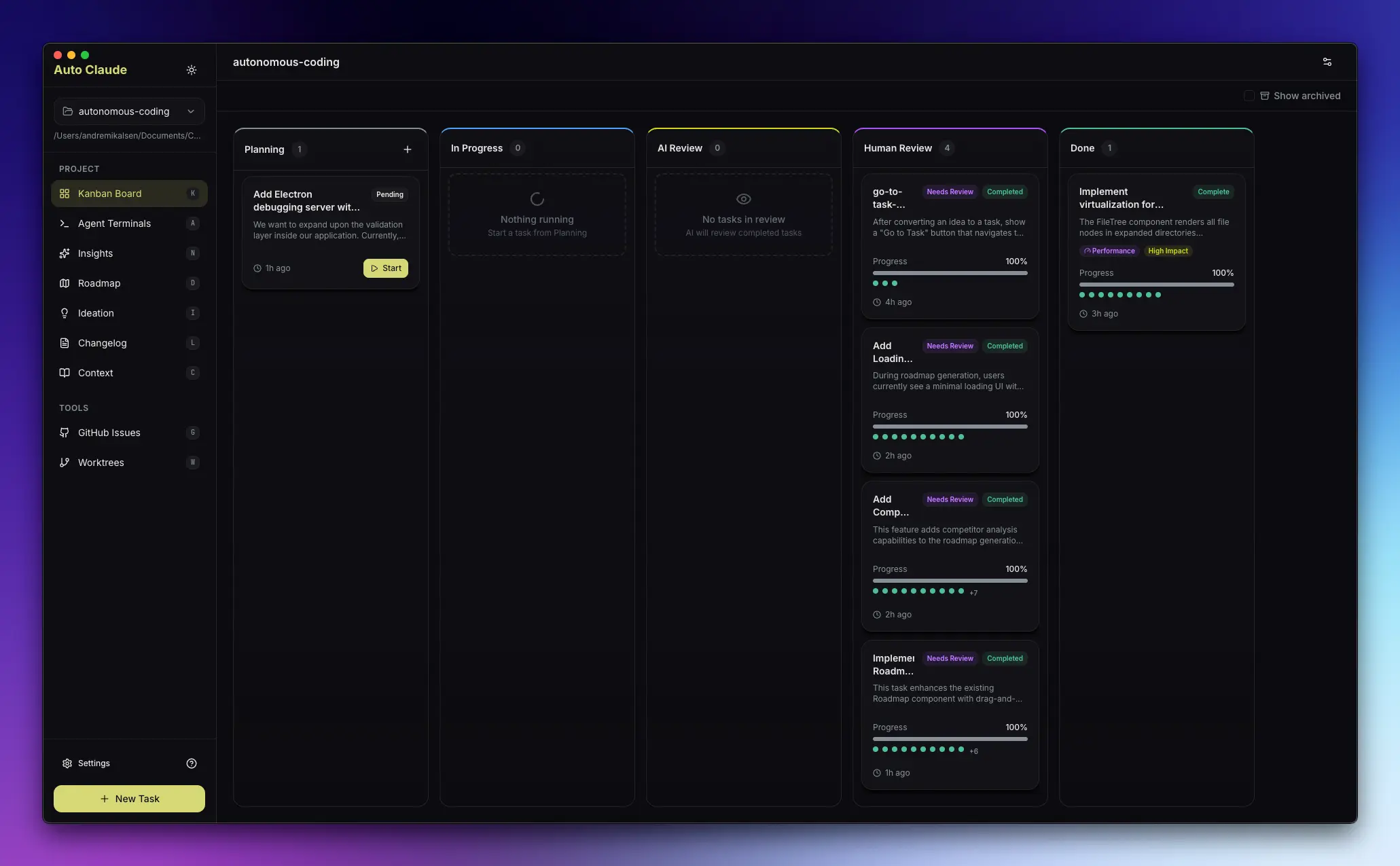
Aperant, formerly Auto Claude, is an open-source desktop app and multi-agent coding framework that runs Claude Code agents across isolated software development tasks.
The app turns Claude Code into a managed workflow for planning, coding, validation, and merge review. You describe the feature, bug fix, refactor, or documentation task, and Aperant coordinates agents through project discovery, implementation planning, code changes, QA checks, and review.
Aperant itself is free to use under the AGPL-3.0 license, but the normal setup requires Claude Code CLI access, a Claude Pro or Max subscription, and a Git repository.
It works best when your project needs multiple isolated coding tasks, visible task progress, and a review path before changes reach the main branch.
Features
Autonomous Task Execution: Agents create a specification, plan the implementation, edit files, and run validation checks. You can keep your own review step before code reaches the main branch.
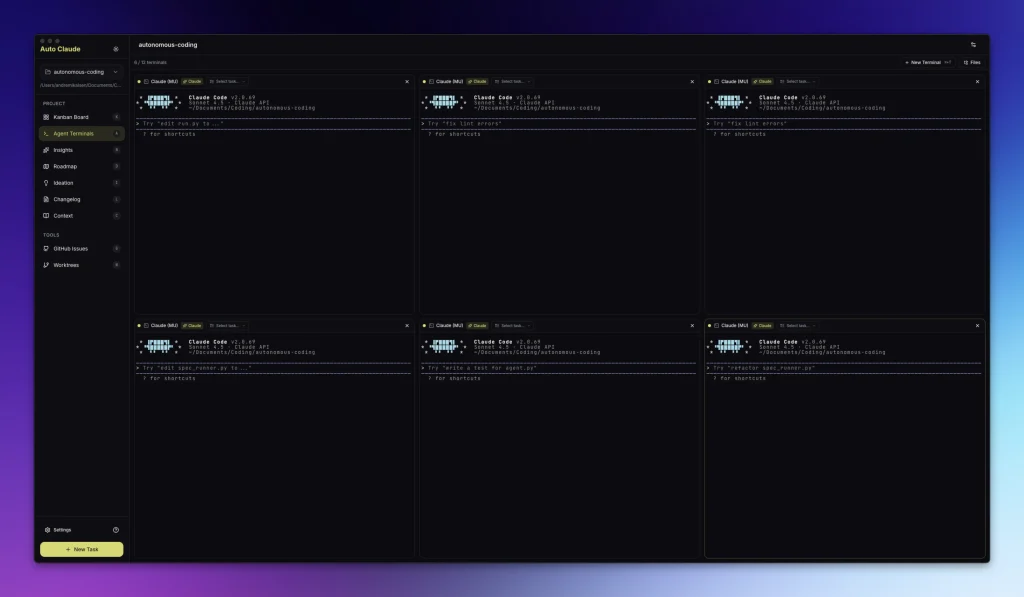
Parallel Agent Terminals: Aperant runs multiple Claude Code sessions at the same time. The interface supports up to 12 agent terminals, one-click task context injection, and terminal font controls with operating system defaults.
Git Worktree Isolation: Each task runs in a separate git worktree. Your main branch stays available while agents work on fixes, features, documentation, or refactors in isolated directories.
Self-Validating QA Loop: Aperant adds a reviewer and fixer pattern after implementation. The QA reviewer checks the work against acceptance criteria, and the fixer agent can address reported issues before you review the final diff.
AI-Powered Merge Resolution: The app detects merge conflicts between the task branch and the main branch. It uses git auto-merge for simple cases and AI conflict handling for regions that need a coding decision.
Cross-Session Memory Layer: Newer Aperant builds use an embedded LadybugDB memory layer. This removes the old Docker and FalkorDB setup path for the memory system and keeps agent context closer to the desktop app.
Context Engineering: Agents inspect your project structure before writing code. They use project discovery, requirements gathering, specification creation, and planning steps so the implementation can follow the existing codebase.
Multi-Platform Support: Aperant has desktop builds for Windows, macOS, and Linux. The current user setup requires a Claude Pro or Max subscription, the Claude Code CLI, and a project initialized as a Git repository.
Visual Project Management: The Kanban board shows tasks across planning, coding, review, and completion states. Recent releases add a collapsible sidebar, expandable task descriptions, task screenshot capture, and bulk worktree operations.
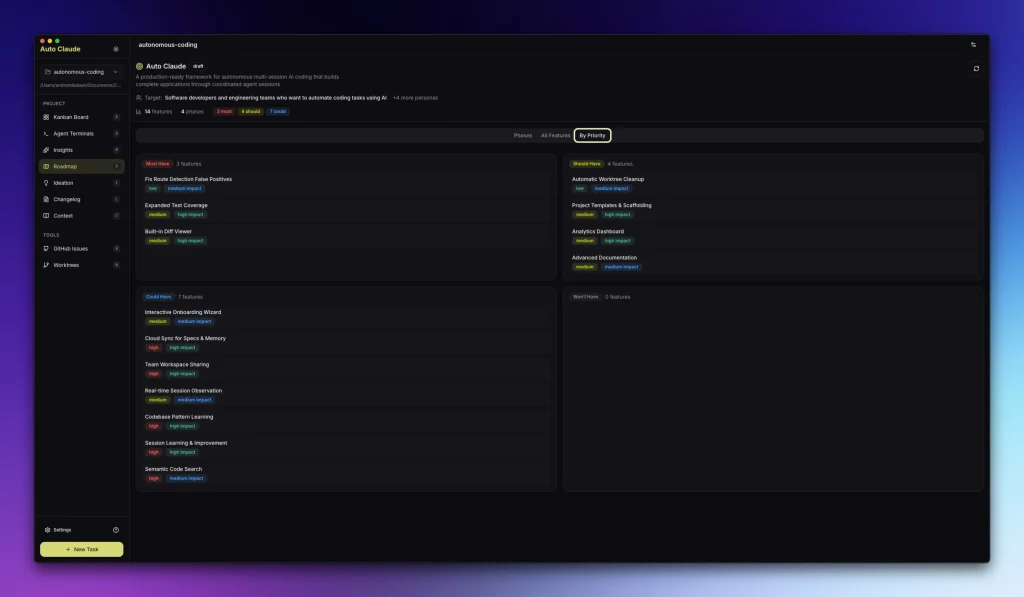
Roadmap Planning: Aperant includes roadmap planning with expand and collapse controls for phase features. The roadmap view syncs with the task lifecycle as work moves through the board.
Ideation Support: The Insights and Ideation areas inspect a project and propose refactors, performance work, security fixes, documentation gaps, and UI improvements. Treat those ideas as starting points, then convert the useful ones into tasks.
GitHub and GitLab Integration: Aperant imports issues, investigates repository tasks with AI, and creates merge requests. Recent releases also add AI-generated PR templates, better GitHub error messages, and improved PR review visibility.
Professional Changelog Generation: The app generates release notes from completed tasks or from commit history. This works well when your project already treats agent work as reviewable changes.
Use Cases
Feature Development: You can describe a feature such as OAuth login, role permissions, or a new dashboard. Aperant creates the task specification, breaks the work into implementation steps, edits the relevant files, and prepares the change for review.
Bug Fixing at Scale: Create separate tasks for several unrelated bugs. Aperant runs them in separate worktrees, so each fix can be tested and merged on its own schedule.
Code Refactoring: You can ask the Ideation feature to inspect a codebase and identify refactor candidates. The useful suggestions can become implementation tasks with isolated branches and reviewable diffs.
Documentation Generation: Create a task for API docs, onboarding notes, inline comments, or release notes. Aperant inspects the repository and drafts documentation that matches the code structure.
Multi-Feature Parallel Development: Run separate tasks for a dashboard, export feature, and notification flow. Each agent works in its own worktree, and you merge each result only after review.
How to Use Aperant
1. Download the stable release for your operating system from the Aperant releases page.
2. Install the Claude Code CLI before you start using the desktop app.
npm install -g @anthropic-ai/claude-code
3. Prepare a Git repository for the project you want agents to edit. Aperant relies on git worktrees, so a normal project folder without Git is not enough.
cd your-project
git init
git add .
git commit -m "Initial commit"
4. Open Aperant and select your project folder. The app scans the repository and prepares its project task workspace.
5. Connect Claude through the app’s account flow. Aperant needs a Claude Pro or Max subscription because it depends on Claude Code CLI access.
6. Click “New Task” in the Kanban board. Write the task as a concrete engineering request with acceptance criteria, affected areas, and limits. A precise task description reduces correction work later.
7. Let Aperant move the task through discovery, requirements gathering, specification creation, planning, implementation, and QA validation. You can pause work from the interface or stop the running terminal process when needed.
8. Review the completed work in the task panel and test the isolated worktree shown by the app. Run your normal project checks from that worktree before you merge anything.
9. Merge the change only after the diff, tests, and behavior look right. Discard a worktree when the result is wrong, or create a follow-up task that asks the agents to fix specific issues.
Pros
- Parallel Development: Run several tasks at once.
- Main Branch Protection: Work happens in git worktrees.
- Reviewable AI Work: The app prepares diffs before merge.
- Built-In QA Flow: Reviewer and fixer agents reduce manual cleanup.
- Embedded Memory Layer: Newer builds use LadybugDB locally.
- Project Discovery: Agents inspect the codebase before edits.
- Cross-Platform Builds: Windows, macOS, and Linux are supported.
- Open-Source License: Aperant is released under AGPL-3.0.
Cons
- Requires Claude Subscription: Claude Code access needs a paid Claude plan.
- Requires Claude Code CLI: The desktop app depends on Anthropic’s CLI.
- Requires Git: Projects must be initialized repositories.
- Beta Risk: Beta releases can contain bugs or incomplete features.
- Local Resource Use: Parallel agent terminals can consume memory and CPU.
- License Constraints: AGPL-3.0 matters for distribution and service use.
Related Resources
- The Ultimate Claude Code Resource List: A curated list of free agents, skills, and plugins for Claude Code.
- Aperant GitHub Repository: Source code, issues, discussions, license, and release links.
- Aperant Releases: Download stable and beta installers for Windows, macOS, and Linux.
- Claude Code Documentation: Read the official guide for Claude Code CLI features, configuration, and usage.
- Anthropic’s Autonomous Coding Quickstart: Study a sample autonomous coding implementation with the Claude Agent SDK.
- Aperant Discord Community: Get help, share projects, and follow community discussion.
- Claude Code Best Practices: Learn effective patterns for working with Claude Code from Anthropic engineers.
- Git Worktree Documentation: Understand how git worktrees separate parallel development work.
- Best CLI AI Coding Agents: Compare open-source AI coding agents and adjacent developer tools.
FAQs
Q: Is Aperant the same project as Auto Claude?
A: Yes. Aperant is the current name for the project formerly published as Auto Claude. Stable downloads may still use Auto-Claude file names, while newer beta downloads use Aperant file names.
Q: Can I use Aperant without a Claude subscription?
A: No. Aperant depends on Claude Code CLI access, and the normal setup needs a Claude Pro or Max subscription. A free Claude account is not enough.
Q: Is Aperant free?
A: Aperant is free to use and open source under the AGPL-3.0 license. You still need to pay for any required Claude subscription, and closed-source commercial distribution may require separate licensing.
Q: How does Aperant differ from Claude Code?
A: Claude Code is Anthropic’s terminal-based coding assistant. Aperant builds a desktop task system around Claude Code with a Kanban board, parallel agent terminals, worktree isolation, QA review, merge handling, and project memory.
Q: Does Aperant still require Docker or FalkorDB?
A: Recent Aperant builds use an embedded LadybugDB memory layer. Older Auto Claude setup paths mentioned Docker and FalkorDB, so use the current release instructions unless you maintain an older version.
Q: Is my code safe with Aperant?
A: Aperant uses git worktrees so agent changes stay outside your main branch until review. You should still inspect permissions, review diffs, and run your normal tests before merging agent-generated code.
Q: Can multiple team members use Aperant on the same project?
A: Yes. Each team member runs Aperant locally with a separate Claude account. Worktrees remain local, and your team reviews and merges changes through the same Git workflow used for human-written code.
Q: How long does an Aperant task take?
A: Task time depends on project size, Claude Code availability, acceptance criteria, and how much code the agent must inspect or change. Treat agent output as a draft until your own tests and review pass.
Changelog:
06/09/2026
- Update




Leave a ReplyCancel Reply