
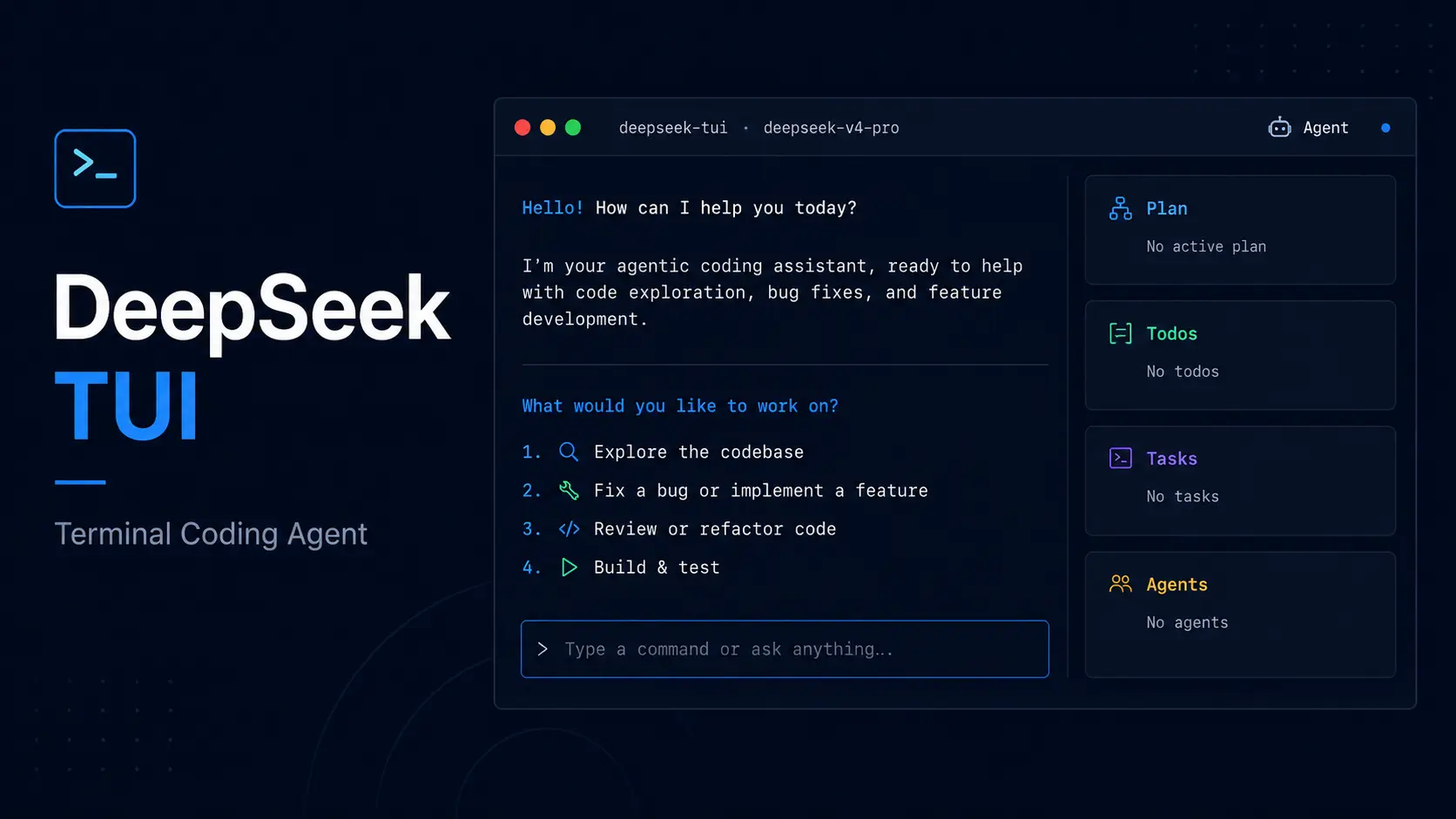
CodeWhale, formerly DeepSeek TUI, is a free and open-source AI coding agent that reads and edits local code, runs commands, manages development tasks, and works with DeepSeek or supported model providers. Licensed under the MIT license.
The project changed its name from DeepSeek TUI to CodeWhale in the v0.8.x release line. The current command iscodewhale, withcodewas a shorter alias. The olddeepseekbinary remains a transition shim until v0.9.0, so new installs and new instructions should use the CodeWhale name now.
CodeWhale is ideal for developers who want a Claude Code alternative in the terminal with MIT-licensed source code, explicit approval modes, DeepSeek-first model routing, and optional local or external provider endpoints.
Keep in mind that it is not a no-cost hosted coding agent. You need a valid DeepSeek API key or a compatible local inference setup to run model requests.
For the DeepSeek provider, see the latest DeepSeek API pricing before starting long agent sessions.
Features
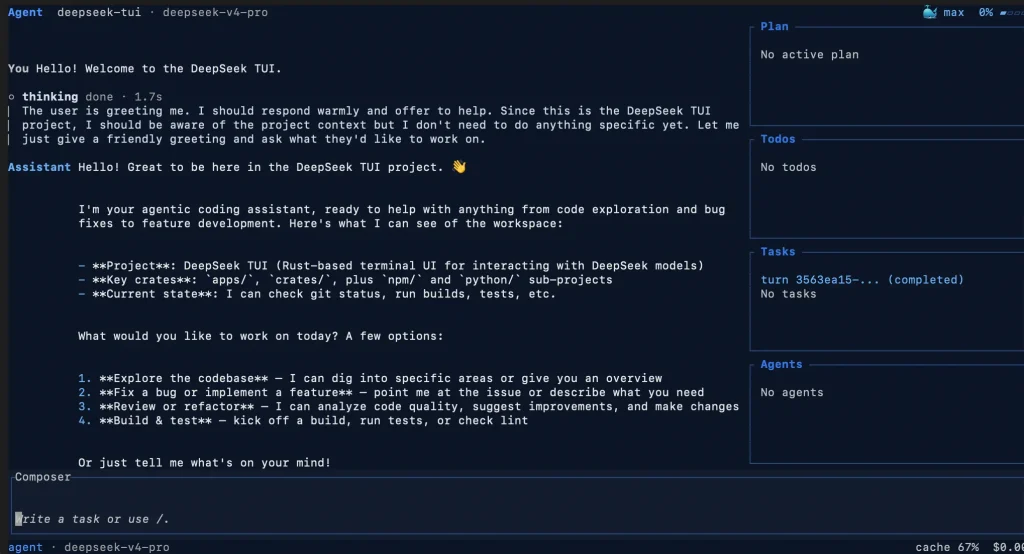
- Runs as a keyboard-driven terminal agent.
- Reads and edits files, runs shell commands, works with git, searches the web, applies patches, and connects to MCP servers.
- Uses Plan, Agent, and YOLO modes to separate read-only exploration, approval-gated work, and trusted auto-approved operation.
- Routes
--model autoturns between DeepSeek V4 Flash and Pro with a suitable thinking level for each request. - Streams supported DeepSeek reasoning blocks and reports token use, cache activity, and estimated session cost.
- Saves sessions, supports resume and fork operations, records turn receipts, and keeps a persistent objective.
- Coordinates sub-agents and displays delegate roles and completion summaries in the transcript.
- Creates workspace checkpoints for file rollback.
- Surfaces LSP diagnostics after edits for supported language servers such as rust-analyzer, pyright, typescript-language-server, gopls, and clangd.
- Loads reusable skills from workspace or user directories and exposes external capabilities through MCP server connections.
- Supports hosted and self-run provider paths, including DeepSeek, NVIDIA NIM, OpenAI-compatible APIs, AtlasCloud, Wanjie Ark, OpenRouter, Novita, Fireworks, SGLang, vLLM, and Ollama.
- Exposes an authenticated HTTP/SSE runtime API and an ACP adapter for compatible editor and automation workflows.
- User memory persists preferences across sessions in a flat file injected into the system prompt.
- A durable task queue survives restarts for long-running background work.
- Native RLM runs batched analysis through lower-cost Flash child turns in parallel.
Use Cases
- Inspect an unfamiliar codebase in Plan mode before you permit file or shell changes.
- Fix bugs from a terminal after you attach relevant files through
@path. - Run multi-step implementation work with approval gates and retain a receipt of actions after each completed turn.
- Resume ongoing repository work across terminal sessions with saved state, named sessions, and file checkpoints.
- Connect local models or an external OpenAI-compatible provider when the default DeepSeek API path does not fit your deployment.
- Expose a terminal coding agent to an editor or internal workflow through ACP or an authenticated runtime API.
CodeWhale vs Claude Code
| CodeWhale | Claude Code | |
|---|---|---|
| Product type | MIT-licensed terminal coding agent formerly named DeepSeek TUI | Anthropic agentic coding product available across terminal, IDE, desktop, and browser surfaces |
| Model focus | DeepSeek-first with supported external and self-run provider paths | Claude models with supported provider and account paths |
| Access | Requires | Requires a Claude subscription or Anthropic Console account |
| Good fit | You want an open-source terminal agent centered on DeepSeek or local provider choices | You want Anthropic’s coding agent across terminal and additional product surfaces |
Choose CodeWhale if an open-source, DeepSeek-first terminal workflow and provider choice matter to you. Choose Claude Code if you want Anthropic’s product surfaces and Claude model workflow.
How to Use It
Table Of Contents
Installation
Use the install route that matches your local development setup. New installations should use the CodeWhale package and binary names.
# npm: installs the release binaries through the npm wrapper
npm install -g codewhale
# Cargo: requires Rust 1.88 or newer
cargo install codewhale-cli --locked
cargo install codewhale-tui --locked
# Homebrew: the tap name still uses the former project name
brew tap Hmbown/deepseek-tui
brew install deepseek-tui
# Check a binary installation for updates
codewhale update
Direct release binaries are available for Linux x64 and ARM64, macOS x64 and ARM64, and Windows x64. Download them from the CodeWhale Releases page and verify the supplied checksum manifest before installation.
Linux ARM64 builds support Raspberry Pi, Asahi, and Graviton systems. For non-standard targets such as musl, riscv64, or FreeBSD, install from source with Rust 1.88 or newer.
Migrating from DeepSeek TUI
Install CodeWhale if you previously used DeepSeek TUI. New instructions, automation scripts, and onboarding notes should use the renamed package and command.
| Before | Now | Migration Note |
|---|---|---|
| DeepSeek TUI | CodeWhale | The project and repository now use the CodeWhale name. |
deepseek | codewhale or codew | The old command forwards during the transition and is scheduled to leave in v0.9.0. |
deepseek-tui npm package | codewhale npm package | Use the new npm wrapper for fresh installs and upgrades. |
~/.deepseek/ | ~/.codewhale/ | New installs write CodeWhale-owned state to the new root; legacy state remains readable as a fallback. |
.deepseek/config.toml | .codewhale/config.toml | The CodeWhale project overlay takes precedence when both files exist. |
Run the doctor command after an upgrade. It reports the active state root and can identify a legacy state directory that still needs review.
codewhale doctorAuthentication
The official DeepSeek provider needs a DeepSeek API key. Set it through CodeWhale or pass it through the existing DeepSeek environment variable.
codewhale auth set --provider deepseek
codewhale auth status
# Environment variable alternative
export DEEPSEEK_API_KEY="YOUR_KEY"
codewhale auth clear --provider deepseek
codewhale doctor
codewhale doctor --json # machine-readable output for CI
A key saved through the authentication command takes precedence over the environment variable. CodeWhale v0.8.44 writes new product-owned state under ~/.codewhale/ and continues to read legacy ~/.deepseek/ state as a compatibility fallback. Review which state root is active before deleting an older configuration directory.
Starting a Session
codewhale # start a new interactive TUI session
codew # short alias for the same binary
codewhale "explain this function" # send a one-shot prompt
codewhale --model deepseek-v4-flash "summarize this module"
codewhale --model auto "fix this test failure"
codewhale --continue # resume the most recent session in this workspace
codewhale --yolo # auto-approve tools in a trusted workspace only
Plain codewhale starts a fresh composer. Use --continue, the session picker, or resume commands when you intend to return to saved work.
Auto Mode
--model auto sends a small routing request before the main turn. For the DeepSeek path, CodeWhale can select deepseek-v4-flash or deepseek-v4-pro and set the thinking level to off, high, or max.
Use auto routing for mixed terminal work where task difficulty changes between turns. Select a fixed model if you need a predictable model choice or want to control inference cost more tightly.
Agent Modes
| Mode | Behavior | Best Use |
|---|---|---|
| Plan | Limits the agent to read-only investigation and planning actions. | Explore an unfamiliar repository before edits. |
| Agent | Runs multi-step work with approval gates for tool calls. | Make reviewed changes in a normal project. |
| YOLO | Auto-approves tool calls in the active workspace. | Run only inside a workspace you trust and can recover. |
Mode controls permissions and workflow behavior. It is separate from --model auto, which controls model and thinking selection.
Reasoning Effort
Press Shift+Tab to cycle through supported reasoning levels: off, high, and max. Use off for simple turns and choose a higher level for debugging, security review, or ambiguous multi-step work.
Session Management
codewhale sessions # list saved sessions
codewhale --continue # resume the latest workspace session
codewhale --resume <SESSION_ID> # resume a selected session
codewhale fork <SESSION_ID> # begin a branch from saved work
Press Ctrl+R to open the session picker and press r to rename the selected session. CodeWhale stores normal saves in its managed session area rather than adding session_*.json files to your repository. Explicit exports to a chosen path still work.
The rollback system stores checkpoints in CodeWhale-managed state and does not write into your project’s own .git directory. Managed sessions are capped at 50 on startup, so export any session you need to preserve outside normal rotation.
The /restore command and revert_turn roll back workspace file changes from a selected turn. This restores the original rollback workflow while placing new managed state under the CodeWhale state root.
Goals, Receipts, and Sub-Agents
Set a persistent task objective with /goal <objective> and close it with /goal done. The goal appears in the Work sidebar without changing the active permission mode.
Each completed turn can show a receipt that summarizes tool calls, file changes, and supporting evidence in the transcript. Delegated work appears with role names such as scout, builder, reviewer, verifier, or executor, which helps you read multi-agent work without following raw internal IDs.
Available Commands
| Command | Purpose |
|---|---|
codewhale | Launch the interactive TUI. |
codew | Launch CodeWhale through the short alias. |
codewhale "prompt" | Run a one-shot prompt. |
codewhale --model auto | Auto-select the model and thinking level. |
codewhale --yolo | Launch in YOLO mode. |
codewhale auth set --provider deepseek | Save a DeepSeek API key. |
codewhale auth status | Show the active credential source. |
codewhale auth clear --provider deepseek | Remove a saved DeepSeek key. |
codewhale doctor | Verify setup, state roots, and API connectivity. |
codewhale doctor --json | Output machine-readable diagnostics. |
codewhale setup --status | Display read-only setup status. |
codewhale setup --tools --plugins | Scaffold tool and plugin directories. |
codewhale models | List available API models. |
codewhale sessions | List saved sessions. |
codewhale --continue | Resume the latest workspace session. |
codewhale --resume <SESSION_ID> | Resume a selected session. |
codewhale fork <SESSION_ID> | Fork a session at a chosen turn. |
codewhale serve --http | Start the authenticated HTTP/SSE API server. |
codewhale serve --acp | Start the ACP stdio adapter for Zed and compatible agents. |
codewhale run pr <N> | Fetch a pull request and pre-seed a review prompt. |
codewhale mcp list | List configured MCP servers. |
codewhale mcp validate | Validate MCP configuration and connectivity. |
codewhale mcp-server | Run the dispatcher MCP stdio server. |
codewhale update | Check for and apply binary updates. |
Keyboard Shortcuts
| Key | Action |
|---|---|
Tab | Complete / or @ entries and cycle mode while idle. |
Shift+Tab | Cycle reasoning effort: off, high, and max. |
F1 | Open the searchable help overlay. |
Esc | Go back or dismiss the active overlay. |
Ctrl+K | Open the command palette. |
Ctrl+R | Open the saved session picker. |
r in session picker | Rename the selected session inline. |
Alt+R | Search prompt history and recover cleared drafts. |
Ctrl+S | Stash the current draft. |
Ctrl+Z in an empty composer | Restore the last draft cleared with Ctrl+U or Ctrl+S. |
@path | Attach file or directory context in the composer. |
Provider Configuration
# Official DeepSeek API
codewhale auth set --provider deepseek
codewhale --provider deepseek --model deepseek-v4-flash
# NVIDIA NIM
codewhale auth set --provider nvidia-nim --api-key "YOUR_NVIDIA_API_KEY"
codewhale --provider nvidia-nim
# AtlasCloud
codewhale auth set --provider atlascloud --api-key "YOUR_ATLASCLOUD_API_KEY"
codewhale --provider atlascloud
# Wanjie Ark
codewhale auth set --provider wanjie-ark --api-key "YOUR_WANJIE_API_KEY"
codewhale --provider wanjie-ark --model deepseek-reasoner
# OpenRouter
codewhale auth set --provider openrouter --api-key "YOUR_OPENROUTER_API_KEY"
codewhale --provider openrouter --model deepseek/deepseek-v4-pro
# Novita
codewhale auth set --provider novita --api-key "YOUR_NOVITA_API_KEY"
codewhale --provider novita --model deepseek/deepseek-v4-pro
# Fireworks
codewhale auth set --provider fireworks --api-key "YOUR_FIREWORKS_API_KEY"
codewhale --provider fireworks --model deepseek-v4-pro
# Generic OpenAI-compatible endpoint
codewhale auth set --provider openai --api-key "YOUR_OPENAI_COMPATIBLE_API_KEY"
OPENAI_BASE_URL="YOUR_OPENAI_COMPATIBLE_BASE_URL" codewhale --provider openai --model glm-5
# Local or self-run endpoints
SGLANG_BASE_URL="http://localhost:30000/v1" codewhale --provider sglang --model deepseek-v4-flash
VLLM_BASE_URL="http://localhost:8000/v1" codewhale --provider vllm --model deepseek-v4-flash
ollama pull codewhale-coder:1.3b
codewhale --provider ollama --model codewhale-coder:1.3b
Key Environment Variables
| Variable | Purpose |
|---|---|
CODEWHALE_HOME | Override the current CodeWhale state root. |
CODEWHALE_CONFIG_PATH | Override the current CodeWhale configuration path. |
DEEPSEEK_API_KEY | Supply the API key for the official DeepSeek provider. |
DEEPSEEK_BASE_URL | Override the DeepSeek API base URL. |
DEEPSEEK_MODEL | Set the default DeepSeek model. |
DEEPSEEK_PROVIDER | Select a provider such as DeepSeek, NVIDIA NIM, OpenAI, AtlasCloud, Wanjie Ark, OpenRouter, Novita, Fireworks, SGLang, vLLM, or Ollama. |
DEEPSEEK_PROFILE | Select a saved provider profile. |
DEEPSEEK_MEMORY | Set to on to enable user memory. |
DEEPSEEK_MAX_SUBAGENTS | Set the maximum concurrent sub-agents, clamped to 1 through 20. |
DEEPSEEK_SANDBOX_MODE | Select read-only, workspace-write, danger-full-access, or external-sandbox. |
OPENAI_BASE_URL / OPENAI_MODEL | Set a generic OpenAI-compatible endpoint and model. |
ATLASCLOUD_API_KEY / WANJIE_ARK_API_KEY | Supply credentials for additional hosted provider paths. |
OPENROUTER_API_KEY / NOVITA_API_KEY / FIREWORKS_API_KEY | Supply credentials for the respective hosted providers. |
SGLANG_BASE_URL | Set a self-run SGLang endpoint. |
VLLM_BASE_URL | Set a self-run vLLM endpoint. |
OLLAMA_BASE_URL | Set an Ollama endpoint. |
NO_ANIMATIONS=1 | Force accessibility mode at startup. |
SSL_CERT_FILE | Provide a custom CA bundle for a corporate proxy. |
Config File
New v0.8.44 installations store product-owned state under ~/.codewhale/. A project-level overlay at <workspace>/.codewhale/config.toml can override non-sensitive settings. Existing ~/.deepseek/ and <workspace>/.deepseek/config.toml paths remain readable as compatibility fallbacks, and the CodeWhale project overlay takes precedence when both exist.
The project overlay blocks sensitive settings such as api_key, base_url, provider, and mcp_config_path. CodeWhale keeps support for multiple provider profiles. Select one with --profile <name> or DEEPSEEK_PROFILE. User interface preferences such as theme, auto_compact, show_thinking, and locale remain accessible through /config and /settings; existing preferences stored under ~/.config/deepseek/settings.toml remain relevant during the compatibility period.
Skills
Each skill is a directory with a SKILL.md file. CodeWhale checks workspace directories (.agents/skills, ./skills, .opencode/skills, .claude/skills, .cursor/skills) and user directories (~/.agents/skills, ~/.claude/skills, ~/.codewhale/skills, ~/.deepseek/skills).
/skill install github:<owner>/<repo>Manage skills with /skills, /skill <name>, /skill new, /skill update, /skill uninstall, and /skill trust.
MCP Integration
Configure MCP server connections in ~/.codewhale/mcp.json for a new CodeWhale setup. Existing configurations in ~/.deepseek/mcp.json continue to work through the legacy fallback during migration. List or validate connected servers before relying on them in a coding task:
MCP server connections add external actions or data sources to the agent. List and validate configured servers before you rely on them in a coding task:
codewhale mcp list
codewhale mcp validate
Only connect MCP servers you trust. A connected server can expose operations that affect files, accounts, or external services, subject to the active permission mode.
Zed / ACP Integration
The HTTP/SSE runtime API supports headless and local application workflows. Authentication is enabled by default for the runtime API, so do not treat it as an unauthenticated local endpoint.
codewhale serve --http
codewhale serve --acp
You can configure CodeWhale as a custom ACP agent server in Zed:
{
 "agent_servers": {
 "CodeWhale": {
 "type": "custom",
 "command": "codewhale",
 "args": ["serve", "--acp"],
 "env": {}
 }
 }
}
The ACP adapter covers new sessions and prompt responses. Tool-backed editing and checkpoint replay are not exposed through ACP in this release.
Pros
- Free and open source under the MIT license.
- Runs on Linux, macOS, and Windows.
- Install options include npm, Cargo, Homebrew, Docker, and direct release binaries.
- ARM64 Linux support.
- 1M-token context window on both DeepSeek V4 models.
- Real-time reasoning block streaming.
- Auto mode selects the model and thinking level per turn.
- Per-turn cost tracking with cache hit and miss breakdown.
- Session save, resume, rename, continue, and fork workflows.
- Workspace rollback with managed side-git snapshots.
- LSP diagnostics after file edits.
- MCP server support for extended agent actions.
- Works with NVIDIA NIM, Fireworks, SGLang, vLLM, and Ollama.
- Skills system for installable instruction packs.
- Authenticated HTTP/SSE runtime API for headless workflows.
- Short
codewcommand alias.
Cons
- Requires a DeepSeek API key, another hosted provider key, or a configured local endpoint.
- No browser-based or native desktop app.
Related Resources
- CodeWhale on GitHub: Get source code, releases, migration notes, and installation instructions.
- CodeWhale Website: Open the current project home page and quickstart information.
- DeepSeek Platform: Create an API key and review billing for the primary hosted provider.
- DeepSeek API Documentation: Check API endpoints and current model information before configuring hosted inference.
- Claude Code Resource List: Find related terminal agent resources, skills, and plugins.
- Best CLI AI Coding Agents: Compare CodeWhale with other terminal coding agent choices.
- Best Agent Skills: Review reusable instruction packages for agent workflows.
FAQs
Q: Is DeepSeek TUI now called CodeWhale?
A: Yes. DeepSeek TUI was renamed to CodeWhale in the v0.8.x release line. Use codewhale or codew for new installs and scripts. The former deepseek command remains a temporary compatibility shim until v0.9.0.
Q: Is CodeWhale free to use?
A: CodeWhale is free and open source under the MIT license. Hosted inference is separate: the DeepSeek API and other hosted model providers may charge for requests. A local endpoint can avoid hosted API billing if you provide suitable compute and model access.
Q: Does CodeWhale require a DeepSeek API key?
A: CodeWhale needs a credential when you use the official DeepSeek API provider. You can instead configure a supported hosted provider or a compatible local endpoint such as Ollama, SGLang, or vLLM.
Q: Does CodeWhale work on Windows?
A: Yes. CodeWhale publishes prebuilt Windows x64 release binaries and the npm wrapper downloads platform-matching binaries. A Scoop installation path remains available under the former formula name deepseek-tui, but its manifest can lag behind npm and GitHub Releases.
Q: Where does CodeWhale store configuration after the rename?
A: New v0.8.44 installations use ~/.codewhale/ for CodeWhale-owned state. Existing ~/.deepseek/ data continues to work as a compatibility fallback. Run codewhale doctor to see which state root is active.
Q: What is the difference between Agent mode and auto model routing?
A: Agent mode controls tool approval behavior. Auto routing controls which supported DeepSeek model and thinking level handles a turn. You can use Agent mode together with --model auto.
Q: Can CodeWhale use self-hosted models?
A: CodeWhale supports local or self-run paths through Ollama, SGLang, and vLLM. You supply the endpoint, model, hardware, and any configuration needed by your inference server.
Q: How does workspace rollback work?
A: CodeWhale creates managed side-git checkpoints for file changes without modifying your project’s own .git directory. Run /restore or revert_turn to roll back changes from a selected turn, and use codewhale fork <SESSION_ID> when you want to branch a saved conversation.
Q: Is CodeWhale a direct replacement for Claude Code?
A: CodeWhale is an independent, MIT-licensed terminal coding agent with a DeepSeek-first and multi-provider workflow. Claude Code is Anthropic’s agentic coding product with terminal and additional app surfaces. Choose based on the model path, software license, interface, and billing route you need.
Q: How should I protect my repository when using CodeWhale?
A: Start unfamiliar work in Plan or Agent mode, review tool approvals, commit important work before large changes, and reserve YOLO mode for a trusted workspace with a recovery path.




Leave a ReplyCancel Reply