
MemPalace is a free, open-source local AI memory system with a Python CLI and MCP server. It stores AI conversations and project files as verbatim local memory, builds a palace-style index, and lets you search that memory across sessions from Claude Code, Codex, Cursor, ChatGPT, Claude, Gemini, and local models.
The system solves a problem that every developer, team lead, and power AI user hits eventually: six months of architecture decisions, debugging rationale, and project context live in chat windows that reset every session.
MemPalace applies the classical method of loci, the ancient memory palace technique, to organize that history into a navigable structure of wings, halls, rooms, closets, and drawers.
The spatial hierarchy is tied to retrieval. MemPalace stores raw drawers for exact recall, keeps compressed notes for quick context loading, and uses semantic search plus graph navigation when a later session needs the original reasoning behind a decision.
Background and Inspiration
The project was co-created by actress Milla Jovovich (known for Resident Evil and The Fifth Element) and engineer Ben Sigman. Milla documented the inspiration in social media posts and videos: after months of meticulously filing AI conversations, she found that even the best-organized files were poorly retrieved by LLMs.
Drawing from classical mnemonic techniques (the memory palace used by ancient Greek orators), she architected the virtual palace structure, while Ben engineered the implementation, compression dialect, and integrations. The core philosophy: “Store everything, then make it findable.” This contrasts with systems that use LLMs to decide what to keep, since MemPalace keeps the verbatim drawer text available for later retrieval.
As of June 17, 2026, the MemPalace GitHub repository has about 55.8k stars and 7.2k forks.
Features
- Organizes conversation and project history into a hierarchical palace structure of wings (people or projects), halls (memory types), rooms (specific topics), closets (compressed notes), and drawers (verbatim originals).
- Stores raw drawer text locally so project context, reasoning, and trade-off details remain available after the original chat session ends.
- Uses AAAK as an experimental, AI-readable shorthand layer for compact memory notes. Raw verbatim storage remains the safer default when exact wording matters.
- Loads a compact wake-up context for an AI session, usually around 600 to 900 tokens for identity, preferences, active projects, and recent context.
- Reports 96.6% R@5 on LongMemEval with raw verbatim search and 98.4% held-out R@5 for the hybrid v4 benchmark path.
- Creates hallways inside a wing when entities co-occur, and promotes repeated cross-wing connections into tunnels so related projects and people stay connected.
- Supports living graph weights through Hebbian potentiation and Ebbinghaus decay, so repeated connections gain weight and stale connections fade over time.
- Supports a temporal entity-relationship knowledge graph in local SQLite, with validity windows, invalidation, and point-in-time queries.
- Exposes 33 MCP tools for compatible agents and coding environments. The tool set covers palace read/write, mining, knowledge graph queries, navigation, tunnels, hook settings, and agent diaries.
- Supports agent diaries through dedicated MCP tools, so specialist agents can write and read compact AAAK diary entries tied to their own work context.
- Provides lifecycle hooks for Claude Code and Codex, with Cursor and Antigravity support added in recent releases.
- Mines project files, conversation exports, and general data auto-classified into decisions, preferences, milestones, problems, and emotional context.
- Ingests office documents through
--mode extract. Supported formats include PDF, DOCX, PPTX, XLSX, RTF, and EPUB when the extraction dependencies are installed. - Uses multilingual embeddings by default for new installs through embeddinggemma, with MiniLM still available for existing setups that have not changed configuration.
- Supports ChromaDB by default and can use sqlite_exact, Qdrant, or pgvector as pluggable vector backends.
- Includes Docker images for the MCP server and CLI, with CPU and GPU variants available through the project release path.
Use Cases
- Search old architecture debates to recover why a team chose GraphQL, Clerk, Postgres, or another stack decision.
- Mine Claude, ChatGPT, Claude Code, Codex, Cursor, Antigravity, Gemini CLI, and Slack-style exports so future sessions can recall debugging history and milestone discussions.
- Feed local LLMs a compact wake-up context before each session.
- Query project-specific memory inside one wing when you manage several apps at the same time.
- Maintain specialist agent diary memory for code review, architecture, or operations work.
- Index office documents and project files when your AI context lives outside chat transcripts.
How to Use It
Table Of Contents
Get Started
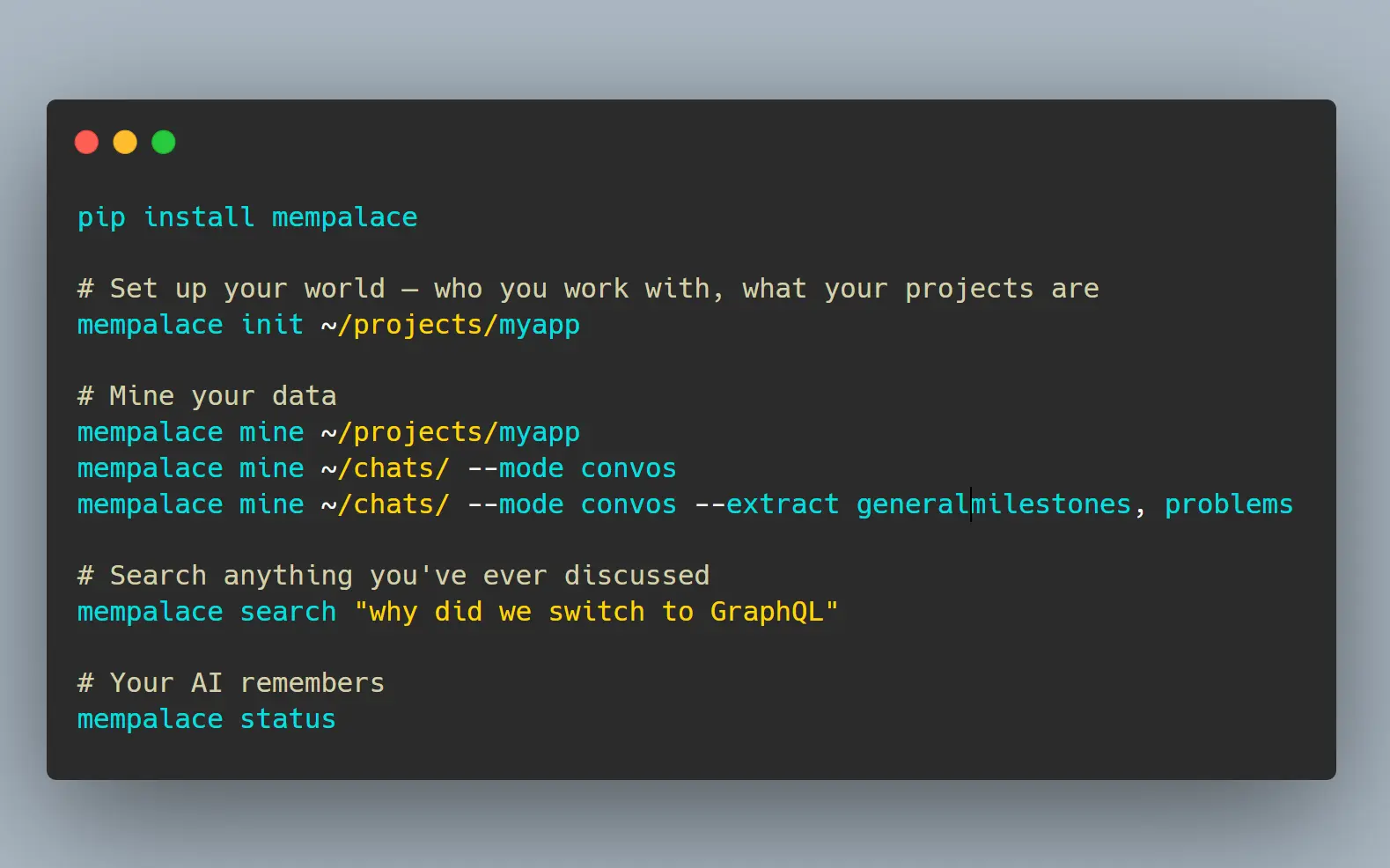
1. Install MemPalace. The current recommended path is uv tool install:
uv tool install mempalaceYou can also use pipx, or install with pip inside a virtual environment:
pipx install mempalace
python -m venv .venv
source .venv/bin/activate
pip install mempalace
MemPalace requires Python 3.9 or newer.
2. Run the guided onboarding for a project directory. This generates your wing configuration, bootstrap memory, and identity file:
mempalace init ~/projects/myapp3. Choose the mining mode that fits your data source:
# Mine project files: code, docs, notes
mempalace mine ~/projects/myapp
# Preview a mining run before writing memory
mempalace mine ~/projects/myapp --dry-run
# Mine conversation exports
mempalace mine ~/chats/ --mode convos
# Mine conversations and auto-classify into decisions, preferences, milestones, problems
mempalace mine ~/chats/ --mode convos --extract general
# Tag a mining run with a specific wing
mempalace mine ~/chats/orion/ --mode convos --wing orion
# Mine office documents: PDF, DOCX, PPTX, XLSX, RTF, and EPUB
mempalace mine ~/documents/ --mode extract
If you want a different vector backend, select it during setup or pass the backend option when the command supports it:
MEMPALACE_BACKEND=sqlite_exact mempalace mine ~/projects/myappSome chat exports concatenate multiple sessions into one file. Split them first:
mempalace split ~/chats/
mempalace split ~/chats/ --dry-run
mempalace split ~/chats/ --min-sessions 3
4. Search anything:
mempalace search "why did we switch to GraphQL"
mempalace search "database decision" --wing orion
mempalace search "auth decisions" --room auth-migration
5. Load context into an AI session:
For MCP-compatible clients and coding environments, use the built-in setup helper:
mempalace mcp
mempalace mcp --palace ~/.mempalace/palace
The MCP server exposes search, mining, graph, navigation, tunnel, and diary tools to compatible agents. Newer hooks resolve the installed mempalace-mcp console script, which helps uv and pipx installs find the right Python environment.
For local models or manual workflows, generate the wake-up context and paste it into the system prompt:
mempalace wake-up > context.txtOr search on demand and inject results into a prompt:
mempalace search "auth decisions" > results.txtYou can also call the Python API directly:
from mempalace.searcher import search_memories
results = search_memories("auth decisions", palace_path="~/.mempalace/palace")
6. Compressing a wing:
mempalace compress --wing myapp7. Status check:
mempalace statusAll Available Commands
| Command | Description |
|---|---|
mempalace init <dir> | Guided onboarding: generates identity context, wing config, and initial project memory |
mempalace mine <dir> | Mine project files such as code, docs, and notes |
mempalace mine <dir> --dry-run | Preview a mining run before writing memory |
mempalace mine <dir> --mode convos | Mine conversation exports |
mempalace mine <dir> --mode convos --extract general | Mine and auto-classify into memory types |
mempalace mine <dir> --mode convos --wing <name> | Tag mining run with a wing name |
mempalace mine <dir> --mode extract | Mine office documents and ebooks with extraction dependencies installed |
mempalace split <dir> | Split concatenated transcripts into per-session files |
mempalace split <dir> --dry-run | Preview split output before writing files |
mempalace split <dir> --min-sessions 3 | Only split files with 3 or more sessions |
mempalace search "<query>" | Semantic search across all closets |
mempalace search "<query>" --wing <name> | Search within a specific wing |
mempalace search "<query>" --room <name> | Search within a specific room |
mempalace wake-up | Load L0 + L1 context, usually around 600 to 900 tokens |
mempalace wake-up --wing <name> | Load project-specific context |
mempalace compress --wing <name> | Compress a wing into shorter memory notes |
mempalace status | Palace overview |
mempalace mcp | Show MCP server setup commands for compatible clients |
mempalace repair | Repair or rebuild broken local palace indexes |
mempalace repair rebuild-index | Rebuild embeddings after changing the embedding model |
mempalace migrate-wings | Normalize legacy wing names so older palaces stay discoverable |
All commands accept --palace <path> to override the default palace location.
Available MCP Tools
Palace (read)
| Tool | Description |
|---|---|
mempalace_status | Palace overview, AAAK spec, and memory protocol |
mempalace_list_wings | Wings with memory counts |
mempalace_list_rooms | Rooms within a wing |
mempalace_get_taxonomy | Full wing to room to count tree |
mempalace_search | Semantic search with wing and room filters |
mempalace_check_duplicate | Check for duplicates before filing |
mempalace_get_aaak_spec | AAAK dialect reference |
Palace (write and mine)
| Tool | Description |
|---|---|
mempalace_add_drawer | File verbatim content |
mempalace_delete_drawer | Remove by ID |
mempalace_mine | Mine files or transcripts into the palace |
mempalace_sync | Synchronize pending memory changes |
mempalace_get_drawer | Read a drawer by ID |
mempalace_list_drawers | List drawers with filters |
mempalace_update_drawer | Update drawer metadata or content |
Knowledge Graph
| Tool | Description |
|---|---|
mempalace_kg_query | Entity relationships with time filtering |
mempalace_kg_add | Add new facts |
mempalace_kg_invalidate | Mark facts as ended |
mempalace_kg_timeline | Chronological entity story |
mempalace_kg_stats | Graph overview |
Navigation
| Tool | Description |
|---|---|
mempalace_traverse | Walk the graph from a room across wings |
mempalace_find_tunnels | Find rooms bridging two wings |
mempalace_graph_stats | Graph connectivity overview |
mempalace_create_tunnel | Create a cross-wing connection |
mempalace_list_tunnels | List existing tunnels |
mempalace_delete_tunnel | Delete a tunnel |
mempalace_list_hallways | List within-wing hallway connections |
mempalace_delete_hallway | Delete a hallway connection |
mempalace_follow_tunnels | Follow cross-wing tunnel paths |
Agent Diary and System
| Tool | Description |
|---|---|
mempalace_diary_write | Write an AAAK diary entry |
mempalace_diary_read | Read recent diary entries |
mempalace_hook_settings | Read or update hook behavior |
mempalace_memories_filed_away | Report what the hook filed after a session |
mempalace_reconnect | Reconnect to the active palace path |
Auto-Save Hooks for Claude Code, Codex, Cursor, and Antigravity
Add lifecycle hooks to your Claude Code or Codex configuration when you want MemPalace to save work at session boundaries:
{
 "hooks": {
 "Stop": [{"matcher": "", "hooks": [{"type": "command", "command": "/path/to/mempalace/hooks/mempal_save_hook.sh"}]}],
 "PreCompact": [{"matcher": "", "hooks": [{"type": "command", "command": "/path/to/mempalace/hooks/mempal_precompact_hook.sh"}]}]
 }
}
The Stop hook saves every configured interval. It captures topics, decisions, quotes, and code changes. The PreCompact hook runs before context compression so the active session can be filed before the window shrinks.
Cursor support includes a plugin directory, slash commands, and lifecycle hooks for stop, preCompact, and sessionStart. Antigravity support includes a plugin package, MCP registration, a skill, and lifecycle hooks for background mining and first-call memory injection.
Memory Stack Layers
| Layer | Content | Typical Size | Load Trigger |
|---|---|---|---|
| L0 | AI identity | ~50 to 100 tokens | Always |
| L1 | Preferences, active projects, team context, and guardrails | ~500 to 800 tokens | Always |
| L2 | Recent sessions and current project room | ~200 to 500 tokens | Topic match |
| L3 | Deep semantic search across drawers and closets | Variable | Explicit query |
Configuration Files
Global config at ~/.mempalace/config.json:
{
 "palace_path": "/custom/path/to/palace",
 "collection_name": "mempalace_drawers",
 "embedding_model": "embeddinggemma",
 "people_map": {"Kai": "KAI", "Priya": "PRI"}
}
Wing config at ~/.mempalace/wing_config.json (generated by mempalace init):
{
 "default_wing": "wing_general",
 "wings": {
 "wing_kai": {"type": "person", "keywords": ["kai", "kai's"]},
 "wing_driftwood": {"type": "project", "keywords": ["driftwood", "analytics", "saas"]}
 }
}
Identity file at ~/.mempalace/identity.txt: plain text loaded every session as Layer 0.
Pros
- Free and open-source under the MIT License.
- Keeps raw memory local by default and publishes a no-telemetry design promise.
- Preserves verbatim drawers, which matters when you need the exact reasoning behind an old decision.
- Reports strong LongMemEval recall numbers for both raw search and hybrid retrieval.
- Works through CLI commands and an MCP server, with support for Claude Code, Codex, Cursor, Antigravity, and local model workflows.
- Supports pluggable vector backends, Docker images, and office-document mining.
Cons
- Local LLM workflows still require manual context injection unless your client supports MCP or a dedicated hook path.
- Some transcript exports need splitting before mining.
- The default multilingual embedding model for new installs may download a model on first use.
- AAAK is experimental and lossy, so raw verbatim drawers are the safer source for exact recall.
- Contradiction detection is documented as planned work, so do not rely on it as a complete shipping safety layer.
- Optional Qdrant or pgvector backends move memory into the storage system you configure. Keep the default local path for private material unless you have reviewed that storage setup.
Related Resources
- MemPalace GitHub Repository: Source code, releases, issue history, and recent project activity.
- MemPalace Benchmarks: LongMemEval benchmark results and reproduction details.
- MemPalace CLI Reference: Command reference for init, mine, search, wake-up, repair, and MCP setup.
- MemPalace MCP Tools: MCP tool list for palace search, mining, graph work, navigation, diaries, and hooks.
- MemPalace on PyPI: Package version, license, Python requirement, and install metadata.
- ChromaDB Documentation: Reference for the default vector database MemPalace uses for semantic search.
- MCP Overview: Specification for the protocol MemPalace uses to expose memory tools to compatible AI agents.
- Claude Code Hooks Documentation: Setup guide for stop and pre-compaction hooks.
- SQLite: Read about the local database engine behind the knowledge graph layer.
- Method of Loci: Read the classical memory technique that inspired the palace layout.
- Personal AI Memory: One-Click Context Recall Across ChatGPT, Claude & Gemini
FAQs
Q: What is AAAK and why does it matter?
A: AAAK is a compact shorthand dialect for AI-readable memory notes. It can reduce token use for repeated context, but it is experimental and lossy. Use raw verbatim drawers when exact wording matters, and use AAAK for compact session memory where the shorter form is acceptable.
Q: How is MemPalace different from Mem0 or Zep?
A: MemPalace focuses on local, verbatim memory storage first. It keeps the original drawer text and then adds palace structure, semantic search, MCP access, and graph navigation. Managed memory systems can be easier to deploy in hosted products, but MemPalace is stronger when you want local control over raw AI conversation and project memory.
Q: What conversation and file formats does MemPalace support?
A: The conversation mining path handles AI and chat transcripts. Examples include Claude, ChatGPT, Claude Code, Codex, Cursor, Antigravity, Gemini CLI, and Slack-style exports. The --mode extract path adds PDF, DOCX, PPTX, XLSX, RTF, and EPUB ingestion when extraction dependencies are installed.
Q: Is there any risk of data leaving my machine?
A: The default MemPalace path stores palace data locally. The first use of the default multilingual embedding model may download model files, and optional Qdrant, pgvector, Docker, or cloud reranking setups can change where data is stored or processed. Keep ChromaDB or sqlite_exact local storage for private memory unless you have reviewed the external backend.
Q: What does the knowledge graph add on top of semantic search?
A: The knowledge graph stores entity-relationship triples with validity windows, so you can query what was true about a person or project on a specific past date. It also supports timelines, invalidation, and graph statistics. Full contradiction detection is planned work, so treat it as a future safety layer and keep human review in the loop now.
Q: How does MemPalace keep multiple projects separate?
A: Each project gets its own wing. Search commands accept a --wing flag to scope results, and the palace structure’s rooms and halls further narrow retrieval within a wing. Hallways connect related entities inside one wing, and tunnels connect repeated entities across wings.
Q: What is the MemPalace init command?
A: mempalace init <dir> runs onboarding for a project directory. It creates identity context, configures wings, and can mine the directory after setup so the first memory index exists before you start searching.
Q: How do you use the MemPalace mine command?
A: Use mempalace mine <dir> for project files, mempalace mine <dir> --mode convos for conversation exports, and mempalace mine <dir> --mode extract for office documents. Add --dry-run when you want to preview the ingest before writing memory.
Q: How do you connect the MemPalace MCP server?
A: Run mempalace mcp to print the setup command for compatible clients. New installs also provide the mempalace-mcp console script, which is the server entry point used by hooks and MCP clients.
Changelog
June 17, 2026
- Updated to v3.4.1



Leave a ReplyCancel Reply