|
VOOZH | about |
|
VOOZH | about |
By Industry
By Role
By Popular Use Case
All-in-one data and application integration platform.
Build enterprise-grade agents, assistants, and automations.
Mobilize data to the cloud with visual ETL/ELT and reverse ETL.
Connect every application with our no-code/low-code iPaaS solution.
Experience the leading self-service integration platform for yourself.
Walk away with a practical framework for operationalizing AI agents securely.
Bring automation to every part of your organization.
By Industry
By Role
By Popular Use Case
Drive profitability and growth through joint sales and marketing strategies.
Access the SnapLogic Partner Connect Portal or request an account.
Gain access to a world-class partner ecosystem.
Discover the partner opportunities and tiers for system integrators.
Partnerships for ISV, MSP, OEM, and Embedded providers.
Search for partners in our robust global network.
Our customers’ accomplishments continue to shape SnapLogic’s success.
Our community for thought leadership, peer support, customer education, and recognition.
Recognizing individuals for their contributions to the SnapLogic community.
Enhance your expertise about intelligent integration and enterprise automation.
Extract maximum value from your SnapLogic investment with a standardized set of best practices.
Learn more about how our customers benefit from using SnapLogic.
Our home for eBooks, white papers, videos, and more.
SnapLogic is here to support you throughout your entire experience.
SnapLogic is on a mission to bring enterprise automation to the world.
We’re here to help.
We’d love to hear from you.
Get the guide to modern data orchestration.
Enjoy the on-demand sessions to learn how to integrate agents with core business systems.
The Metadata Snap Pack can list assets in a project and perform a series of actions, including create, read, update, and delete operations on assets.
The Metadata Integration Snaps include the following:
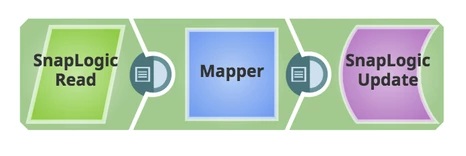
The pipeline below shows how to enable or disable a task using the SnapLogic Update Snap
Learn more about how Snaps work with the SnapLogic Intelligent Integration Platform here.