

















Product Screenshots
 |
VOOZH | about |
|
VOOZH | about |
For Individuals
For Business
Repairs corrupt MS SQL database files (MDF and NDF) and Rebuilds all SQL Server database objects while maintaining data integrity Including deleted records. Recommended by MVPs and database admins worldwide. Supports Parallel Processing for faster SQL database recovery.
*Software works only on your Desktop/Laptop
*Download the free trial version to scan & preview recoverable SQL server database objects.
TOP USE CASES
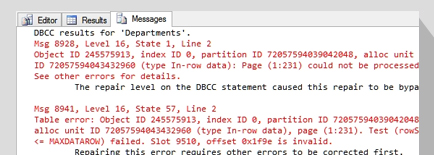
If DBCC CHECKDB reports consistency errors in the SQL Server database, you need to fix the errors as soon as possible to reduce database downtime. The first step is to restore from an updated backup copy. If you cannot restore from the backup, running DBCC CHECKDB with 'REPAIR_ALLOW_DATA_LOSS' can recover the database but may result in data loss. The SQL database repair tool from Stellar® can help you fix consistency errors and restore the database to its original state, maintaining data integrity.
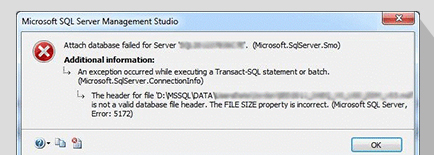
Learn More 👁 arrowYou may encounter error 5172 if there is corruption in the SQL database MDF file header. The MDF file header can become corrupt due to faulty drivers and controllers, abrupt SQL Server reboot, etc. SQL database file header corruption can make the database file inaccessible. The problem can be easily resolved by repairing the MDF file with Stellar Repair for MS SQL software. This SQL database repair tool helps fix corrupt MDF file and restores its complete data.
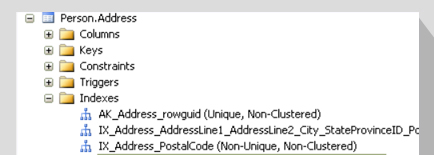
Learn More 👁 arrowCorruption in clustered or non-clustered indexes can lead to incorrect query results and missing entries. Using specialized SQL repair software can help fix index corruption. It also helps restore all the SQL Server database components, including clustered and non-clustered indexes, to a New Database, Live (existing) Database or Other Formats like CSV, HTML, and XLS.
Learn More 👁 arrowSoftware Important Capabilities
Corruption in SQL database (MDF and NDF) files can render the database inaccessible. The SQL database repair tool repairs corrupted MDF and NDF files and restore the database to its functional state. It also helps extract all the database components, including tables, triggers, indexes, stored procedures, etc., with precision and integrity
The SQL Database Repair software allows users to retrieve deleted table records without modifying the table schema. It provides 'Include Deleted Records' option to recover the deleted records. Users can save these recovered records as a new table just below the original file. This helps differentiate between the original and the repaired table with deleted records and helps to check the recovered table's referential integrity.
Learn More
The SQL repair tool scans the corrupt database and provides a preview of all repairable items. The repairable items are listed in a tree-like structure in the left pane. Select any item to view its contents in the right pane. The preview feature helps verify if the repairable items match the original data present in the SQL database before corruption.
The software allows saving the repaired file to a new database, live database, or other formats, such as HTML, XLS, and CSV. Further, the software provides Fast Saving and Standard Saving modes to save the repaired file. The Fast Saving mode is advised for large databases, as it saves the repaired data first and then the indexes. The Standard Saving mode saves the repaired data and indexes simultaneously.
Reviews & Feedback
Know your Product Better
The SQL database repair tool uses Parallel Processing to speed up the database repair. It efficiently utilizes all available cores of the multicore processor on your system to repair the SQL database at up to 8x faster speeds, thereby significantly reducing the recovery time and downtime.
The SQL database repair tool has two scan modes - Standard and Advanced Scan. Standard Scan is the recommended option for scanning and repairing corrupt SQL database (MDF and NDF) files. The Advanced Scan option is advisable for extensive scanning and repairing of severely corrupt database files.
The software helps repair SQL database on both Windows as well as Linux machines. It is compatible with Ubuntu 16.04 (64-bit), 18.04 (64-bit), 19.10 (64-bit), CentOS 7 (64-bit), and Red Hat Enterprise Linux 7 (64-bit). Download the Free trial for Linux Systems.
Stellar SQL database repair software shows a preview of the SQL server database repairable objects and allows you to select specific objects you want to restore. You can also search for specific items by entering their name in the Search box in the preview window.
The tool repairs SQL database (.mdf and .ndf) files and saves the files by connecting to SQL Server with Windows authentication or SQL Server authentication method. Windows authentication is a helpful method for users who are already logged onto Windows and do not wish to log on separately to SQL Server to save the repaired database file.
The software allows saving log reports for analyzing the SQL database repair process at a later stage. You can view the log of the repair process displayed at the bottom. If you're unable to view it, try enabling it by clicking the Log Window checkbox in the File menu's View section.
Stellar Toolkit for MS SQL is a 5-in-1 suite of specialized tools to repair corrupt SQL database files, extract data from a corrupt backup, reset database file password, analyze SQL logs, and convert databases. The toolkit can work with the latest SQL Server 2025, 2022, 2019 and earlier versions. Read More
The efficient software repairs corrupt .bak file and restores SQL server Database, it extracts and restores all database objects from the backup with data integrity. Compatible with all types and versions of SQL server backups. Read More
HOW TO USE STELLAR REPAIR FOR MS SQL
Corrupt SQL database using Stellar Repair for MS SQL
PRICING
Repairs corrupt MDF and NDF files, and recovers all the database components.
CASE STUDY
Stellar Repair for MSSQL resolved a Ransomware attack, identifying Mallox Ransomware. This underscores the need for data recovery plans and professional help. KARNI packaging's experience shows expertise and proactive measures can restore business and enhance security.
Learn More 👁 arrowRecovery from the Mallox Ransomware attack saved our business. We are truly grateful for their expert assistance.
Karni Packaging
Confidential Automobile Company recovery with MSSQL Database File Repair highlights the need for robust cyber resilience plans, emphasizing proactive security and reliable recovery tools. Their success shows how swift action can mitigate ransomware's impact, preserving business and reputation.
Learn More 👁 arrowWe are immensely grateful for the support and effectiveness of software during our most challenging time. The ransomware attack had us on the brink of a major crisis, with our critical business data held hostage.
Confidential Automobile Company
This was a great win for the client as the entire 200 GB corrupt database had been restored to its original state in the least possible time, without wasting efforts or losing database integrity.
Learn More 👁 arrowThis is a very handy and easy to use software that I would recommend to anyone.
St. Robert, MO
It was easy recovering all Database components including tables, triggers, indexes, keys, rules, and stored procedures, and supports recent as well as older SQL database versions.
See Gartner Review👁 left arrowSoftware recovered all the precious data
The managed to extract data in almost all corruption cases. The tool is good value for money given its out of the box functionality.
See SQL Server Central Review👁 left arrowFix SQL Server Recovery Pending and repair corrupt databases fast.
Trouble with 'Recovery Pending' in SQL Server? Explore causes, easy fixes, and advanced recovery tools to regain access.
See C Sharp Corner Review👁 left arrowStellar’s MS SQL database repair software is simple to use, especially at a time when pressure is mounting due to database unavailability. It is a very useful solution that I recommend.
See G2 Review👁 left arrowBest for Corrupt SQL database repair
Due to power outage, server rebooted multiple times that causes one of database corrupt. I ordered Stellar SQL repair to repair my database.
See Capterra Review👁 left arrowDATA SHEET
| Version: | 11.0.0.2 |
| License: | Single System |
| Edition: | Corporate, Technician, & Toolkit |
| Language Supported: | English |
| Release Date: | June, 2026 |
| Processor: | Intel compatible (x64-based processor) |
| Memory: | 16 GB minimum (32 GB recommended) |
| Hard Disk: | 250 MB for installation files |
| Operating System: (64 Bit only) |
Windows 11, 10, 8.1, 8 & Windows server 2022, 2019, 2016, 2012 |
| Virtual Environments: | VMware® vSphere, VMware® ESX/ESXi, VMware® Workstation Pro, Microsoft® Hyper-V, Oracle® VirtualBox (All supported versions) |
|
|
USEFUL ARTICLES
This article describes step-wise instructions to fix the ‘SQL server suspect database’ issue by running Transact-SQL (T-SQL) commands in SQL Server Management Studio (SSMS). Also, it mentions a SQL recovery tool that can easily and quickly restores the database.
The Recovery Pending state is different from the SUSPECT state. This post will outline the reasons why a database (db) is marked in recovery pending state. Also, it will describe methods to fix this problem and recover the database.
This blog will explain the possible causes of database consistency errors. It will also discuss ‘how to fix DBCC CHECKDB consistency errors' in the SQL Server database using manual methods and a professional SQL repair tool.
*Download the free trial version to scan & preview recoverable SQL server database objects.
FIND YOUR ANSWERS
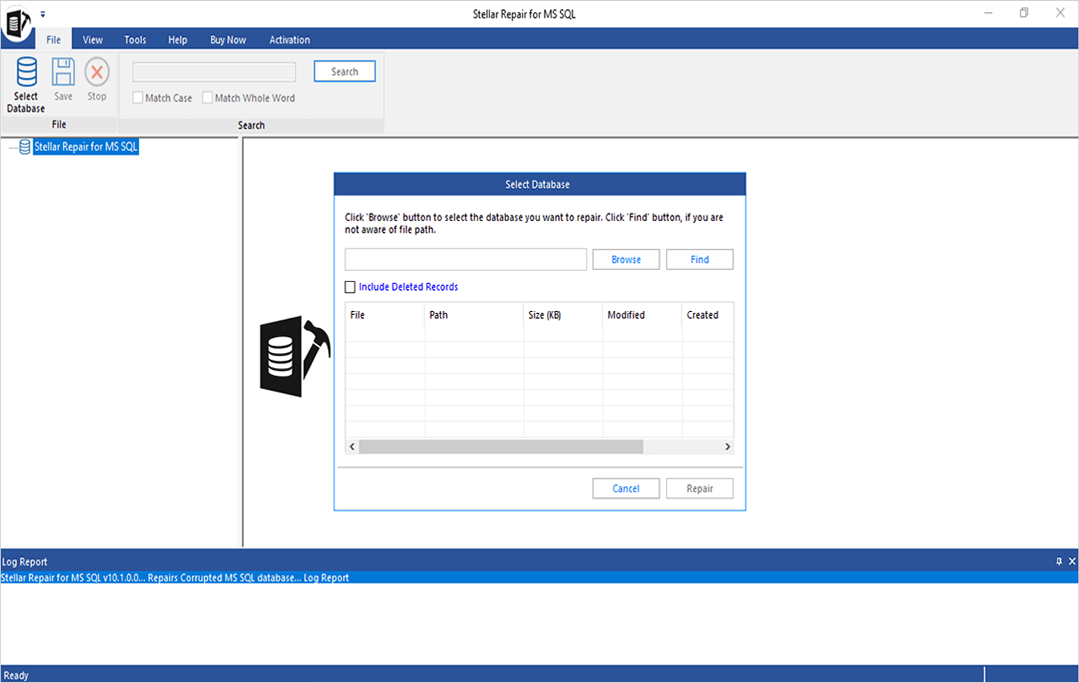
To repair and rebuild corrupt SQL database, download and install SQL database repair software on your machine and follow these steps:
The database is now rebuild and saved at the selected location.
Use the Fast Saving mode to quickly save the repaired database and its components. Choosing this mode saves the repaired data first and then saves the indexes.
To save the repaired data and indexes at the same time, use the Standard Saving mode. However, this mode can take a little time to save the repaired data.
Yes, the software can repair SQL database files, without any file size limitation.
Yes, the software helps fix the SQL Server database in recovery pending state issue.
Yes, the 'Demo' version of the SQL repair software provides a preview of all repairable objects. For saving the repaired data, you need to register the product.
Yes, you can perform granular recovery of individual SQL items using Stellar SQL repair tool.
Yes. The full version of Stellar Repair for MS SQL - be it Corporate, Technician or Toolkit – can repair unlimited databases.
Databases created in SQL Server 2025, 2022, 2019, 2017, 2016, 2014, and earlier versions are supported by this tool.
In the trial version, users can scan and repair the database file and preview all the recoverable items. However, the trial version doesn’t allow to save the repaired file. Whereas in the full version of the software, user can save the databases.
Yes. The demo version of Stellar Repair for MS SQL shows an enhanced preview of recoverable database items.
If your log (or LDF) file is unavailable or corrupted, then you can use our software perform recovery of your database.
Yes, you can recover data from a corrupt .BAK file using the Technician or Toolkit version of the software. The Corporate version of the software doesn’t allow extracting databases from a backup file.
Yes, Stellar Repair for MS SQL supports recovery of LDF or log files.
Follow the below steps to restore SQL Server 2025 database using this software:
Stellar Repair for MS SQL is a complete DIY software that can be operated without having any special technical expertise. You have to follow 3 simple steps: Select the MDF file, Repair the file, and Preview/Save the data. Watch this tutorial video to learn how this software works.
Yes, Stellar Repair for MS SQL is designed to help admins overcome such errors and repair corrupted database files. You can learn more about SQL database recovery from Suspect Mode.
Use the software’s Find feature to list all primary and secondary database files. From the list, select one primary or secondary file for recovery.
Yes. You can use our software to repair the corrupted database file, if the DBCC CHECKDB command fails to repair it.
Sometimes the tool may not perform the intended task due to severe damage to the database. Our professional experts can help to get your MS SQL Database Repaired and save your resources and time.
Learn MoreWHY STELLAR® IS GLOBAL LEADER
0M+
Customers
0+
Years of Excellence
0+
R&D Engineers
0+
Countries
0+
Partners
0+
Awards Received
Stellar Repair for MS SQL
I understand that the above information is protected by Stellar's Privacy Policy.
Note: We will not share your personal data with any third parties. We will only send you quick startup guides, offers and free giveaways.
Listening...👁 Voice Recognized
Stellar Repair for MS SQL