VOOZH about

URL: https://www.tecmint.com/count-word-occurrences-in-linux-text-file/

⇱ How to Count Word Occurrences in a Text File


Skip to content

Graphical User Interface word processors and note-taking applications have information or detail indicators for document details such as the count of pages, words, and characters, a headings list in word processors, a table of content in some markdown editors, etc. and finding the occurrence of words or phrases are as easy as hitting Ctrl + F and typing in the characters you want to search for.

A GUI does make everything easy but what happens when you can only work from the command line and you want to check the number of times a word, phrase, or character occurs in a text file? It’s almost as easy as it is when using a GUI as long as you’ve got the right command and I’m about to narrate to you how it is done.

Suppose you have an example.txt file containing the sentences:

Praesent in mauris eu tortor porttitor accumsan. Mauris suscipit, ligula sit amet pharetra semper, 
nibh ante cursus purus, vel sagittis velit mauris vel metus enean fermentum risus.

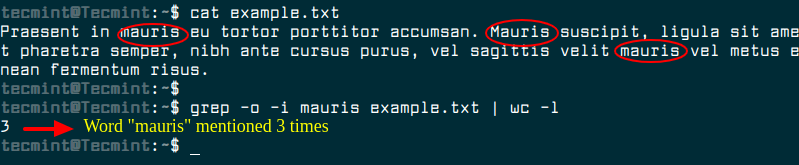
You can use grep command to count the number of times "mauris" appears in the file as shown.

$ grep -o -i mauris example.txt | wc -l
👁 Count Word Occurrence in Linux File
Count Word Occurrence in Linux File

Using grep -c alone will count the number of lines that contain the matching word instead of the number of total matches. The -o option is what tells grep to output each match in a unique line and then wc -l tells wc to count the number of lines. This is how the total number of matching words is deduced.

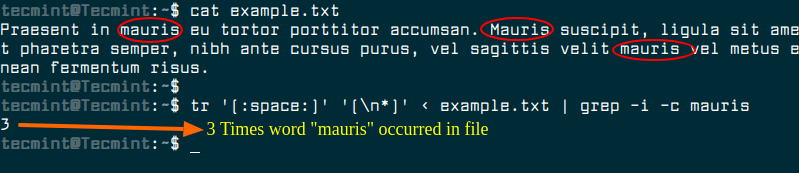
A different approach is to transform the content of the input file with tr command so that all words are in a single line and then use grep -c to count that match count.

$ tr '[:space:]' '[\n*]' < example.txt | grep -i -c mauris
👁 Count Occurrences of Word in File
Count Occurrences of Word in File

Is this how you would check word occurrence from your terminal? Share your experience with us and let us know if you’ve got another way of accomplishing the task.

If this article helped, share it with someone on your team.
TecMint Weekly Newsletter
Get the Learn Linux 7 Days Crash Course free when you join 34,000+ Linux professionals reading every Thursday.
Check your email for a magic link to get started.
Something went wrong. Please try again.
TecMint has been free for 14 years. Help keep it that way.
Google AI Overviews and tools like ChatGPT have cut into search traffic for independent tech sites like TecMint. Running this site costs over $2,000 every month for hosting, infrastructure, and paying authors to keep the content accurate and tested.

If this article helped you solve a problem, consider buying a coffee. It helps keep TecMint free, supports the authors, and keeps the project going.
☕ Buy Me a Coffee
Martins D. Okoi
Martins Divine Okoi is a graduate of Computer Science with a passion for Linux and the Open Source community. He works as a Graphic Designer, Web Developer, and programmer.

Each tutorial at TecMint is created by a team of experienced Linux system administrators so that it meets our high-quality standards.

5 Comments

Leave a Reply
  1. What is your console font?

    Reply
    • @Technotron,

      We’ve used Fira Code font for our Linux terminal…

      Reply
  2. It’s not perfect but I adapted the ‘tr‘ approach to print a count of each word in some standard input:

    tr -c "'[:alnum:]" "\n" | grep "[[:alnum:]]" | sort | uniq -c | sort -n
    

    While grep -c works on a line, this puts every word or number on its own line and sorts them. Then uniq -c deduplicates them as well as printing the number of occurrences. grep is used to remove blank lines only because if you don’t, uniq prints out the number of blank lines as well, and I didn’t yet come up with a better way to do that.

    The final sort is optional, used to list the words by frequency of appearance instead of alphanumerically. Note the apostrophe in the first set given to tr such that possessives and contractions remain whole words but parenthesis, quotation marks, and other punctuation are stripped off. Also note that this breaks on longer, comma-separated numbers, turning each group into a (probably meaningless) lone 1-, 2-, or 3-digit number. So just don’t try to handle those as though they are words, and there is no problem.

    Reply
  3. I use Silver Searcher (https://geoff.greer.fm/ag/), which is capable to search ~1TB file in less than a second.

    • To print all found entries: ag -i mauris example.txt
    • To only count all entries: ag -c mauris example.txt

    Give it a try…

    Reply

Got Something to Say? Join the Discussion... Cancel reply

Free Course
Get a free Linux course before you go.
Subscribe to TecMint Weekly and get the Learn Linux 7 Days Crash Course free. Read by 34,000+ Linux professionals every Thursday.
Check your email for a magic link to get started.