VOOZH about

URL: https://www.tecmint.com/create-your-own-instant-messagingchat-server-using-openfire-in-linux/

⇱ How to Create Your Own IM/Chat Server Using "Openfire" in Linux


Skip to content

With the invention of the Internet, the way of communication revolutionized, a long ago. E-mail replaced traditional postal mail. The email was fast still there were some bottlenecks. One would not know if the person on the other end is online or not, hence email was a fast way of communication than postal mail but its constraints gave way to Instant Messaging (IM).

Instant Messaging like America Online (AOL) and CompuServe get famous much before the Internet gets famous. We all have used and still using IM in our day-to-day life. Especially, among the Young generation, IM is very famous like WhatsApp or Telegram. How about setting our own chat server? Let’s do it with an open-source and cross-platform application called Openfire.

What is Openfire?

Openfire is an Instant Messaging and Group chat server, written in Java that uses XMPP (Extensible Messaging and Presence Protocol) server. Wikipedia reports, Openfire was previously called ‘Wildfire‘ and ‘Jive Messenger‘. The Application Software is developed by Jive Software and a community called ‘IgniteRealtime.org‘, and is Licensed under Apache License.

Openfire Features

  • Web-Based Admin control
  • SSL/TLS support
  • LDAP connectivity
  • User Friendly
  • Platform Independent
Testing Environment
  • OSUbuntu 20.04 and CentOS 8
  • OpenFire ServerOpenfire 4.5.3 [Server]
  • IM ClientSpark2.9.2 [Client]

Installation of Openfire in Linux

Openfire, as said above is a cross-platform application, available for all known platforms – Windows, Mac and Linux. You can download, package relevant to your OS and architecture from the link provided below:

  1. http://www.igniterealtime.org/downloads/index.jsp

You may also, use the following wget command to download the package and install it using dpkg or rpm command as shown below.

Install OpenFire On Debian/Ubuntu/Linux Mint

$ wget http://download.igniterealtime.org/openfire/openfire_4.5.3_all.deb
$ sudo dpkg -i openfire_4.5.3_all.deb
Sample Output
Selecting previously unselected package openfire.
(Reading database ... 539398 files and directories currently installed.)
Preparing to unpack openfire_4.5.3_all.deb ...
Unpacking openfire (4.5.3) ...
Setting up openfire (4.5.3) ...
Processing triggers for systemd (245.4-4ubuntu3.2) ...
Processing triggers for ureadahead (0.100.0-21) ...
ureadahead will be reprofiled on next reboot

On RHEL/CentOS/Fedora

# wget http://download.igniterealtime.org/openfire/openfire-4.5.3-1.i686.rpm
# rpm -ivh openfire-4.5.3-1.i686.rpm
Sample Output
Preparing... ########################################### [100%]
 1:openfire ########################################### [100%]

After successful installation, Stop and Start the Openfire service.

$ sudo systemctl stop openfire
$ sudo systemctl start openfire

Now point the browser to “http://localhost:9090” or “http://your-ip-address:9090” and follow these simple steps to install Openfire on your machine.

1. Select Preferred Language (I chose English).
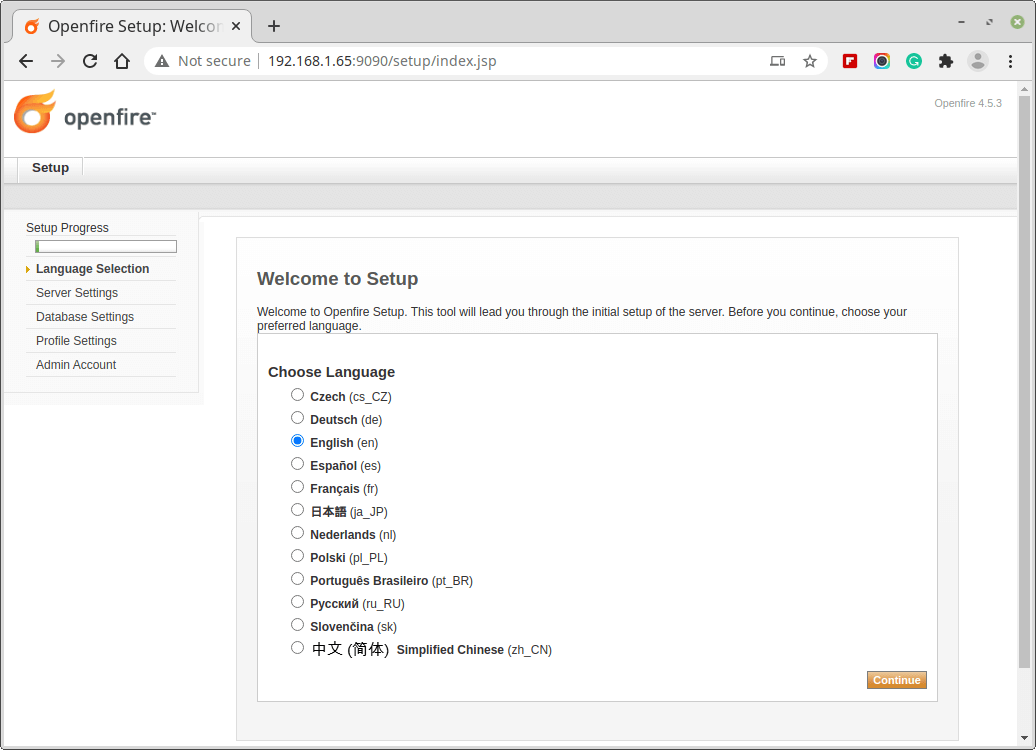
👁 Openfire Setup Language
Openfire Setup Language

2. Select Domain name, Admin port, and Secure Admin port. Generally, you don’t need to change these data, until you need a custom port.
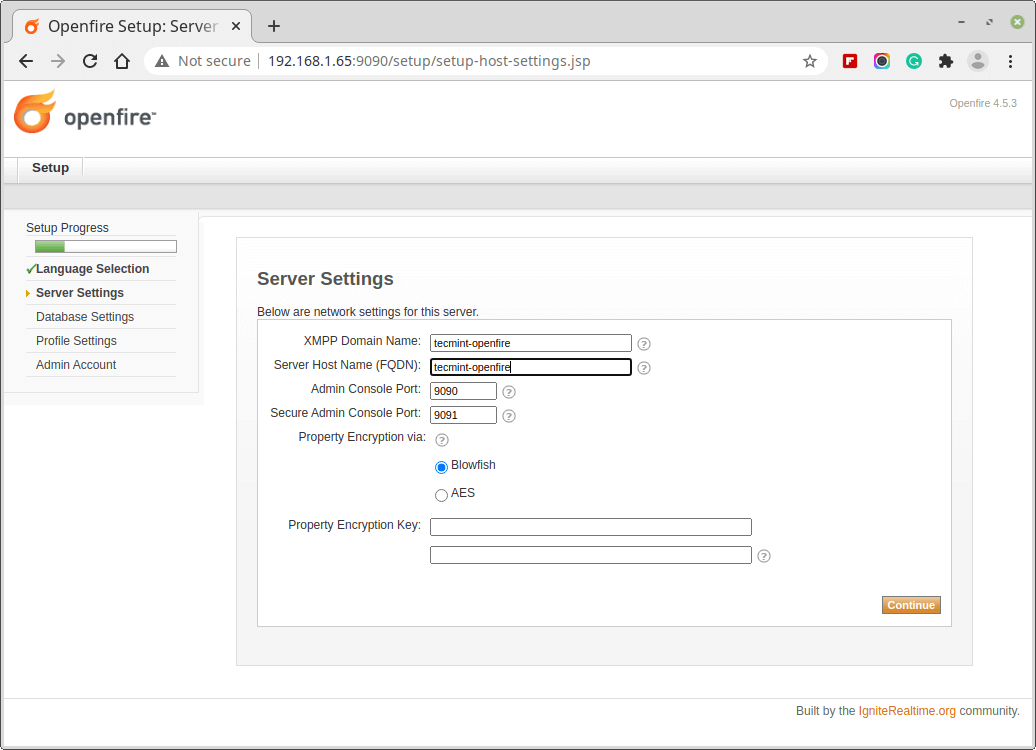
👁 Openfire Server Settings
Openfire Server Settings

3. You have the option to set an external database as well as or can use an embedded database. Embedded database requires no external database configuration, hence is easy to configure and set, but it doesn’t give the same level of performance as an external database.
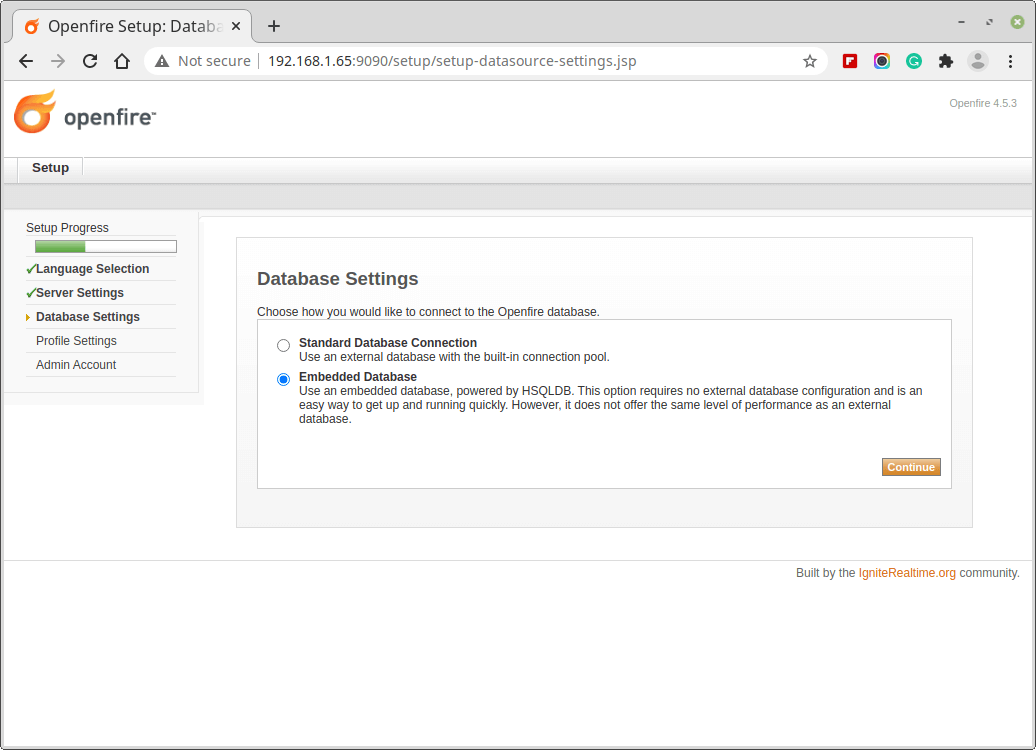
👁 Openfire Database Settings
Openfire Database Settings

4. Then, you need to set up a profile setting.
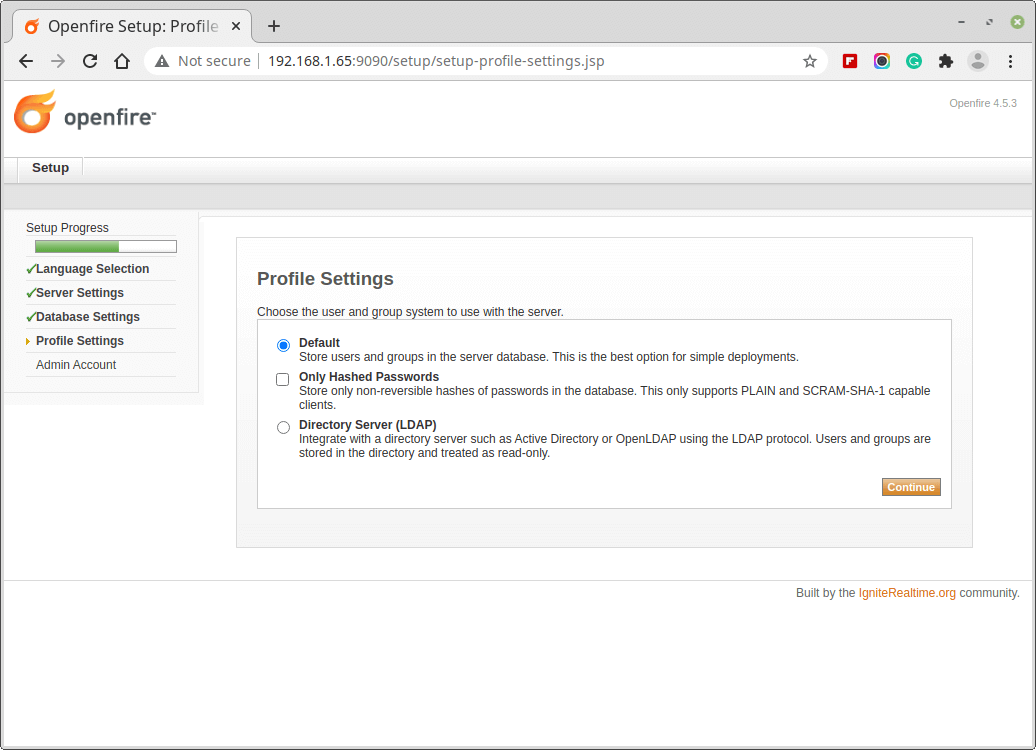
👁 Openfire Profile Settings
Openfire Profile Settings

5. The last step is to set up the Admin password and email address. Note, that the current password is ‘admin‘, in the new installation.
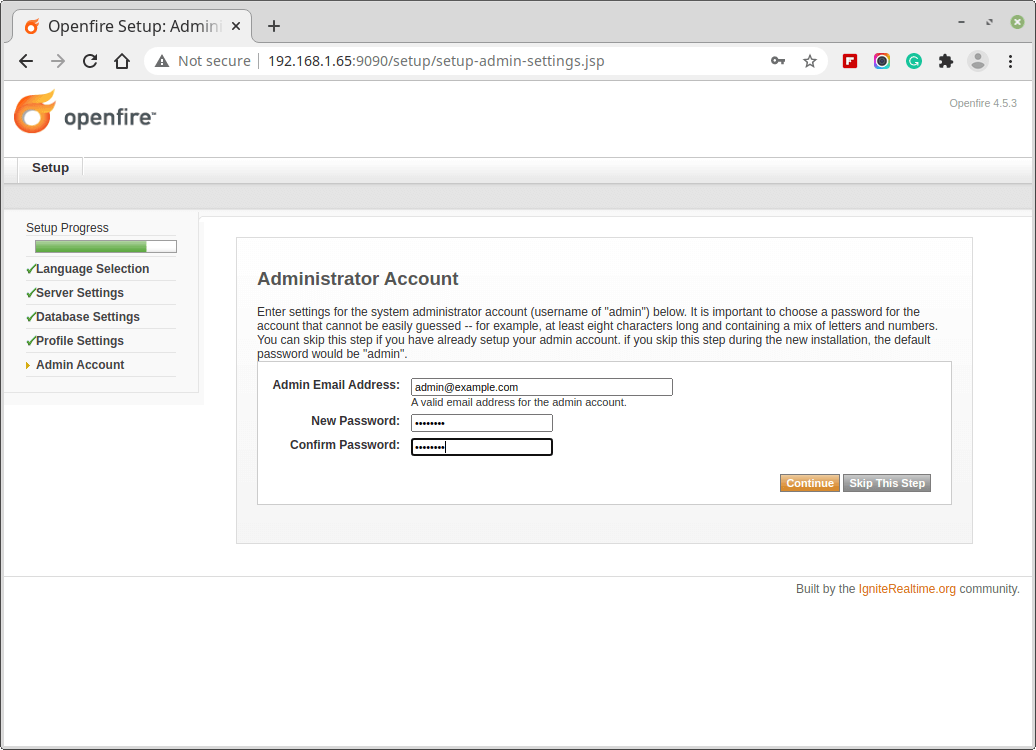
👁 Openfire Admin Account
Openfire Admin Account

6. On a successful setup, a confirmation message is shown.
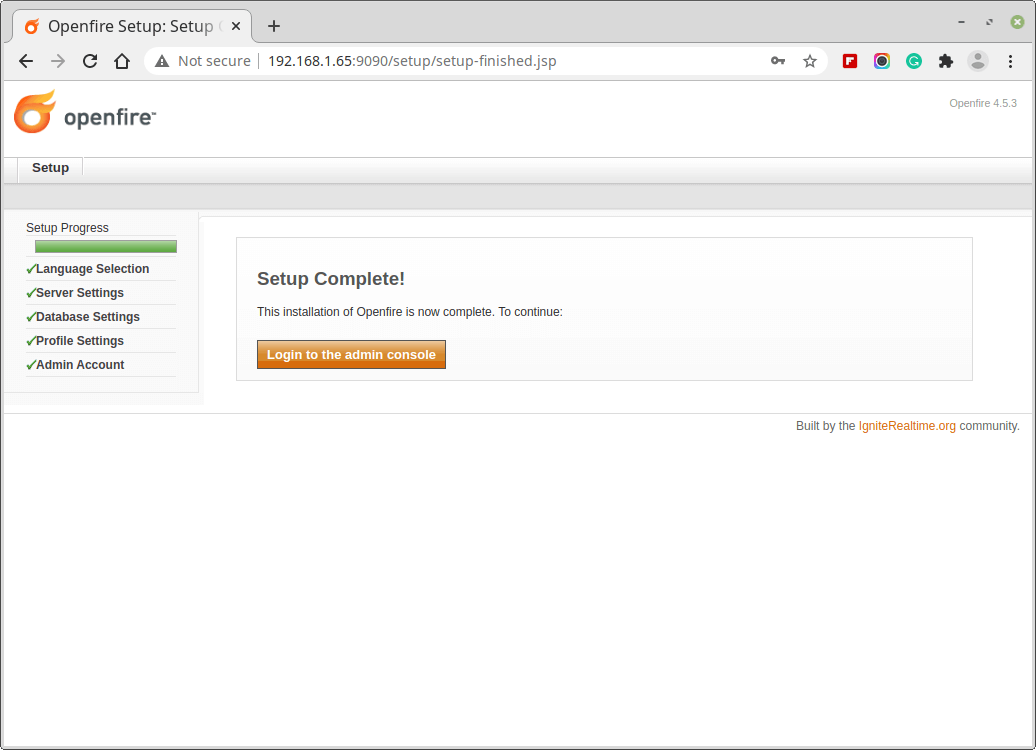
👁 Openfire Setup Complete
Openfire Setup Complete

7. Login to Openfire Admin using username “admin” and password, the one we set above.
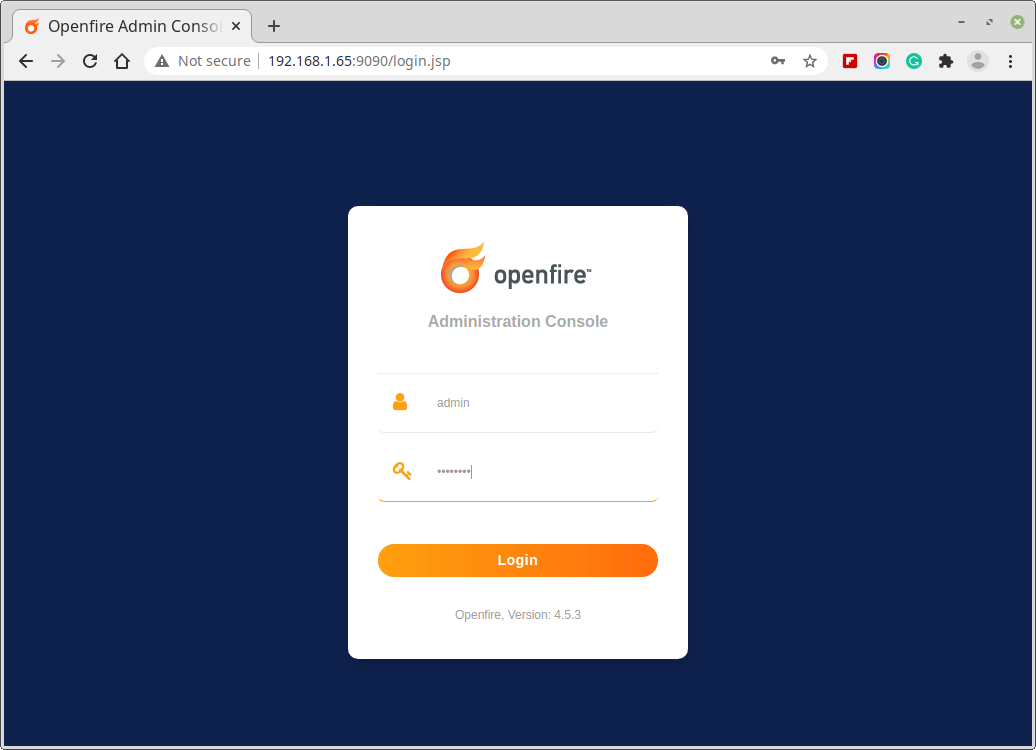
👁 Openfire Admin Login
Openfire Admin Login
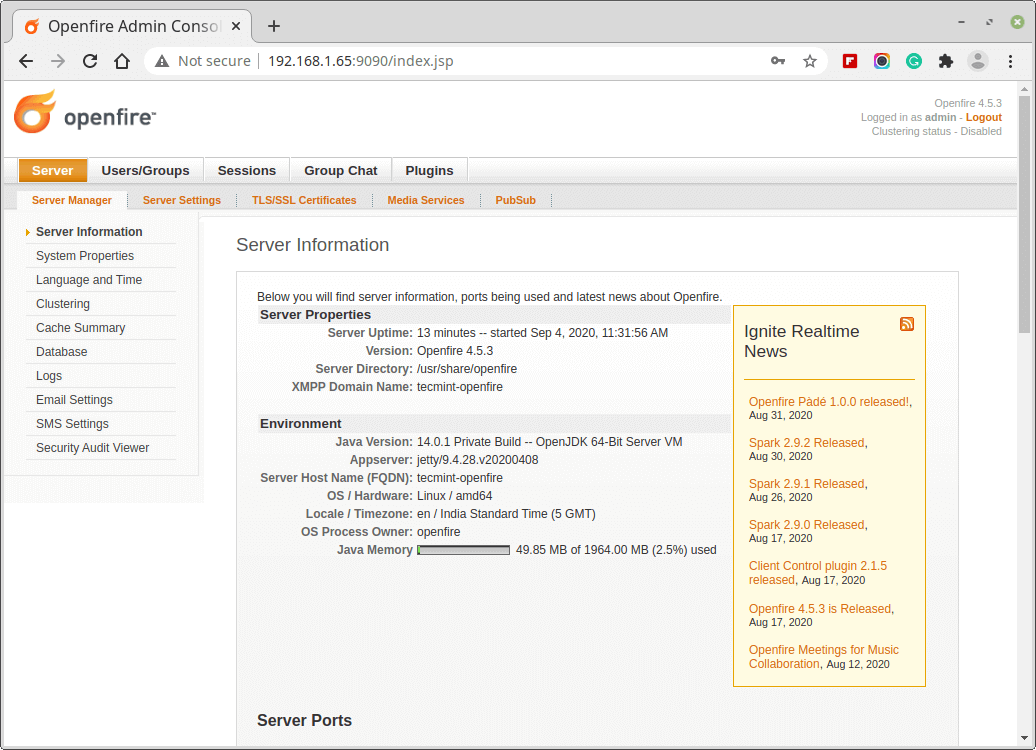
👁 Openfire Server Information
Openfire Server Information

8. Next, create a new user under Users/Groups.
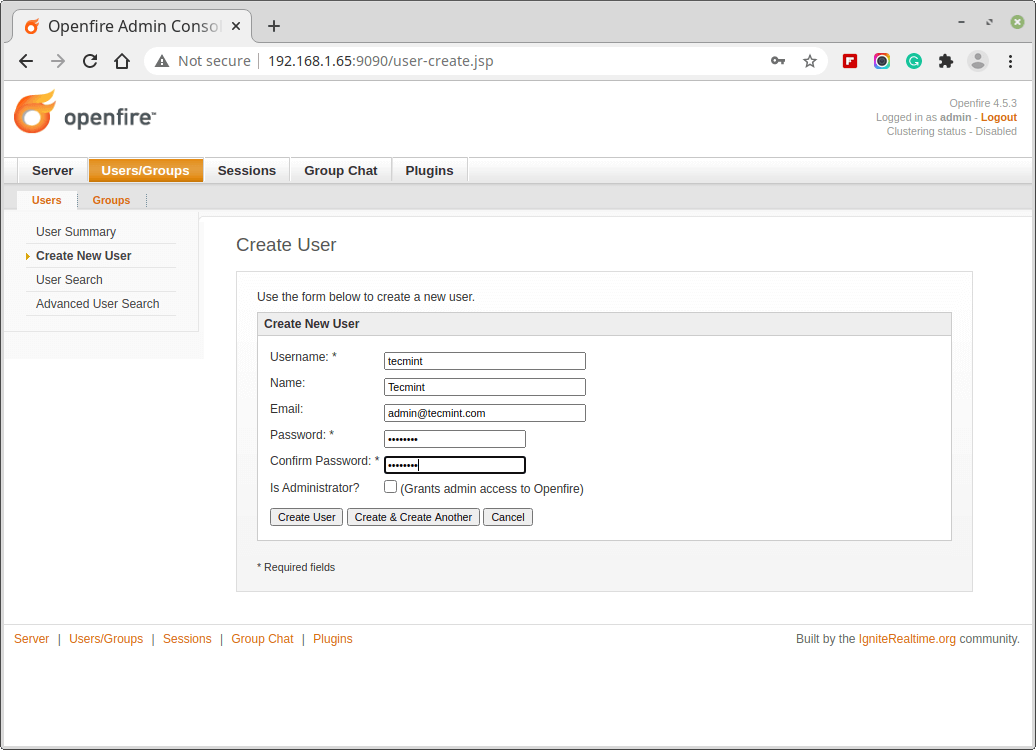
👁 Create New User in Openfire
Create New User in Openfire

The server is set up successfully, you can add users, groups, contacts, plugins, etc. Since the application is X based and is very handy, it is just a few clicks away. And now we need to download the client application ‘Spark‘, for user communication.

Installation of Spark Client

Download and Install cross-platform Spark client for your system using the below link.

  1. http://www.igniterealtime.org/downloads/index.jsp

Once you’ve installed Spark client, open the application and enter the username, password, and IP address of Openfire server.
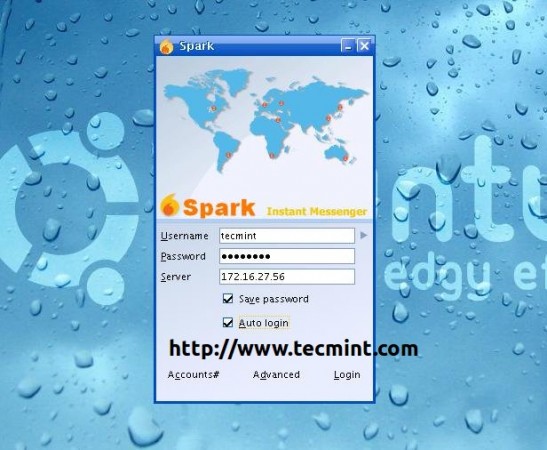
👁 Install Spark IM Client
Spark IM Client

Once you logged in you can chat with the users who are online.
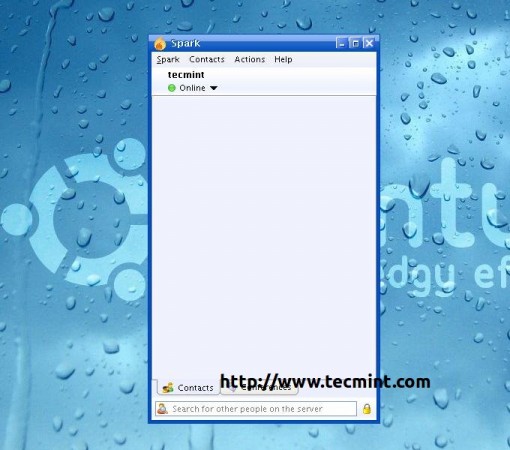
👁 Spark Client
Spark Client Chat Window

That’s all for now. Stay connected to Tecmint. Don’t forget to tell us, how much you liked the article, in our comment section.

If this article helped, share it with someone on your team.
TecMint Weekly Newsletter
Get the Learn Linux 7 Days Crash Course free when you join 34,000+ Linux professionals reading every Thursday.
Check your email for a magic link to get started.
Something went wrong. Please try again.
TecMint has been free for 14 years. Help keep it that way.
Google AI Overviews and tools like ChatGPT have cut into search traffic for independent tech sites like TecMint. Running this site costs over $2,000 every month for hosting, infrastructure, and paying authors to keep the content accurate and tested.

If this article helped you solve a problem, consider buying a coffee. It helps keep TecMint free, supports the authors, and keeps the project going.
☕ Buy Me a Coffee
Ravi Saive
I'm Ravi Saive, an award-winning entrepreneur and founder of several successful 5-figure online businesses, including TecMint.com, GeeksMint.com, UbuntuMint.com, and the premium learning hub Pro.Tecmint.com.

Each tutorial at TecMint is created by a team of experienced Linux system administrators so that it meets our high-quality standards.

100 Comments

Leave a Reply
  1. I have just downloaded all these files and i am going to test it for my office network. will it need a domain environment or it will be ok in workgroup.

    Reply
  2. does anyone knows how to configure openfire using a IPv6 network?

    Reply
  3. Is there any android client compatible with OpenFire ?

    Reply
  4. How do i find the ip of my server

    Reply
    • @Colton,

      You can get the IP address of your server using ifconfig or ip command as shown.

      # ifconfig
      # ip addr show
      
      Reply
      • So that means that the pcs ip is the ip i use

        Reply
        • @Colton,

          Yes thats the IP you should use..

          Reply
  5. Hi,

    I have a list of contacts in open fire server, but in client app its not showing the lists??

    Reply
  6. hello,
    how can we integrate Openfire using php. can you share hare any url or code.

    Reply
    • @Abhishek,

      Openfire is based application, and I think yes you can integrate it with any PHP script, I suggest you to go through the Openfire integration documentation..

      Reply
  7. I keep getting this error when starting openfire

    “PID file /var/run/openfire.pid not readable (yet?) after start.”
    “Failed to start SYSV: Openfire is an XMPP server, which is a server that facilitates XML based communication, such as chat..”

    Reply
  8. When I am trying to install spark, the error is coming “bamboo user does not exist” . how to resolve this ?

    Reply
    • @Jitin,

      Create that bamboo user and then install spark, that’s it..

      Reply
  9. I want to use the client server on fine and want to access from my android phone
    Please suggest me client server app for android
    Alternate of spark

    Reply
    • Hello, i have successfully installed server able to login via admin console but while trying to login from sprak to server it says invalid username & password. I tried multiple users same error.

      Please suggest me @984044991 / [email protected]

      Reply
      • @Vimalraj,

        Have you entered correct openfire sever details? have you created the user in openfire? please check these things..

        Reply
  10. I have successfully configured openfire server . It is working fine with spark .

    Now I want to give an option on my website to enable chat for the users . Is there any way to integrate spark in website ( if they have some web based version) or any alternate solution for this ?

    Reply
  11. I integrated open fire with windows Active directory but after change the password of domain user it is not effect in client messenger spark please suggest to me how to resolve the issue.

    Reply
  12. When i setup file , then forget password . how to get password ?

    Reply
    • @Jidendra,
      Only way is to recover from MySQL database, go to MySQL and update admin password.

      Reply
      • so you are using embeeded database, how can you change the mysql password

        Reply
        • @Manoj,

          To change MySQL root password, use the following commands:

          $ mysql -u root -p
          mysql> use mysql;
          mysql> update user set password=PASSWORD("NEWPASSWORD") where User='root';
          
          Reply
          • Thanks for the reply, good to know that

  13. I have an issue with uninstall openfire from the server. i am unable pl’z help me out from this situation.

    Reply
    • @Vasudev,
      What’s issue? can you please share with us so that we cam help you out..

      Reply
  14. Thanks a lot for the tut friend! I’m also a CS major, I was considering coding my own server and client in Python.. but it’s a bit tedious. I will do Udp/Tcp client and server, maybe check out the source for this. Anyway, thanks a lot!

    Reply
    • Thanks @Necrosynth for the feedback.
      If I were coding it I would have preferred UDP – Keep connected even when connection drop and IP changes, no time out.
      I would love to see the codes you are writing (on github probably).
      Keep connected for more such posts.

      Reply
      • Hi,
        I integrated open fire with windows Active directory but after change the password of domain user it is not effect in client messenger spark please suggest to me how to resolve the issue.

        Reply
  15. That so very good tutorial ..
    openfire good and install server but would like to know devo do so you can access my seridor from internet (outside my local network ) ..
    Thank you …

    Reply
  16. All i want is to creat my own instant messaging

    Reply
    • QLAWUNMI,
      So who is stopping you. Go ahead and create your own IM.

      Reply
  17. bro is openfire free?

    Reply
    • @Hamza,
      Yes its open source and free to use..

      Reply
  18. Nice explanation.
    I would like to know if Spark saves the chat transcripts of every user on the server automatically, or is it only available on the user’s system?
    If it doesn’t do it automatically, is there any way to do so?

    Reply
    • @Rohan,
      I think it saves at server level..never checked, could you please check and update me..

      Reply
  19. if it is possible tell me how to create my own messenger

    Reply
    • Yeah BIVUGIRE Gibert,
      It is quiet possible to create your own Instant Messanger. All You Need is

      1. Domain (You may buy it from any Domain registrant)
      2. Hosting (Though you may buy it from any host, I suggest you to buy from Hostgator and apply code “TecMint025”, to get 25% off).
      3. Deploy ‘Openfire’, and Perform Necessary settings.

      You may contact Admin @ tecmint.com[at]gmail.com for Domain/Hosting related concern.
      You may Contact me @ avishek1210[at]gmail.com for any technical concern.

      We can do Basic settings for you for free. If More than basic settings are required we may do it for you on a very small charge.

      Reply
  20. I want to use voice over ip inside my organization. How can it be possible.

    Reply
    • There are a plenty of VOIP Application software for Linux. Here are a few –

      VoIP Softphone clients
      QuteCom VoIP softphone originally known as WengoPhone
      Ekiga VoIP and video conferencing application for GNOME
      Linphone SIP video-phone
      Twinkle Qt-based VoIP phone
      Kiax Simple user interface for making VoIP calls to Asterisk PBX
      Skype Skype peer-to-peer Voice over Internet Protocol (VoIP) software
      KPhone Supports Presence and Instant Messaging

      Server Software
      Asterisk Open Source VoIP PBX
      FreeSWITCH Telephony platform to facilitate the creation of voice and chat driven products
      GNU Gatekeeper VOIP gatekeeper for H.323
      sipXecs IP based communications system (IP PBX)

      Reply
  21. I am not able to install spark on my OS X Yosemite/mavericks10.9.4,and also not able to install spark web.Fast path web chat is also not working,i have centos 6.6(32 bit)…

    Reply
    • @naveen,
      let me know what exactly the problem is?
      What are you getting in error? Let me know.

      Reply
  22. in case, I installed openfire and then I have my website.
    I would like to integrate chat to my website so that I and my customer can used it for exchanging information.

    is it possible?

    Reply
    • yes Truong, its possible. We can do it for you on a very Minimal Charge. You may contact us at tecmint.com[at]gmail.com

      Reply
      • do i need some sofftware to create database or openfire can automaticaally create it for me …

        Reply
        • You need to create a database manually in MySQL or you can use PhpMyAdmin Gui tool to create database..

          Reply
  23. shoul i suposed to install open fire in every computer i instal spark

    Reply
    • @Harque,
      Just spark client is enough…..on every computer..

      Reply
  24. I want complete tutorial of openfire installation in windows.

    Reply
  25. windows.
    Because i got database error in installation in openfire.
    And supposed i want to make chat server. (Tecmint.com)
    Then how can i fill this domain in openfire ?
    Please help me

    Reply
  26. apart from using spark client, I tried in my local machine it is not able to connect with my emulator. So, please let me know how it is possible!

    Reply
    • Which emulator you using? and how you connecting? can you elaborate more.. so we could help you out..

      Reply
  27. How can we connect using android to this openfire created server?

    Please tell me asap.

    Reply
  28. Something strange happened with me. i have downloaded openfire using wget.
    After that i ran the command rpm -ivh openfire-3.8.2-1.i386.rpm, but it is showing no such file or directory error..

    Reply
    • Did you see the file using ls -l command? or else try to download again using wget and then give it a try..let’s see

      Reply
  29. How can I block vulnerable words in chat..so my users can not use vulnerable words in chat and can’t use abuse words also. If any one know then please help me.

    Reply
    • You can use the “content filter” plugin. It’s user friendly and easy to use.

      Reply
  30. I have successfully install OpenFire 3.9.3. I can access the web based gui to start the initial configuration. However once i get to the Profile Setting i cannot get a successful connection to my Active Directory server. I have tried every combination to get it working. And there doesn’t seem to be many articles on what needs to be done. Am i missing something?

    Reply
    • @ ShortCircuit,
      seems something is either wired, Messed or missed. Please post the error message so that we can understand what exactly is going on. Is it some kind of Database error?

      Reply
  31. Dear Avishek Kumar,

    Can you give some idea that how to configure remote office spark client to access the server.

    thanks,

    Reply
    • for accessing from remote you need to install open-fire in vps or dedicated servers.

      Reply
  32. Hi, I am not an It expert. i am wondering if I can create some like older versions of yahoo messenger, with features like chat rooms, like yahoo desktop client etc.

    Reply
    • Dear Ali,
      It is an Opensource Project, hence the codes can be modified to the degree of requirement.

      Best of Luck!

      Reply
  33. I want to develop a chat client that can just connected to a specific server that we have set, and can be costumized such as changing its logo with my own logo. Is there any recommendation from you?

    Reply
    • Dear Irfan,
      I don’t think it is going to be any issue as far as changing logo is concerned. Just find out the location of current logo in use and replace it with your’s.

      For the rest you have to test it and work to take it into production.

      Reply
  34. program work bt still some error in client side.

    Reply
  35. Hi sir,

    I have configure Own Instant Messaging/Chat Server Using Openfire server side all work done but client side some problem……

    how to connect the server to user ?????????????

    Reply
  36. Looking for a chat area to have video chat and text. I am looking at all my options. Something Myself and few others can monitor. With boot/tos options.

    Reply
  37. How to connect openfire with squirrelmail in centos 6.5

    Reply
  38. “Now point the browser to “http://localhost:9090” or “http://your-ip-address:9090” and follow these simple steps to install Openfire on your machine.”

    This is so confusing. If you have the nginx, where do you open this? Most Linux severs doesn’t have a browser or gnome (imagine that the servers are remote). Running firefox over X is a pain in the as*.

    http://your-ip-address:9090 won’t be accessible! Unless you set up sth. in the nginx which you didn’t mention how.

    Reply
    • Yes, right most of the servers don’t have GUI version of browsers, but you can still use command line browsing with lynx or links tools.

      Reply
  39. can i communicate my insatant messenging app developed in c# with openfier server

    Reply
  40. Is there a way to use this with Zimbra 8 ?

    Reply
  41. i exactly followed your step except i installed openfire in windows 7. I created a user through admin panel. Now i’m trying to login in spark. but spark says username and password doesn’t match. What could be the reason for this ? i double checked the user exist in DB.

    Reply
  42. Hi Avishek Kumar

    is there any other messenger than spark that compatible with openfire??? couse spark consumes alot of resource (about 200MB ram) in our pc/laptop

    thanks for your answer

    Reply
    • you can use pidgin instead of spark.

      Reply
  43. Any Limitation in user, its allow only 25 user, any way for unlimited, if no kindly suggest any other tools which support unlimited

    Reply
  44. Hello Avishek Kumar,

    Article which you have publish is very impressive and helpful.
    I have installed the same on Cent OS 6.3.
    Installation was successful.
    But i am able to take access through browser, Even i tried to stop and restart the service.
    Kindly Help.

    Reply
    • have you tried to add the port 9090 after the url?

      Reply
  45. Sir,
    I am a engineering student. I want to create an online messaging service (like WhatsApp)
    I would like to know how to put this config online. Can you plz refer some books that will help me understand it better.

    Reply
  46. Hi Sir Avishek Kumar,

    I installed the openfire..is there any possible way to add more user because I setup embedded db whick limit to 25…I also read an instruction from openfire website on migrating db. but i have problem on it. please help i am new hir

    Reply
  47. How to connect internet from now?

    Reply
    • Dear Mario,
      we were unable to understand what you mean.
      Are you asking us how to connect to Internet?
      (Ethernet, wifi,….)

      Please be clear about your saying, we would be happy to help you.

      Reply
  48. How many users can this IM server handle simultaneously? Hundreds? Thousands? Tens of thousands? I’m not talking about hardware limitation here, but just software limitation.

    Reply
    • Dear Fadi(itoctopus), Your concern is very Important.
      Speaking True, we are not aware of this.
      If you find any relevant information regarding this, Please let us know with the source, so that we can update it into the article.

      Thanks

      Reply
  49. Like i will ever install java on any of my servers….. Sure. That is unfortunate that few apps i found which would be useful are written in java. Otherwise i would use them.
    Java is simply not going to happen.

    Reply
    • @ name required,
      I think you are a little concerned with the security flaws of Java.
      :)

      Reply
  50. Hi

    I followed your steps to install this utility on RHEL 6.4 box. The installation was successfull, however after the installation when I tried to stop the service, it says that Openfire is not running. So then I started the service. No errors were reported. And when I checked the service status using the command service openfire status, it says the openfire is not running.

    Any idea What is happening here?

    Regards
    Jo

    Reply
    • Dear Jo,
      I am unable to understand, what is going on in your case.
      What it is showing when you redirect your browser to 127.0.0.1:9090?

      See your configuration file, for the port it is using. Please let us know, about your action and results.

      Reply
  51. Hi,

    How to uninstall this ???

    Reply
    • To remove openfire, run the following command.

      # rpm -evh openfire
      
      Reply
    • its very easy to uninstall ths????

      Reply
      • Yes! just run the rpm -evh openfire command.

        Reply
        • HI Ravi,

          I want to check all user’s chat, is it possible?

          Reply

Got Something to Say? Join the Discussion... Cancel reply

Free Course
Get a free Linux course before you go.
Subscribe to TecMint Weekly and get the Learn Linux 7 Days Crash Course free. Read by 34,000+ Linux professionals every Thursday.
Check your email for a magic link to get started.