
By default Ubuntu does not set up a root password during installation and therefore you don’t get the facility to log in as root. However, this does not mean that the root account doesn’t exist in Ubuntu or that it can’t be completely accessed. Instead you are given the ability to execute tasks with superuser privileges using sudo command.
Actually, the developers of Ubuntu decided to disable the administrative root account by default. The root account has been given a password which matches no possible encrypted value, thus it may not log in directly by itself.
Attention: Enabling root account is not at all required as most activities in Ubuntu do not actually call for you to use the root account.
Although users are strongly recommended to only use the sudo command to gain root privileges, for one reason or another, you can act as root in a terminal, or enable or disable root account login in the Ubuntu using following ways.
1. How to Enable Root Account in Ubuntu?
To Access/Enable the root user account run the following command and enter the password you set initially for your user (sudo user).
$ sudo -i

2. How to Change Root Password in Ubuntu?
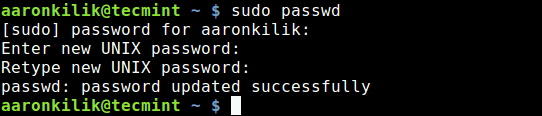
You can change root password with ‘sudo passwd root‘ command as shown below.
$ sudo passwd root
Enter new UNIX password:
Retype new UNIX password:
passwd: password updated successfully
3. How to Disable Root Access in Ubuntu?
If you wish to disable root account login, run the command below to set the password to expire.
$ sudo passwd -l root

You may refer Ubuntu documentation for further information.
That’s it. In this article, we explained how to enable and disable root login in Ubuntu Linux. Use the comment form below to ask any questions or make any important additions.
If this article helped you solve a problem, consider buying a coffee. It helps keep TecMint free, supports the authors, and keeps the project going.



Got Something to Say? Join the Discussion... Cancel reply