
SELinux, or Security-Enhanced Linux, is a security mechanism for mandatory access control (MAC) implemented in the Linux kernel to add an extra layer of protection by controlling access to files, processes, and resources.
One aspect of SELinux is managing Booleans, which are switches that control various security policies.
In this article, we’ll focus on enabling or disabling specific SELinux Booleans, especially for Apache on RHEL-based distributions, to ensure optimal security and functionality.
Understanding SELinux Booleans
Booleans in SELinux are like on-off switches that determine whether certain actions are allowed or denied. These Booleans can be toggled to enable or disable specific security policies.
For Apache, there are several Booleans that control its interactions with SELinux.
Enabling or Disabling Apache SELinux Booleans
To view all SELinux booleans, use the getsebool command together with less command.
getsebool -a | less
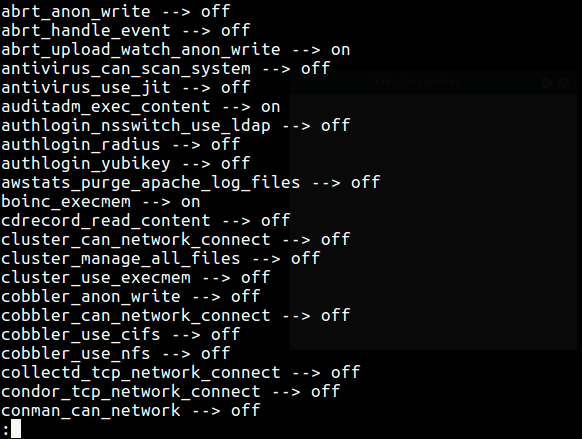
To view all boolean values of the Apache program (or daemon), use the ‘getsebool‘ command with the grep utility, which will list all httpd-related booleans.
getsebool -a | grep httpd
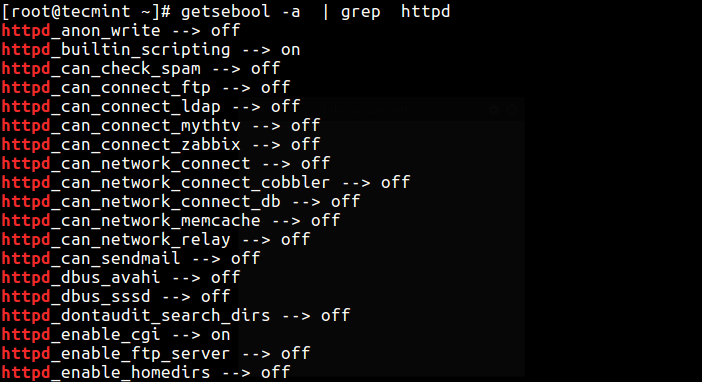
Here are some common Apache-related SELinux Booleans:
- httpd_can_network_connect: Allows Apache to make network connections.
- httpd_can_network_connect_db: Allows Apache to connect to databases over the network.
- httpd_can_sendmail: Allows Apache to send email.
- httpd_enable_cgi: Allows Apache to execute CGI scripts.
- httpd_enable_homedirs: Allows Apache to read user home directories.
These Booleans control various aspects of Apache’s interactions with SELinux, helping to maintain security while allowing necessary functionality.
To enable a boolean, you can use the switch ‘On‘ or the numerical value (1). To disable a boolean, you can use the switch ‘Off‘ or the numerical value (0) using the setsebool command as described below.
Enable Booleans for Apache
If you have a web server installed on your system, you can permit HTTPD scripts to write files in directories labeled public_content_rw_t by enabling the allow_httpd_sys_script_anon_write boolean.
getsebool allow_httpd_sys_script_anon_write
setsebool -P allow_httpd_sys_script_anon_write on
OR
# setsebool -P allow_httpd_sys_script_anon_write 1
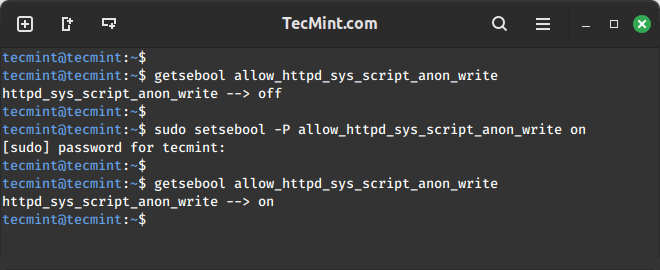
The -P option in the setsebool command ensures that changes persist across system reboots, which is important for maintaining consistent security policies.
Disable Booleans for Apache
Similarly, to disable or turn off the above SELinux boolean value, run the following command.
setsebool allow_httpd_sys_script_anon_write off
setsebool allow_mount_anyfile off
OR
setsebool allow_httpd_sys_script_anon_write 0
setsebool allow_mount_anyfile 0
Don’t forget to read the following security-related articles.
- How to Disable SELinux Temporarily or Permanently
- Mandatory Access Control Essentials with SELinux
- 20 Useful Security Tips for Linux Server Hardening
SELinux Booleans provides a flexible way to control security policies on Linux systems. For Apache, enabling or disabling specific Booleans can enhance security while allowing necessary functionality.
By understanding how to manage these Booleans, administrators can tailor SELinux policies to suit their organization’s needs effectively.
If this article helped you solve a problem, consider buying a coffee. It helps keep TecMint free, supports the authors, and keeps the project going.



Got Something to Say? Join the Discussion... Cancel reply