VOOZH about

URL: https://www.tecmint.com/install-memcached-linux/

โ‡ฑ How to Install Memcached for Faster Apps on RHEL 9


Skip to content

Memcached is an open-source distributed memory object caching program that allows us to improve and speed up the performance of dynamic web applications by caching data and objects in Memory.

Memcached is also used to cache entire database tables and queries to improve the performance of the database. It is the only caching system available freely and used by many big sites like YouTube, Facebook, Twitter, Reddit, Drupal, Zynga, etc.

Memcached can commit to denial of service attacks if not correctly configured. In this article, we will explain how to install and secure your Memcached server on RHEL-based Linux distributions such as Rocky Linux, AlmaLinux, and Fedora.

TecMint Weekly Newsletter
Get the Learn Linux 7 Days Crash Course free when you join 34,000+ Linux professionals reading every Thursday.
Check your email for a magic link to get started.
Something went wrong. Please try again.

Installing Memcached in Linux

First, update your local software package index and then install Memcached from the official repositories using the following yum commands as root administrative user.

yum update
yum install memcached
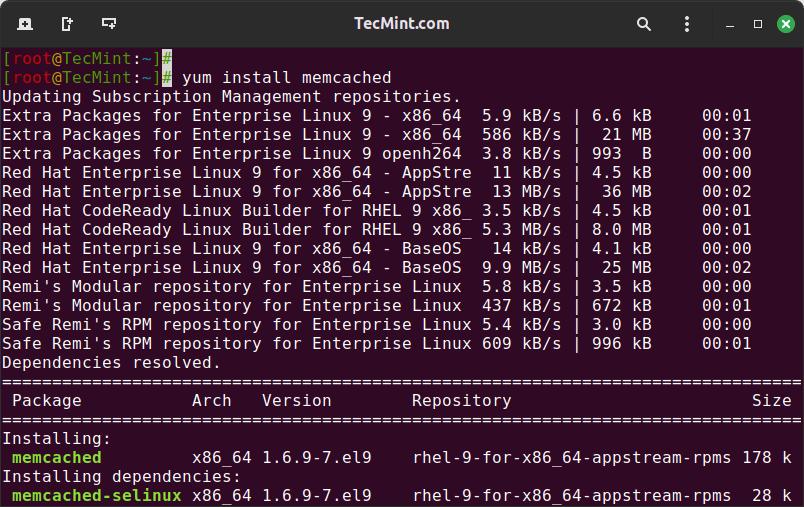
๐Ÿ‘ Install Memcached in RHEL 9
Install Memcached in RHEL 9

Next, we will install libmemcached โ€“ a client library that offers a couple of tools to manage your Memcached server.

yum install libmemcached
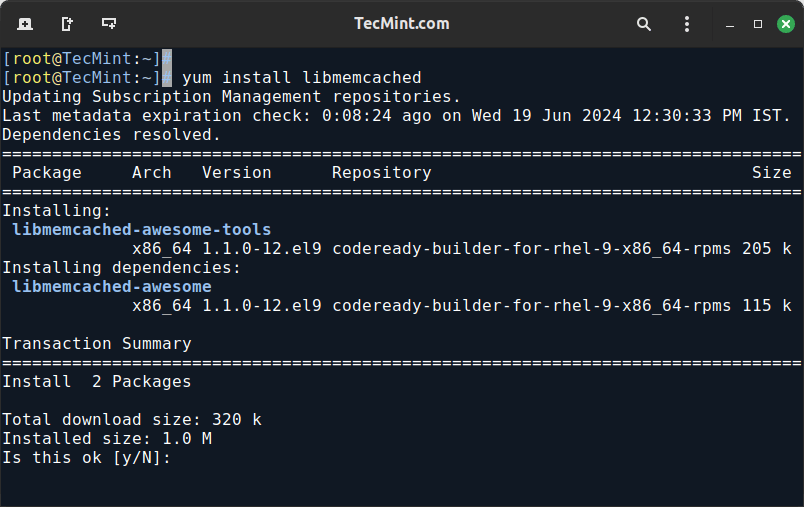
๐Ÿ‘ Install libmemcached in RHEL
Install libmemcached in RHEL

Memcached should now be installed on your system as a service, along with the tools that require you to test its connectivity. Now we can proceed further to secure its configuration settings.

Securing Memcached Configuration Settings

To make assure that the installed Memcached service is listening on the 127.0.0.1 local interface, we will alter the OPTIONS variable in the /etc/sysconfig/memcached configuration file.

vi /etc/sysconfig/memcached

Search for the OPTIONS variable, and add the -l 127.0.0.1,::1 to OPTIONS variable. These configuration settings will protect our server from denial-of-service attacks.

/etc/sysconfig/memcached
PORT="11211"
USER="memcached"
MAXCONN="1024"
CACHESIZE="64"
OPTIONS="-l 127.0.0.1,::1"
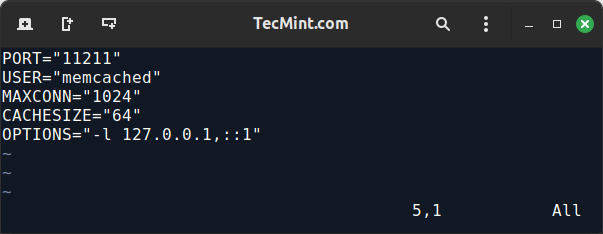
๐Ÿ‘ Secure Memcached in RHEL
Secure Memcached in RHEL

Letโ€™s discuss each of the above parameters in detail.

  • PORT : The port used by Memcached to run.
  • USER : The start-up daemon for the Memcached service.
  • MAXCONN : The value used to set max simultaneous connections to 1024. For busy web servers, you can increase to any number based on your requirements.
  • CACHESIZE : Set cache size memory to 2048. For busy servers, you can increase up to 4GB.
  • OPTIONS : Set the IP address of the server, so that Apache or Nginx web servers can connect to it.

Restart and enable your Memcached service to apply your configuration changes.

systemctl restart memcached
systemctl enable memcached

Once started, you can confirm that your Memcached service is bound to the local interface and listening only on TCP connections using following netstat command.

netstat -plunt
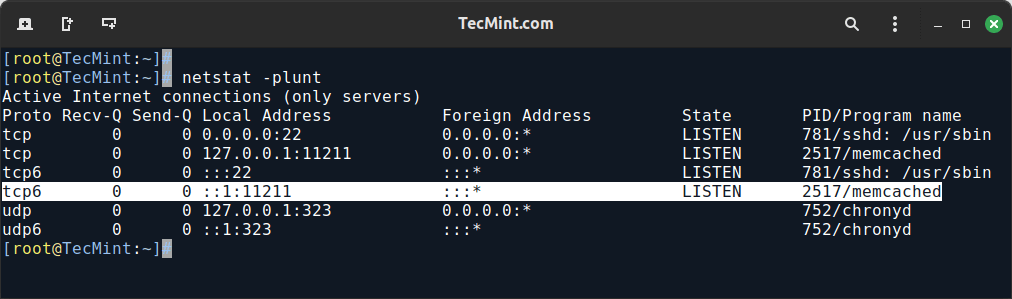
๐Ÿ‘ Check Memcached Server
Check Memcached Server

You can also check the status of the server using the memcached-tool as shown.

memcached-tool 127.0.0.1 stats
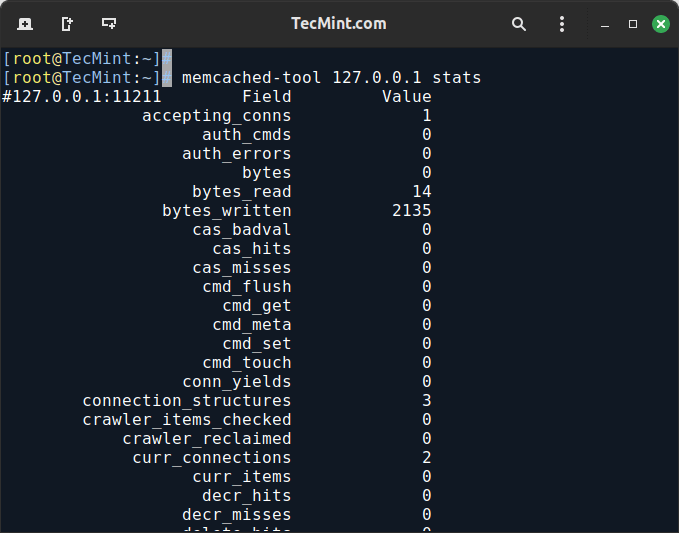
๐Ÿ‘ Check Memcached Running Status
Check Memcached Running Status

Now make sure to allow access to the Memcached server by opening a port 11211 on your firewall as shown.

firewall-cmd --permanent --zone=public --add-port=11211/tcp

Test Memcached Installation

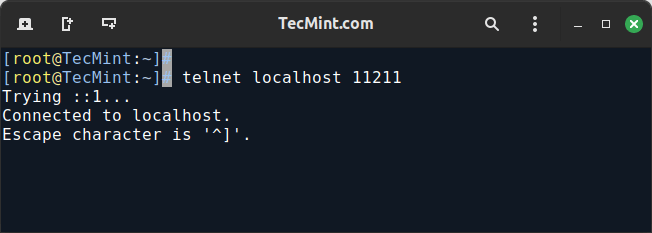
To verify that Memcached is working properly, you can connect to it using the telnet command.

telnet localhost 11211

If the connection is successful, youโ€™ll see a prompt similar to this:

๐Ÿ‘ Test Memcached Server
Test Memcached Server

Install Memcached PHP Extension

To install the Memcached PHP extension and integrate it with Perl, Python, Apache, and Nginx on a Linux system, youโ€™ll need to follow specific steps for each component.

For PHP:

yum install php-memcached

You may need to restart Apache, Nginx, or PHP-FPM after installation:

systemctl restart httpd 
systemctl restart nginx
systemctl restart php-fpm 

For Perl:

yum install perl-Cache-Memcached

For Python:

yum install python3-memcached

Once installed, configure your PHP, Perl, or Python applications to utilize Memcached for caching. This involves modifying application code to connect to the Memcached server and store/retrieve cached data.

Conclusion

In this article, we have explained how to install and secure your Memcached server for the local network interface, aiming to optimize the performance of dynamic web applications by reducing database load through efficient caching.

If you have faced any issues during installation, do ask for help in our comment section below.

If this article helped, share it with someone on your team.
TecMint Weekly Newsletter
Get the Learn Linux 7 Days Crash Course free when you join 34,000+ Linux professionals reading every Thursday.
Check your email for a magic link to get started.
Something went wrong. Please try again.
โ˜•
TecMint has been free for 14 years. Help keep it that way.
Google AI Overviews and tools like ChatGPT have cut into search traffic for independent tech sites like TecMint. Running this site costs over $2,000 every month for hosting, infrastructure, and paying authors to keep the content accurate and tested.

If this article helped you solve a problem, consider buying a coffee. It helps keep TecMint free, supports the authors, and keeps the project going.

โ˜• Buy Me a Coffee
Ravi Saive
I'm Ravi Saive, an award-winning entrepreneur and founder of several successful 5-figure online businesses, including TecMint.com, GeeksMint.com, UbuntuMint.com, and the premium learning hub Pro.Tecmint.com.

Each tutorial at TecMint is created by a team of experienced Linux system administrators so that it meets our high-quality standards.

15 Comments

Leave a Reply
  1. Hi, I try your guide to activate Memcache on moodle, but moodle cannot activate the plugin. Turns out I must do: โ€œyum install php-pecl-memcachedโ€(with โ€œdโ€), while the guide only mention โ€œyum install php-pecl-memcacheโ€ (without โ€œdโ€).

    I think itโ€™s because when I try it, moodle 3.8 uses the newer version. nevertheless, moodle docs (https://docs.moodle.org/38/en/Caching) links to this page and I think you should know.

    OS: Centos 7, apache, php-fpm, and moodle 3.8.1.

    overall, thanks for the guide.

    Reply
  2. Hi Ravi,

    I followed this fantastic guide and installed memcache. Now on my server, if I test it from the console, memcache is installed, but if i try from PHP info it is not installed. I need to speed up Prestashop but even from the control panel of Prestashop Memcache it is not seen. What am I doing wrong?

    Reply
    • @Orazio,

      Please install Memcached PHP extension to work with Memcached daemon.

      # yum install php-pecl-memcache
      
      Reply
  3. Nicely explained. Why some prefer CentOS over Debian? To me, Debian has been really easy to setup. It was also really easy to configure Memcached with PHP on Debian. Do you think it is because of performance or maybe security?

    Reply
  4. With server have 1G ram, how many config Cachesize=?

    Reply
  5. Could you show me how about the hardware requirement to install Memcache?

    Reply
    • @De Nguyen,
      Memcached can be installed any system which has minimum 1GB RAM.

      Reply
  6. when editing memchached file pls put -l local host that is not โ€œ-1โ€ thats โ€œlโ€

    Reply
  7. Hi,

    Every thing fine but now how can we route all the Users to Memcached server to avail the cache service?

    Reply
  8. Hi, I am a subscriber of your site. And I found a confusion; at the firewall you have inserted the IP ranges from 172.16.1.1 to 172.16.1.10 for Port 11211

    what I need to put there ? should I need to insert there my vpsโ€™ ip address or local ipaddress ? Please help me. What I need to put there ?

    Reply
    • Yes define your own server IP addresses.

      Reply
  9. In the Enable EPEL Repository section, under RHEL 5/CentOS 5 64-bit, the second command has an extra โ€œwgetโ€ at the start. It should just be an โ€œrpmโ€ command like the second command in the other related sections, but it has โ€œwget rpm โ€ฆโ€ and the โ€œwget โ€ is extra.

    Reply
    • Thanks, corrected now..

      Reply
  10. Good one โ€ฆ.

    Reply

Got Something to Say? Join the Discussion... Cancel reply

Free Course
Get a free Linux course before you go.
Subscribe to TecMint Weekly and get the Learn Linux 7 Days Crash Course free. Read by 34,000+ Linux professionals every Thursday.
Check your email for a magic link to get started.