
httpstat is a Python script that reflects curl statistics in a fascinating and well-defined way, it is a single file which is compatible with Python 3 and requires no additional software (dependencies) to be installed on a users system.
It is fundamentally a wrapper of cURL tool, means that you can use several valid cURL options after a URL(s), excluding the options -w, -D, -o, -s, and -S, which are already employed by httpstat.
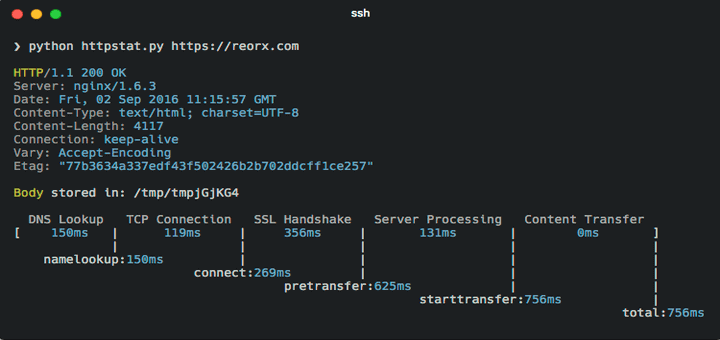
You can see in the above image an ASCII table displaying how long each process took, and for me the most important step is “server processing” – if this number is higher, then you need to tune your server to speed up website.
For website or server tuning you can check our articles here:
- 5 Tips to Tune Performance of Apache Web Server
- Speed Up Apache and Nginx Performance Upto 10x
- How to Boost Nginx Performance Using Gzip Module
- 15 Tips to Tune MySQL/MariaDB Performance
Grab httpstat to check out your website speed using following instillation instructions and usage.
Install httpstat in Linux Systems
You can install httpstat utility using two possible methods:
1. Get it directly from its Github repo using the wget command as follows:
$ wget -c https://raw.githubusercontent.com/reorx/httpstat/master/httpstat.py
2. Using pip (this method allows httpstat to be installed on your system as a command) like so:
$ sudo pip install httpstat
Note: Make sure pip package installed on the system, if not install it using your distribution package manager yum or apt.
How to Use httpstat in Linux
httpstat can be used according to the way you installed it, if you directly downloaded it, run it using the following syntax from within the download directory:
$ python httpstat.py url cURL_options
In case you used pip to install it, you can execute it as a command in the form below:
$ httpstat url cURL_options
To view the help page for httpstat, issue the command below:
$ python httpstat.py --help
OR
$ httpstat --help
Usage: httpstat URL [CURL_OPTIONS]
 httpstat -h | --help
 httpstat --version

Arguments:
 URL url to request, could be with or without `http(s)://` prefix

Options:
 CURL_OPTIONS any curl supported options, except for -w -D -o -S -s,
 which are already used internally.
 -h --help show this screen.
 --version show version.

Environments:
 HTTPSTAT_SHOW_BODY Set to `true` to show response body in the output,
 note that body length is limited to 1023 bytes, will be
 truncated if exceeds. Default is `false`.
 HTTPSTAT_SHOW_IP By default httpstat shows remote and local IP/port address.
 Set to `false` to disable this feature. Default is `true`.
 HTTPSTAT_SHOW_SPEED Set to `true` to show download and upload speed.
 Default is `false`.
 HTTPSTAT_SAVE_BODY By default httpstat stores body in a tmp file,
 set to `false` to disable this feature. Default is `true`
 HTTPSTAT_CURL_BIN Indicate the curl bin path to use. Default is `curl`
 from current shell $PATH.
 HTTPSTAT_DEBUG Set to `true` to see debugging logs. Default is `false`
From the output of the help command above, you can see that httpstat has a collection of useful environmental variables that influence its behavior.
To use them, simply export the variables with the appropriate value in the .bashrc or .zshrc file.
For instance:
export HTTPSTAT_SHOW_IP=false
export HTTPSTAT_SHOW_SPEED=true
export HTTPSTAT_SAVE_BODY=false
export HTTPSTAT_DEBUG=true
Once your are done adding them, save the file and run the command below to effect the changes:
$ source ~/.bashrc
You can as well specify the cURL binary path to use, the default is curl from current shell $PATH environmental variable.
Below are a few examples showing how httpsat works.
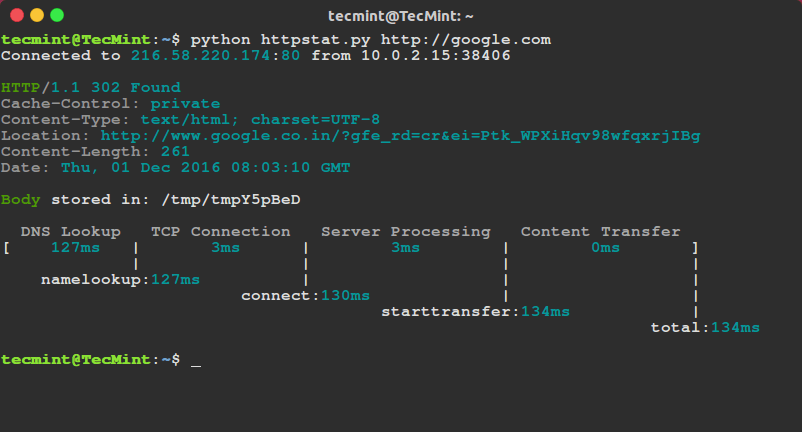
$ python httpstat.py google.com
OR
$ httpstat google.com
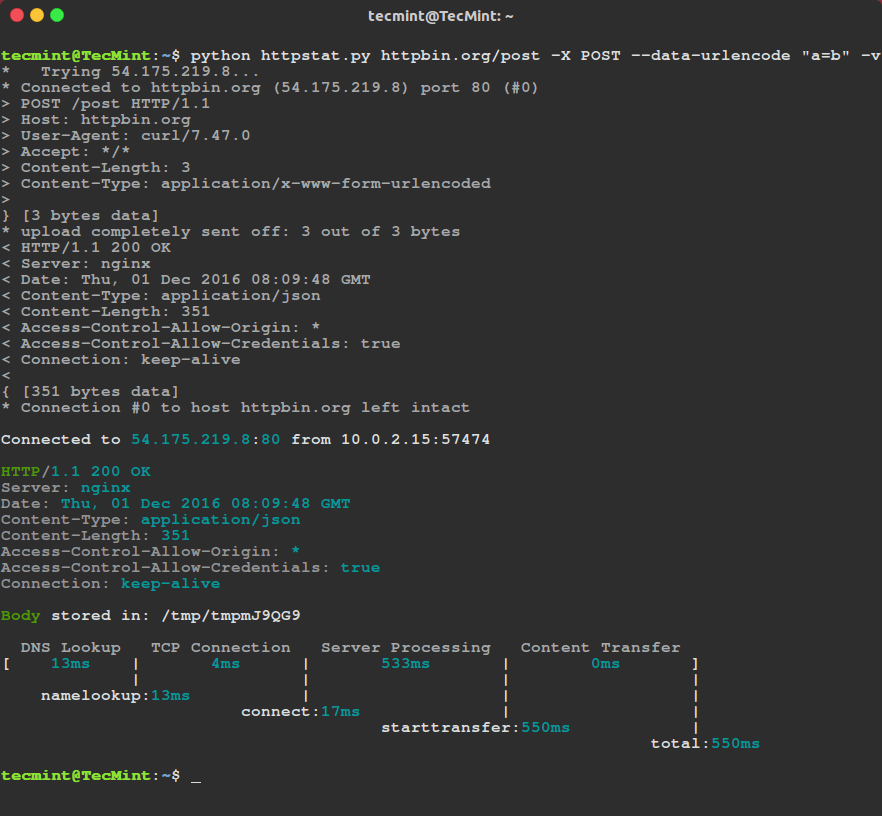
In the next command:
-xcommand flag specifies a custom request method to use while communicating with the HTTP server.--data-urlencodedata posts data (a=b in this case) with URL-encoding turned on.-venables a verbose mode.
$ python httpstat.py httpbin.org/post -X POST --data-urlencode "a=b" -v
You can look through the cURL man page for more useful and advanced options or visit the httpstat Github repository: https://github.com/reorx/httpstat
In this article, we have covered a useful tool for monitoring cURL statistics is a simple and clear way. If you know of any such tools out there, do not hesitate to let us know and you can as well ask a question or make a comment about this article or httpstat via the feedback section below.
If this article helped you solve a problem, consider buying a coffee. It helps keep TecMint free, supports the authors, and keeps the project going.



Got Something to Say? Join the Discussion... Cancel reply