
Apache CouchDB is an open source document-oriented database with NoSQL – means, it doesn’t have any database schema, tables, rows, etc, that you will see in MySQL, PostgreSQL, and Oracle. CouchDB uses JSON to store data with documents, which you can access from a web browser via HTTP. CouchDB works smoothly with all latest modern web and mobile apps.
This article explains how to install Apache CouchDB 2.3.0 on RHEL, CentOS, Fedora, Debian and Ubuntu Linux distributions using the convenience binary packages.
Enabling the Apache CouchDB Package Repository
To install Apache CouchDB on CentOS and RHEL distributions, first you need to install and enable EPEL repository and update the system software packages to latest using following commands.
# yum update
# yum install epel-release
Next, on CentOS distribution, create a file called /etc/yum.repos.d/bintray-apache-couchdb-rpm.repo and place the following text into it.
[bintray--apache-couchdb-rpm]
name=bintray--apache-couchdb-rpm
baseurl=http://apache.bintray.com/couchdb-rpm/el$releasever/$basearch/
gpgcheck=0
repo_gpgcheck=0
enabled=1
On RHEL distribution, create a file called /etc/yum.repos.d/bintray-apache-couchdb-rpm.repo and place the following text into it. Make sure to replace the version number el7 or el6 in the file.
[bintray--apache-couchdb-rpm]
name=bintray--apache-couchdb-rpm
baseurl=http://apache.bintray.com/couchdb-rpm/el7/$basearch/ gpgcheck=0 repo_gpgcheck=0 enabled=1
On Debian/Ubuntu distributions, run the following command to enable repository. Make sure to replace {distribution} with the appropriate choice for your OS version: Debian 8: jessie, Debian 9: stretch, Ubuntu 14.04: trusty, Ubuntu 16.04: xenial or Ubuntu 18.04: bionic.
$ echo "deb https://apache.bintray.com/couchdb-deb {distribution} main" | sudo tee -a /etc/apt/sources.list
Installing the Apache CouchDB Packages
On CentOS and RHEL distributions, issue the following command to install Apache CouchDB packages.
# yum -y install epel-release && yum install couchdb
On Debian/Ubuntu distributions, first you need to install the repository key, update the repository cache and install the Apache CouchDB packages.
$ curl -L https://couchdb.apache.org/repo/bintray-pubkey.asc | sudo apt-key add -
$ sudo apt-get update && sudo apt-get install couchdb
Configure the Apache CouchDB
By default, CouchDB runs on port 5984 and can be accessed within the server itself [localhost] only, if you would like to access it from the web, you need to modify the file /opt/couchdb/etc/local.ini and change the settings under [chttpd] section as shown below.
# vi /opt/couchdb/etc/local.ini
[chttpd]
port = 5984
bind_address = 0.0.0.0
Next, go to the bottom of this file and define the admin user and password as shown.
[admins]
admin = tecmint
Restart and enable the CouchDB service after making above changes.
# systemctl enable couchdb.service
# systemctl restart couchdb.service
# systemctl status couchdb.service
Verifying Apache CouchDB
Verify the CouchDB by going to the below URL http://your-ip-address:5984, there will see a Welcome page that displays the following message.
{"couchdb":"Welcome","version":"2.3.0","git_sha":"07ea0c7","uuid":"1b373eab0b3b6cf57420def0acb17da8","features":["pluggable-storage-engines","scheduler"],"vendor":{"name":"The Apache Software Foundation"}}
Next, visit Couchdb web interface at http://your-ip-address:5984/_utils/ to create and manage the Couchdb database.
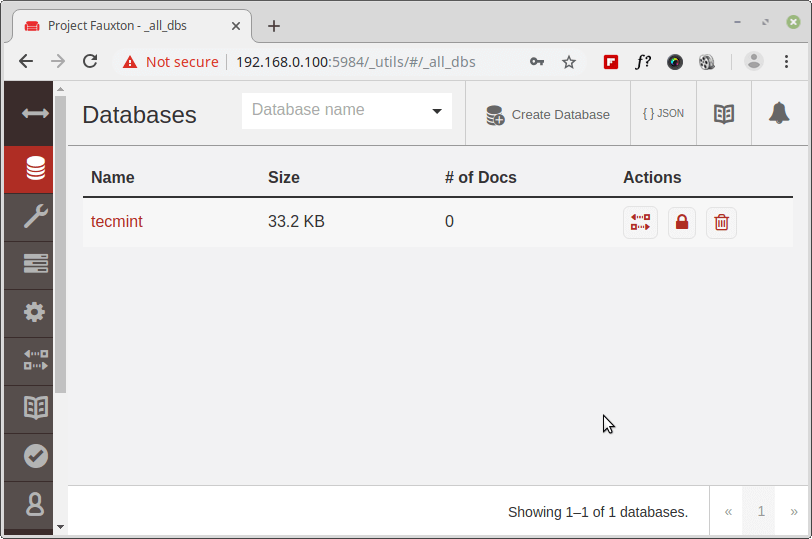
For more information on how to create a database and manage their settings visit THIS PAGE, or stay tuned for our next series of articles on CouchDB.
If this article helped you solve a problem, consider buying a coffee. It helps keep TecMint free, supports the authors, and keeps the project going.


Got Something to Say? Join the Discussion... Cancel reply