
Tripwire is a popular Linux Intrusion Detection System (IDS) that runs on systems in order to detect if unauthorized filesystem changes occurred over time.
In CentOS and RHEL distributions, a tripwire is not a part of official repositories. However, the tripwire package can be installed via Epel repositories.
To begin, first install Epel repositories in CentOS and RHEL system, by issuing the below command.
# yum install epel-release
After you’ve installed Epel repositories, make sure you update the system with the following command.
# yum update
After the update process finishes, install Tripwire IDS software by executing the below command.
# yum install tripwire
Fortunately, Tripwire is a part of Ubuntu and Debian default repositories and can be installed with the following commands.
$ sudo apt update
$ sudo apt install tripwire
On Ubuntu and Debian, the tripwire installation will be asked to choose and confirm a site key and local key passphrase. These keys are used by tripwire to secure its configuration files.
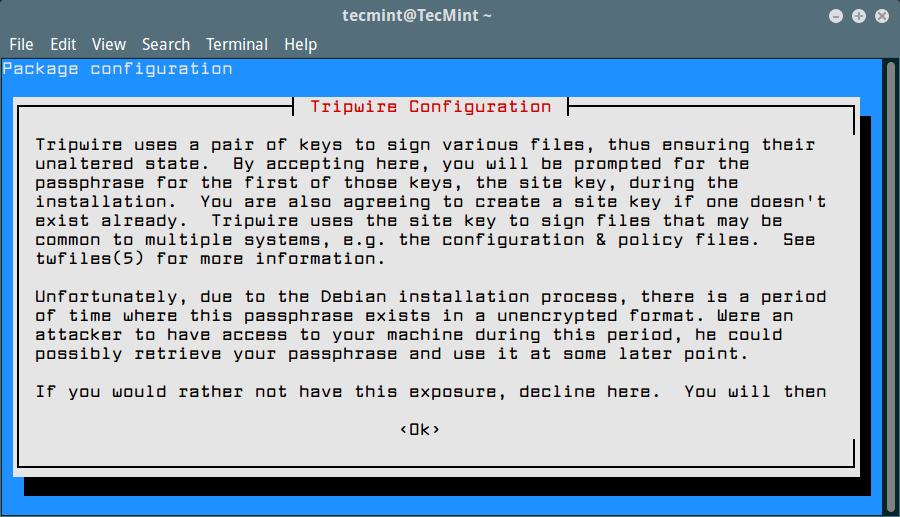
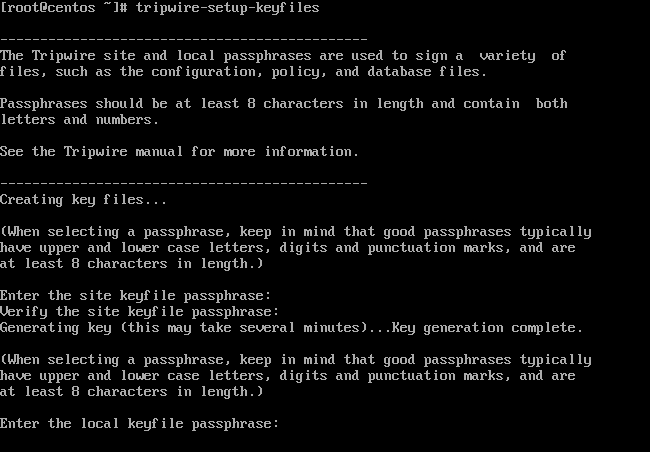
On CentOS and RHEL, you need to create tripwire keys with the below command and supply a passphrase for site key and local key.
# tripwire-setup-keyfiles
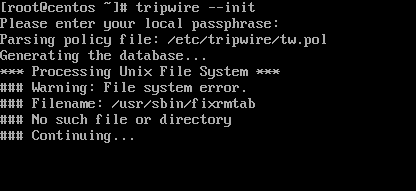
In order to validate your system, you need to initialize the Tripwire database with the following command. Due to the fact that the database hasn’t been initialized yet, a tripwire will display a lot of false-positive warnings.
# tripwire --init
Finally, generate a tripwire system report in order to check the configurations by issuing the below command. Use --help switch to list all tripwire check command options.
# tripwire --check --help
# tripwire --check
After tripwire check command completes, review the report by opening the file with the extension .twr from /var/lib/tripwire/report/ directory with your favorite text editor command, but before that you need to convert to text file.
# twprint --print-report --twrfile /var/lib/tripwire/report/tecmint-20170727-235255.twr > report.txt
# vi report.txt

That’s It! you have successfully installed Tripwire on the Linux server. I hope you can now easily configure your Tripwire IDS.
If this article helped you solve a problem, consider buying a coffee. It helps keep TecMint free, supports the authors, and keeps the project going.




Got Something to Say? Join the Discussion... Cancel reply