
VLC is a free and open source, popular, and cross-platform multimedia player and framework that plays files, discs, webcams, devices as well as streams.
VLC is the best free multi-format media player for Linux desktop systems, supporting most multimedia files, DVDs, Audio CDs, VCDs, and various streaming protocols such as YouTube.
VLC is a packet-based media player for Linux that plays almost all video content. It plays all formats you can think of; offers advanced controls (complete feature-set over the video, subtitle synchronization, video, and audio filters), and supports advanced formats.
In this article, we will explain how to install the latest version of VLC Media Player in Fedora Linux.
Installing VLC Media Player in Fedora
Before installing VLC, it’s essential to update your Fedora packages to ensure that your system meets the requirements.
sudo dnf update
sudo dnf upgrade
VLC is now available from the default Fedora repositories. Therefore to install it, you just need to use the following dnf command to install the VLC media player as shown.
sudo dnf install vlc
Optionally, to play media files directly in VLC from your browser, you can use extensions such as “Open in VLC” or “Play with VLC“, as these extensions allow you to play media files directly in your browser.
Additionally, you can also install FFmpeg, which handles many video formats and extends VLC’s capabilities.
sudo dnf install ffmpeg-free
After the installation is complete, you can verify that VLC is installed correctly.
vlc --version
To run the VLC media player using GUI, open the launcher by pressing the Super key and type vlc to start it.
Once it has opened, accept the Privacy and Network Access Policy, then click continue to start using VLC on your system.
Alternatively, you can also run vlc from the command line as shown (where the source can be a path to the file to be played, URL, or other data source):
vlc source
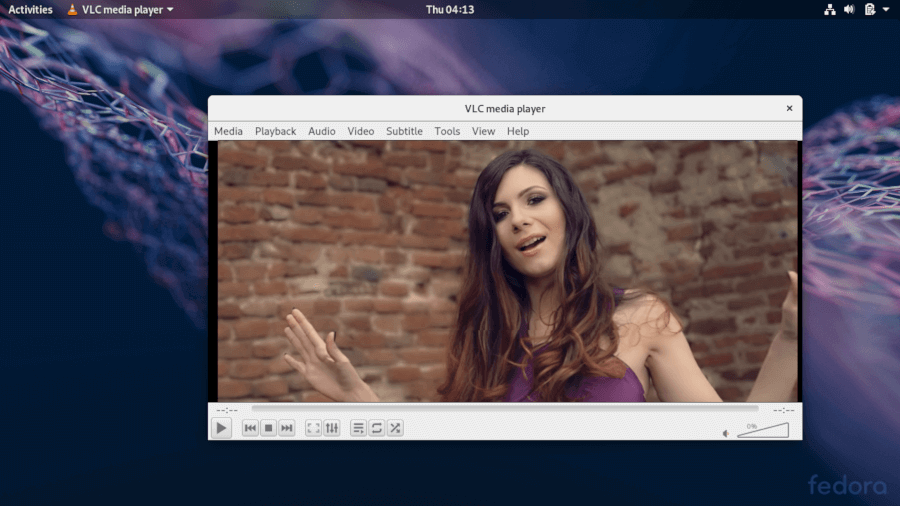
To ensure you have the latest features and security patches, it’s advisable to keep VLC updated regularly by running:
sudo dnf update
sudo dnf upgrade
Conclusion
VLC is a popular and cross-platform multimedia player and framework that plays most multimedia files and discs, and devices and supports various streaming protocols.
If you have questions, use the feedback form below to ask any questions or share your comments with us.
If this article helped you solve a problem, consider buying a coffee. It helps keep TecMint free, supports the authors, and keeps the project going.
Got Something to Say? Join the Discussion... Cancel reply