
In our previous article, we have described how to count the number of files and subdirectories inside a given directory. This guide will show you how to rename all files and directories names to lowercase in Linux.
Read Also: How to Find Out Top Directories and Files (Disk Space) in Linux
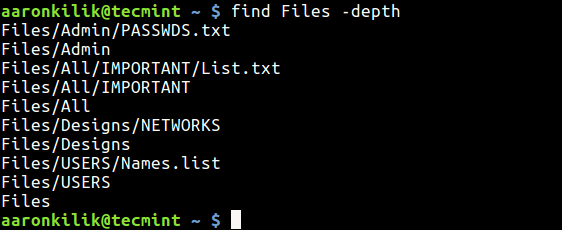
There are several ways to achieve this, but we’ll explain two of the most efficient and reliable methods. For the purpose of this guide, we have used a directory named Files which has the following structure:
# find Files -depth
1. Using find, xargs and rename Commands Together
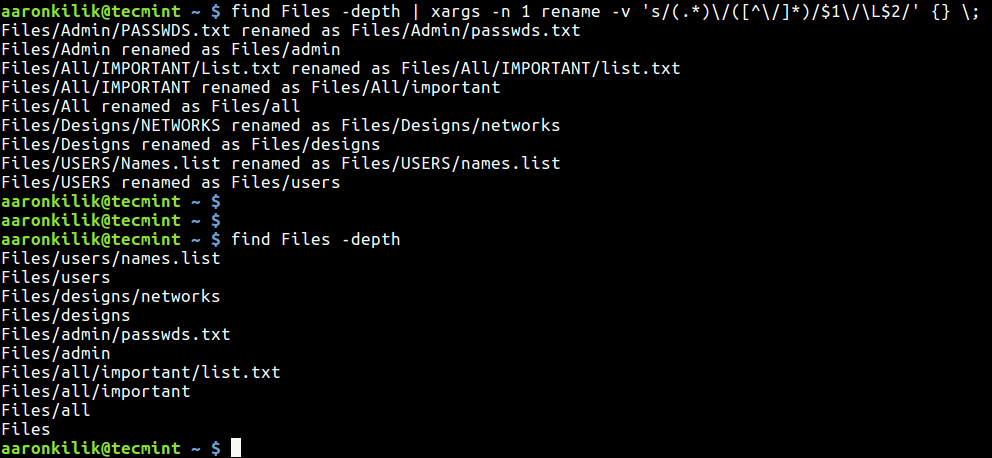
rename is a simple command line utility for renaming several files at once in Linux. You can use it together with find utility to rename all files or subdirectories in a particular directory to lowercase as follows:
$ find Files -depth | xargs -n 1 rename -v 's/(.*)\/([^\/]*)/$1\/\L$2/' {} \;
Explanation of options used in the above command.
-depth– lists each directory’s contents before the directory itself.-n 1– instructs xargs to use at most one argument per command line from find output.
Sample output after renaming files and subdirectories to lowercase in Files directory.
Another alternative way using the find and mv commands in a script as explained below.
2. Using find and mv Commands in Shell Script
First create your script (you can name it anything you prefer):
$ cd ~/bin
$ vi rename-files.sh
Then add the code below in it.
#!/bin/bash
#print usage
if [ -z $1 ];then
 echo "Usage :$(basename $0) parent-directory"
 exit 1
fi

#process all subdirectories and files in parent directory
all="$(find $1 -depth)"


for name in ${all}; do
 #set new name in lower case for files and directories
 new_name="$(dirname "${name}")/$(basename "${name}" | tr '[A-Z]' '[a-z]')"

 #check if new name already exists
 if [ "${name}" != "${new_name}" ]; then
 [ ! -e "${new_name}" ] && mv -T "${name}" "${new_name}"; echo "${name} was renamed to ${new_name}" || echo "${name} wasn't renamed!"
 fi
done

echo
echo
#list directories and file new names in lowercase
echo "Directories and files with new names in lowercase letters"
find $(echo $1 | tr 'A-Z' 'a-z') -depth

exit 0
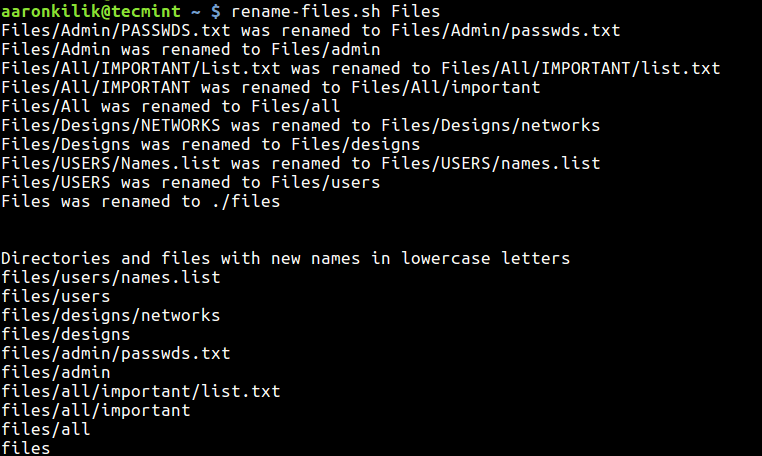
Save and close the file, then make the script executable and run it:
$ chmod +x rename-files.sh
$ rename-files.sh Files #Specify Directory Name
You may also like to read these following related articles.
- Explanation of “Everything is a File” and Types of Files in Linux
- fswatch – Monitors Files and Directory Changes or Modifications in Linux
- Fasd – A Commandline Tool That Offers Quick Access to Files and Directories
- FSlint – How to Find and Remove Duplicate Files in Linux
In this guide, we expalined you how to rename all files and directories to lowercase in Linux. If get any errors, please hit us up via the feedback form below. You can as well offer us any other methods of doing the same.
If this article helped you solve a problem, consider buying a coffee. It helps keep TecMint free, supports the authors, and keeps the project going.

Got Something to Say? Join the Discussion... Cancel reply