
In a previous article, we explained the difference between shutdown, poweroff, halt and reboot Linux commands, where we uncovered what these mentioned commands actually do when you execute them with various options.
This article will show you how to send a custom message to all system users before shutting down a Linux server.
Suggested Read: tuptime – Shows Historical and Statistical Running Time of Linux Systems
As a system administrator, before you can shut down a server, you may want to send system users a message alerting them that the system is going. By default, the shutdown command broadcasts a message to other system users as shown in the screenshot below:
# shutdown 13:25
Shutdown scheduled for Fri 2017-05-12 13:25:00 EAT, use 'shutdown -c' to cancel.

Broadcast message for root@tecmint (Fri 2017-05-12 13:23:34 EAT):

The system is going down for power-off at Fri 2017-05-12 13:25:00 EAT!
To send a custom message to other system users before an in line shutdown, run the command below. In this example, the shutdown will happen after two minutes from the time of command execution:
# shutdown 2 The system is going down for required maintenance. Please save any important work you are doing now!
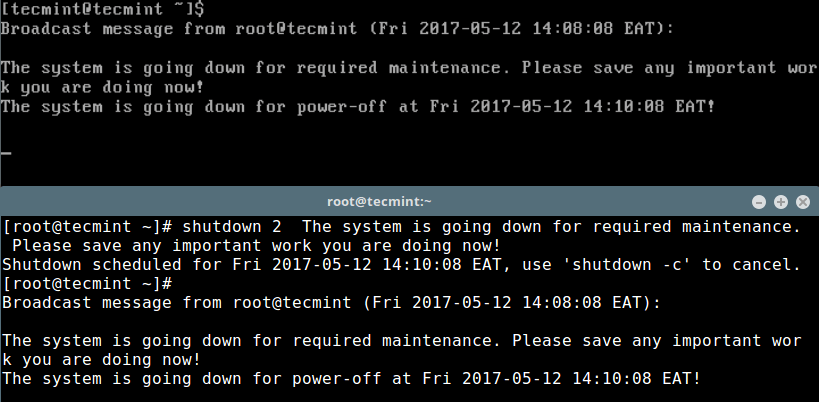
Supposing you have certain critical system operations such as scheduled system backups or updates to be executed at a time the system would be down, you can cancel the shutdown using the -c switch as shown below and initiate it at a later time after such operations have been performed:
# shutdown -c
Shutdown scheduled for Fri 2017-05-12 14:10:22 EAT, use 'shutdown -c' to cancel.

Broadcast message for root@tecmint (Fri 2017-05-14 :10:27 EAT):

The system shutdown has been cancelled at Fri 2017-05-12 14:11:27 EAT!
Additionally, learn how to auto execute commands/scripts during reboot or startup using simple and traditional methods in Linux.
Don’t Miss:
- Managing System Startup Process and Services (SysVinit, Systemd and Upstart)
- 11 Cron Scheduling Task Examples in Linux
Now you know how to send custom messages to all other system users before a system shutdown. Are there any ideas you want to share relating to this topic? Use the comment form below to do that?
If this article helped you solve a problem, consider buying a coffee. It helps keep TecMint free, supports the authors, and keeps the project going.

Got Something to Say? Join the Discussion... Cancel reply