VOOZH about

URL: https://www.tecmint.com/sql-buddy-mysql-administration-tool-for-linux/

⇱ SQL Buddy - A Web Based MySQL Administration Tool


Skip to content

SQL Buddy is an open source web-based tool was written in PHP language that intended to manage SQLite and MySQL administration via web browsers like Firefox, Chrome, Safari, Opera and IE+ (Internet Explorer).

SQL Buddy is a simple, lightweight and super fast application that offers a well-designed interface with a comprehensive feature set for database administrators and programmers. The tool allows you to add, edit, modify and drop databases and tables, import and export databases, indexes, foreign key relationships, run SQL queries and so on.

It is a good alternative to phpMyAdmin with fast and attractive Ajax-based web interface with support for 47 different languages and themes. Compared to phpMyAdmin, SQL Buddy has almost all features set of phpMyAdmin but SQL Buddy is very lightweight in size 320kb (i.e 1.1MB) after extracting and very easy to setup no installation requires, just unzip the files under web-server root directory and log in with your database username and password.

SQL Buddy also offers some useful keyboard shortcuts like create, edit, delete, refresh, select all and query, so you can manage the tool without the use of mouse. If you deal with large number of MySQL databases, then SQL Buddy is your all time choice.

Installing SQL Buddy in Linux

To use SQL Buddy, first Download SQL Buddy using wget command and unzip the files in a folder and then upload the folder to your web-server root directory via ftp. For example, (/var/www/html/sqlbuddy) in my case, but it shouldn’t matter where you place them or what you name the folder.

# wget https://github.com/calvinlough/sqlbuddy/raw/gh-pages/sqlbuddy.zip
# unzip sqlbuddy.zip
# mv sqlbuddy /var/www/html/

Next, navigate to the web browser and type the following command to launch the SQL Buddy.

http://yourserver.com/sqlbuddy
OR
http://youripaddress/sqlbuddy

Select MySQL and enter your username and password.
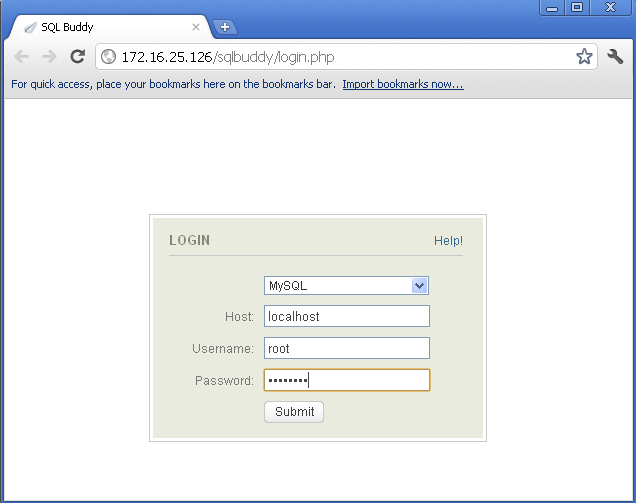
πŸ‘ Sql buddy login screen
SQL Buddy Login Screen

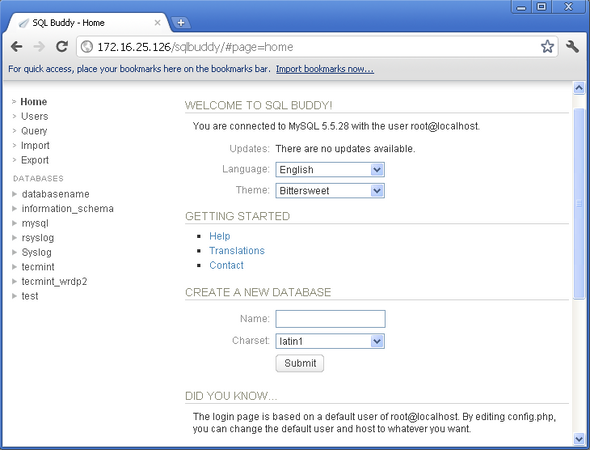
Welcome screen of SQL Buddy.

πŸ‘ sql buddy welcome page
SQL Buddy Welcome Screen

These are some useful SQL Buddy keyboard shortcuts are available.
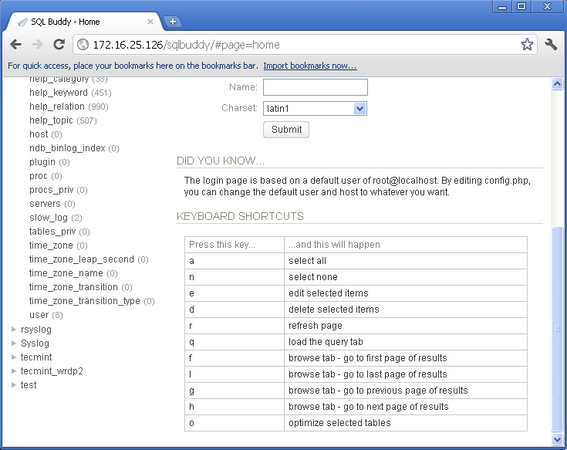
πŸ‘ sql buddy keyboard shortcuts
SQL Buddy Keyboard Shortcuts

If you want to customize your installation, then there are few useful variables in config.php that you may interested.

# vi /var/www/html/sqlbuddy/config.php

If you want to restrict SQL Buddy to specific IP address, then open the file with VI editor.

# vi /etc/httpd/conf.d/sqlbuddy.conf

Add the following lines of code to sqlbuddy.conf file. Replace your-ip-address with your server.

Alias /cacti /var/www/html/sqlbuddy

<Directory /var/www/html/sqlbuddy>
 <IfModule mod_authz_core.c>
 # httpd 2.4
 Require all granted
 </IfModule>
 <IfModule !mod_authz_core.c>
 # httpd 2.2
 Order deny,allow
 Deny from all
 Allow from your-ip-address
 </IfModule>
</Directory>

Restart the web server.

# service httpd restart		
OR
# systemctl restart apache2	

If you need any help, please visit the forum available at sql-buddy topics or use our comment section for any queries.

If this article helped, share it with someone on your team.
TecMint Weekly Newsletter
Get the Learn Linux 7 Days Crash Course free when you join 34,000+ Linux professionals reading every Thursday.
Check your email for a magic link to get started.
Something went wrong. Please try again.
β˜•
TecMint has been free for 14 years. Help keep it that way.
Google AI Overviews and tools like ChatGPT have cut into search traffic for independent tech sites like TecMint. Running this site costs over $2,000 every month for hosting, infrastructure, and paying authors to keep the content accurate and tested.

If this article helped you solve a problem, consider buying a coffee. It helps keep TecMint free, supports the authors, and keeps the project going.
β˜• Buy Me a Coffee
Ravi Saive
I'm Ravi Saive, an award-winning entrepreneur and founder of several successful 5-figure online businesses, including TecMint.com, GeeksMint.com, UbuntuMint.com, and the premium learning hub Pro.Tecmint.com.

Each tutorial at TecMint is created by a team of experienced Linux system administrators so that it meets our high-quality standards.

10 Comments

Leave a Reply
  1. SQL Buddy is dead since 2011.

    If you want to use a lightweight tool try Adminer.

    I think it’s better than phpMyAdmin.

    Reply
    • Adminer (formerly phpMinAdmin) is a full-featured database management tool written in PHP. Conversely to phpMyAdmin, it consist of a single file ready to deploy to the target server. It is available for MySQL, PostgreSQL, SQLite, MS SQL, Oracle, Firebird, SimpleDB, Elasticsearch and MongoDB.

      Reply
  2. I am startled to see you extolling the virtues of software that has had no maintenance since 2013 and must be very out of date for both PHP and MySQL support.

    Reply
  3. What is the default password for sql buddy?

    Reply
  4. Take a look on free tool Valentina Studio, is the best way to transform your data into meaningful information; create, administer, query and explore Valentina DB, MySQL, Postgre and SQLite databases for free on 32/64 bit Windows, Linux and Mac OS X. http://www.valentina-db.com/en/valentina-studio-overview

    Reply
  5. phpmyadmin is not enough ? why should I use this?

    Reply
    • If you are a beginner to MySQL administration and don’t need multiple functions phpmyadmin – http://www.phpmyadmin.net/home_page/index.php will be enough for you. I used phpmyadmin when I needed simple to import or export MySQL database to/from my sites on wordpress. But if you want to jump to a new level of MySQL management and administration, have lots of features and really comfortable and intuitive graphical user intarface, then I’ll recommend you to try Devart’s dbForge Studio for MySQL – http://www.devart.com/dbforge/mysql/studio/ . I started to use it long ago and its suits all me needs. With version 6.0 it improved the functional significantly!

      Reply

Got Something to Say? Join the Discussion... Cancel reply

Free Course
Get a free Linux course before you go.
Subscribe to TecMint Weekly and get the Learn Linux 7 Days Crash Course free. Read by 34,000+ Linux professionals every Thursday.
Check your email for a magic link to get started.