
Transferring or Migrating a MySQL/MariaDB database between servers usually takes only a few easy steps, but data transfer can take some time depending on the volume of data you would like to transfer.
In this article, you will learn how to transfer or migrate all your MySQL/MariaDB databases from an old Linux server to a new server, import it successfully, and confirm that the data is there.
Important Notes
- Make sure to have the same version of MySQL installed on both servers with the same distribution.
- Make sure to have enough free space on both servers to hold the database dump file and the imported database.
- Don’t ever consider moving the
datadirectory of the database to another server. Never mess with the internal structure of the database, if you do, you will face problems in the future.
Export a MySQL Databases to Dump File
First start by login into your old server and stopping the mysql/mariadb service using the systemctl command as shown.
# systemctl stop mariadb
OR
# systemctl stop mysql
Then dump all your MySQL databases into a single file using the mysqldump command.
# mysqldump -u [user] -p --all-databases > all_databases.sql
Once the dump is completed, you are ready to transfer the databases.
If you want to dump a single database, you can use:
# mysqldump -u root -p --opt [database name] > database_name.sql
Transfer MySQL Databases Dump File to New Server
Now use the scp command to transfer your database dump file to the new server under the home directory as shown.
# scp all_databases.sql [email protected]:~/ [All Databases]
# scp database_name.sql [email protected]:~/ [Singe Database]
Once you connect, the database will be transferred to the new server.
Import MySQL Databases Dump File to New Server
Once the MySQL dump file has been transferred to the new server, you can use the following command to import all your databases into MySQL.
# mysql -u [user] -p --all-databases < all_databases.sql [All Databases]
# mysql -u [user] -p newdatabase < database_name.sql [Singe Database]
Once the import is completed, you can verify the databases on both servers using the following command on the mysql shell.
# mysql -u user -p
# show databases;
Transfer MySQL Databases and Users to New Server
If you want to move all your MySQL databases, users, permissions, and data structure old server to the new one, you can use the rsync command to copy all the content from the mysql/mariadb data directory to the new server as shown.
# rsync -avz /var/lib/mysql/* [email protected]:/var/lib/mysql/
Once the transfer completes, you can set the ownership of the mysql/mariadb data directory to user and group mysql, then do a directory listing to check that all files have been transferred.
# chown mysql:mysql -R /var/lib/mysql/
# ls -l /var/lib/mysql/
How to Migrate MySQL Database Using GUI
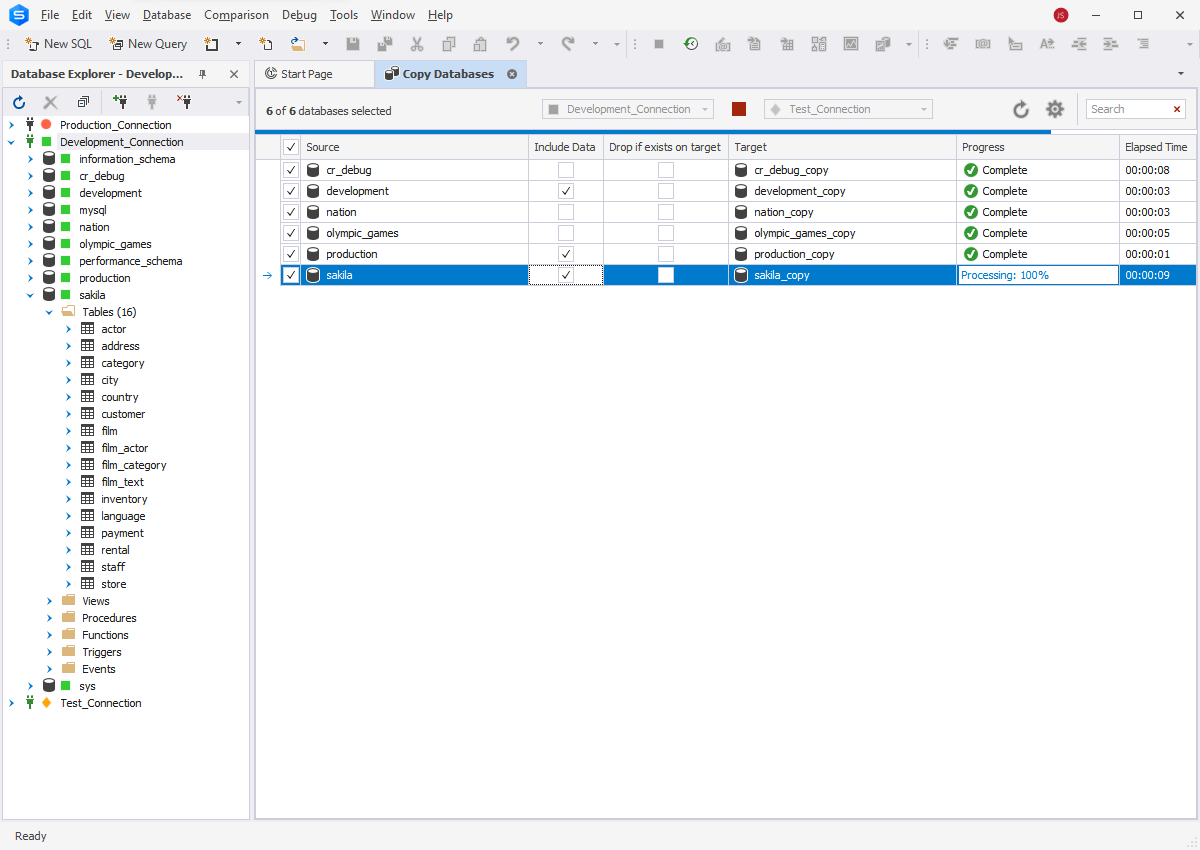
Modern database tools enable users to streamline MySQL database migration tasks. The main factor is a user-friendly graphical interface that guides them through each step of the migration process. The task configuration takes a few clicks – no need to type any commands manually to transfer the MySQL database to a new destination.
Typically, such tools support various methods of transferring the entire databases or their parts. It could be backup and restore, copying databases, data import, and export, etc.
Besides, a MySQL data migration tool can be a stand-alone solution or a part of a much more powerful toolset like dbForge Studio for MySQL, suitable to cover all the rest of the database tasks.
That’s all! In this article, you learned how to easily migrate all MySQL/MariaDB databases from one server to another. How do you find this method compared to other methods? We would like to hear from you via the comment form below to reach us.
If this article helped you solve a problem, consider buying a coffee. It helps keep TecMint free, supports the authors, and keeps the project going.



Got Something to Say? Join the Discussion... Cancel reply