
ttyload is a lightweight utility which is intended to offer a color-coded graph of load averages over time on Linux and other Unix-like systems. It enables a graphical tracking of system load average in a terminal (“tty“).
It is known to run on systems such as Linux, IRIX, Solaris, FreeBSD, MacOS X (Darwin) and Isilon OneFS. It is designed to be easy to port to other platforms, but this comes with some hard work.
Some of its notable features are: it uses fairly standard, but hard-coded, ANSI escape sequences for screen manipulation and colorization. And also comes with (but doesn’t install, or even build by default) a relatively self-contained load bomb, if you want to view how things work on an otherwise unloaded system.
Suggested Read: GoTTY – Share Your Linux Terminal (TTY) as a Web Application
In this article, we will show you how to install and use ttyload in Linux to view a color-coded graph of your system load average in a terminal.
How to Install ttyload in Linux Systems
On Debian/Ubuntu based distributions, you can install ttyload from the default system respositores by typing the following apt-get command.
$ sudo apt-get install ttyload
On Other Linux distributions you can install ttyload from the source as shown.
$ git clone https://github.com/lindes/ttyload.git
$ cd ttyload
$ make
$ ./ttyload
$ sudo make install
Once installed, you can start it by typing the following command.
$ ttyload
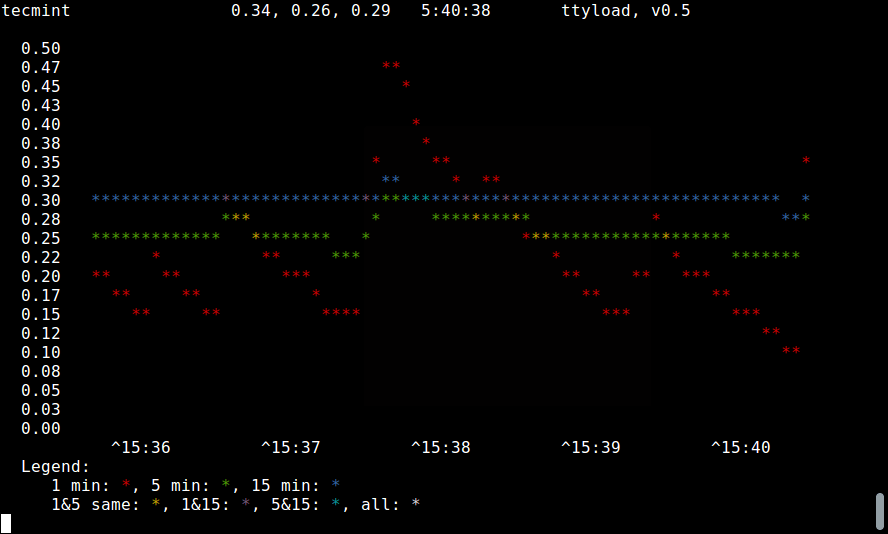
Note: To close the program simply press [Ctrl+C] keys.
You can also define the number of seconds in the interval between refreshes. Default value is 4, and the minimum is 1.
$ ttyload -i 5
$ ttyload -i 1
To run it in a monochrome mode which turns off ANSI escapes, use the -m as follows.
$ ttyload -m
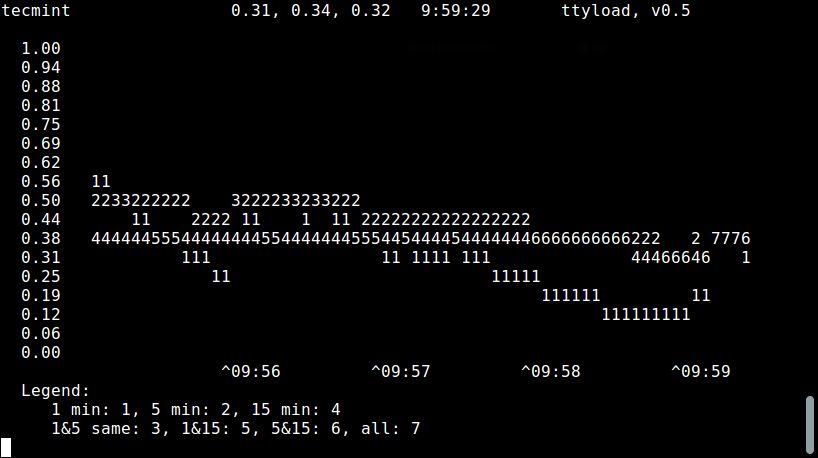
To get the ttyload usage info and help, type.
$ ttyload -h
Below are some of its important features yet to be added:
- Support for arbitrary sizing.
- Make an X front end using the same basic engine, to have “3xload”.
- Logging-oriented mode.
For more information, check out the ttyload Homepage: http://www.daveltd.com/src/util/ttyload/
Thats all for now! In this article, we showed you how to install and use ttyload in Linux. Write back to us via the comment section below.
If this article helped you solve a problem, consider buying a coffee. It helps keep TecMint free, supports the authors, and keeps the project going.




Got Something to Say? Join the Discussion... Cancel reply