VOOZH about

URL: https://www.tecmint.com/use-linux-awk-command-to-filter-text-string-in-files/

⇱ How to Filter Text in Linux with Awk and Regular Expressions


Skip to content

When we run certain commands in Linux to read or edit text from a string or file, we often try to filter the output to a specific section of interest. This is where using regular expressions comes in handy.

Please refer to our previous tutorials in the Awk series:

TecMint Weekly Newsletter
Get the Learn Linux 7 Days Crash Course free when you join 34,000+ Linux professionals reading every Thursday.
Check your email for a magic link to get started.
Something went wrong. Please try again.

What are Regular Expressions?

A regular expression can be defined as strings that represent several sequences of characters. One of the most important things about regular expressions is that they allow you to filter the output of a command or file, edit a section of a text or configuration file, and so on.

Features of Regular Expression

Regular expressions are made of:

  • Ordinary characters such as space, underscore(_), A-Z, a-z, 0-9.
  • Meta characters that are expanded to ordinary characters, include:
    • (.) it matches any single character except a newline.
    • (*) it matches zero or more existences of the immediate character preceding it.
    • [ character(s) ] it matches any one of the characters specified in character(s), one can also use a hyphen (-) to mean a range of characters such as [a-f], [1-5], and so on.
    • ^ it matches the beginning of a line in a file.
    • $ matches the end of the line in a file.
    • \ it is an escape character.

In order to filter text, one has to use a text filtering tool such as awk. You can think of awk as a programming language of its own. But for the scope of this guide to using awk, we shall cover it as a simple command line filtering tool.

The general syntax of awk is:

awk 'script' filename

Where 'script' is a set of commands that are understood by awk and are executed on file, filename.

It works by reading a given line in the file, making a copy of the line, and then executing the script on the line. This is repeated on all the lines in the file.

The 'script' is in the form '/pattern/ action' where the pattern is a regular expression and the action is what awk will do when it finds the given pattern in a line.

How to Use Awk Filtering Tool in Linux

In the following examples, we shall focus on the meta characters that we discussed above under the features of awk.

Printing All Lines from File Using Awk

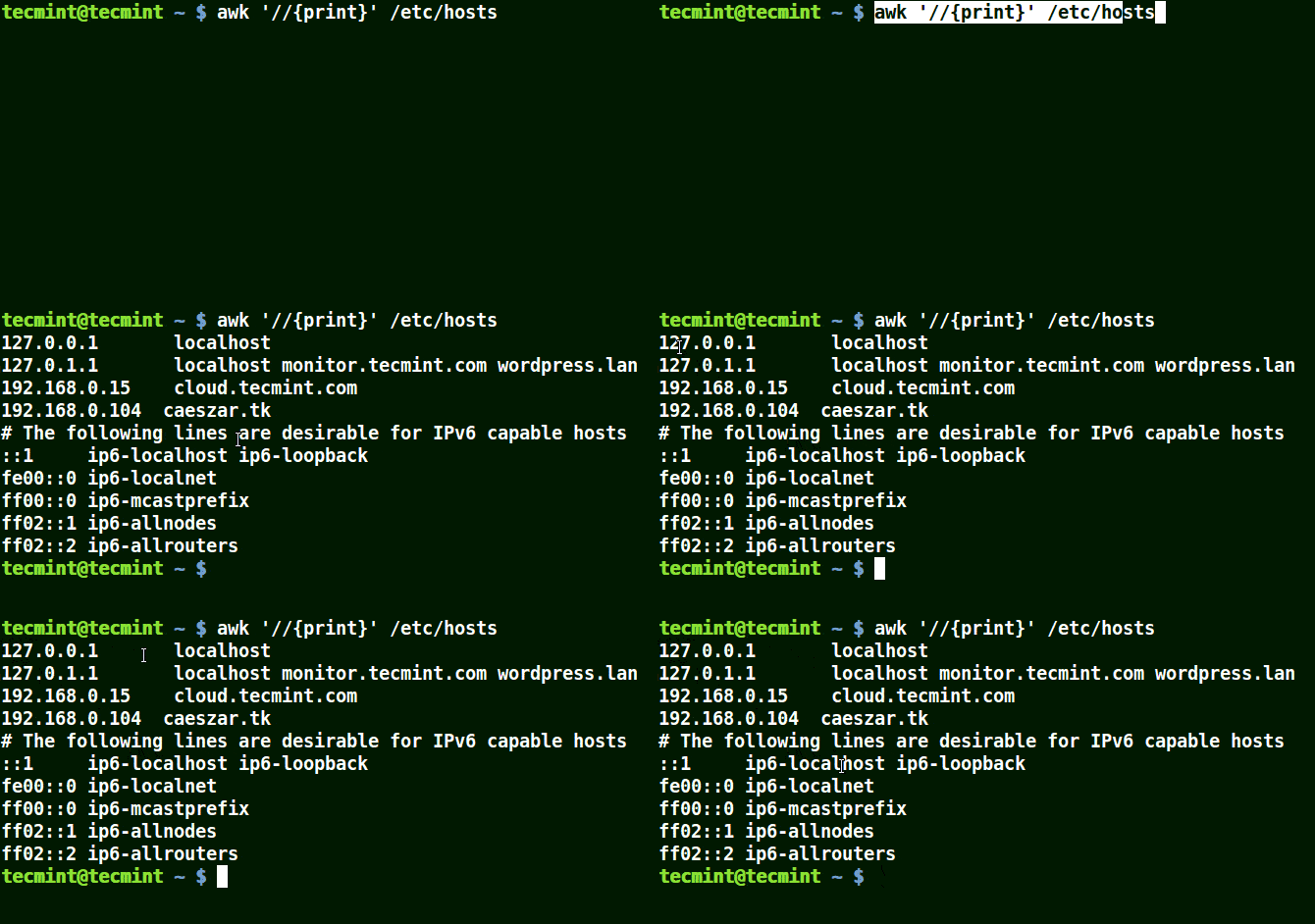
The example below prints all the lines in the file /etc/hosts since no pattern is given.

awk '//{print}'/etc/hosts
👁 Awk Prints all Lines in a File
Awk Prints All Lines in a File

Use Awk Patterns: Matching Lines with ‘localhost’ in File

In the example below, a pattern localhost has been given, so awk will match the line having localhost in the /etc/hosts file.

awk '/localhost/{print}' /etc/hosts 

👁 Awk Print Given Matching Line in a File
Awk Print Given Matching Line in a File

Using Awk with (.) Wildcard in a Pattern

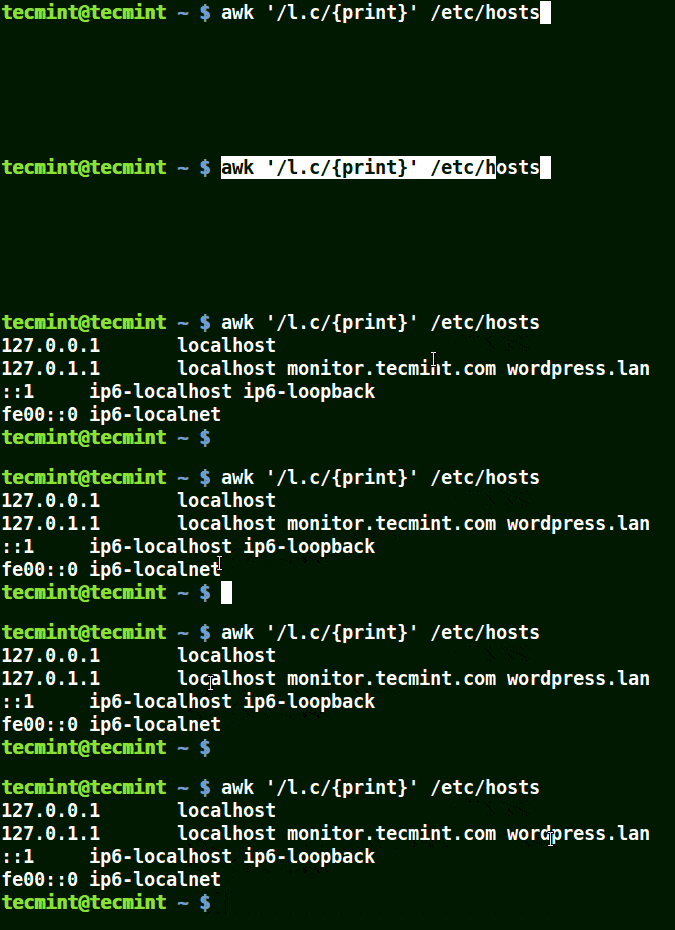
The (.) will match strings containing loc, localhost, localnet in the example below.

That is to say * l some_single_character c *.

awk '/l.c/{print}' /etc/hosts
👁 Use Awk to Print Matching Strings in a File
Use Awk to Print Matching Strings in a File

Using Awk with (*) Character in a Pattern

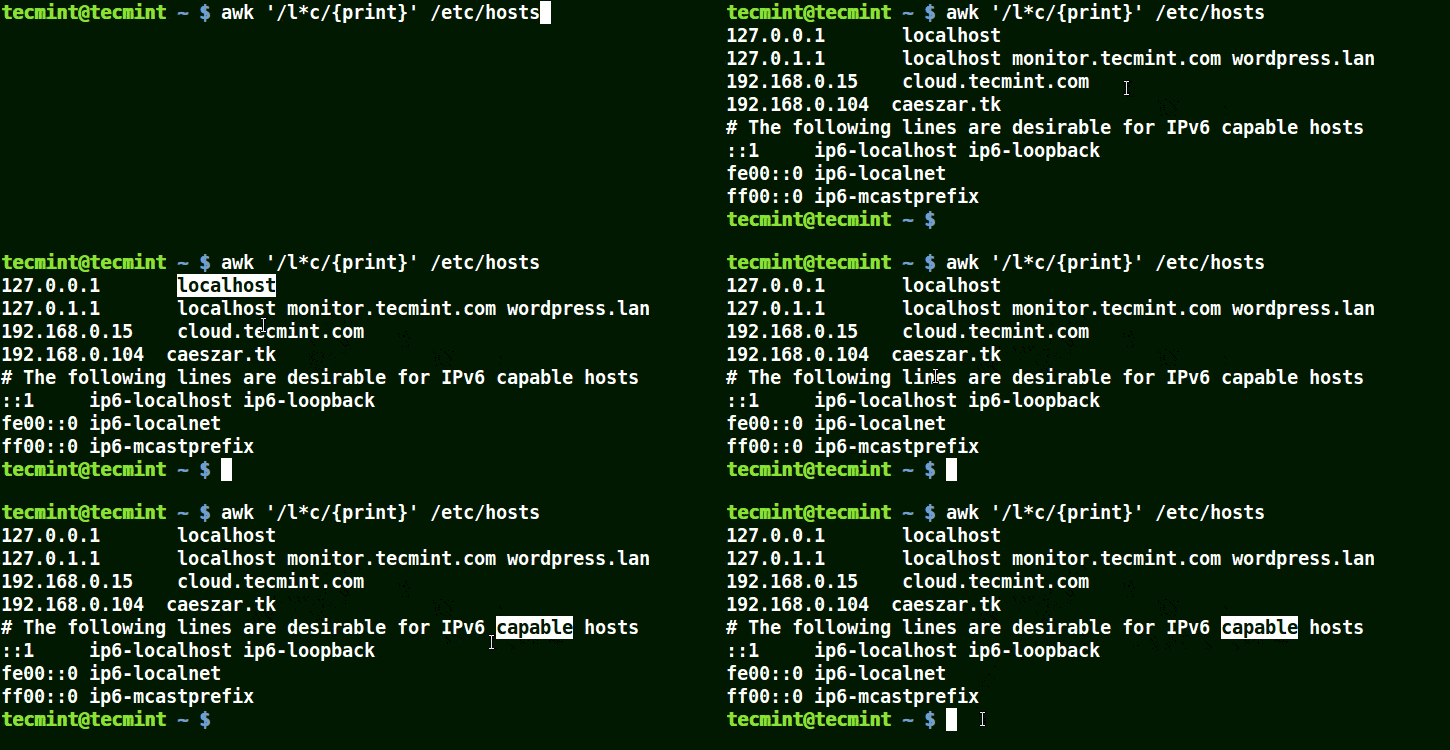
It will match strings containing localhost, localnet, lines, capable, as in the example below:

awk '/l*c/{print}' /etc/localhost
👁 Use Awk to Match Strings in File
Use Awk to Match Strings in File

You will also realize that (*) tries to get you the longest match possible it can detect.

Let’s look at a case that demonstrates this, take the regular expression t*t which means matching strings that start with the letter t and end with t in the line below:

this is tecmint, where you get the best good tutorials, how to's, guides, tecmint. 

You will get the following possibilities when you use the pattern /t*t/:

this is t
this is tecmint
this is tecmint, where you get t
this is tecmint, where you get the best good t
this is tecmint, where you get the best good tutorials, how t
this is tecmint, where you get the best good tutorials, how tos, guides, t
this is tecmint, where you get the best good tutorials, how tos, guides, tecmint

And (*) in /t*t/ wild card character allows awk to choose the last option:

this is tecmint, where you get the best good tutorials, how to's, guides, tecmint

Using Awk with set [ character(s) ]

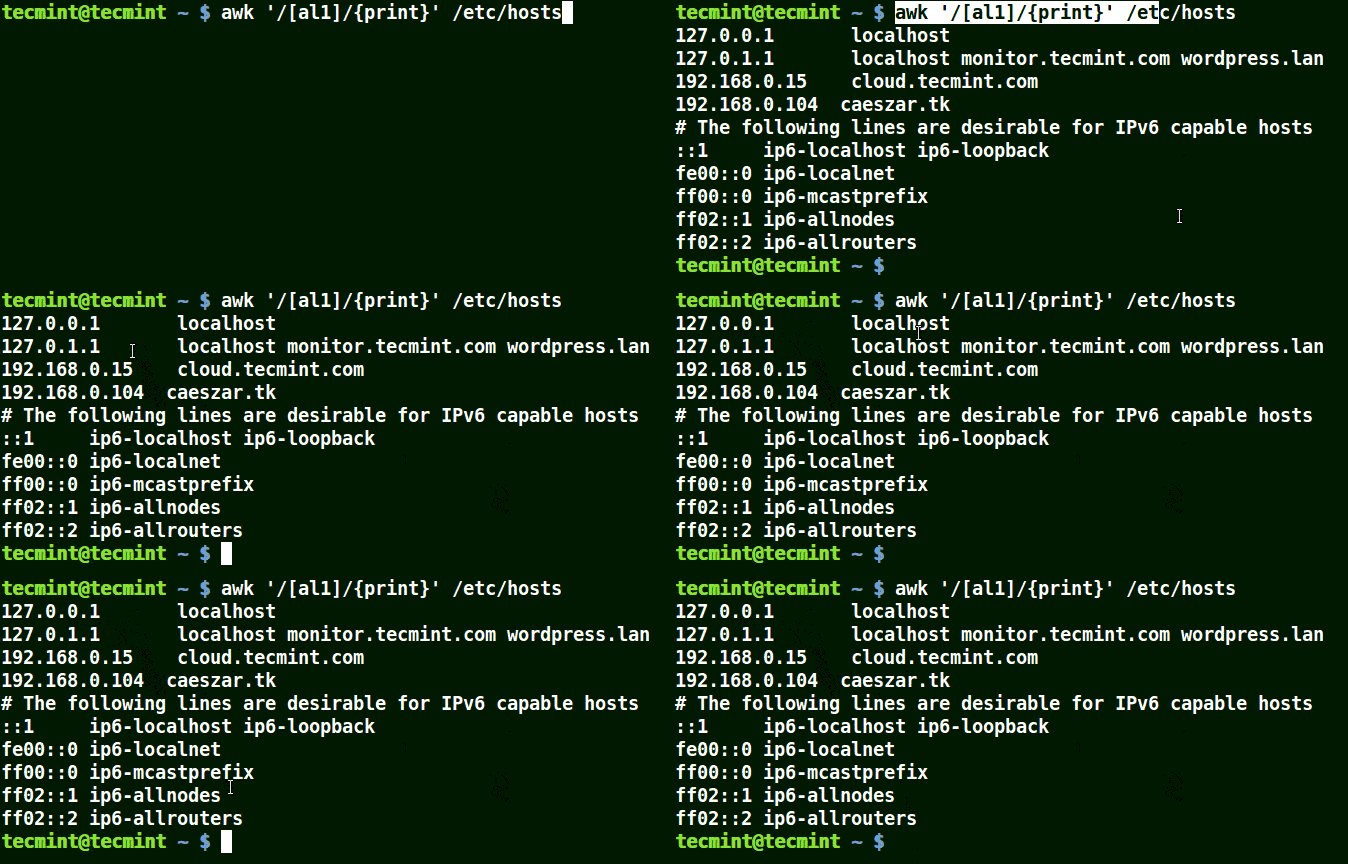
Take for example the set [al1], here awk will match all strings containing character a or l or 1 in a line in the file /etc/hosts.

awk '/[al1]/{print}' /etc/hosts
👁 Use-Awk to Print Matching Character in File
Use-Awk to Print Matching Character in File

The next example matches strings starting with either K or k followed by T:

# awk '/[Kk]T/{print}' /etc/hosts 

👁 Use Awk to Print Matched String in File
Use Awk to Print Matched String in File

Specifying Characters in a Range

Understand characters with awk:

  • [0-9] means a single number
  • [a-z] means match a single lowercase letter
  • [A-Z] means match a single upper-case letter
  • [a-zA-Z] means match a single letter
  • [a-zA-Z 0-9] means match a single letter or number

Let’s look at an example below:

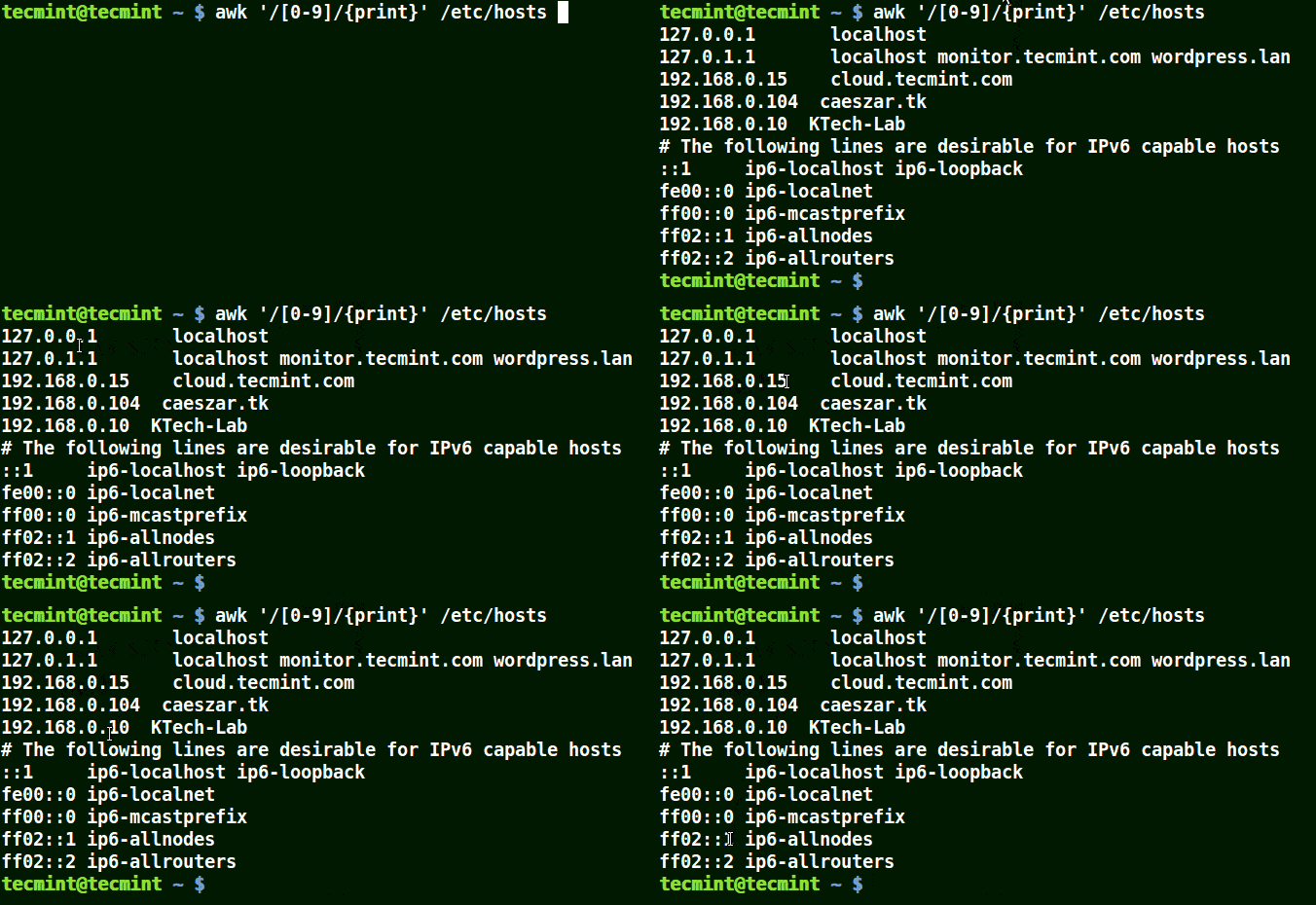
awk '/[0-9]/{print}' /etc/hosts 
👁 Use Awk To Print Matching Numbers in File
Use Awk To Print Matching Numbers in File

All the line from the file /etc/hosts contain at least a single number [0-9] in the above example.

Use Awk with (^) Meta Character

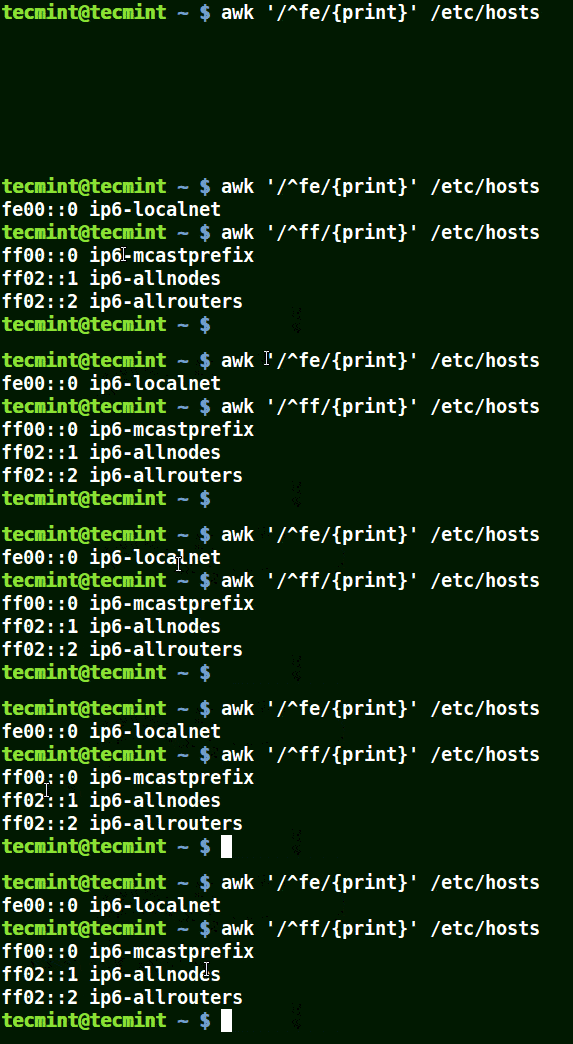
It matches all the lines that start with the pattern provided as in the example below:

# awk '/^fe/{print}' /etc/hosts
# awk '/^ff/{print}' /etc/hosts
👁 Use Awk to Print All Matching Lines with Pattern
Use Awk to Print All Matching Lines with Pattern

Use Awk with ($) Meta Character

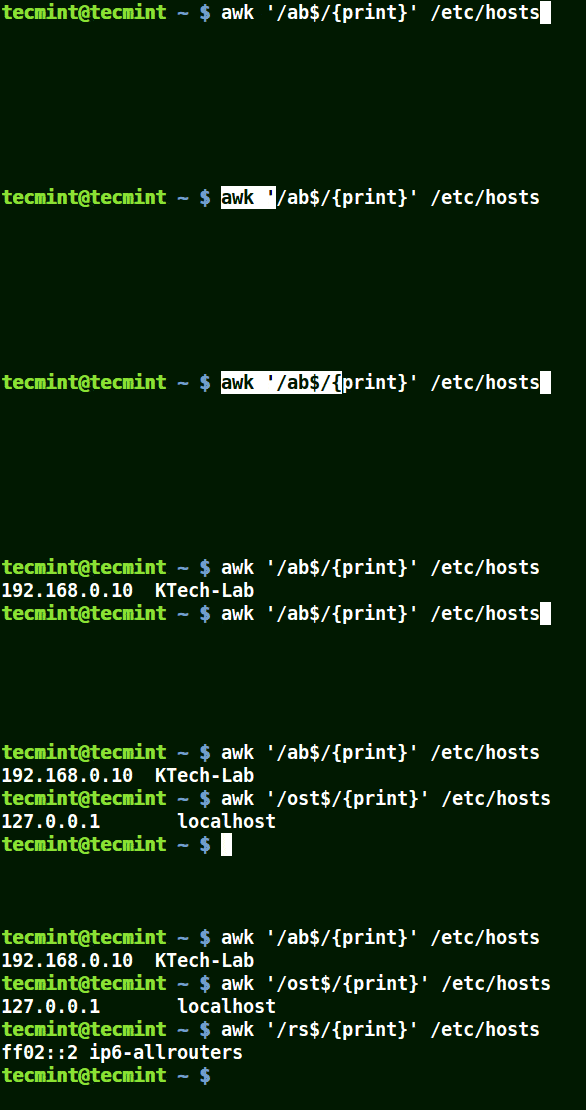
It matches all the lines that end with the pattern provided:

awk '/ab$/{print}' /etc/hosts
awk '/ost$/{print}' /etc/hosts
awk '/rs$/{print}' /etc/hosts
👁 Use Awk to Print Given Pattern String
Use Awk to Print Given Pattern String

Use Awk with (\) Escape Character

It allows you to take the character following it as a literal that is to say consider it just as it is.

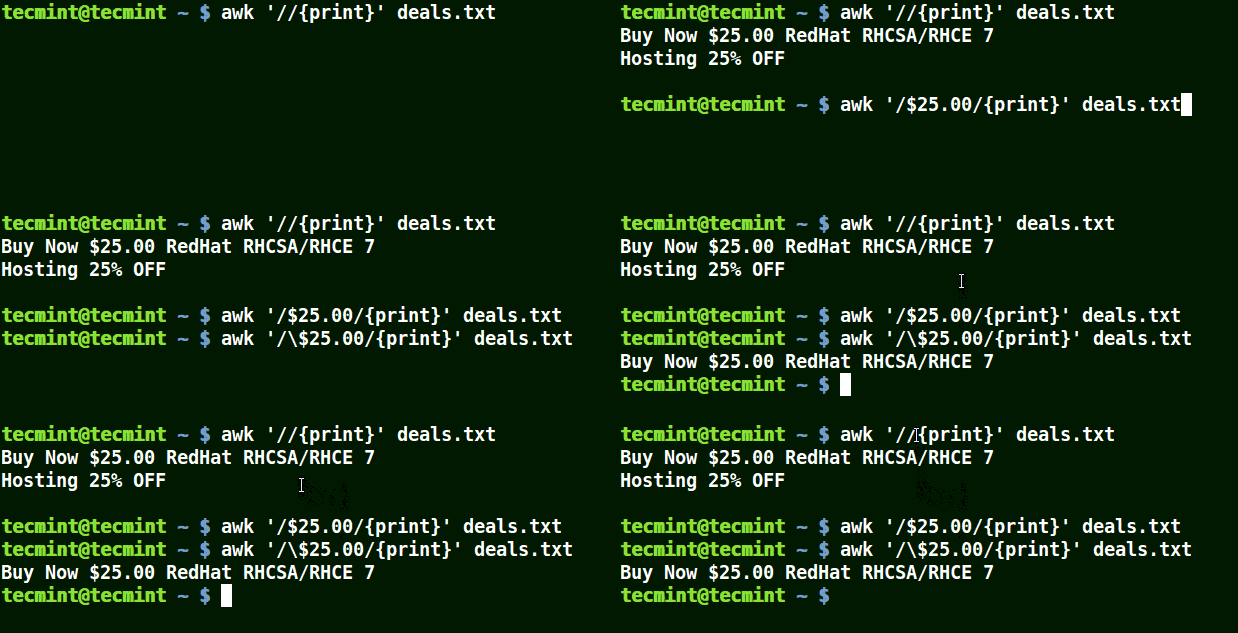
In the example below, the first command prints out all lines in the file, and the second command prints out nothing because I want to match a line that has $25.00, but no escape character is used.

The third command is correct since an escape character has been used to read $ as it is.

awk '//{print}' deals.txt
awk '/$25.00/{print}' deals.txt
awk '/\$25.00/{print}' deals.txt
👁 Use Awk with Escape Character
Use Awk with Escape Character
Summary

That is not all with the awk command line filtering tool, the examples above a the basic operations of awk. In the next parts, we shall be advancing on how to use complex features of awk.

For those seeking a comprehensive resource, we’ve compiled all the Awk series articles into a book, that includes 13 chapters and spans 41 pages, covering both basic and advanced Awk usage with practical examples.

Product Name Price Buy
eBook: Introducing the Awk Getting Started Guide for Beginners $8.99 [Buy Now]

Thanks for reading through and for any additions or clarifications, post a comment in the comments section.

If this article helped, share it with someone on your team.
TecMint Weekly Newsletter
Get the Learn Linux 7 Days Crash Course free when you join 34,000+ Linux professionals reading every Thursday.
Check your email for a magic link to get started.
Something went wrong. Please try again.
TecMint has been free for 14 years. Help keep it that way.
Google AI Overviews and tools like ChatGPT have cut into search traffic for independent tech sites like TecMint. Running this site costs over $2,000 every month for hosting, infrastructure, and paying authors to keep the content accurate and tested.

If this article helped you solve a problem, consider buying a coffee. It helps keep TecMint free, supports the authors, and keeps the project going.
☕ Buy Me a Coffee
Aaron Kili
Aaron Kili is a Linux and F.O.S.S enthusiast, an upcoming Linux SysAdmin, web developer, and currently a content creator for TecMint who loves working with computers and strongly believes in sharing knowledge.

Each tutorial at TecMint is created by a team of experienced Linux system administrators so that it meets our high-quality standards.

35 Comments

Leave a Reply
  1. I’ve come across many awk tutorials, but this one stands out as the best by far. It’s helped me grasp awk in a way I never thought possible. The breakdown of the awk syntax, particularly the explanation of “awk pattern action file,” is incredibly clear and concise. I’ve yet to find such clarity elsewhere. Thank you immensely for this invaluable resource.

    Reply
  2. This is wonderful tutorial and very well illustrated.

    There is a minor error in the explanations on what asterisk (*) means in regular expressions — it means ‘match the previous character zero or more times‘. For example 'p*' will match the letter ‘p’ zero or more times, thus this expression will match anything and everything because it will be looking for the letter ‘p’ to be contained zero or more times — and absolutely any text contains the letter ‘p’ either zero or more times.

    For this reason asterisk is never used with just a single symbol before it, it must be used in an expression with more symbols inside it, like /A-*B/, which will match “A” followed by zero or more hyphens "-" and then followed by “B”, thus the following strings will produce a match “AB” (this has zero occurrences of ‘-‘), “A-B”, “A–B”, “A—B” and so on.

    Note that the text presented in this tutorial erroneously suggests that /A-*B/ will not match “AB” when a simple check in AWK shows that it is matching it (in fact a test in any REGEXP application will show the same result, e.g. egrep).

    For this reason this tutorial interprets somewhat erroneously the result of:

    # awk '/l*c/{print}' /etc/localhost
    

    The above will match all lines that contain the letter ‘c’ regardless whether they contain the letter ‘l’ or not. This is because /l*/ means ‘match letter l zero or more times‘, so /l*c/ means ‘match letter c preceded by zero or more occurrences of letter l‘, but any line that contains the letter c in it also contain zero or more letters l in front of it — the key to understanding this is “ZERO or more times“.

    CONCLUSION: In REGEXP the asterisk symbol (*) does not mean the same thing as in Microsoft Windows and DOS/CMD file-name matching, it does not match any character (as this tutorial erroneously suggests), it matches the preceding character ZERO or more times.

    Reply
  3. I’m struggling to make my script work. I have a huge file and each line needs to be searched for the string “WAP” and then, when found, the character appearing two characters BEFORE the string needs to be returned. Can you help me simplify this?

    Reply
  4. “Using Awk with (*) Character in a Pattern

    It will match strings containing localhost, localnet, lines, capable, as in the example below:”

    I think capable not match, but the whole line.

    Reply
    • @ROBSON

      Yes, this is true, it matches the whole line.

      Reply
  5. Amazing tutorial , thanks a lot, I have a question.

    I have a file (testFile) with the following content:

    one:two:three
    three:two:one
    

    I’m running this command as a test where after looking for the pattern I want a message telling me wheter or not it found matches .

    awk ‘/^z/{print} {if (NR == 0) {print “No matches found”} else {print “There are matches”} }’ testFile

    Since there are no lines matching the pattern, I’m expecting the “No matches found” message, but it shows “There are matches“.

    Reply
    • HI,

      Can you please provide the script details further, if possible

      Thanks & Regards,
      Mithran

      Reply
  6. I like this tutorial, but the animated gifs are so annoying that I gave up after the l.c and will look elsewhere.

    Reply
    • @John

      What is wrong with the gifs? Tell us so that we can correct them in future articles, to make them easy for our followers and readers like you to understand.

      Reply
      • The problem with your gif is when we are in the mid of reading gif. It again starts to load. Either slow it down or just load it once only. Its really annoying.

        Reply
        • @Udit

          We’ll work on this as quick as possible. Thanks sharing this reasonable concern.

          Reply
  7. Very good tutorial. as a beginner it is very useful, I really appreciate.

    Reply
    • @Gulzhan,

      Thanks for finding this awk tutorial useful and thanks for appreciating our work..all credit goes to our authors for creating such quality articles for our readers like you..

      Reply
  8. there is no file named localhost in /etc/ directory…
    # awk ‘/l*c/{print}’ /etc/localhost

    The gif is fine but the command is wrong

    Reply
  9. Nice tutorial.

    There are however some things that are not correct. "*" is NOT short for “any number of characters”. "*" in regular expressions means zero or more of the *preceding* character.

    For example /l*c/ matches all strings containing any number of l followed by a c. Thus it matches lc, llc, lllc, llllllc, but since any number of l can be zero it also matches just c.

    Thus /l*c/ is equivalent to all strings containing a c. l* is totally superfluous. All strings matched by /l*c/ will also be matched by /c/, and all strings matched by /c/ will also be matched by /l*c/. /t*t/ matches any string containing a *single* t.

    Again, in this situation the t* will not do anything. If you want to match any character you use a period, ex /t.*t/ matches any string containing two t (a t, followed any number of any character, and then a t).

    If you want to match a string beginning with a t and ending with a t you need “anchors”. The regular expression /^t.*t$/ matches a string starting and ending with a t.

    If you want to match a string containing a word beginning with a t and ending with a t you need word boundaries. I don’t know if you have word boundaries in awk regular expressions. However you do have them in perl regular expressions. You may use white space “\s” to compensate for the lack of word boundaries but then you must also know that the start and end of a string is not considered word boundaries. Thus, if you want to match all strings containing words beginning and ending with a t you need something like /(^|\s)t\S*t(\s|$)/

    /Erik

    Reply
    • HI Erik Persson

      You are awesome. You taught me awk. No one else explained it like you. Do you teach?

      Reply
  10. This is the best awk tutorial ever. I never understood awk so thoroughly. A simple explanation of awk sysntax(i.e., awk pattern action file) is enough to understand the awk command which i have not read anywhere else. thanks a lot.

    Reply
    • @Suresh

      Welcome, thanks for following us and for the kind words of appreciation as well as encouragement.

      Reply
  11. Thank you guys it is really useful website and I appreciate your effort.

    Reply
    • @erramah

      Welcome, thanks for the kind words of appreciation and above all, the positive feedback.

      Reply
  12. Hi,
    Here is a little typo in tutorial in first awk command.
    awk ‘//{print}’/etc/hosts
    It should be devided to: awk ‘//{print}’ /etc/hosts so as whitespace was missed and this command doesn`t do anything but just waiting for something.

    Reply
    • Correct, it is suppose to have whitespace as in: awk ‘//{print}’ /etc/hosts

      Reply
      • @Kostyanius,

        Thanks for pointing out that typo..

        @Aaron,

        Corrected in the writeup..

        Reply
  13. The best knowledge full page is this, keep posting

    Reply
    • @Shashank,

      Thanks for appreciating our work…:)

      Reply
    • Do not forget to read the next parts of this AWK tool series for more interesting stuff, we always strive to give you the best.

      Reply
  14. Thanks for this tutorial!
    I always used “grep” but awk seems to do very well the job and the syntax is a bit more friendly to my taste.
    I wonder if it is not even more efficient than “grep” too.
    Correct me if i am wrong, but with grep we always need to use a pipe.
    I assume that awk is a bit more efficient (for file crawling) and that we should try to use it instead of grep (if we can.)
    Am I wrong?
    awk is so powerfull and amazing, i am impatient to read the next chapter :)

    Reply
    • Thanks for sharing your experience, both grep and awk are great tools to use. As you have mentioned grep sometimes needs a pipe to deal with filtering text of strings.

      But a user always has to find something convenient to use.

      Reply
    • In the case you just want simple search, use grep, it is faster. AWK is full scripting programming language with syntax similar to C and can do tricks you cannot do with simple grep.

      AWK has good support for associative arrays and that is a strong “tool” when you know how to use it (simple key-value DB). AWK is great tool to process TEXT files. It is easy for AWK to do a calculations or reformat file to the form you want to have, like just extract important information, do a statistic, find what is missing in file, etc.

      Is AWK slow? My experience is that it a little bit faster than Python, it depends on task. AWK is great tool to write pipe filters but it can do more. This article is nice way to introduce AWK as tool to “grep” text.

      Reply
      • @me

        Well written, this is a good explanation to summarize the comparison between grep and Awk, as well as uncovering some powerful features of Awk as a text processing language. Thanks for stopping by.

        Reply
  15. Awk is very useful for printing colums, but everything else can be achieved with grep.

    Reply
    • Yes, grep is a nice tool when dealing with columns, but it will depend on user’s convenience

      Reply
    • The “grep” tool lets you search for a string/pattern easily, but grep is NOT very powerful.

      MANY more things can be done with the logic/code abilities of “awk”… (see examples below)

      Search for NUMBER range in column three:

      awk ‘$3>20 && $3=10 && NR<=800 {if($6 ~"^[+-]?[0-9.]*){vx=$6+0;ss+=vx,nv++} else {nx++;tx[NR]=$3} END{if(!nv){print "No nums in col six"} else {print "Scan",nv,"values. Sum:",ss,"Avg:",ss/nv,"Non Nums:"nx}}}'

      Reply
      • @Joseph

        Awk is practically more powerful than grep as a pattern searcher as you have demonstrated above.

        Reply

Got Something to Say? Join the Discussion... Cancel reply

Free Course
Get a free Linux course before you go.
Subscribe to TecMint Weekly and get the Learn Linux 7 Days Crash Course free. Read by 34,000+ Linux professionals every Thursday.
Check your email for a magic link to get started.