
Building a home lab is one of those projects that starts simple and quietly snowballs. You begin with one machine and a clear goal, but over time you add services, hardware, and complexity until the lab becomes something you rely on rather than just experiment with. The problem is that many of the decisions that matter most are the ones you make right at the beginning, when everything still feels disposable, and that's where the majority of the lessons are learned. My home lab started simple and has since become a bit more complex, and throughout that process, I learned these 4 valuable lessons from mistakes that could've been prevented with a bit of wisdom.

7 mistakes I made building a home lab so that you don’t have to
You’re probably making these home lab mistakes
Choosing the wrong OS
Do your research before wasting time
When I first started my home lab, I figured the operating system could be treated like a desktop operating system. I thought I could easily swap later if I didn't like something, but the preliminary setup takes way too long to make swaps. The home lab OS you choose sets the tone for everything else later on.
When I repurposed an old gaming rig for my first home lab, I tried TrueNAS, because I had always heard good things about its containers and VM management. What I didn't realize is that you need to have more than one drive to really make it work, and since all I was running was a 500 GB NVMe boot drive, I couldn't make a storage pool, rendering my home lab basically useless.
I then opted for Proxmox, which turned out to fit my needs much better. The process of swapping over was fine because I hadn't set anything up yet, but if I had, I can see it being a massive hassle getting stuff moved over. My advice would be to choose one and get acquainted with its requirements, quirks and potential issues with your hardware via forums and documentation before making a boot drive and installing it for real.
5 things I learned after building my first home lab
There's more to home labs than meets the eye
Running everything on the same flat network
VLANs are your friend
A flat network feels great at the beginning. Everything can talk to everything else, discovery works effortlessly, and there’s almost no configuration required beyond the bare minimum. If your network doesn't grow beyond locally hosted services and a few devices, a flat network is fine, but once you start adding smart home devices, guest Wi-Fi, exposed services, or multiple servers, a flat network becomes a liability.
I didn't bother with this at first, because I figured I wouldn't have enough services and devices for it to make sense, but my network grew to the point where segmenting it after the fact became an overwhelming task that I just didn't have time for. Eventually, I got around to segmenting, but it would've been so much simpler if I had done it to begin with.

5 things I learned from merging my entire digital life into one self-hosted home lab
Complete control over your data comes with its challenges.
Exposing services to the internet too casually
There are easy solutions for this
At some point, every home lab builder wants remote access. The mistake is treating public exposure as the default instead of the exception. It’s easy to open a port, forward it to a container, and move on, until bots or malicious actors find it, logs fill with garbage traffic, or a misconfiguration turns into a real security issue.
Most services don't need to be accessible from the outside at all, but the easiest solution by far is something like Tailscale or NetBird. These services make it trivial to access your entire lab securely without exposing a single port. Instead of hardening dozens of individual services, you secure one private network and let everything live behind it. This approach dramatically shrinks your attack surface, and it's something I should've done from the start. My dashboards, admin panels, and internal services stay invisible to the wider internet, while still being accessible from anywhere I, or other authorized people, need them. For the few services that truly need public access, you can be deliberate about it, locking them down behind authentication and reverse proxies.
I'm trying out overlay networks beyond Tailscale, and NetBird is my new favorite
Software defined networking is neat
Not managing cable sprawl before it gets crazy
Have a plan
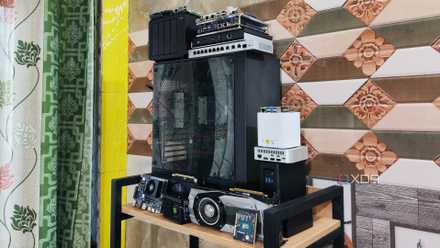
When I first set everything up related to my home lab, I had maybe a handful of Ethernet cables, some power cords, and a couple of devices running services. It was quite easy to keep things "messy neat" as I like to say. Everything is able to be accessed, it's not the prettiest, but it's functional.
After things grew just a little bit more, the cables became very difficult to manage. Every time I went to go swap out hardware or reroute a cable, it became a 20-minute process rather than a 20-second one, and it could've been avoided if I had managed the cables to begin with.

7 myths you probably still believe about building a home lab
Home lab lies you have been told
Anyone can make these mistakes at the start
Any home lab beginner is prone to these kinds of mistakes, and they continue to be friction points later on, but the good news is that every one of these problems is avoidable with a little upfront planning. Choosing the right foundation, segmenting early, being intentional about remote access, and treating physical organization as part of the system can go a long way.