
Buying a Raspberry Pi Zero back in 2016 taught me a lot about Linux, automation, containerization, and other aspects of computing. Since then, I’ve brought plenty of DIY ideas to life with Single-Board Computers – and my repertoire of SBC projects has expanded even further after I started writing for XDA. Although I’ve largely shifted my focus to the Raspberry Pi 5, I’ve also reviewed a plethora of SBCs during that time, ranging from cool-looking devices with major dealbreakers to fully-functional RISC-V systems and NAS-centric boards.
However, the Radxa X4 stood apart from the rest of the SBC crowd when I reviewed it back in September 2024, and over the last couple of months, it has become an important part of my computing lab. What's weird is that I haven't seen the Radxa X4 mentioned anywhere, even though it’s hands-down my favorite SBC in recent times.
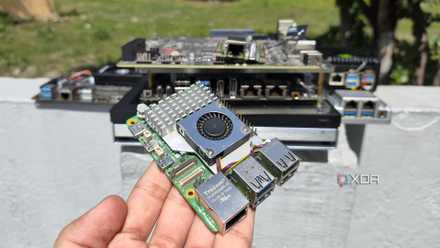
5 amazing computing devices you can buy instead of a Raspberry Pi 5
The Raspberry Pi 5 may be a terrific system for DIY projects, but there are plenty of other alternatives for tinkerers
About this article: In case you're wondering, then no, Radxa X4 hasn't sponsored the post. This is just me fanboying over an SBC that's extremely underrated in the tinkering community.
1 An x86 CPU at an affordable price
It costs about the same as an RPi 5 4GB model
Arm SBCs are known for their budget-friendly nature, with the Zero boards from many series (including the Raspberry Pi family) costing well under $20 despite offering a fully-functional computing system. Their x86 counterparts, on the other hand, often cost the same as mini-PCs while offering lower thermal headroom, and in many cases, weaker processors.
However, the Radxa X4 flips that notion on its head, with the cheapest version of the SBC packing 4GB of memory for a mere $65, which is barely $5 more than the 4GB variant of the Raspberry Pi 5 at the time of its release. While its Intel N100 processor is far from the most powerful CPU on the market, it blows most Arm SBCs in this price range out of the water with its solid performance in DIY projects.
|
Benchmarks |
Radxa X4 (8GB) |
Raspberry Pi 5 (8GB) |
|---|---|---|
|
PC Mark 10 |
2615 |
- |
|
Geekbench (Single Core, CPU) |
962 |
751 |
|
Geekbench (Multi-Core, CPU) |
2448 |
1539 |
|
Geekbench (OpenCL, GPU) |
3047 |
- |
And that’s before you take the lack of compatibility problems into consideration…
2 Dedicated BIOS firmware
And plenty of operating systems to choose from
Although rival Arm boards have gotten better over time, better software compatibility and support for multiple operating systems are major reasons why the Raspberry Pi family has stood at the apex of the SBC landscape. However, the power balance gets shattered into smithereens once you bring x86 systems like the Radxa X4 into the fold. Aside from its performance benefits, the Intel N100 has significantly better compatibility with software packages – and it can run tools, apps, and services that would cause Arm boards to throw compatibility errors like there’s no tomorrow.
Plus, the Radxa X4 features proper BIOS firmware, so you don’t have to work with makeshift UEFI solutions when you want to load Windows 11, Proxmox, and other x86 operating systems on the SBC.
3 Solid Ethernet speeds
2.5G connectivity is a steal at this price
1 Gigabit Ethernet has remained the mainstream standard for quite a while. While it can get the job done for casual users, you’re bound to require faster Ethernet speeds once you start dabbling in home server and NAS projects. With the Radxa X4 featuring a dedicated PCIe Gen 3 x4 slot for M.2 SSDs, a 1G connection would clearly bottleneck the SBC’s performance in advanced workloads.
Thankfully, the Radxa X4 breaks free from the 1G shackle impeding most SBCs by shipping with a 2.5 Gigabit connection. Throw in some external SSDs, and you can build a reliable TrueNAS Scale file-sharing server with the Radxa X4. While I’m not quite a member of the wireless connectivity faction, I appreciate that the SBC supports up to Wi-Fi 6 and Bluetooth 5.2 standards.
4 Built-in microcontroller
And it’s the RP2040 of all things
Designed for automation, robotics, and circuitry projects, microcontrollers are a great addition to every tinkerer’s toolkit. Even though there’s a lot of overlap between SBC and microcontroller projects, you’ll need a dedicated MCU if you want to get into the nitty-gritty of RTOS and embedded systems. But if you’re the proud owner of a Radxa X4, you won’t have to drop more money on a microcontroller.

5 exciting Arduino projects you can pair with a Raspberry Pi
Arduino microcontrollers and Raspberry Pi SBCs are a match made in tinkering heaven
That’s because the SBC has an MCU module built into it. Weirdly enough, it’s the RP2040 microcontroller, which was designed by the Raspberry Pi Foundation. The GPIO pins can be used to pair extra sensors, LEDs, and other circuit components to the RP2040, and you can even get the Intel N100 and the RP2040 to communicate with each other over the USB or UART interfaces.
The Radxa X4 is truly the underrated king of SBCs
I was already impressed with the Radxa X4 when I reviewed it last year, and I’ve started to grow more fond of the SBC over the last couple of months. Despite packing several neat features, its pint-sized design lets me use the Radxa X4 in several wacky projects. When I used a projector to replace my monitor, the Radxa X4’s compatibility with Windows 11, miniature size, and fast Ethernet speeds made it the perfect companion for that wacky project. It’s also surprisingly decent at running emulators, making it significantly better than typical Arm boards if you want to emulate titles designed for newer consoles. Distro-hopping is just as painless on the SBC, and you can even configure it as a Proxmox Backup Server if you’ve got a PVE-powered home server.
Radxa X4
- Storage
- M.2 M-key slot, eMMC storage (optional)
- CPU
- Intel N100
- Memory
- Up to 16GB LPDDR5
- Operating System
- Most x86 operating systems, Windows 11
Radxa X4 is a powerful device that's armed with an Intel N100 processor and 16GB LPDDR5 memory, making it perfect for anyone who needs to run non-ARM operating systems on their SBCs. What's more, despite sporting a 2.5GbE connection and an RP2040 40-pin GPIO header, it's a highly affordable SBC.