
It's a pretty established fact that adding an SSD to an old PC is one of the biggest improvements to its overall performance. But what about if you already have an SSD but are tempted by the recent price drops of NVMe storage? Will that upgrade bring a similar boost to performance, or is it something you could leave until you next buy a new computer? Well, while it won't bring the super speed-up of moving from an HDD to an SSD, putting NVMe in your computer does come with some worthwhile benefits for the upgrade.

Best M.2 SSDs in 2025
Need a storage upgrade? You probably want an M.2 SSD, and these are the best options you can find right now.
5 No more cables
I hate cable management, don't you?
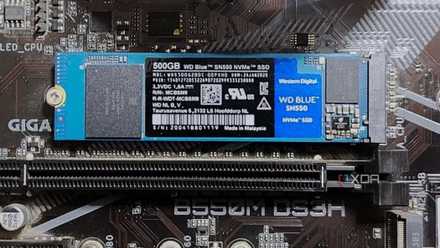
While it's true that NVMe SSDs are several times faster than SATA SSDs, they have one benefit that doesn't get talked about enough. That's the removal of not one but two cables that you normally would have to manage in the cramped rear compartment of your PC chassis. Two fewer cables, per SATA SSD that's removed and replaced with an M.2 NVMe SSD. That's a big win in my eyes, even in a midtower sized case. If you prefer your PC to be more compact, you know every cubic millimeter of space is precious, and swapping SATA drives out for M.2 NVMe is one of the easiest ways to reclaim some space.
The only real drawback is that most motherboards have more SATA ports than M.2 slots for SSDs. That's not always the case, like if you have a premium motherboard or a newer one that often has four or more M.2 slots ready for filling. But even M-ITX motherboards have at least one M.2 slot, and with the price of NVMe storage, it's quick and easy to add 2TB of storage capacity, without worrying about cable routing.
How to install an M.2 SSD in a PC: A beginners guide
One of the easiest components to install on a PC.
4 Prices have dropped considerably
So you can buy a larger storage capacity
Depending on how long ago you got the SSD that's inside your PC, you might be surprised at how affordable NVMe SSDs are today. While SSD pricing can be variable, even among those with similar specifications, they're all significantly cheaper than they were a few years ago and closer to the prices of SATA SSDs for similar storage capacities. I remember paying nearly $150 for a 256GB SATA SSD when the first consumer models came out, which felt expensive when I could have gotten over a terabyte of HDD for the same price, but I wanted the speed for Windows 10 and games. Nowadays, you can get 2TB of NVMe SSD for that price, with read speeds over 10x the speeds of even the latest SATA SSDs. If you look at the pricing for SATA SSDs, they're in the same ballpark and, in some cases, are more expensive than their NVMe counterparts. It just doesn't make sense not to buy the faster SSD standard, assuming you have a computer with M.2 slots to take advantage of them.

5 SSD specs you should really care about when buying one
Go beyond the obvious when it comes to buying a new SSD
3 They're significantly faster
SATA SSDs run out of steam earlier
While it might be tempting to grab the latest PCIe 5.0 SSDs for your computer, they might be surplus to requirements. If your computer is a few years old, it's more likely to support PCIe 3.0 or PCIe 4.0 instead. That's not a problem for compatibility as PCIe NVMe SSDs are backward-compatible with earlier generations, so the PCIe 5.0 SSD will run in those M.2 slots, but it'll be limited to the speeds of the max PCIe version your motherboard supports. That means you'll have spent more than necessary, as PCIe 3.0 and PCIe 4.0 SSDs are significantly more affordable.
The other thing is that even PCIe 3.0 NVMe SSDs are several times faster than SATA SSDs. You can see this above, with a SATA SSD on the left, a PCIe 3.0 SSD in the middle, and a PCIe 5.0 SSD on the right. The SATA SSD has 561.41MB/s sequential read speeds, which is right about at the maximum the SATA III port can handle. A PCIe 3.0 NVMe SSD is almost five times faster, with a 2,491.17MB/s sequential read speed. The PCIe 5.0 NVMe SSD is many times faster again, but only for sequential speeds. With most computing tasks, random read speeds are more important, and the difference between PCIe NVMe generations isn't as staggering for these types of tasks. Again, while it doesn't matter much which generation of PCIe NVMe you pick up, they're all a significant margin faster than the SATA SSD you're already using.

5 reasons an SSD is the best PC upgrade you'll ever make
If you're still running a spinning hard drive on your PC, it's high time to switch over to an SSD.
2 Lower latency
Get your data, faster
It's not all about straight-line speed, either. NVMe storage has significantly lower latency than SATA SSDs, reducing the time it takes for the storage device to respond to data requests. We're talking about several microseconds rather than tens of microseconds. That might not seem like much, but it adds up over the number of data requests the system makes. The other thing is that NVMe SSDs are able to run concurrent operations at once, with a queue depth of several tens of thousands, while SATA can only support 32 I/O requests at any one time.
1 Lower power consumption
Every little bit helps with power usage
While all SSDs have lower power consumption than HDDs, NVMe drives are often more power-efficient than SATA SSDs, but that does depend on the PCIe generation being used. PCIe 5.0, for example, often gets close to the 11.5W maximum that the M.2 socket can supply, while PCIe 3.0 is closer to 3.5W. With SATA SSDs pulling around 4-7.5W at maximum, it might be a close-run race, but NVMe also idles at a lower wattage. With most user workflows mostly staying in the lower power states, it's hard to quantify exactly how much power-saving NVMe could bring, but it will be an improvement, especially when the system is sleeping or idling.
Replacing your SATA SSDs with NVMe ones brings a host of improvements
If you've got an older SATA SSD as your PC's boot drive, you're missing out on faster boot speeds, among other handy improvements. NVMe SSDs are faster, use less power most of the time, and are often even cheaper than the same storage capacity. Also, if you've had that SATA SSD for a number of years now, there's a chance it's coming near to the end of its operational life, so upgrading before that will mean not losing any data. You do have backups, right? If not, now is the time to start, and to do some more research on which NVMe you're going to upgrade to.