
Summary
- Make sure your new motherboard fits your case and has room for future upgrades.
- Prioritize performance over aesthetics and consider future-proofing for a high-end gaming PC.
- Choose the right RAM and CPU socket type to ensure compatibility and optimal performance.
It's always fun building a new gaming PC, although it can also be stressful when you have to remember all the specifications and requirements for each piece of hardware going into the build. You shouldn't spend your time biting your nails worrying if your new motherboard will fit in the PC case, or if your RAM will be compatible with your motherboard.
That's why we are here to tell you about the five most important things you should think about when you are shopping around for a new motherboard. With the information below, you can learn about different motherboard form factors, how RAM generations work for motherboards, and what socket types you will need to have for which generation of CPUs.
5 Expansion slots and upgrades
Make sure your PC is future-proof
It is important to consider how you will want to upgrade your computer in the future. Unfortunately, every computer will become slow and outdated at some point. It's important to make sure that your new gaming PC is as future-proof as possible so that you only have to make small upgrades over the next few years rather than buying a new PC every time it starts to feel slow.
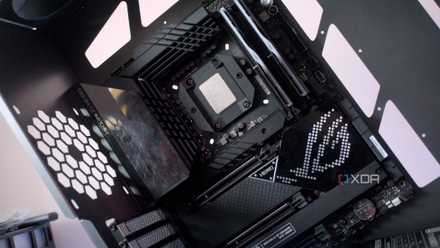
The motherboard's size is an important factor in how well it will age, specifically how many expansion slots and connections it has, as well as how advanced the motherboard's hardware and software is. Expansion-wise you want to make sure it has a slot for an M.2/NVMe storage device on the motherboard. You'll also want to have an extra set of RAM slots if you want to buy another pair of RAM sticks in the future. Future-proofing your device is incredibly important if you are looking to build a high-end gaming PC because you don't want the system to become redundant in the next few years.
But if you are looking to build a low to mid-level gaming PC, then future-proofing becomes less important. Building a gaming PC on older generations of hardware can work for gamers who only play certain types of games. For instance, you won't need the latest hardware on a PC that is just meant to play Minecraft, Roblox, Fortnite, and a few other titles. However, if you want to play all the newest titles as they are released and have all the settings maxed out, then future-proofing may be the most important factor to consider when building a gaming PC.
Why a motherboard might be the most important part to future-proof in your PC
Stop ignoring your motherboard.
4 Price and aesthetics
Balancing your dream PC with your budget
This category may or may not be a big deciding factor when choosing a motherboard for your gaming PC. Building a gaming PC is not a cheap undertaking and if you want to build yourself a powerful gaming PC you're either going to have to pay a lot of money or do a lot of careful planning on what high-end budget parts can do the job just as well as an expensive part.
When building a gaming rig, sometimes paying an extra $100 now to get a motherboard that has the next-generation socket may be a better choice than replacing both your motherboard and CPU in a year or two. Make sure that you're not just paying for a motherboard because it looks better or has better branding. You should always search for a performance review of the particular model. While spending more on looks is fine if you have the budget, you need to prioritize performance and reliability.

Best white motherboards in 2025
No white PC build is complete without a white motherboard, and we've rounded up some of the best ones
3 RAM compatibility
What RAM can the motherboard support?
If you're looking to build a powerful gaming PC, then you will need a motherboard that supports the best RAM that you can get. Unfortunately, not all RAM can be used on just any PC; there are certain types of RAM that only certain generations of motherboards can use. There are multiple different types of RAM, but the RAM that is more relevant to a gaming PC is DDR RAM, which stands for double data rate.
If you are planning to build at least a mid-tier gaming PC, then the only RAM you should be looking at is DDR5 (current gen) RAM or at the very least DDR4 (previous gen) RAM. This is because anything below that will be incredibly slow on any modern gaming PC if it's still even supported by the motherboard at all. Apart from this, you will also need to keep an eye on the speed of the RAM before you buy it. DDR4 RAM has speeds ranging from around 2100 MHz to 4000 MHz, whereas DDR5 RAM will have speeds from 4200 MHz to 6400 MHz.
It is always recommended that you get more RAM than you think you will need for your PC, but realistically, most gaming PCs can get away with a minimum of 16GB of RAM (2 sticks of 8GB). More is better, but it doesn't need to be a priority.

DDR4 vs DDR5 RAM: What's different and which one should you buy?
DDR4 vs DDR5 RAM remains one of the most discussed topics in the PC computing space.
2 Size and form factor
E-ATX / ATX / Micro-ATX / Mini-ITX
The first and most important step when planning out your new gaming PC is ensuring that the motherboard fits comfortably in the case you bought or plan on buying. There is no greater pain than planning out a PC build and having hardware that doesn't fit inside the PC case or gets in the way of other components.
When you start looking for a new motherboard, you may hear words like ATX or ITX and wonder what these words mean. The words above just refer to the motherboard type. The words themselves were coined by Intel, in a bid to standardize motherboard sizes, and it worked. So what are the most common motherboard sizes?
Luckily, it's less complicated than it seems. Motherboards normally come in 4 different form factors (sizes): E-ATX, ATX, Micro-ATX, and Mini ITX. There is a fifth type of motherboard size, known as XL-ATX, but it is very rare to find and there are only a few manufacturers that still make them today.
- XL-ATX: Extra Large
- E-ATX: Large
- ATX: Normal
- Micro-ATX: Small
- Mini-ITX: Extra Small
Each of these form factors comes with its own benefits and drawbacks which should be taken into consideration as you plan and build your new gaming PC. As you would expect, the smaller your motherboard is the fewer slots and connections it will have. You will also have to be more particular when choosing parts, as you factor in the size of the components or the number of slots available to use on the PC.
This doesn't mean that either a big or small motherboard is necessarily better for your PC, you should always choose the option that makes sense for your particular situation. But it does mean that as you browse for your PC case and other hardware, you should always remember the dimensions of your motherboard.

Confused by motherboard specs? Here are the most important ones you should know
Choosing a motherboard isn't just about CPU compatibility. There are a lot more aspects you should care about
1 CPU socket type
Intel or AMD?
While GPU slots may all be built the same, CPU sockets most definitely aren't, and getting the wrong socket type can be the easiest thing to forget while you're shopping for a new motherboard. When you’re looking for a new CPU, you will have to choose whether you want an AMD or an Intel CPU.
Both AMD and Intel CPUs have different socket sizes and shapes, and in addition to this, both companies change their CPU socket sizes every few generations. Intel is especially guilty of this behavior. After you have chosen which CPU brand you want, you need to decide which generation of CPU you want, and then you can see what socket type you'll need to have on your motherboard. For instance, if you are building a high-end PC, then you will want a newer Intel CPU, so you should look for a motherboard with the LGA 1700 socket which will fit 12th through 14th-generation CPUs. Looking at anything older isn't a good idea.
If you'd prefer to use an AMD CPU and want a newer motherboard, then you need a motherboard with an AM5 socket. This is the latest AMD socket type and will guarantee that you will be able to upgrade your CPU for a few generations. If you are looking for a less expensive option, you will have to look for a motherboard with an AM4 socket. This socket type works for most older AMD CPUs.

How to tell what CPU socket you have
Thankfully, finding out what CPU socket your motherboard has isn't rocket science.
You should now be able to find the perfect motherboard for your gaming PC
Hopefully, this guide helped you make a more informed purchase while you were planning your next gaming PC build. For now, you should know the difference between the different motherboard form factors, have an idea about CPU socket sizes, and know more about what RAM to get and how much you need. So, if you would like to learn more about how to build a gaming PC or what mistakes to avoid when building a new gaming PC, then make sure to check out the rest of the site for useful information.