
The advent of camera phones spawned smartphones, instantly ballooning the storage requirements on handheld devices in the past couple of decades. Most users are now inexplicably dependent on cloud storage to manage documents, back up their app data, and even store copious amounts of images and video. This is no accident, and corporations happily mint money from cloud storage services without subsidizing hardware for consumers in return. In fact, I'm tempted to believe the death of expandable storage on smartphones also contributed to a boom in cloud storage demand.
As such, hosting your own cloud storage service in the form of a NAS is among the first steps a tech-savvy user would take in this age of expanding digital footprints. Moving these memories from the cloud to a privately owned NAS is a liberating experience, offering control, privacy, and a greater sense of ownership of our data. I recently hopped over to this side of the fence with a Synology DS925+ NAS to reclaim my data from the clutches of big tech. While the hardware is up and running, I find myself at a crossroads, pondering the ideal image management system to entrust with my precious memories. The options are plentiful, each with its own set of strengths and weaknesses, making the decision a surprisingly challenging one. So, here are the top 5 contenders I'm struggling to choose between.
8 open-source photo management tools for great library organization
Self-hosted and secure management tools to organize your photos
5 PhotoPrism
A great jumping off point
Starting off with a popular open-source solution trusted by many, PhotoPrism is a private and self-hosted solution that offers most of the features we have come to expect from cloud providers. That list includes duplicate handling, face recognition for people that appear frequently, geotagging, thumbnail preview for video, and file tagging support. It’s designed to be a comprehensive solution for organizing, viewing, and sharing your photo and video collection. One of its standout features is its use of AI-powered image recognition for automatic tagging of your photos. This means you can search for images using keywords describing their content, without tagging each file tediously.
PhotoPrism also has sufficient documentation that makes it beginner-friendly for first-timer NAS owners like me, but if you're an advanced user looking to jump ship and try replacing your current service with this, PhotoPrism supports Docker, Raspberry Pi, and FreeBSD too. I could access the PWA on any device to browse a photo collection, but setting up Docker is recommended to run your own server on the free version. For those who value metadata, PhotoPrism excels at reading and preserving EXIF data, ensuring that information like date, time, and location is kept intact.
On the flipside, some of its more advanced features, such as multi-user support and detailed analytics, are reserved for the Plus version. For individual use, the free version should suffice for most people just starting out with managing their image management journey. If anything, PhotoPrism is a great starting point to see what self-hosting your image backup cloud can do for you, and which features you'd like to add down the road.
Photoprism
4 PhotoSync
Delivering the one feature that matters
The biggest convenience we take for granted with cloud providers is the reliable, one-way or two-way sync we enjoy at the flick of a switch in the Settings page. However, setting up your own NAS and using it quickly reveals that secure real-time sync with authentication isn't all that easy to implement, and some services even command a premium for this feature. However, it doesn't have to be this complicated, because PhotoSync nails the basics of real-time one-way sync so photos aren't hogging the precious memory space on your handheld devices. This means you can have your photos automatically uploaded from your phone to your NAS without worrying about changes on the NAS affecting the files on your phone.
Sure, it lacks the image organization chops of a tool like PhotoPrism, but it beats tools like SyncThing which only offer two-way sync, so identical copies of the images are maintained on your NAS and mobile device simultaneously. PhotoSync offers a high degree of customization, allowing you to specify exactly how and where your photos are stored. You can set up custom folder structures based on date, time, or other metadata, and even have it automatically delete photos from your phone after they’ve been successfully transferred. It supports a wide range of transfer protocols, including SMB, FTP, and WebDAV, making it brand-agnostic for most NAS devices.
While sync is usually a paid service for most image management utilities, I wouldn't mind paying for PhotoSync since it takes the effort out of the synchronization, even though it is a paid utility as well. That's because, in this case, I'm paying for a "set it and forget it" solution for backing up my smartphone photos, with minimal friction.
PhotoSync
3 Memories for NextCloud
The solution that benefits from integrations
NextCloud is one of the names that inevitably comes up in anyone's search for NAS utilities, and my experience was no exception. I'm not using NextCloud yet, but Memories has me convinced a switch over may just be worthwhile. Memories is an add-on for NextCloud that provides a beautiful and intuitive interface for viewing and organizing your photos. It offers features like a timeline view, automatic tagging based on location and EXIF data, and the ability to create and share albums.
One of the biggest advantages of using it comes through direct integration with the broader NextCloud ecosystem, meaning you can share photos with other NextCloud users, collaborate on albums, and access your photos from any device with the NextCloud mobile or desktop client rather easily. For those who are already using NextCloud as their private cloud solution, this level of integration is a major selling point.
That said, several forum posts highlight that NextCloud performance varies drastically depending on your NAS' internals. If you have a large photo library, you may need a NAS with a decent amount of processing power and RAM to ensure a smooth and responsive experience. This is a significant deterrent for me since I am a hobbyist photographer and my library is expansive. I'm afraid I'll be disappointed after all the effort of switching to NextCloud only to be hamstrung by poor performance. Another not-so-major qualm is the absence of advanced AI-powered features I'd find on any other dedicated photo management tool like PhotoPrism or Immich.

5 amazing apps you should run on your self-hosted Nextcloud server
If you're hosting your own Nextcloud instance, you should use these plugins to make it even better.
Nextcloud
- OS
- Windows, macOS, Linux
- Key highlights
- Self-hosted, open source
2 Synology Photos
Default without fault
At the outset, I mentioned that I dipped my toes in the NAS world trusting one of the biggest names in the game — Synology. The gamble may not have paid off with vendor-locking for hard drives coming into effect right from the model I purchased, but that's a longer tangential discussion for another day. However, Synology has built a robust software ecosystem catering to its NAS hardware, and that includes an image management utility called Synology Photos. As a first-party application, it offers a clean and user-friendly interface that will feel familiar to anyone who has used other Synology software.
Just like setting up a Synology NAS, the setup here is very simple, and I have been using this software as a stopgap while I figure out what I'm missing out on, setting the expectations for the replacement. Since it comes pre-installed, it is a prime contender for many users, just like Edge on Windows, and anyone who opines that setting up Docker containers is needlessly complex can happily stick with Synology Photos. It's easy to create albums, share photos with friends and family, and manage user permissions. It also offers some basic AI-powered features, such as facial recognition and object detection, which can help with organizing your library.
While Synology Photos is a great default, I find that its face detection system is hit-or-miss compared to other options on this list. Moreover, the mobile app I need for sync is clunky, and has crashed a couple of times. I worry that these aspects may encumber the migration to another utility, but I'm also confident it would be worthwhile. Synology Photos offers a little bit of everything, giving users a taste of what's possible with local hosting and sync, but lacks the chops to compete against the best alternative I've found so far.

7 Synology features you can install on any NAS
Some features have to be platform-agnostic
1 Immich
The closest you'll get to Google Photos
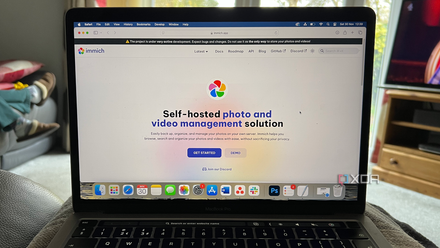
Immich is a relatively new but rapidly developing open-source photo and video backup solution that has been gaining a lot of traction in the self-hosting community. It's designed to be a high-performance, self-hosted alternative to Google Photos, with a strong focus on mobile-first usability. It offers a beautiful and modern web interface, as well as dedicated mobile apps for both iOS and Android. That sounds like a recipe for success, especially since Google Photos is widely acclaimed for simplicity and several users switching to self-hosted libraries may be looking for such familiarity.
One of the most impressive aspects of Immich is its performance. It's designed to be fast and responsive, even with very large photo and video libraries. I love that it offers most of the advanced features we have come to expect from a cloud service, such as real-time backup of photos and videos from your mobile devices, object detection, and facial recognition. As I alluded to earlier, Immich is one of the best services on this list for facial recognition, so if you snap a lot of portraits or need reliable face detection to find old photos in a hurry, this solution has you covered.
The only major downside I see is that Immich is rather new, so there may be stability concerns with the steady stream of updates, and users looking for a lasting solution may have well-founded longevity concerns as they do with most open-source projects. Those worries notwithstanding, there is a learning curve involved in setting it up and maintaining it. However, for those who are willing to invest a bit of time and effort, Immich offers a powerful and flexible solution for managing your photo and video library.

5 reasons I stopped storing everything on my NAS and went hybrid instead
What belongs on the NAS — and what really doesn’t
Immich
- Key highlights
- Self-hosted
- iOS compatible
- Yes
An important question
Reassuringly, Immich has the largest number of GitHub stars and contributors of any modern FOSS image library software, and a permissive license. It is also free for all users, and a desktop app is the only feature I might miss. So, for the time being, I'm using Synology Photos, but Immich seems to be the most promising alternative to it. The latter supports foreground and background backups, Google Cast, hardware transcoding, and a well-designed Android app. In all probability, I'll switch to Immich, but I'm still on the fence considering all the other options on this list.
Ultimately, the right choice of image management tool for your NAS will depend on your specific needs and preferences. If you're looking for a simple, "just works" solution with tight integration with your Synology NAS, then Synology Photos is an excellent choice. If you're a NextCloud user who values an all-in-one solution, then the Memories app is a fantastic option.
The more technically inclined among you may prefer Immich or PhotoPrism for a feature-rich solution with advanced AI capabilities. However, if threadbare sync that's reliable is all that matters, PhotoSync might cut it. That said, it's important that I reiterate the importance of separate backups and redundancy proofing in your NAS using a RAID array. After all, a NAS isn't exactly a backup solution and I wouldn't entrust all my data to just one device.

Why you should always back up your NAS, even if you use RAID
Using RAID alone isn't enough to protect against data loss.