
If you aren't intrigued by the Steam Deck OLED, the consensus is that the Asus ROG Ally is the great PC gaming handheld you should buy instead. It has more power than any other handheld on the market, and generally performs well. Some of the device's flaws have been fixed on the Asus ROG Ally X, which is the absolute best Windows gaming handheld money can buy.
While the ROG Ally is a great handheld — I bought one myself, choosing it over the Steam Deck — it's clear that the out-of-box experience with Windows 11 isn't as great as what you get with SteamOS. That's true regardless of whether you buy the cheapest AMD Z1 ROG Ally or the most expensive Asus ROG Ally X. For that very reason, every ROG Ally owner should dabble with third-party programs and plugins to make their gaming handheld easier to use, more performant, and compatible with other kinds of games.

Asus ROG Ally X review: Top-notch hardware dragged down by Windows
The ROG Ally X’s hardware should make it dwarf the Steam Deck, but once again, Windows is a huge asterisk.
Whether you're looking for software to make your ROG Ally perform the absolute best it can or if you want to gain efficiency, the programs below have got you covered. We've also selected a few apps that make your ROG Ally or ROG Ally X more versatile for gaming, like emulators and remote play clients. You don't need to install them all, but you'll want to load up at least a few of these programs to make the most out of your ROG Ally.
8 BloatyNosy
Make the Windows 11 experience on your ROG Ally more manageable
The ROG Ally has some of the best performance you can get in the handheld form factor, so what holds it back? The answer is certainly Windows 11. Despite Microsoft's best efforts to improve things, Windows is still poorly optimized for gaming handhelds like the ROG Ally, and includes a lot of bloat. That's where BloatyNosy comes in. This program includes multiple modes, including CoTweaker, Universal Debloat, and Decrapify.
It'll help you automatically fix your privacy settings, remove unwanted applications, debloat the overall Windows 11 experience. Windows really isn't great for gaming handhelds (at least, for now), but BloatyNosy can make the experience a lot better for ROG Ally users.
BloatyNosy
BloatyNosy is a quick and easy way to optimize your Windows 11 experience. It'll let you uninstall bloatware, opt-out of unwanted features and ads, and much more.
7 VLC Media Player
For when you want to listen or watch content on your ROG Ally
There may be times when you want to enjoy some music or video content on your Asus ROG Ally, and for that, you'll need a media player. Our do-it-all media player program for the ROG Ally is VLC, but you should use the one that fits into your media library and consumption habits best. For example, you could easily choose to install iTunes or Spotify on your ROG Ally instead of VLC, but we think the latter is the most compatible and versatile option for Windows handhelds.
VLC Media Player is a free and open-source program that has been downloaded nearly 150 million times, so you know it's legit. This app can handle just about any media file you throw at it, from audio files like FLACs to video files like MP4s. It'll play CDs, DVDs, and much more. Best of all, VLC Media Player can tap into your NAS media library over your network for wireless playback.
VLC
VLC Media Player is a great way to play basically any kind of media file on your Asus ROG Ally. You can play audio files, video files, and more on this free and open-source application. Plus, it supports DVDs, audio CDs, VCDs, and much more.
6 Nyrna
Quickly suspend ROG Ally apps and games
There are a few glaring ways that PC gaming handhelds fall behind traditional consoles, especially those that run Windows. A great feature found on consoles like the Nintendo Switch and PlayStation will let you suspend games and put them to sleep. Why isn't there a feature like this on gaming handhelds such as the ROG Ally? With Nyrna, it is. Nyrna is absolutely essential, allowing you to suspend games to free up performance resources or take a break from gaming.
The cool part about Nyrna is that it lets users pause games that don't have an inbuilt pause function. So, if you're playing Dark Souls or Elden Ring on your ROG Ally, you can take a break and safely pause them with Nyrna — and you won't lose your progress.
Nyrna
Nyrna aims to make your Asus ROG Ally feel more like a true gaming console. It brings the popular sleep and suspend functions from the Nintendo Switch and PlayStation to your PC handheld, making it easy to pause apps and games.
5 Handheld Companion
A controls interface designed for handhelds, first and foremost
Remember the poor Windows 11 optimization for the handheld form factor that we keep talking about? This app, Handheld Companion, wants to make the experience slightly better. For starters, Handheld Companion is designed for touch, and that immediately puts it a step above the native Windows 11 settings menus. This program makes it possible to use motion control in games, access a quicktools overlay, and remap your controls in a quick and easy way. It's the best way to add motion controls to any game using a device's IMU, gyroscope, accelerometer, or external sensor.
Handheld Companion
Handheld Companion is a one-stop shop for all your PC gaming handheld needs. It puts frequently-needed toggles and tweaks in a single handheld-friendly UI.
4 Universal x86 Tuning Utility Handheld
Get the most out of your ROG Ally's chip
Like the Handheld Companion app, the Universal x86 Tuning Utility Handheld program also adds a touch-friendly way to manage your ROG Ally's settings. However, this app is much more advanced and makes it possible for users to tune their ROG Ally to their specific performance needs. For example, you can use the Universal x86 Tuning Utility to adjust your device's thermal temperature limits, power limits, CPU/APU voltage curves, maximum CPU and GPU speeds, and much more.
You should know what you're doing before making heavy changes to your ROG Ally's hardware settings with the Universal x86 Tuning Utility. With that being said, for power users familiar with this kind of thing — especially those used to tweaking their settings on full-size gaming PCs — this program is absolutely essential for customization.
Universal x86 Tuning Utility Handheld
This program helps you be sure that your ROG Ally is optimized for all the apps and games you want to run, and puts crucial toggles and settings right where you need them.
3 Chiaki
A PlayStation Remote Play client for ROG Ally
With the PlayStation Portal now in the fold, there may not be a need for a gaming handheld if all you want to do is play your PlayStation games remotely. However, if you already own an ROG Ally or if PS Remote Play is only one part of your gaming handheld needs, you may want to give Chiaki a try. It's a PlayStation Remote Play client that lets your ROG Ally tap into your PlayStation console, which can be especially helpful if you want to play console-exclusive titles.
This program not only works on the ROG Ally, but also many more platforms, including Linux, FreeBSD, OpenBSD, NetBSD, Android, macOS, Windows, and Nintendo Switch. It's an excellent option for people who want a consistent PS Remote Play experience on their ROG Ally and all their other devices.
Chiaki
Want to play your PlayStation games remotely on your ROG Ally? Chiaki is a convenient PS Remote Play client that works on PC gaming handhelds.
2 EmuDeck
Excellent emulation software for gaming handhelds
Longtime emulation enthusiasts might cringe at how it has completely blown up since Apple allowed emulators on iOS, but there's no doubting that the emulation community is getting more attention than ever. If you want to start emulating games on your ROG Ally, one of the best suites available is EmuDeck. In fact, we've got a full guide on how to get EmuDeck up-and-running on your ROG Ally.
EmuDeck supports consoles and games as recent as the PlayStation 3, making it a very versatile option. This program is nearly plug-and-play; after connecting EmuDeck to the internet, it takes only a few minutes to get set up. Instead of setting up many emulators on their own, this app handles it all in one location. For the retro game lover, EmuDeck is a must-have program for your ROG Ally.
EmuDeck
EmuDeck is one of the best emulation suites available on PC gaming handhelds, and you'll want to use it on your ROG Ally if you love retro gaming.
1 Playnite
Get all of your ROG Ally games in one place
Our final recommendation is something that every ROG Ally can take advantage of, whether you're a power user or a casual handheld gamer. Playnite is a unified game library for your handheld, and it's a formidable alternative to the stock Armoury Crate software that ships on the ROG Ally by default. All of your games from various platforms will be found in one place — even the ones you haven't installed yet. Playnite supports the Steam, Epic, Origin, GOG, Battle.net, and Ubisoft Connect game libraries, plus others.
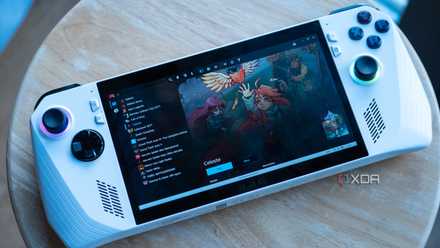
How to setup Playnite on the Asus ROG Ally
If you want a unified front-end for all of your games on the Asus ROG Ally, then Playnite is one of the best to use.
Playnite can be a quick and easy game launcher for your ROG Ally, or it could become much more with a bit of work. This game library app supports extensions and plugins that can add functionality. Plus, you can customize your theme to match your individual style and aesthetics. There are smaller features, too, like a built-in playtime counter. Playnite can be as simple or as robust as you make it, and that's what makes it so great for the ROG Ally.
Playnite
Playnite is a singular game library manager for all your handheld games. It's an alternative to Asus' Armoury Crate software that ships with the ROG Ally by default.
Should you install all of these apps on your ROG Ally?
These are the apps we recommend ROG Ally owners consider, but you don't need to install them all. Some users might prefer to keep their gaming handheld running stock, and Asus' custom Armoury Crate software is actually pretty good. However, to add some functionality, optimization, and game support to your ROG Ally, you can load up some of these programs on your device.
There are some we recommend for just about everyone, like BloatyNosy, Handheld Companion, VLC Media Player and the x86 Tuning Utility. Others might depend on how you use your ROG Ally, like EmuDeck, Playnite, and Chiaki. After you've picked your favorite programs and plugins, check out our favorite ROG Ally games.