
Like many other computing enthusiasts, I got into the home lab ecosystem after turning my old PC into a server. Once I’d gotten a taste of the virtualization nectar, I quickly switched to enterprise-grade hardware that includes dual-Xeon CPUs and ECC memory modules, and soon, it became clear that there was no turning back. My current computing setup involves a plethora of different devices, including ARM and RISC-V systems.
While I love all my tinkering systems, mini-PCs have been some of the best additions to my self-hosting and experimentation stack. If you’re having a hard time picking the ideal device for your server nodes, I heartily recommend grabbing a mini-PC or two.
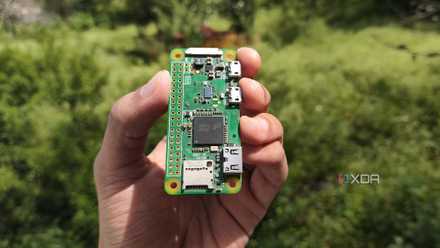
I built an always‑on VPN gateway with a Raspberry Pi Zero to access my home lab from anywhere
It's perfect when I want to work on my home lab projects from external networks
4 Tiny footprint
I can place it anywhere in my home lab
Unless you have a huge basement where you can shove your computing hardware, you’ll need to make quite a bit of space for your home lab paraphernalia. Server-rated motherboards often require larger-than-life E-ATX cases or dedicated racks, both of which are hard to accommodate in the average room. That’s before you consider the cable clutter – both inside and outside the PC case – you’ll have to put up with if you go for a huge server.
Mini-PCs occupy minimal space thanks to their compact designs, and you can stack them under a monitor or behind your desk without making the setup resemble a rat’s nest. Heck, many of them are portable enough to accompany you on your travels, making them perfect for some on-the-go home lab experiments.
3 Low power consumption
Even a cheap UPS can power it during outages
If you’re planning to run your home server 24/7, you’ll want to calculate its power consumption beforehand. Otherwise, you’ll end up getting caught off guard by sky-high energy bills. However, old PCs and server-oriented hardware can guzzle energy like there’s no tomorrow, and dual CPU systems can single-handedly spike your electricity consumption.
Even on a fairly high-end model, mini-PCs tend to use significantly less energy than typical PCs, let alone dedicated server equipment. Besides lowering your electricity bills, the energy-efficient nature of mini-PCs lets you power them from budget-friendly Uninterrupted Power Supply (UPS) units. As someone whose backwater town has frequent blackouts, I don’t have to spend thousands of dollars just to grab a UPS that can power my mini-PC server for a couple of hours.
2 Solid virtualization performance
You’ll be surprised at what a mini-PC can do
If you thought running Docker containers on a Raspberry Pi was cool, prepare to be amazed by the capabilities of modern mini-PCs. While typical SBCs have a more convenient form factor, even x86 boards tend to fall short when it comes to sheer performance. Plus, the mini-PC landscape is filled with budget-friendly systems that strike the right balance between cost, performance, and size.
Depending on your workloads, you can put together a reliable home server using a tiny mini-PC. For VM-heavy tasks, anything more powerful than the Intel i3-N305 should suffice once you bring bare-metal virtualization platforms like Proxmox and XCP-ng into the picture. Even if you prefer enterprise-grade hardware for your main server like I do, mini-PCs can act as reliable secondary nodes for your computing lab. With enough of these systems, you can even cobble together a robust high-availability cluster that’s capable of running your essential VMs and containers even if the primary workstation goes offline.
1 Versatile use cases
Sky’s the limit with mini-PCs
I love virtualizing as many operating systems, tools, and applications as I can lay my hands on. However, there are a couple of services that I refuse to self-host on my main server machine. A router/firewall OS like OPNsense is definitely useful for enhancing the security of my home server, but it’s too risky to host a VM that could take out my Internet connection on my primary experimentation machine.
The same goes for a monitoring server, as I won’t receive any alerts about my failed services if the virtual machine meant to keep an eye on my server becomes inaccessible. And don’t even get me started on the risks of running a backup VM on my main server. Luckily, mini-PCs come in handy for these projects, and I can host all three services on them without worrying about a botched home lab experiment rendering them offline.
Give some extra oomph to your home lab by arming it with a mini-PC
So far, I’ve gone over the pros of mini-PCs, but it wouldn’t be a comprehensive post if I didn’t mention their drawbacks. Since most mini-PCs ship with embedded processors and memory modules, they aren’t the most upgradable devices in your home lab. If your tiny system doesn’t feature a dedicated PCIe slot, you’ll have to resort to OCuLink to M.2 adapters to pair GPUs, NICs, and other PCIe cards with the mini-PC.
But if you’re looking for a compact and energy-efficient system that can hold its own against projects involving virtual machines and containers, you can’t go wrong with a mini-PC.

5 ways I use SBCs in my home lab to prove they don't need to be powerful to be useful
My home lab encompasses many devices, some smaller than others...