
If you’re a part of the DIY community, you may have heard about Arduino and Raspberry Pi boards. At first glance, both devices look extremely similar and can even be used interchangeably for a handful of cool projects.
That said, there are plenty of differences that set them apart, and depending on your use case, it may be better to prioritize one over the other. Therefore, we’ve put together an in-depth comparison between Raspberry Pi and Arduino to help you pick the right board for your next DIY project.
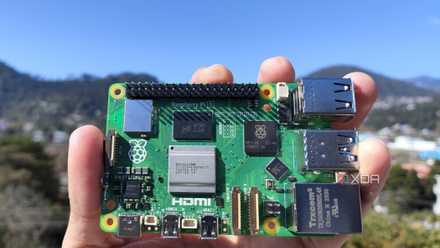
Raspberry Pi 5 review: The holy grail of DIY projects got even better (and rarer)
The Raspberry Pi 5 is one of the most powerful consumer-grade SBCs out there. Sadly, its limited stock means you'll have a hard time finding one.
Pricing and availability
Typically, Raspberry Pi boards can cost anywhere between $10 to $80, with a few extra dollars for the peripherals. With the Raspberry Pi boards packing a lot of functionality, you might be inclined to believe that they’re more expensive than the blue-colored microcontroller family.
However, the official Arduino boards surprisingly cost quite a bit. But the keyword here is “official.” Unlike Raspberry Pi, Arduino boards are fully open-source. Factor in the ease of producing clones with the official Arduino schematics, and you’ll find the market chock-full of inexpensive Arduino boards that cost a fraction of the price charged by the Raspberry Pi Foundation for their SBC lineup.
Similarly, the Raspberry Pi is plagued by supply issues, where scalpers charge a handsome fee for even the last-gen boards. While chip shortage does impact the production of the Arduino family, you won’t encounter much of a trouble finding an original Arduino board at reasonable prices.
SBC vs Microcontroller
Let’s get this out of the way first: the Arduino may look like a blue-colored Raspberry Pi, but the two can’t be any different in terms of hardware. For starters, the Raspberry Pi family is a single-board computer (SBC), that you can use as a general-purpose PC.
Meanwhile, the Arduino family consists mostly of microcontrollers, not SBCs. The only Raspberry Pi model that the Arduino can be compared to is the Raspberry Pi Pico, which is also a microcontroller rather than an SoC like the mainline Raspberry Pi boards. For the uninitiated, a microcontroller is an integrated circuit that sees more use as part of an embedded system and can’t be used as a standalone computer. And that brings us to the first difference between the two:
Operating system
If you’ve read any of our tutorials on the Raspberry Pi, you may have noticed that we start things off by writing operating system files onto a microSD card. Leaving the Raspberry Pi Pico aside, every other board from the RPi family includes a microSD card slot that lets you boot into an ARM-based OS. As such, you’re free to use a Raspberry Pi as a full-blown computer, making it better than an Arduino when you need to build complex projects that involve a more software and application-based approach.

10 best operating systems for Raspberry Pi 5
Unsure about which OS you should use with your Raspberry Pi 5? Here are ten operating systems worth running on the palm-sized system
On the other hand, a microcontroller like Arduino doesn’t support an operating system. As such, instead of flashing an OS onto a USB drive/SD card, you’ll need to program the Arduino board by connecting it to another PC and manually creating C/C++ codes using the Arduino IDE.
CPU and RAM
The mainline boards feature an ARM Cortex processor. Although not quite as powerful as a full-fledged desktop CPU, the processors built into the Raspberry Pi boards have a significantly higher clock speed, cache size, and cores than most Arduino models.
For instance, the ultra-cheap Raspberry Pi Zero includes an ARM11 processor with a 1GHz clock speed. In comparison, the most powerful Arduino GIGA R1 (at least, in terms of microcontrollers) includes a 480MHz Cortex-M7 and a 240MHz M4 chip, despite costing more than four times the RPi Zero.
Additionally, the newer Raspberry Pi boards usually come with 64-bit CPUs, with even the oldest members of the green SBC family shipping with at least a 32-bit chip. In contrast, the blue microcontroller family only possesses 8-bit processors.
The situation is largely the same on the RAM front. Whereas the Raspberry Pi boards have RAM ranging from 512MB to a whopping 8GB, the Arduino family barely has a maximum memory of 1MB – and that too on the expensive high-end boards!
USB ports and connectivity
With the Raspberry Pi being close to an actual computer, the SBC family includes quite a lot of ports and connections. Depending on your particular model, you can get as many as four USB sockets, two display outputs, an Ethernet jack, and an AUX jack. You’ll also find DSI/CSI connectors, PoE ports, and several unusual interfaces on the popular SBC family, with the latest Raspberry Pi 5 bringing debug UART, BAT, and PCIe sockets to the table.
On the other hand, Arduino boards usually include two ports: a USB Type-B (or micro-USB) port to connect the microcontroller to a PC, and a DC barrel port that you can use as an alternate way to supply power to the board.
Additionally, almost all Raspberry Pi boards, barring certain cheap models, support Bluetooth and Wi-Fi. However, the Arduino series usually lacks wireless connectivity options, and you'll have to make do without Bluetooth or Wi-Fi unless you're using the more premium boards that include "Wi-Fi" in their names.
IO pins and sockets
The General Purpose Input Output (GPIO) pins are neat little interfaces that allow you to pair all types of HATs and sensor modules to extend the functionality of your Raspberry Pi. All mainline Raspberry Pi boards share the same 40 GPIO pin layout and can be used to control peripherals via the UART, SPI, and I2C buses.
Things aren’t quite so simple on the Arduino side of things. The Arduino Uno I’ve used as a reference has 32-pin sockets, which require a male jumper cable to connect to a sensor or a breadboard. 14 of these sockets are used for digital IO, 6 are exclusively used to accept analog inputs, while the rest are power, reset, and I2C sockets. Arduino boards also don’t follow the consistent nature of the Raspberry Pi’s GPIO pins, meaning, the number of IO pins and sockets can vary dramatically depending on your Arduino model.
Arduino vs Raspberry Pi: An apples to oranges comparison
Having used both Arduino and Raspberry Pi, I’d say the latter is better for newcomers who want to get started with DIY projects. Sure, both are well-documented, have a huge community of enthusiasts and tinkerers backing them, and are useful for a variety of projects. However, the fact that you can use a Raspberry Pi as a computer makes it significantly more versatile than an Arduino board.
Raspberry Pi 5
- CPU
- Arm Cortex-A76 (quad-core, 2.4GHz)
- Memory
- Up to 8GB LPDDR4X SDRAM
- Operating System
- Raspberry Pi OS (official)
- Ports
- 2× USB 3.0, 2× USB 2.0, Ethernet, 2x micro HDMI, 2× 4-lane MIPI transceivers, PCIe Gen 2.0 interface, USB-C, 40-pin GPIO header
- GPU
- VideoCore VII
- Starting Price
- $60
Highly versatile and capable, the Raspberry Pi is the better choice if you're just starting out or want to get started with coding your own projects.
That said, if you’re into robotics or just want a cheap microcontroller to tinker with, I suggest picking up an Arduino. They also make for a great alternative if you just want to work with embedded systems or build projects centered around electronics and circuits.
Arduino Uno REV3
Perfect for IoT projects that are more involved with the circuitry side of things, the Arduino UNO Rev3 is an affordable board that's worth picking up if you want to experiment with microcontrollers.