
Summary
- Windows 11 ARM Edition, despite its lack of support for Ethernet and broken drivers, is a challenging yet fun project for any Raspberry Pi 5 owner.
- LineageOS is a great operating system for those who wish to test Android apps on their Raspberry Pi 5 boards, while Kali Linux is amazing for hackers and cybersecurity enthusiasts.
- Finally, Recalbox, LibreELEC, Home Assistant, Nextcloud Pi, and OpenWRT may have specific use cases, but they are definitely worth trying out.
Over the years, Raspberry Pi boards have taken over the DIY projects landscape and have become synonymous with the term SBC. But despite their standalone nature, you'll still need an operating system to drive every mainline entry in the Raspberry Pi family.
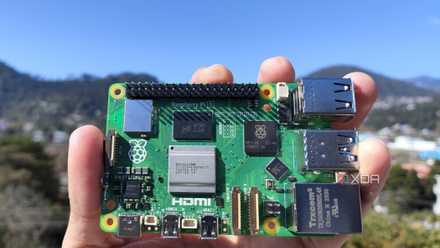
Fortunately, you have a lot to choose from, as these tiny boards are compatible with a host of operating systems. Having spent a long time tinkering with my RPi 5, here are ten of my favorite OS you need to use on the latest member of the popular SBC family.
Raspberry Pi 5 review: The holy grail of DIY projects got even better (and rarer)
The Raspberry Pi 5 is one of the most powerful consumer-grade SBCs out there. Sadly, its limited stock means you'll have a hard time finding one.
10 Windows 11 ARM Edition
Who says you can only run Linux on the Raspberry Pi?
Even though it has been nearly seven years since Microsoft debuted Windows on Arm, there has been a noticeable lack of ARM-powered laptops. The situation is even worse for SBCs like the Raspberry Pi, which aren’t even on Microsoft’s radar. Luckily, the talented team at WoR project managed to find a way to install Windows 11 on Raspberry Pi boards.
Of course, there are a couple of caveats, including a lack of support for Ethernet and incompatibility with the RPI’s GPIO pins. Plus, installing Windows 11 for the Pi 5 requires quite a bit of effort and you need to use two storage drives: one for the operating system and another for the RPi5 UEFI. But if you have the patience and grit to go through the installation procedure, you’d be pleasantly surprised at how well the ARM version of Windows 11 runs on the palm-sized computer.

How to install Windows 11 on your Raspberry Pi
If you've grown tired of running Linux distros on your Raspberry Pi, you can switch things up by installing Windows 11 on the device.
9 DietPi
The most optimized OS on the block
At the other end of the optimization spectrum, you have the lightweight DietPi operating system. Boasting the lowest resource consumption out of every other option on this list, DietPi is perfect when you want to maximize the efficiency of your Raspberry Pi projects.
Unlike Windows 11, setting up DietPi is a piece of cake. All you have to do is download the DietPi ISO that's compatible with the Raspberry Pi 5 before flashing it onto a microSD card. While the average tinkerer may not need this minimalist OS to build a weather station, print server, USB hub, or other non-intensive projects, DietPi comes in handy when you need to eke out every last drop of performance out of your RetroArch emulation machine or Ollama AI server.

DietPi is a lightweight, optimized OS for your Raspberry Pi that can give you a performance boost
Looking for a blazing-fast alternative to the Raspberry Pi OS Lite? DietPi has got you covered!
8 LibreELEC
Video streaming on a budget
Although the Raspberry Pi 5 can’t compete with a PC when it comes to real-time transcoding workloads, it makes for an excellent media server. Just like emulation, there are a ton of operating systems that can help you set up local video streaming with your RPi 5.
However, the Kodi-based LibreELEC distro is one of the best, as it includes all the features you’ll need in a media server without requiring you to jump through several hoops to set it up.
7 Home Assistant
Automate your home (and your life)
As IoT systems and smart devices become more widespread and affordable, managing them becomes quite a hassle, especially when almost all appliances have their own apps. Thankfully, Home Assistant is an open-source OS that provides a centralized hub to control all your smart gadgets.
Besides supporting almost all popular smart devices, this neat OS provides several third-party add-ons to further increase their functionality. On top of that, Home Assistant lets you write custom scripts to automate all your smart gadgets. With the Raspberry Pi 5's superior computational prowess, the credit-card-sized board can easily handle multiple smart devices and integrations on Home Assistant.

How I automated my entire home with just a Raspberry Pi
Automating your smart home appliances has never been easier
6 Recalbox
For all your emulation needs
When I was looking for a way to set up emulators on the Raspberry Pi, I came across multiple operating systems that could scratch that itch. However, each software had its caveats: Lakka includes a gorgeous PlayStation-like UI, though it didn’t include Kodi functionality. Batocera is easy to set up, though it lacks a web interface.
Then there’s Recalbox, which perfectly balances customizability, performance, and functionality while packing a simplistic UI. Retro-Pie is the only OS that’s more feature-laden than Recalbox, but it requires you to master terminal commands to get the most out of it. Plus, I encountered some trouble connecting newer controllers to Retro-Pie, while Recalbox worked out-of-the-box with all of my gamepads.
5 LineageOS
No reason to stick to desktop interfaces
While we’re on the subject of emulation, you can even run an Android operating system on your Raspberry Pi. Developer KonstaKANG has been porting the mobile and Android TV variants of LineageOS for quite some time. The basic versions of both operating systems are decent enough if you want a barebones OS that works with your Raspberry Pi’s touchscreen display.
However, everything changes once you install Google Play or another app store. Suddenly, you have a fully functional device that can run your favorite Android games and APK applications.
4 Nextcloud Pi
Your personal Raspberry Pi-flavored cloud
If you're wary of uploading your data to online third-party cloud services, then you can try hosting a lo cloud on your Raspberry Pi 5. Nextcloud Pi is an amazing OS that's optimized for the tiny SBC family, and works incredibly well regardless of whether you want to store multiple images or large project files.
Sure, setting it up is a job and a half, especially if you want to access your files from an external network. But the payoff is well worth the hassle.

I built a personal cloud using my Raspberry Pi, and here’s how you can, too
The Raspberry Pi provides an easy and affordable means to host a private cloud for all your important files
3 OpenWRT
Mitigating network threats for all your devices
Setting up custom firewall rules is one of the best ways to prevent spyware, adware, and other network-based malware from ruining your day. While you could flash OpenWRT or another custom firmware onto your router, not everyone is willing to risk voiding their router's warranty.
However, if you have some extra LAN cables and a USB Type-A to Ethernet dongle, you can configure your Raspberry Pi 5 to act as a powerful firewall to safeguard all the devices connected to your home network. I'll admit, configuring OpenWRT and selecting the ideal network settings requires a lot of trial and error. But for those willing to sit through the entire process, OpenWRT is easily one of the best operating systems you can use to increase the security of your home network.

How to protect your home network with a Raspberry Pi firewall
Here's how you can configure a network-wide firewall with your Raspberry Pi
2 Ubuntu
The golden standard for Linux operating systems
With Ubuntu being the OS pretty much every Linux user is acquainted with, it had to be placed this high up in the list. Performance-wise, Ubuntu works reasonably well on the Raspberry Pi boards. The ARM variant of Ubuntu is pretty much identical to the desktop version, down to the apps and the overall UI. So, it’s easy to use for beginners as well as those familiar with Ubuntu’s classic desktop interface.
If you prefer a command-line interface over a GUI OS, you can even choose the Ubuntu Server. Sadly, it’s still not quite as fast as the official Raspberry Pi OS, though it’s a pretty solid alternative if you want a more modern desktop UI.

How to install Ubuntu on your Raspberry Pi
Bored of using Raspberry Pi OS? Check out our guide on how to run Ubuntu on your Raspberry Pi!
1 Raspberry Pi OS
It’s bound to be great when it’s named after the device
Finally, we have the Raspberry Pi OS, which has been developed specifically for the RPi boards. Since its debut in 2012, the Raspberry Pi OS (formerly Raspbian) has become the operating system of choice for many RPi board users. Since it was hand-crafted for the Raspberry Pi SBCs, it’s faster than Ubuntu and light years ahead of Windows 11 in terms of performance. Moreover, most projects tend to favor Raspberry Pi OS over the alternatives. So, it’s possible to run into compatibility and stability issues if you use any other operating system when attempting to replicate the projects created by the lively Raspberry Pi community.
Plus, you won’t be disappointed with the Raspberry Pi OS if you prefer a more minimalist UI. That said, despite including pretty much everything you need to use to make the most of your RPi SBC, the Raspberry Pi OS isn't as user-friendly as Ubuntu. Therefore, you might need some time to get the hang of things if it’s your first time using a Linux distribution.
There’s plenty more to choose from!
Those were some operating systems that every Raspberry Pi 5 owner should try out at least once, though many other distributions work well with the device. While some, like Recalbox, OpenWRT, Home Assistant, and LibreELEC, have specific use cases, others, like Ubuntu, Kali Linux, and Raspberry Pi OS, can be used to create a multitude of projects.
Since the Raspberry Pi 5 is a relatively new board, there are a couple of distros that haven’t been ported over yet. For instance, OpenVaultMedia (OVM) still doesn’t support the RPi 5, meaning you’ll have to go through a rather cumbersome procedure if you want to use the tiny device as a budget NAS. Likewise, those who wish to turn their Raspberry Pi 5 into a surveillance system will have to install motioneyeOS on top of another operating system, as it's incompatible with the most powerful Raspberry Pi SBC. And although Proxmox works really well for home labs, the Raspberry Pi 5 still isn't powerful enough to run the virtualization platform at its full potential.