
With their tiny form-factor, low power consumption, and affordable prices, Single-Board Computers are some of the best companions for DIY enthusiasts. While may lack the raw firepower of a full-fledged gaming PC, but these self-contained boards possess all the necessary components, including embedded processors, memory, and I/O ports, that you’d need to build your project.
This means you can configure SBCs for practically any purpose, including retro game emulation, media servers, or even Minecraft servers. And while they won’t entirely replace the best NAS devices, you can use them for that, too. With the release of the first Raspberry Pi in 2012, the market has become oversatured with SBCs, making it difficult to pick out the ideal board for your projects. To help you with that, I've rounded up the best SBCs that money can buy in 2024.
-
Orange Pi 5 Pro 16GB LPDDR5
Runner-up

Best Raspberry Pi alternatives
The Raspberry Pi is just one of many great single-board computer options available for a variety of projects.
Our picks for the best Single-Board Computers in 2024
Raspberry Pi 5
The gold standard other SBCs are compared to
- CPU
- Arm Cortex-A76 (quad-core, 2.4GHz)
- Memory
- Up to 8GB LPDDR4X SDRAM
- Operating System
- Raspberry Pi OS (official)
- Ports
- 2× USB 3.0, 2× USB 2.0, Ethernet, 2x micro HDMI, 2× 4-lane MIPI transceivers, PCIe Gen 2.0 interface, USB-C, 40-pin GPIO header
- GPU
- VideoCore VII
The Raspberry Pi is back, and the fifth iteration of the SBC is a lot more capable than the older models. From a new quad-core Arm Cortex-A76 CPU, support for dual monitor setups at 4K 60Hz, and a dedicated power button, there's a lot to love about this palm-sized computer.
- Supports up to 8GB of RAM
- Can support two 4K displays
- Biggest community for support and project ideas
- Supply chain issues means it is often overpriced
- Prone to overheating
- Doesn't include an AUX port
The Raspberry Pi 5 debuted in 2023 and, despite its limited availability in the first few months, has retained its standing as the king of all SBCs. While it's not really the most powerful SBC on the block, the RPi 5 is at least twice as powerful as its predecessor in almost every aspect. However, the strongest selling point of the Raspberry Pi 5 isn't the capable hardware, but the huge community of hobbyists and enthusiasts that back this credit-card-sized device. From detailed how-to content on the most exotic projects you can imagine to wacky accessories and a plethora of operating systems, you'll have a blast with the Raspberry Pi 5 if you're fond of tinkering.
Specs-wise, the Raspberry Pi 5 comes with a quad-core Arm Cortex-A76 processor capable of running at 2.4GHz. On the memory front, the newest addition to the RPi lineup doesn't have any cheap 1GB or 2GB models, and instead only comes in 4GB and 8GB variants. This SoC is substantially more powerful than previous models, and in my review, I found the device to be more than capable when it came to running everyday tasks, thanks in no small part to the high-optimized Raspberry Pi OS.
The onboard port selection has also been improved, as a PCie gen 2.0 interface has been added alongside the USB-C for power, two micro HDMI capable of driving 4K displays, Gigabit Ethernet, Wi-Fi 5 with both 2.4GHz and 5GHz bands, and Bluetooth 5.0 BLE. It also has two USB-A 2.0 ports, two USB-A 3.1 Gen 1 connections, a microSD card slot for the operating system storage, two four-lane MIPI CSI camera ports, and the handy 40-pin general-purpose input/output headers (GPIO) header for gadgets and LED control.
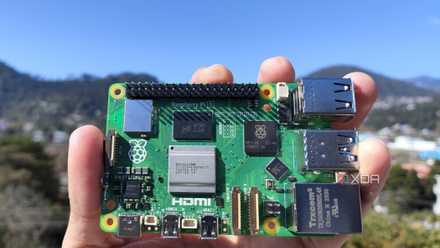
Raspberry Pi 5 review: The holy grail of DIY projects got even better (and rarer)
The Raspberry Pi 5 is one of the most powerful consumer-grade SBCs out there. Sadly, its limited stock means you'll have a hard time finding one.
Of course, there are a couple of issues with the device, with its tendency to overheat without a dedicated cooling option being a big issue for those who don't want to shell out extra money on accessories. Besides the supply chain problems that still persist in certain parts of the world, there's also a noticeable lack of a dedicated AUX port and hardware encoders, both of which were present on earlier devices. Nevertheless, if you can deal with these issues, the Raspberry Pi 5 is by far the best SBC for beginners and pros alike.
Orange Pi 5 Pro 16GB LPDDR5
The Raspberry Pi-killer
- Brand
- Orange Pi
- CPU
- Rockchip RK3588S (octo-core 2.4GHz)
- Memory
- 16GB LPDDR5
- Operating System
- Orange Pi OS (Droid), Orange Pi OS (Arch), Ubuntu, Debian, Android 12
- Ports
- 1 × USB 3.0, 3 × USB 2.0, 1 × Gigabit Ethernet, 3.5 mm audio input/output
With its impressive Rockchip RK3588S processor, Arm Mali-G610 GPU, and up to 16GB of LPDDR5 memory, the Orange Pi 5 Pro is a powerful SBC that outperforms the Raspberry Pi 5 in sheer performance.
- Rockchip RK3588S is one of the most powerful consumer-grade SBC CPU
- Includes an M.2 slot, an AUX port, and full-sized HDMI connections
- Has a dedicated NPU that can provide 6TOPS in AI workloads
- Expensive
- Lackluster community support
The Raspberry Pi boards may be the most popular SBCs, but Orange Pi's SBC have always bested them on the performance front — and this trend continues with the Orange Pi 5 Pro. The newest entry in the Orange Pi ecosystem is powered by a Rockchip RK3588S CPU, which packs eight cores and runs at a frequency of 2.4GHz. You aren't limited on the RAM front either, as the Orange Pi 5 Pro supports up to 16GB of LPDDR5, which is twice that of RPi 5. Like most SBCs, the Orange Pi 5 Pro uses a microSD card for the operating system and project files, but you can also install an SSD into the M.2 slot if you want a faster storage device. The best part? You don't need to invest in a PCIe-to-NVMe adapter because the Orange Pi 5 Pro has a full-sized slot for M.2 SSDs.

Orange Pi 5 Pro review: Best bang for the buck
It's like a Raspberry Pi 5, but faster and better
Like its rivals, this miniature single-board computer supports a multitude of Linux operating systems, including the official Orange Pi OS. The Orange Pi 5 Pro isn't lacking on the ports front either, as the board ships with one USB 3.1 ports, three USB 2.0 ports, an audio jack, an RJ45 Ethernet socket, and two HDMI ports that support up to 8K resolution. Apart from that, you also get the standard 40-pin expansion header, eMMC socket, debug UART interface, USB 2.0 headers, and an MIPI DSI connector, making it easy to pair the Orange Pi 5 Pro with pretty much every type of sensor on the market.
LattePanda 3 Delta
Great specs at a high price
The LattePanda 3 Delta is one of the most powerful single board computers on the market, if not the most powerful, with a quad-core Intel Celeron processor that supports PCIe 3.0 x2 M.2 NVMe drives for faster storage than Arm-based boards.
- Relatively powerful Intel Celeron N5105 quad-core processor with 2.9GHz boost clock
- 8GB of LPDDR4
- Wi-Fi 6 and Bluetooth 5.2, 2.5GbE wired connectivity
- Extremely pricey
- Higher power requirements
While most of the single-board computers on the market are low-cost, low-power devices with Arm-based processors, sometimes your projects need a little bit more power. Or in the case of the LattePanda 3 Delta, a lot more power, as this x86 SBC is powered by an Intel Celeron N5105 quad-core, four-thread processor with a 2.0GHz base clock and 2.9GHz boost clock and Intel UHD graphics for 4K60 output. That's paired with 8GB of LPDDR4 running at 2,933MHz, so it's essentially a desktop PC that you can put in your pocket. It comes with 64GB of eMMC storage, with one M.2 M-key PCIe 3.0 x2 socket for NVMe storage, and one M.2 B-key PCIe 3.0 x1 socket that supports M.2 SATA or 4G/5G communication modules. It also has Wi-Fi 6, Bluetooth 5.2, and a 2.5 Gigabit Ethernet port.
This tiny powerhouse runs on Windows or Linux and has been used to create rugged cyberdecks, power portable music studios, or in astrophotography. It's not just a mini-PC though, as it has a 40-pin GPIO header, an ATMEGA32U4 microcontroller, l2C, a second set of GPIO for the onboard Arduino Leonardo, and an RS232 header. That makes it suitable for advanced robotics projects, and the Arduino interface can be accessed from whatever operating system is installed via the Arduino IDE or by Python if you flash new firmware to the onboard Arduino. This power comes at a cost, both in monetary terms and in power consumption. That's offset by the utility that the LattePanda 3 Delta provides, enabling a desktop environment and multiple breakout methods for controlling projects.
Nvidia Jetson Nano Developer Kit
A tiny SBC capable of handling machine learning and AI workloads
- Storage
- 16 GB eMMC 5.1
- CPU
- Arm Cortex-A57 (quad-core, 1.43GHz)
- Memory
- 4 GB 64-bit LPDDR4
- Operating System
- Nvidia JetPack
- Ports
- 4x USB-A 3.0, 1x USB 2.0 Micro-B, 1x HDMI 2.0, 1x DisplayPort 1.3, Gigabit Ethernet, M.2 Key E, GPIO, I2C, I2S, SPI, UART, MIPI CSI-2 camera connectors, 5V barrel jack
Nvidia's Jetson Nano Developer Kit is the cheapest way to get started with Nvidia's JetPack SDK for accelerated machine learning applications. It's perfect for adding AI features like image classification and object detection to robotics or drones.
- Uses the Nvidia JetPack SDK that all other Jetson products use
- Uses CUDA for broad AI support
- Supported by the largest AI chipmaker in the world
- No onboard Wi-Fi (but does have M.2 Key E for a module)
While many single board computers are better for general-purpose projects, they tend to fall short if you want to run AI tasks on their limited SoCs. Nvidia's Jetson Nano Developer Kit takes another way. It's designed for anyone to get started with running deep learning or neural networks for an affordable price tag. Similar in size to a Raspberry Pi, it is far more powerful with a 1.4GHz quad-core Arm A57 CPU and 128-core Maxwell GPU paired with 4GB of RAM. It also has a wide range of ports including three USB-A 2.0, one USB-A 3.1 Gen 1, DisplayPort, M.2, HDMI, Gigabit Ethernet, a 40-pin GPIO, and a camera connector.
You can power it from micro USB, or from a barrel connector with up to 4A of juice for more powerful needs. Nvidia has its own tweaked version of Ubuntu Linux designed for the Jetson range, called Linux4Tegra. Most of the AI software that is needed to run tasks like object identification or motion tracking will still need to be downloaded and built from the source, but that's fairly standard for Linux-based maker projects. Nvidia also supplies pre-built Docker containers for use. Once installed, you can use the software to identify objects in still images or video feeds, track objects in motion, or stabilize video feeds digitally. Pretty impressive stuff, and the JetPack API that this entry-level Jetson device uses is the same one that the more expensive versions run, so you can learn without much initial outlay and upgrade when you hit hardware limits to your code.
Raspberry Pi Zero 2 W
Small, affordable, and still surprisingly powerful.
The Raspberry Pi Zero 2 W is a low-end ARM-based single board computer that still packs a quad-core Cortex-A53 SoC at 1GHz, so it's got enough power for drones, retro gaming consoles, and AirPlay-enabled speakers.
- Compact size for embedded use
- Micro USB (OTG) port
- 2.4GHz Wi-Fi and Bluetooth 4.2/LE
- No 5GHz bands
- Supply chain issues mean it's often overpriced
The original Raspberry Pi was designed as a low-cost Arm system board, as a basic PC for educational use and for hobbyists to create projects with. The problem for some hobbyists was that the credit card size of the Raspberry Pi was simply too large. Enter the Raspberry Pi Zero, a compact single board computer not much bigger than a stick of gum. The latest model in this range, the Raspberry Pi Zero 2 W, uses the quad-core Cortex-A53 processor that powered the Raspberry Pi 3, with clock speeds reduced to 1GHz to control thermals. This SoC is paired with 512GB of LPDDR2 memory in a single package, solving the issue of space on such a tiny board. It uses microSD cards for storing the operating system, as with every other Pi device, and comes with 2.4GHz 802.11b/g/n Wi-Fi and Bluetooth 4.2 for wireless connectivity. Unfortunately, there are no 5GHz bands, but perhaps a future refresh will add the faster wireless standard.
Hobbyists and developers get access to a compact camera serial interface, microUSB for power and USB 2.0 (OTG), and mini-HDMI. There's also the 40-pin GPIO header that all Pi devices have, for wiring gadgets, LEDs, and other devices for control. While this tiny SBC is powerful enough to use as a low-powered desktop, its real utility is in the size, and is a great device to add on-device image processing to your projects, like optical character recognition or even machine learning, although this will run at a low frame rate. It's also powerful enough for a wide range of other tasks, including powering a FPV robot, running the ever-popular Pi-hole network-level adblocker, or a handheld retro gaming console.
Odroid H3+
Plenty of power for an SBC
The Odroid H3+ is a highly capable device that, unlike your average SBC, is powered by an Intel Pentium N6005 processor. Once you include the Intel UHD Graphics and support for 64GB of memory, it's clear that the Odroid H3+ can crush pretty much any SBC-oriented workload you can throw at it with ease.
- Intel Celeron N6005 for power and efficiency
- Plenty of ports, including DisplayPort and HDMI connections
- Large heatsink on SoC
- Expensive
- No microSD card slot
The Odroid series boards come from a Korean company called Hardkernel, and were on the market well before Raspberry Pi made its debut. Despite being well over a year old, the Odroid H3+ is a beast of an SBC that provides the same performance as one of the cheaper NUCs. Starting with the processor, it's built around a quad-core Intel Pentium N6005 processor that can hit a boost clock frequency of 3.3GHz. Pair that with the Intel UHD Graphics, and the Odroid H3+ leaves the Raspberry Pi 5 in the dust when it comes to transcoding. Factor in the support for up to 64GB of memory, and it's easy to see why this SBC is as powerful as a budget computer.
Although the Odroid H3+ doesn't include a microSD card slot, it more than makes up for this drawback with an eMMC storage socket and an M.2 slot, where you can plug an ultra-fast SSD to get the most performance out of the SBC. It has two Gigabit Ethernet ports, two USB 2.0 and two USB 3.0 connections, a full-sized HDMI 2.0 port, a DisplayPort connection, two SATA connectors, and separate audio-in and audio-out jacks. There's a 24-pin peripheral extension header for connecting accessories or gadgets, and a backup battery connector to keep the Odroid H3+ running in case of power failure.
Radxa X4
Surprisingly inexpensive, despite the specs
- Storage
- M.2 M-key slot, eMMC storage (optional)
- CPU
- Intel N100
- Memory
- Up to 16GB LPDDR5
- Operating System
- Most x86 operating systems, Windows 11
- Ports
- 3x USB 3.2 Gen 2, 1x USB 2.0, 1x 2.5GbE RJ45, 1x audio/microphone AUX jack, 40-pin GPIO
Radxa X4 is a powerful device that's armed with an Intel N100 processor and 16GB LPDDR5 memory, making it perfect for anyone who needs to run non-ARM operating systems on their SBCs. What's more, despite sporting a 2.5GbE connection and an RP2040 40-pin GPIO header, it's a highly affordable SBC.
- 2.5 Gigabit Ethernet, Wi-Fi 6, and Bluetooth 5.2
- Intel N100 can run x64 operating systems
- Extremely compact
- Can get really hot without a proper heatsink
- No microSD card
- External RTC module
If you've been active in the SBC landscape, you may recognize the name Radxa. Known for manufacturing powerful boards that rival (and even surpass) those from the Raspberry Pi Foundation, the Radxa X4 is the company's newest offering - and it's quite the computing beast.
The Radxa X4 ships with the Intel N100, which is an x86 processor typically found in mini-PCs and NAS like the Aiffro K100. As such, the SBC has enough firepower to run Windows 11 without making the experience a complete lag-fest. Pair that with up to 8GB LPDDR5 memory, and the X4 can run pretty much every operating system under the sun with ease. Storage-wise, you're looking at an M.2 M-Key connector for M2230 SSDs alongside an optional eMMC socket, though the lack of a microSD card slot is a bit of a downer.
Thankfully, the port layout on the Tinker Board S R2.0 makes up for this drawback, as the device includes one USB 2.0 and three USB 3.0 Type-A ports. Plus, you also get a 2.5GbE RJ45 connector, two microHDMI ports, an audio jack and a standard 40-pin header that's powered by an RP2040 microcontroller, of all things! Sure, the N100 on the X4 is slightly weaker than the N3005 on the Odroid H3+ (which we'll get to in a bit), but with the same price tag as the 4GB variant of the Raspberry Pi 5, it's one of the most affordable x86 SBCs on the market.
ZimaBlade
Intel Celeron CPUs combined with PCIe 2.0 x4 interface
- Brand
- IceWhale
- Storage
- 32 GB eMMC 5.1
- CPU
- Intel N3450, J3455, E3950
- Memory
- 1x DDR3L SODIMM
- Operating System
- CasaOS, ZimaOS
Built for NAS operations, the ZimaBlade is a compact SBC that packs an Intel Celeron processor instead of an ARM CPU. While the DDR3 memory is a major limitation, the ZimaBlade can crush most server-based projects without breaking a sweat.
- Affordable
- SATA III ports for storage
- PCIe 2.0 x4 interface for expandability
- Only supports older DDR3 memory
- Doesn't come with Bluetooth or Wi-Fi functionality
The vast majority of single board computers are designed for general use, with general-purpose input/output headers (GPIO) for powering any project the maker could dream up. The cool-sounding ZimaBlade is different in that regard, as it's designed for NAS and server-based projects with its Gigabit Ethernet port, two SATA III ports, and a PCIe 2.0 x4 slot. ZimaBoard provides three variants of Celeron processors for the ZimaBlade: Intel N3350, N3450, J3455, and E3950, and even the base model with the N3350 has quite a lot of firepower for a home-server, RAM-wise, you're locked at the outdated DDR3L form-factor, though 16GB of memory is enough for most SBC workloads.
Unfortunately, the ZimaBoard doesn't support Bluetooth or Wi-Fi connectivity, so you'll have to keep it connected to your router via a LAN if you wish to use it in a headless configuration. It comes with its own open-source cloud operating system installed, CasaOS, which is designed around the Docker ecosystem for containerized server use. Not that you need to use that operating system, as the hardware can run any OS that you would wish, including TrueNAS or Ubuntu. That opens the door to using the ZimaBoard as a NAS, or an opnsense router, or a media server, or many other home networking needs.
What you need to know when picking an SBC to tinker with
Besides the options we've highlighted on this list, there are plenty of other big-name SBCs out there. For example, the Milk-V Duo S is an incredible device that lets you switch between an ARM and a RISC-V processor, making it great for those who wish to experiment with the new open-standard RISC architecture. Then there's the Libra Computer Alta AI, which provides a 5TOPS NPU without costing upwards of $100. But for the average tinker, the Raspberry Pi 5 remains the perfect SBC. It packs a wide range of I/O, and has a large collection of accessories, software, and operating systems designed specifically for this board.
Similarly, the budget SBC category is dominated by another Raspberry Pi board: the Zero 2 W. While it may look tiny and adorable at first glance, the RPi Zero 2 W has tons of I/O and a relatively powerful SoC. It also has wireless connectivity without having to solder on adapters, with 2.4GHz 802.11 b/g/n Wi-Fi and Bluetooth 4.2 LE.
And for developers wanting to dip their toes into the world of AI and machine learning with CUDA-based projects, the Nvidia Jetson Nano Developer Kit is the most cost-effective way. It's essentially half of the Tegra X1 that powers the Nintendo Switch, with a quad-core Arm A57 processor and 128-core Maxwell GPU. If you wish to learn about neural networks but aren't willing to splurge on expensive Jetson modules, then this SBC is your best friend, as it also supports the Jetson API and SDK that you'd otherwise only find on high-end devices.
Raspberry Pi 5
The gold standard other SBCs are compared to
- CPU
- Arm Cortex-A76 (quad-core, 2.4GHz)
- Memory
- Up to 8GB LPDDR4X SDRAM
- Operating System
- Raspberry Pi OS (official)
- Ports
- 2× USB 3.0, 2× USB 2.0, Ethernet, 2x micro HDMI, 2× 4-lane MIPI transceivers, PCIe Gen 2.0 interface, USB-C, 40-pin GPIO header
- GPU
- VideoCore VII
The Raspberry Pi is back, and the fifth iteration of the SBC is a lot more capable than the older models. From a new quad-core Arm Cortex-A76 CPU, support for dual monitor setups at 4K 60Hz, and a dedicated power button, there's a lot to love about this palm-sized computer.