
Legend has it that no one builds an SFF PC the first time around. Okay, some people might attempt this feat, but most PC builders ponder an SFF build only after they've built a few mid-tower or full-tower PCs. There can be multiple motivations behind getting an SFF build together, including aesthetic desires, space limitations, or pure curiosity.
A compact PC build doesn't differ from any other in terms of the basics, but you still need to remember a few essential things before embarking on this journey, especially if you're building one for the first time. SFF builds have undoubtedly grown more popular in recent years, so if you're thinking of hopping aboard the compact PC train, there's no time like the present.

Building your first PC? Use full size parts, you’ll thank me later.
Skip the small cases and mATX motherboards for your first foray into PC building
5 Know your cable management
No more shoving cables out of sight
It's not like cable management is optional on a common mid-tower build, but you have much more room for cables to...mysteriously disappear, if you know what I mean. You don't have to know perfect cable management to get a half-decent PC at the end, looks-wise. On a small form factor build, however, this luxury of stuffing cables behind the motherboard is severely curtailed.
On a small form factor build, however, this luxury of stuffing cables behind the motherboard is severely curtailed.
It's not impossible to properly route cables in mini-ITX cases, but you'll need to dip into your reserves of patience and skill much more than usual. If you're easily disturbed by stray cables peeking out from undesirable corners of the case, you might want to pick a particularly roomy case, find a modular PSU that fits your build, or just give in and finally learn proper cable management. After all, you can't just ignore it forever. That reminds me, I should finally get around to watching that cable management video on my Watch Later playlist.

4 ways you can reduce cable clutter and build a clean and minimal PC in 2024
Begone, cable clutter!
4 Pick the right case and cooler
Balance size and airflow considerations
Choosing your SFF case is the most important decision you'll have to make when building a compact PC. After all, the reason most people consider building a compact PC is because they're inspired by sleek and modern-looking SFF cases. However, it's not just about the looks when you're finally picking one for your own build. You need to consider that a lower internal volume naturally means less space for airflow (and components).
Less space means you can't install as many case fans or use massive 360mm liquid coolers to liquid-cool your PC.
Many SFF cases have mesh side panels, but you'll always be restricted in terms of airflow when compared to a regular-sized case. Less space means you can't install as many case fans or use massive 360mm liquid coolers to liquid-cool your PC. You can use 240m or 280mm liquid AIOs in some models, but in the smallest of them, using a low-profile air cooler might be your only option.
A restricted space might also lead to higher-than-usual decibel levels, especially if you're using particularly power-hungry components. Hence, the art of balancing the system becomes more important than ever when you choose to go down the SFF PC route.

Console-sized PC build guide: the best parts to buy for a small form factor gaming PC
In this guide, we will give you the best PC parts for a mini-ITX build designed to give you gaming performance in a smaller form factor.
3 Choose your motherboard wisely
You can't have it all
As always, your choice of motherboard will determine the functionality and upgradability of your PC. Most SFF cases can accommodate micro-ATX and mini-ITX motherboards. But if you're eyeing that slim vertically oriented case, a mini-ITX motherboard will be the only option. The downside of a tiny motherboard is that you have to sacrifice a few PCIe, RAM, and M.2 slots.
This might not be a big problem if you only want to install one PCIe GPU, two sticks of RAM, and a single M.2 SSD. However, for those looking for a space-saving workstation, this could be a deal-breaker. Hence, you might want to go for a more expensive mini-ITX motherboard or a slightly larger case (one of the boxy models) to accommodate a micro-ATX motherboard.
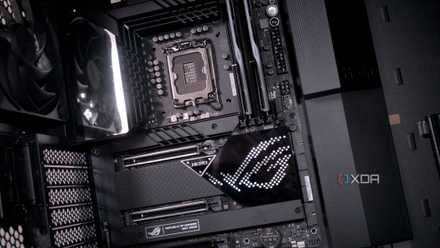
5 things to keep in mind when choosing the right motherboard for your gaming PC
If you are planning your next gaming PC build, consider these 5 things before you buy your next motherboard
2 You probably can't use your regular PSU
SFX is where it's at
Similar to the motherboard issue, you'll often need to use a different PSU form factor than you're familiar with. Many compact cases are compatible only with what's known as SFX or SFX-L power supplies. SFX power supplies usually cost more than their regular-sized ATX counterparts, and any plans to use a full-sized PSU from your earlier builds won't work if you have a tiny case.
Some SFF cases do allow you to use either an SFF or ATX power supply, but then you'll have to sacrifice a slim chassis. There are no inherent disadvantages to SFX PSUs as such, and due to the smaller size, they have to be engineered with more stringent tolerances, so you're often getting higher-quality units when buying SFX PSUs. They usually come with shorter cables, so you might need extensions, depending on where the PSU mount is located inside your case.

How do I select the right PSU for my PC?
Choosing the right PSU for your PC will save you a lot of wasted time and money
1 Balance performance and thermals
Don't grab the most powerful CPU and GPU
Finally, building in an SFF case means you can't just pick flagship CPUs and GPUs without a second thought. Contrary to a mid-tower or full-tower case, you can't simply bring in a beefy 360mm liquid cooler or install a complex custom loop to cool your power-hungry CPU and GPU. Plus, the smaller size of the case means you also can't include a physically massive GPU inside it.
What this means is that you need to make informed choices about your CPU and GPU. If you're building a gaming-focused build, it's better to pick a mid-range, dual-slot graphics card that will fit inside your case, and pair it with a budget 6-core CPU that's easier on your cooler. For a productivity build, you might want a more powerful 8-core or 12-core CPU, which would require a case that is compatible with 280mm radiators (ideally more than one).
If you're building a gaming-focused build, it's better to pick a mid-range, dual-slot graphics card that will fit inside your case.
Some SFF cases can do it all, and will accommodate an RTX 4090 and a Core i9-14900K, but more often than not, you'll have to be okay with thermal throttling, higher operating temperatures, and a generally louder system. Also, these cases would be stretching the definition of SFF cases anyway, so you might just want to move to a bigger case, and easily create your ultimate machine without space constraints.

6 reasons why enthusiast PC building has become too demanding
Building enthusiast PCs has its perks, but perfecting every aspect is getting too difficult for most people
SFF PCs are exciting projects that everyone should try at least once
If you haven't yet built a small form factor PC, I suggest you consider it for your next build. You'll have fun choosing a sleek and compact case, balancing your CPU and GPU picks, and learning to be crafty with your building skills. These days, there are plenty of mini-ITX cases and compact graphics cards with enough horsepower to help you create your next masterpiece with a small physical footprint.