
When PCIe 5.0 SSDs were first announced, they looked like the future, promising super-speedy SSD storage as the best SSDs around. It's now nearly two years since the first Gen 5 SSDs were announced (and one since they hit the market), and while we're getting close to the maximum speeds promised by PCIe 5.0, the newest SSDs on the block aren't living up to their promises. While they do have astonishing straight-line speed, most computing tasks rely on random access, which puts Gen 5 on an even footing with Gen 4. The newest SSDs also consume a lot of power, close to the maximum the M.2 specification can supply, and far too much to be used in laptops yet. Unless you're one of the edge cases that rely on sequential data transfers, PCIe 5.0 SSDs are in a strange position of being more expensive, more power-hungry, and not being that much faster for normal tasks, and which makes them easily avoided by most computer users.
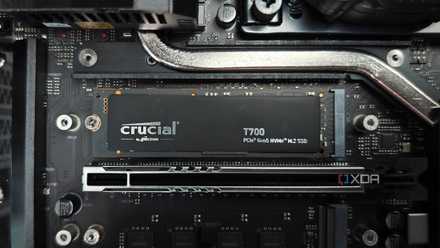
Buying a PCIe 5.0 SSD makes no sense (yet)
We're finally seeing the first PCIe 5.0 SSDs hit the market, and they might have finally crossed the line when it comes to heat and power.
Sequential speeds are one thing
But they're similar to Gen 4 in random reads or writes
Gen 5 PCIe SSDs are fantastic at one thing: sequential read and write speeds when transferring large files or other sustained transfers. That's not in dispute here; we've tested them and know that they outperform any other SSD at that one task. But that's not the only task we do on our computers, and PCIe 5.0 SSDs aren't that much faster at the random storage access that daily tasks perform. The table below has test results from the Crucial T700 and T705, two of the fastest Gen 5 drives, and the Samsung 990 Pro, which is one of the fastest Gen 4 drives. They're all fairly similar at random reads and writes, which makes the Gen 5 drives less attractive to most users.
Gen 5 PCIe SSDs are fantastic at one thing: sequential read and write speeds when transferring large files or other sustained transfers.
|
Crucial T705 |
Crucial T700 |
Samsung 990 Pro |
|
|---|---|---|---|
|
SEQ1M, Q8T1 |
|
|
|
|
SEQ1M, Q1T1 |
|
|
|
|
RND4K, Q32T1 |
|
|
|
|
RND4K, Q1T1 |
|
|
|
It's not just normal everyday tasks that Gen 5 fails to wow at. With those faster speeds, you'd think loading screens in video games would be faster, but that's just not the case. Loading times aren't that different from Gen 3 to Gen 4 to Gen 5, so your purchasing decision should go down to which drive has the most capacity that fits your budget, and not the generation of PCIe that it supports. Remember, PCIe storage is back-compatible, so you can put a Gen 5 in a Gen 3 slot if you want. It just won't run faster than Gen 3 is rated for. Which, as it turns out, is plenty of speed for everyday use.
There's a heat issue
Some of the heatsinks are comical
When the first PCIe 5.0 SSDs came to market, some of them launched without a heatsink, and that was a big problem. Even the first drives rated for 10,000MB/s speeds get very hot, and could even crash the system they were installed in under normal testing conditions. TechPowerUp saw one drive, the Corsair MP700, shut down after 86 seconds of reading data, at which time it reached over 80C. The only time they could get a full test cycle to complete was when a 120mm fan was directly blowing on the drive, a setup that nobody at home is going to do.
The situation hasn't changed much since. In our review of the Crucial T700, the speedy SSD was placed under a motherboard's heatsink, and it still reached 81 degrees Celsius while under testing load. The MSI Spatium M570 got to the same temperature, even with the huge heatsink it comes supplied with. When I reviewed the Crucial T705, I didn't notice more than 53C, but I was using a PCIe add-in card with a giant heatsink. Phison, the company that makes the controllers for PCIe 5.0 SSDs, says that a heatsink is recommended paired with an active cooler like a fan. That makes it impossible to use the current crop of Gen 5 SSDs inside the confines of a laptop, but it also makes keeping them cool inside a desktop PC a challenge as well.

5 reasons PCIe 5.0 SSDs are a waste of money
Seriously, you can probably skip Gen 5 SSDs for a while
You probably (still) don't need PCIe 5.0 SSDs
In their current state, Gen 5 SSDs are technically impressive, but functionally pointless for most consumers. They overheat, they don't work in laptops because of the heat and power requirements, and they require hefty heatsinks and/or fans to work effectively on desktop computers. To me, they feel like an extended beta test, but there might be some light at the end of the tunnel. Silicon Motion is designing its own PCIe 5.0 controllers, but these are geared toward the low-power consumption needs of laptops and other smaller devices. They're still not ready for the market, but lower power controllers will make a big difference to the heat generated by PCIe 5.0 SSDs, and that might make them viable for everyone to use. The new controller won't likely do anything about the higher cost, though, so you're probably still better off buying Gen 4 drives for now.
