
For the longest time, a "good" gaming setup, for me, meant raw horsepower and nothing else. I spent my teens dead set on building a "dream gaming setup" that was nothing but the best, and I've lived with a high-end gaming PC and a PS5 for a while now. Over time, I've come to realize that while performance and power absolutely matter, living with both a PC and a PS5 on the same desk taught me something far more important: friction is the real enemy.
It's the little things that slowly chip away at your enjoyment — dead controllers, tangled cables, having to switch inputs by shuffling cables, swapping headsets, and mentally keeping track of what's charged and what's out of juice. None of these ruin a single session, of course, but together, they prove exhausting.
That's where some incredibly important peripherals come in, without which my entire gaming setup would implode today. They haven't improved the performance of my PC or PS5 in terms of gaming, but what they've done is make my gaming sessions feel effortless. They removed annoyances I'd normalized for years, and in doing so, they've given me something just as valuable as specs: comfort and consistency.

6 things you can connect to the USB port on your PlayStation 5
From everyday peripherals to high-end gaming accessories, the PlayStation 5's USB ports can be real versatile.
A licensed PlayStation 5-PC headset
My Sony Inzone is the only headset I'll ever need
After spending a couple of years with the official Pulse 3D I used with my PS4, I broke up their partnership in 2021 once the PS5 came home. I still used the Pulse 3D headset with my PS5, and yet, something was missing. For starters, it was battery life, but more importantly, I had two headset stands on my desk, with the second one being a wired Razer Barracuda for my PC. In fact, this was before I splurged on a 6-foot table, so things were certainly cramped on the space front. While buying the parts for my dream PC back in '23, I decided enough was enough, and went with a simple solution — the Sony Inzone H7 headset.
Not only did it continue to scratch my itch for official Sony peripherals for my PS5, but it also comes with a slider dongle that lets me switch right back to my PC whenever my gaming sessions cross into post-midnight hours. Bye-bye, two headsets, welcome, one single wireless, dual-connection headset that lets me stay connected to my gaming platform of choice along with my phone, thanks to Bluetooth and 2.4 GHz connections. Plus, they aren't kidding about the 40-hour battery life, either. This thing is a champion.
Sony INZONE-H9
If you're dedicated to Sony and want a new gaming headset, take a look at the Sony INZONE-H9 which feature personalized spatial sound, noise cancelation, up to 32 hours of battery, and a foldable boom microphone.
The Sony DualSense controllers
So good it makes me forgive the lack of Hall Effect sticks
This one's a bit of a no-brainer. After a lifetime of god knows how many different controllers — official, knock-offs, bootlegs, and custom ones from local retailers — I've settled, once and for all, for the Sony DualSense. To call it one of the very best controllers ever made is no understatement, considering just how much value I get from a pair of $75 controllers. It's been a couple of years since Steam, along with all major AAA games, started fully supporting the DualSense and its haptic feedback and adaptive triggers (and they definitely took their time). Now, there's no possible reason to ever consider another, regardless of what I'm gaming on.
Over on the PC, the DualSense supports Steam's Big Picture Mode perfectly, but the best part is how it lets me also use the gyro and the triggers for using it as a mouse for when I'm kicking back on the couch. Oh, and even though PS1, PS2, and a ton of PS3 games aren't natively available on the PS5, guess who just needs to jump into their emulators with the DualSense on the PC and kick back? The utility here for a DualSense on a PC is insane, which is why it's still the only controller I recommend, even to my PC-only friends. Once you feel the DualSense's adaptive triggers emulate the feedback and recoil of an automatic rifle, there's no going back, I promise.
Sony DualSense Wireless Controller
The Sony DualSense wireless controller may not be for Microsoft's consoles, but it's still worth considering for PC gaming. It has super-accurate thumbsticks, adaptive triggers, and haptic rumble. It's also comfortable to use and looks the part.

5 PlayStation franchises that deserve a themed PS5 DualSense Controller
With God of War getting a themed PlayStation 5 DualSense controller, here are 5 other PlayStation franchises that should get one too!
A dedicated KVM switch
One click to switch everything over to the next platform
Juggling between a PC and a PS5 on the same desk is certainly a task, but my KVM switch is the closest thing to magic that I've bought without any risk to my warranties. One button press, and suddenly, my keyboard, mouse, monitor, and audio all switch brains, without any menu diving, HDMI shuffling, and definitely no "wait, which input am I on?"
There's no way on earth that I'm playing Arc Raiders on anything but my PC, and equally zero chances of me playing Fortnite on anything but my PS5 Pro. Before I added a KVM, moving from PC to console felt like closing one room and opening another. Now, thanks to the KVM, it feels like I'm just... turning my chair slightly. That friction disappeared, and completely changed how often I hop between the two platforms. I don't have to replug half my desk after a quick Arc Raiders session when I want to go back to visit Mount Yotei.
The KVM switch also does something subtle but important: it makes both these platforms feel equal. The PS5 doesn't feel like a "secondary" setup anymore. Prior to the KVM purchase, the console got a wired mouse and keyboard, or, essentially, the "inferior" hardware in my closet. One desk, one ecosystem, and zero compromises.

A monitor with a KVM switch was exactly what my dual PC setup needed
If you use two PCs as part of the same desk setup, a KVM switch could be the way to simplify your workstation.
A licensed controller charging dock
No more juiceless gamepads
I didn't realize how much mental bandwidth dead controllers were stealing from me until I stopped thinking about them entirely. A proper charging dock sounds boring until the day you never see the "controller battery low" warning again. Ever since I got my partner into gaming as well, I lost the ability to simply plug in the controller that dies and switch to my second DualSense, since both of them are now used pretty regularly.
Now, my DualSense controllers live on the dock when they're not in my hands. There are no dangling cables, no doubts about whether I plugged it in, and no waking up to a controller that charged for exactly twelve minutes because the cable was loose. They're always topped up, always ready, and always exactly where I expect them to be.
There's also something rather satisfying about it. The dock gives the controllers a home. It turns clutter into intention, and chaos into routine. After a long session, putting the controller down to charge feels like closing a book instead of tossing it on the floor. It's a tiny QoL upgrade that pays dividends every single day, and one I genuinely wish I'd bought years earlier.
A proper USB hub is a game-changer
This is what completely eliminated tangled webs
This one is definitely the least glamorous part of my entire PS5-PC gaming setup, and yet, it's also the one that would absolutely cripple my whole desk if it disappeared overnight. Modern PCs and consoles are powerful enough to simulate entire worlds, but apparently, we still live in a timeline where there are, somehow, never enough USB ports. Between the DualSense, keyboard, mouse, DAC, webcam, capture card, external SSDs, and the occasional random thing I forgot I plugged in three months ago, a USB hub stopped being optional a long, long time ago.
What it really gave me, though, is mental clarity. I'm no longer crawling behind my desk like a raccoon every time I need to swap a cable. Everything lives in one place, clearly labeled, and most importantly, easily reachable. It also makes switching between PC and PS5 sessions feel frictionless, thanks to no unplugging, no "I'll do it later," and no slow descent into cable hell.
It's one of those upgrades you don't feel immediately, but once you have it, every other setup without one feels archaic. This is peak desk hygiene, plain and simple.
Baseus 7-in-1 USB Hub
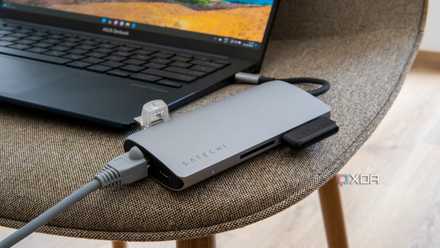
Please stop treating your USB hubs as port replicators
It's not quite the same
These products have removed friction between my two gaming platforms
What all of these upgrades have in common is intent. Each one exists to remove a tiny barrier between me and actually playing games. Not tweaking settings or untangling cables, but just being able to play.
I didn't realize how much mental energy my setup was quietly stealing from me until it stopped doing that entirely. Now, whether I have to hop between a PC and PS5, settle in for a long session, or call it a night, everything has a place and a purpose.