
The world of Linux is chock-full of options users can choose from. Whether it's entirely different distros, desktops, or other customization options, there's a ton you can do to make your system work for you. But even with the overabundance of options, there's always room for a new one, and recently, we got just that in the form of COSMIC.
COSMIC is a new desktop environment from System76, which develops the Pop! OS Linux distro and also makes some hardware running Linux out of the box. COSMIC is heavily inspired by GNOME, which was previously used for Pop! OS, but the changes it makes make this feel like the first Linux desktop that really feels designed for everyday, regular users. Let me explain.

Pop!_OS is what Ubuntu should have been for gaming PCs
Gaming on Linux is here, but Ubuntu could have been so much more.
Lots of customization
But it's user-centric
One of the great things about COSMIC is that it's very customizable, but it does so in a way that feels more welcoming to the average person. Desktops like Mint and KDE Plasma offer a lot of customization, too, but it can honestly be a little overwhelming with how many options you get and how you go about using them.
For example, KDE Plasma has very in-depth theming options, but to apply them, you have to go browsing for themes, which you download from the internet, and you may not always like all the changes each theme applies, so you then have to go into multiple pages to fine-tune all of the settings you may want to change for specific UI elements. There's a degree of trust you need to have in the creators of the theme, too, in terms of whether it will be supported as more updates come out for KDE itself.
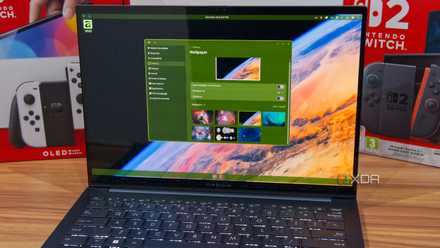
COSMIC's approach to customization is much more focused on the user and it doesn't require downloading anything. You simply get a few UI elements for which you can change the color, with access to the full RGB spectrum to choose from. You can combine colors to your liking to get the perfect look for yourself, and if you do want to share it, you can export themes as files and send them to someone else.
This approach reminds me a lot of the messaging service Telegram, which has a very similar approach to theming, albeit far more complex. With COSMIC, there are just a handful of UI elements that can be customized, so it makes it very easy for anyone to pick it up and start messing with the look of everything to fit their style.
COSMIC also makes it easy to choose between the style of desktop you prefer; you can marge the dock and panel at the bottom of the screen to make a Windows-like taskbar, or have the dock at the bottom and panel at the top for a more macOS-like look. Of course, you can dive deeper into the settings for more options, but the two basic options presented when you get into COSMIC for the first time make things a lot easier for new users.
I switched to the COSMIC Linux desktop, and I can't wait for the future
COSMIC is out of this world, even with its flaws
Great multitasking options
Choose your style at any time
COSMIC really excels at providing options while having a low-barrier to entry, and that translates into its approach to multitasking, too. By default, everything works how you expect in a normal, modern desktop, which is to say, windows can be stacked over each other and moved around at will, and it works just about how you'd expect. COSMIC does give you a very accessible way to snap apps to half of the screen, which makes it easier to have apps side-by-side.
But whereas a typical Linux desktop would require extra tools or force you to choose between a stacking desktop and a tiling desktop at any time. You can change the behavior of your current workspace, or change the default behavior for new workspaces, and different workspaces can function in different ways, so you can always have the experience you want for any given situation. It's all made in a way that removes a lot of the friction that sometimes comes with trying a tiling desktop for the first time, making it more accessible to everyone.
Plus, there are a few more windowing features that make the experience more capable and helpful without adding unnecessary complexity. For example, there's a feature that lets you "stack" windows, making different apps part of the same window and organizing them like browser tabs. It's very similar to a feature Microsoft was developing for Windows, called Sets, but here, it's actually available and it works seamlessly. You can right-click the title bar of any window to enable stacking, and then simply dragging windows over that one will turn them into tabs. It's a legitimately helpful feature but it doesn't get in the way at all. Another cool feature is the ability to take a screenshot of a single app by right-clicking its title bar. You no longer need to open a screenshot tool, then change the capture mode to get just the area you want. A couple of clicks captures only the area you want, and that's it. It's a legitimately helpful feature that I'm kind of surprised more desktops don't do.

4 unexpected ways using a tiling window manager has boosted my productivity on Windows
I was surprised how much more my productive I've become using a tiling window manager on my PC.
It's safe and stable, too
Rust is a hero working in the shadows
Talking about Rust to "normal people" may not make a ton of sense, but I think the impact of being one of the first desktops to be fully coded in Rust comes with serious benefits. Rust is a lightweight language but it's also designed to be very secure and stable. It bypasses most, if not all, of the memory issues that can occur when coding in languages like C, so a lot of errors that can cause things to crash just aren't possible here.
Plus, many of those same memory-related problems open up security vulnerabilities that can be exploited by attackers, so there's a layer of security to it, too. Not too long ago, a user-after-free vulnerability was spotted in the Linux kernel that could allow for privilege escalation in certain scenarios.
You may have heard that Rust has started to make its way into the Linux kernel, and it's becoming an officially supported feature with Linux 7.0, but having it on the desktop environment itself means you get even more stability and security across the board. It's not something a normal user will think about, but it probably matters more to a normal user than anyone else who might know how to deal with these kinds of errors and problems.

Linux 7.0 is coming, and it could be one of the biggest updates in years
This will be good
COSMIC has a lot of potential
COSMIC is still very new on the scene, but it offers a very accessible experience that's user-friendly without introducing weird limitations or a lot of complexity that can be hard to deal with for newcomers. The team is already planning a lot of improvements to flesh out the visual experience, so it's only going to get better, and I'm excited for its future.
