
In today's episode of "Why your ISP router is junk," we're going to replace that locked-down, cheaply made router with a custom OPNsense box. I'm not going to go into why we don't want to use the ISP router. That's been debated to death, and really we should all move on and use that energy for a more positive outcome. Well, except for calling the rent-a-router a big piece of junk (a few times), to get it out of my system.
OPNsense only supports older wireless networking protocols, with Wi-Fi 4 being the cutoff point. If you need wireless networking, you'll want to pick up a capable wireless access point or two.
That said, most people's reasons for choosing a custom OPNsense box come down to one primary motivator: choice. The freedom to add software if you need it, remove features you don't use, and the ability to build the hardware platform for your specific networking needs is an attractive proposition, and it's one that lives up to the promises once you get it all set up.

I finally threw out my ISP router like the trash it was
I only need my ISP to do one thing: send me internet.
5 When was the last time an ISP willingly let you install things on their equipment
All in the name of network security
Okay, show of hands. How many of you got new features on an ISP-supplied router (without paying through the nose for it)? Anyone? I got some extra cable channels once, but that might have been a misconfigured setting on their end because they went away after a few months. ISP routers are designed to route your packets, hand out IP addresses, and slow down to a crawl when you connect more than 25 wireless devices to them. Okay, maybe that last one isn't a hard-and-fast rule, but I swear that always happens to me.
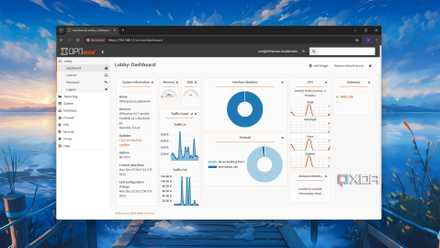
OPNsense does all of that (except the slowdown, although trying to use Wi-Fi 4 with modern smartphones will be sluggish), but it does so much more. It's easier to think of it as an operating system for your router, because the same rules for upgrading and adding software packages apply. OPNsense has numerous official and third-party plugins that only take a few clicks to install, and a few more minutes to configure, everything from intrusion detection and intrusion prevention to backup and recovery tools and more. And because OPNsense runs on FreeBSD, it's trivial to add unofficial plugins or even make installation packages for tools that nobody else is using.
8 things I always do after installing OPNsense
Here's a checklist of things to do with your fresh OPNsense firewall.
4 I couldn't run a reverse proxy with the ISP gear
Well, not without some NAT traversal trickery anyway
One of the joys of home lab life is self-hosting all the apps I can find. I can play with them for a few minutes, lose interest, and forget that there are a million Docker Compose files cluttering up my server. Some apps are more sticky, and I want to keep those around and be able to access them using fully qualified domain names with load balancing, because if you're going to do half a job, you might as well do the other half.
I can feel the comment section itching to tell me that I don't need a reverse proxy to do this with OPNsense, which is true enough—if I only want to access those services inside the network. But I want to use them wherever I am, which means it's reverse proxy time. More specifically, I have internal DNS overrides in Unbound for when my devices are at home, and a reverse proxy to do the same job when I'm out and about.
Depending on if you're running a VPN and how you're running it, you could possibly get away with the Unbound DNS overrides, but I like having multiple layers of failback whenever I build anything with networking that might go wrong while I'm not around to fix it, and it keeps my mind at ease having the double setup. I won't have to do this at all soon, because Technitium is getting native clustering, and once that arrives, I'll have the ability to set up DNS overrides at the LAN level that use conditional forwarding so local subdomains resolve first, then if I haven't gotten around to setting that for new services it'll forward to the external IP of the reverse proxy so I can still accces the service, it just takes a few more milliseconds or however long the failover period is.

I migrated my reverse proxy to OPNsense, and everything is so much simpler
OPNsense is such a joy to use.
3 It runs on almost anything
Well, almost anything which makes it easier for you
OPNsense is incredibly easy to run, to the point where you can almost get away with using a low-powered SBC as your router. We in the virtual office at XDA have been trying to see what it won't run on, and the list is tiny. It can be installed on a NAS enclosure, or a mini PC, or anything that has two network interfaces to use. You could possibly stretch that definition by putting Proxmox onto the device first and then setting VLANs up so that when you install OPNsense in Proxmox, you use the VLANs as the LAN and WAN adapters, but I haven't tried this (yet).
I have virtualized OPNsense on a virtual toaster, the Intel N150. This quad-core CPU has one claim to fame: its low power consumption. I've installed it on an Intel Core Ultra 9 285K, and every manner of device between those two extremes. The only hard and fast rule is that you need two network adapters, although the FreeBSD core doesn't like non-x86 systems well.

I built an OPNsense router and firewall with a mini PC (spoiler: it's awesome)
I tried using an old Thinkpad, but it didn't have enough Ethernet ports.
2 I can run my VPN of choice (or several if I wanted)
No, Mr ISP, you won't be blocking my remote access again
To open my LAN to the outside world, the safest way is through a VPN. Well, the safer ways include newer VPNs that don't require you to leave ports open, like ZeroTier or Tailscale, and both of those run just fine on OPNsense. Suppose you are already running OPNsense as a VM on Proxmox, like many of us do. In that case, you can easily spin up LXC containers with your VPS or VPN in, and that would let you run and the Newt container that is necessary to sidestep NAT traversal without using open ports.
With a simple WireGuard interface on OPNsense, I can make sure certain devices always use a VPN
You can use OPNsense to force all your devices to use a VPN if you want.
1 I can build the cybersecurity stack I want
Try doing this on any ISP router, I'll wait
The firewall options on consumer routers are lackluster at best, but OPNsense can install industry-standard packages, like Suricata, Snort, CrowdSec, Fail2Ban, and Zenarmor. That gives you all the tools necessary for safeguarding your home network, and you'll learn a ton about security while doing it. Or you could add Pi-hole or Adguard Home, or other DNS-based adblocking tools right on the router so they're always running. If they're not, it means the router is offline and you have bigger issues than a few ad banners.

Zenarmor is an incredibly powerful network firewall, and I absolutely love it
If you use OPNsense, it's worth trying out Zenarmor.
OPNsense gives you so much more control than any ISP router I've ever used
If you're thinking about upgrading your network to 2.5GbE, you can make the process easier by getting a barebones router appliance with four 2.5GbE ports, and installing OPNsense on it, then linking it to a Wi-Fi 6E AP. That would give you a networking setup that's miles ahead of any consumer kit, for less than the premium Wi-Fi routers.