
Among all the components involved in a PC build, the CPU cooler might be among the trickiest ones to install. Whether utilizing liquid or air, coolers tend to be large, cumbersome pieces of hardware that can be difficult to work around. Whether you're tackling your first PC build or it's just been a few years since you've gone under the hood, it might be useful to have a refresher on what mistakes to avoid.
These are the most common mistakes you can make when installing (or reinstalling) your CPU cooler, and rest assured, speaking from personal experience, they can happen to anyone.

4 ways a custom liquid CPU cooler can transform your PC
A custom liquid cooling loop is a visual and performance upgrade like no other
4 Buying the wrong size cooler
Check your case dimensions before buying
Modern, powerful CPUs can get pretty toasty when under load, so they need some serious cooling power to keep temps in line. If you're familiar with the little fan heat sinks that used to come in the box with some Ryzen CPUs, that just won't cut it for your 9800X3D, and there's a reason today's high-end CPUs don't even come with coolers included. If you're picking up a 3-fan radiator liquid cooler or the beefy Noctua NH-D15, you'll want to measure your case dimensions before jumping headfirst into an installation.
It's also important to consider not only your case dimensions but the arrangement of the rest of your build as well. Nothing is worse than thinking your cooler fits your build, only to discover that the edge of your enormous GPU blocks your radiator from fitting in the correct orientation.
3 Too lose or too tight
Ensure your cooler is seated properly
As simple as this tip might seem, it's a mistake that happens more often than you think. Depending on the brand and generation of CPU your build is using, your cooler could use any number of mount adapters that make seating it on your CPU a bit more involved. Some coolers have spring-loaded screws or other fasteners that need to be tightened just right.
Mounting the pump block of a liquid cooler can be a touch easier than mounting a whole assembly air cooler with a heatsink since you can see what you're doing, as the head of the cooler shouldn't get in your way too egregiously. On the other hand, installing a large air cooler can present frustrations with blocked views and screws that are difficult to reach with a giant heatsink and fan in your way. Personally, I switched to air coolers when patience lost a fight with a Noctua fan cooler.
If the cooler is too loose or mounted crooked, the heatsink plate won't make proper contact with your CPU. Likewise, if it's too tight, you risk warping or cracking your CPU socket or warping the cooler's base plate. In extreme cases, you risk warping the motherboard as well. The goal is to mount with the cooler or pump block with even pressure throughout.

How to build a computer: A beginners guide to a new PC
Building a computer can seem daunting at first, but this guide will show you the ropes if you're a first-time PC builder.
2 Incorrect fan orientation
Consider the direction of airflow when installing
If I'm being honest, this is another one I learned first-hand while building my very first PC. Proper airflow in your PC case is paramount to maintaining safe temps for your CPU and GPU. Depending on the size of your case, the style of your cooler, and the orientation in which you install your components, you might end up with overlapping fans.
For instance, a large radiator for a liquid cooler often fits best mounted at the front of your PC case, but many cases have intake fans installed right at the front. Radiators will often be mounted with fans facing inside and the fins facing the front. However, since most radiator fans are installed by default to push air over those cooling fins, and your case intake fans are pulling air into the case, you'll end up with fans that are working against each other, which leads to inefficient air flow and poor cooling.
In this scenario, I use a pull configuration, where I've flipped the orientation of my radiator fans so they pull air through the fins. Combined with the intake fans, this results in tons of cool air running over the radiator. This is wonderful for CPU cooling, but keep in mind it means that air is being warmed on those fins and then pulled into your case, which can lead to slightly higher GPU temps. You'll want to make sure that the exhaust fan at the back of your case can handle all that airflow.
Alternatively, you can flip the orientation of the front intake fans and turn them into large exhausts. If you go that route, then remember your case's exhaust fan must also be flipped to function as an intake fan. I wouldn't really advise this as most cases are designed for front-to-back airflow.
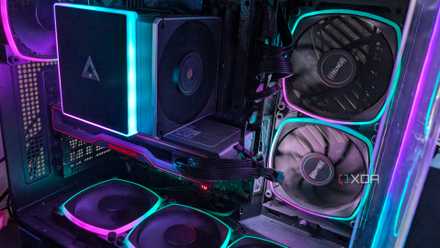
5 myths about fans that are hurting your gaming PC's performance
Myths about PC fans might be keeping you from enjoying better temps, performance, and noise levels.
1 Forgetting the protective plastic
Look, it happens to the best of us
The number one mistake that happens time and again when installing a CPU cooler of any type is forgetting to remove the protective plastic that comes attached to the base plate where it makes contact with the CPU. You've spent hours assembling your build, ensuring that every fan header cable, PSU cable, and LED controller is securely plugged into your motherboard. You've ensured your RAM is properly seated and your GPU is clipped safely into its PCIe slot.
Whether you're a first-timer or an experienced pro, the feeling of pressing the power button for the first time and seeing everything light up and turn on is a wash of relief and excitement. Just when you think you've batted 100, your CPU temps start spiking. You panic, thinking, "What could it be?" You check that the cooler is properly seated, that the pump or fan is actually running and at an appropriate speed, and you ensure that the cooler itself is receiving power. Out of an abundance of caution, you unseat the cooler to check it one more time and realize you've left the protective film attached. I know what that's like because, after 20 years of tinkering with electronics, it happened to me last week.
A PC build is rarely perfect, and mistakes happen
We're all human, and as passionate as many of us are about our builds and hobbies, mistakes are bound to happen. Count yourself lucky if you've made a simple and fixable mistake rather than one that endangers your build or is catastrophic in nature. If you're torn between air or liquid cooling, we have some great guides on deciding what's right for you.