
I had been considering building a dedicated productivity PC lately, and since I have an AM4 gaming PC, I wanted to put together a new AM5 build instead of just getting a new AM4 chip. I picked the Ryzen 9 9900X for its 12-core, 24-thread configuration and 32GB of DDR5 RAM. I used my old GTX 1660 Ti for GPU duty and moved the Gen3 NVMe SSD from my main PC to the new build. The specs looked good enough for Photoshop, Premiere Pro, and DaVinci Resolve, and I didn't think I'd need any major upgrades anytime soon. However, the overall performance on the Ryzen 9 9900X didn't feel like a huge upgrade over that of the Ryzen 7 5700X on my gaming PC. That's when I switched to a Gen5 SSD, and it delivered the snappy performance I was looking for.

4 reasons it's finally worth considering a PCIe 5.0 SSD in 2025
With Crucial's announcement of the P510 Gen 5 SSD, I'm more convinced than ever that 2025 is the year to switch to PCIe 5.0.
After a point, more cores don't really "feel" all that different
The law of diminishing returns
Having more physical CPU cores at your disposal always helps with multithreaded workloads, but there's always a limit to how much real-world difference you can feel. Core scaling quickly hits a ceiling in gaming, but even in productivity workloads, once you have crossed a certain threshold, increasing the number of CPU cores doesn't result in a drastic performance bump. My 8-core Ryzen 7 5700X is a Zen 3 chip, but it's still a decent performer in programs like Photoshop and Premiere Pro. I've been editing images and videos for my business more and more, and as I started working with 4K footage, the Zen 3 processor started to feel limiting.
I thought that was the sign to build a new AM5-based productivity PC with a 12-core CPU like the Ryzen 9 9900X. However, running similar workloads on the new machine didn't actually feel all that different. Sure, the render and export times were lower, but the difference wasn't as drastic as I expected. There were times when I still felt like the system was struggling to parse through raw footage and navigate through video timelines. What I realized was that despite having a 12-core CPU, I was starting to hit other limits, possibly memory or storage bandwidth. It was time to upgrade the aging Gen3 NVMe SSD to something that was a better fit in my new build.
AMD Ryzen 9 9900X
- Cores
- 12
- Threads
- 24
- Architecture
- Zen 5
- Process
- TSMC 4nm, 6nm
12-core high-performance CPU built for gaming and productivity

6 reasons CPU cores don't matter anymore
Core count is an indicator of CPU performance, but it's not as important as it used to be.
What I was missing was a high-speed NVMe SSD
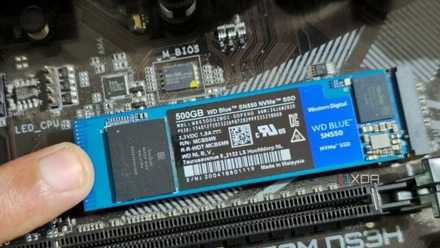
Reusing the Gen3 SSD was, sadly, the wrong move
My Gen3 NVMe drive may have been fine inside my gaming PC, but it was clearly struggling in the new productivity build. Sequential speeds don't always translate to real-world performance gains, especially in gaming and general OS operations. They do, however, affect some productivity workloads considerably. While Gen3 SSDs top out at around 3,500 MB/s, high-end Gen5 SSDs routinely touch nearly 15,000 MB/s. Sure, programs like Photoshop and Premiere Pro won't always deliver a proportional improvement in performance, but this difference is massive.
Soon after I installed the cheapest Gen5 SSD I could find (the market is crazy right now), I felt my video editing tasks speed up. The repetitive act of loading assets, scrubbing the timelines, and exporting large files became smoother and virtually lag-free. All that extra PCIe 5.0 bandwidth was showing its magic, justifying my investment. The extra cores on the CPU weren't a waste; I was simply expecting them to speed up something that wasn't in their job description. The Gen5 SSD was a shot in the arm of my new productivity build, and I should have used one from the start instead of saving money by reusing my Gen3 drive.
I replaced all of my PC's storage, and here's what I went with
Replacing my existing drives was a long time coming
Upgrades should prioritize removing the slowest link
Not changing what's already good enough
Instead of hoping for a high-core-count CPU to single-handedly solve all my productivity woes, I should have assessed the weak links in the build configuration first. A high-end CPU is necessary to speed up multithreaded workloads, but you also need a modern SSD, sufficient RAM, and a decent GPU to handle visual effects. My new AM5 build looked good in the CPU, RAM, and GPU departments, but the Gen3 SSD was a glaring weak link. The difference between the Ryzen 7 5700X and Ryzen 9 9900X didn't impress me because the Gen3 drive was holding the system back. The moment I switched to a Gen5 SSD, the entire workflow felt supercharged.
PC upgrades should ideally focus on changing the slowest component, not upgrading what's already fast enough. Upgrading your GPU for gaming won't yield desirable results if your CPU is still stuck in the past. Adding more RAM won't get rid of sluggish performance if you're still using a hard drive as primary storage. The bottleneck on your PC might not always be readily apparent, which can lead to the wrong upgrade at the wrong time.
The best time to upgrade your PC was... six months ago
For those of you who missed the bus, it's a long wait ahead
More CPU cores aren't always the answer
Gamers know better than to prioritize the number of cores over single-core performance and L3 cache. However, even productivity workloads need to take a comprehensive approach when configuring a build. The CPU and GPU horsepower alone won't make your system feel high-end; you also need fast and sufficient memory and a high-speed NVMe SSD. Without a balanced build, you can't expect high-end results.