
I'm sure none of you are rushing to buy PCIe 5.0 SSDs in this crazy market, but when things were normal, Gen5 SSDs were tempting, if nothing else. Storage speeds have reached a new threshold as Gen5 SSDs touch the 15,000 MB/s figure. Despite the initial hype surrounding PCIe 5.0 SSDs, though, they didn't really disrupt anything for the average consumer. They may be relevant for only a small niche of consumers, but the more interesting observation is that most people don't even need Gen4 speeds. PCIe 3.0 SSDs may feel "outdated", but they're perfectly fine for the majority of users, gamers included. Most real-world use cases don't scale at all beyond Gen3 NVMe speeds, so if you were in a rush to switch to a faster SSD, think again.

4 problems with Gen5 SSDs that have nothing to do with performance
The blazing-fast speeds aren't the only unnecessary thing about PCIe 5.0 drives
The urge to jump to PCIe 5.0 storage is understandable
It just doesn't translate to any real-world gains
PCIe 5.0 SSDs launched at an unreasonable premium over existing Gen4 drives, and considering you weren't getting anything real in return, they didn't get many takers. Before the latest hardware crisis hit us, however, the prices of Gen5 drives had dropped considerably. PC builders could justify buying a faster PCIe 5.0 SSD instead of a PCIe 4.0 model, as the difference was a small percentage of their overall budget. The "might as well buy the new thing to future-proof my build" logic worked well in the case of Gen5 drives, since you were realistically looking at no more than a $50 premium for a 2TB SSD.
When you look at the flip side, though, and consider people on older systems, the privilege of using a Gen5 SSD needed a full platform overhaul. Otherwise, you were stuck at Gen3 or Gen4 speeds, limited by the motherboard's older M.2 slot. Combine the high platform cost with the lack of any real-world performance gains for gaming, general OS operations, or boot speed, and you get a lose-lose proposition. Those who could afford the premium saw no issues jumping to Gen5 storage, but budget builders and value chasers stuck with Gen4 drives. What would probably surprise most users, however, is that Gen3 SSDs were already fast enough for 99% of users.
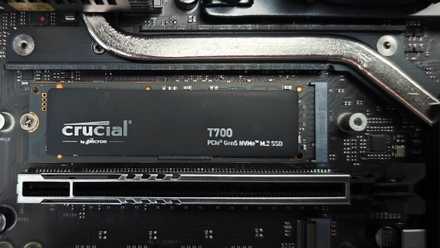
PCIe 5.0 storage solved a problem almost nobody had
Gen5 SSDs are technical marvels, but most consumers just don't need one yet
PCIe 3.0 speeds removed storage as the bottleneck
Everything that came after was incremental
A few years ago, hard drives dominated primary storage. SATA SSDs were still new, and the cost per GB was still prohibitive. The eventual jump from HDDs to SATA SSDs felt like a game-changing upgrade. Everything from boot speeds and loading speeds to general system navigation felt a lot snappier. Moving from SATA SSDs to PCIe 3.0 NVMe SSDs represented an even bigger difference in theoretical speeds — the real-world gains were significant, too, if not as game-changing.
Doubling the 3,500 MB/s speeds of Gen3 SSDs with PCIe 4.0 drives didn't move the needle at all when it comes to most of what we do on our PCs. There are incremental benefits, but most people never notice them. The spinning hard drives or slower SATA SSDs gave rise to a significant bottleneck in the pipeline, but PCIe 3.0 storage removed that bottleneck. Increasing transfer speeds to 7,000 MB/s or doubling them again to 15,000 MB/s didn't do anything because the limitations were already overcome.
Your older Gen3 SSDs might feel dated, but they're not old in any real sense of the word. You still get the same gaming experience on a Gen3 drive as on a Gen4 or Gen5 drive. OS boot speeds are virtually the same, and outside of productivity use cases, faster SSDs simply cost more without delivering anything in return. Besides, you also need to put up with higher operating temps and bulky heatsinks.

The best storage upgrade I ever made wasn't an SSD
Fast storage isn't everything on a PC
Gen3 SSDs still don't make sense when buying new
The value isn't there anymore
PCIe 3.0 SSDs may be fast enough that people with older systems don't need to upgrade yet, but when you're buying new storage, it makes sense to skip Gen3 drives. First, you won't save much by skipping a Gen4 SSD in favor of a Gen3 model. Second, the poor availability of Gen3 drives will push you toward Gen4 SSDs anyway. The uselessness of Gen5 SSDs, at least for gaming and other common workloads, means that most people should simply buy a decent Gen4 SSD without thinking twice. Just ensure you're not buying a tiny SSD that you're forced to replace sooner than you think.
Users who can utilize all the extra bandwidth of a PCIe 5.0 SSD should consider investing in it. If your professional workflow depends on snappy video editing, 3D rendering, database analysis, or other storage-intensive tasks, the slight premium you pay for a faster drive will be forgotten in weeks, if not days. If you're building a new PC, your motherboard probably has at least one PCIe 5.0 M.2 slot, and you could consider jumping to Gen5 storage early even if you don't need the bandwidth yet. If you can afford the premium, and can manage the higher thermals of a Gen5 SSD, it's not a bad buy. That said, don't expect any magical performance difference in gaming or OS operations compared to your older Gen4 or Gen3 SSD.
Crucial T705 Gen5 SSD
- Storage capacity
- 1 TB, 2 TB, 4 TB
- Hardware Interface
- PCIe 5.0, NVMe 2.0
- TBW
- 1,200 - 2,400 TBW
- DRAM
- 1 GB LPDDR4, 2 GB LPDDR4, 4 GB LPDDR4

4 reasons it's finally worth considering a PCIe 5.0 SSD
With Crucial's announcement of the P510 Gen 5 SSD, I'm more convinced than ever that 2025 is the year to switch to PCIe 5.0.
Your PCIe 3.0 storage is already fast enough, but don't buy more of it
Contrary to popular belief, your PCIe 3.0 SSD's real-world performance is mostly identical to that of SSDs with two or four times its theoretical transfer speeds. You don't need to upgrade your existing Gen3 drives yet, but don't consider them when buying a new SSD. Gen4 SSDs are the right choice for almost every user, considering their pricing, performance, and availability. Gen5 SSDs can be useful for productivity users and professionals.